In 2026, productivity is no longer just about working more hours. It is about working smarter by using the right systems, tools, and habits to achieve more in less time. With hybrid work becoming the norm, AI reshaping workflows, and burnout at an all-time high, understanding what genuine productivity looks like has never been more critical.
This guide breaks down 25 real-world productivity examples designed to help professionals, managers, and teams dramatically improve their work efficiency. Whether you are looking for personal productivity strategies or team-wide systems, these examples give you a clear and actionable starting point.
In a hurry? Listen to the blog instead!
What Are Productivity Examples?
Productivity examples are real-world illustrations of behaviors, systems, and tools that help individuals or teams produce more output with the same or fewer resources. Unlike vague advice to “be more organized,” productivity examples show you exactly what doing something productively looks like in practice.
There is an important difference between being productive and being busy. Busyness means filling your day with tasks. Productivity means completing high-impact tasks that move you closer to meaningful goals. Real-world productivity examples help bridge the gap between intention and execution, giving you concrete models to adapt for your own workflow.
Why Productivity Is Important in Modern Workplaces
Modern workplaces face a unique set of challenges. Hybrid and remote teams must coordinate across time zones. AI-driven workflows demand new skills. Employees are battling notification overload and meeting fatigue. In this environment, productivity is not a luxury; it is a survival skill.
When organizations invest in practical productivity systems, they see lower burnout rates, faster project completion, and higher employee satisfaction. Strong productivity habits reduce wasted effort and help teams focus on work that genuinely matters.
25 Best Productivity Examples To Improve Work Efficiency In 2026
1. Time Blocking for Better Focus
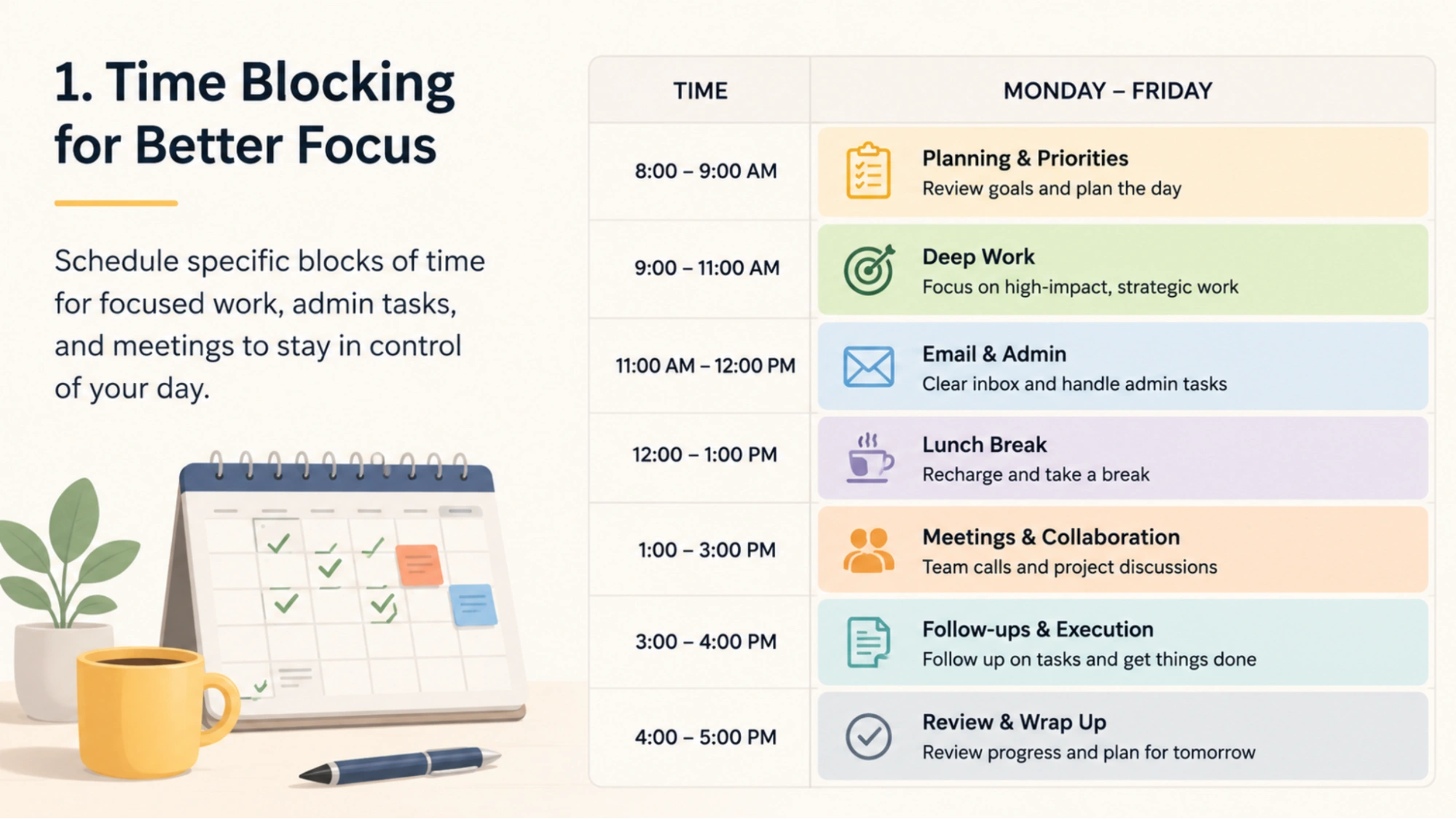
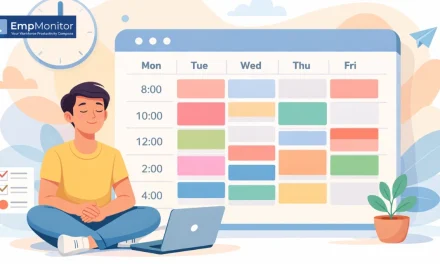
Time blocking means scheduling specific chunks of your calendar for specific types of work. Rather than reacting to whatever lands in your inbox, you proactively assign time to deep work, admin tasks, and meetings. For example, a product manager might block 9–11 AM every day for strategic thinking with all notifications off, and reserve afternoons for collaborative calls. This structure eliminates the daily decision fatigue of figuring out what to do next.
2. Using AI Assistants to Automate Repetitive Tasks
AI productivity tools like Higgsfield AI Image Generator, Claude, ChatGPT, and Copilot can handle repetitive cognitive tasks such as drafting emails, summarizing documents, generating reports, and answering common questions. A sales team, for instance, might use an AI assistant to generate first drafts of client proposals, cutting preparation time from two hours to twenty minutes. This frees up human effort for relationship-building and strategy.
3. Task Batching to Reduce Context Switching
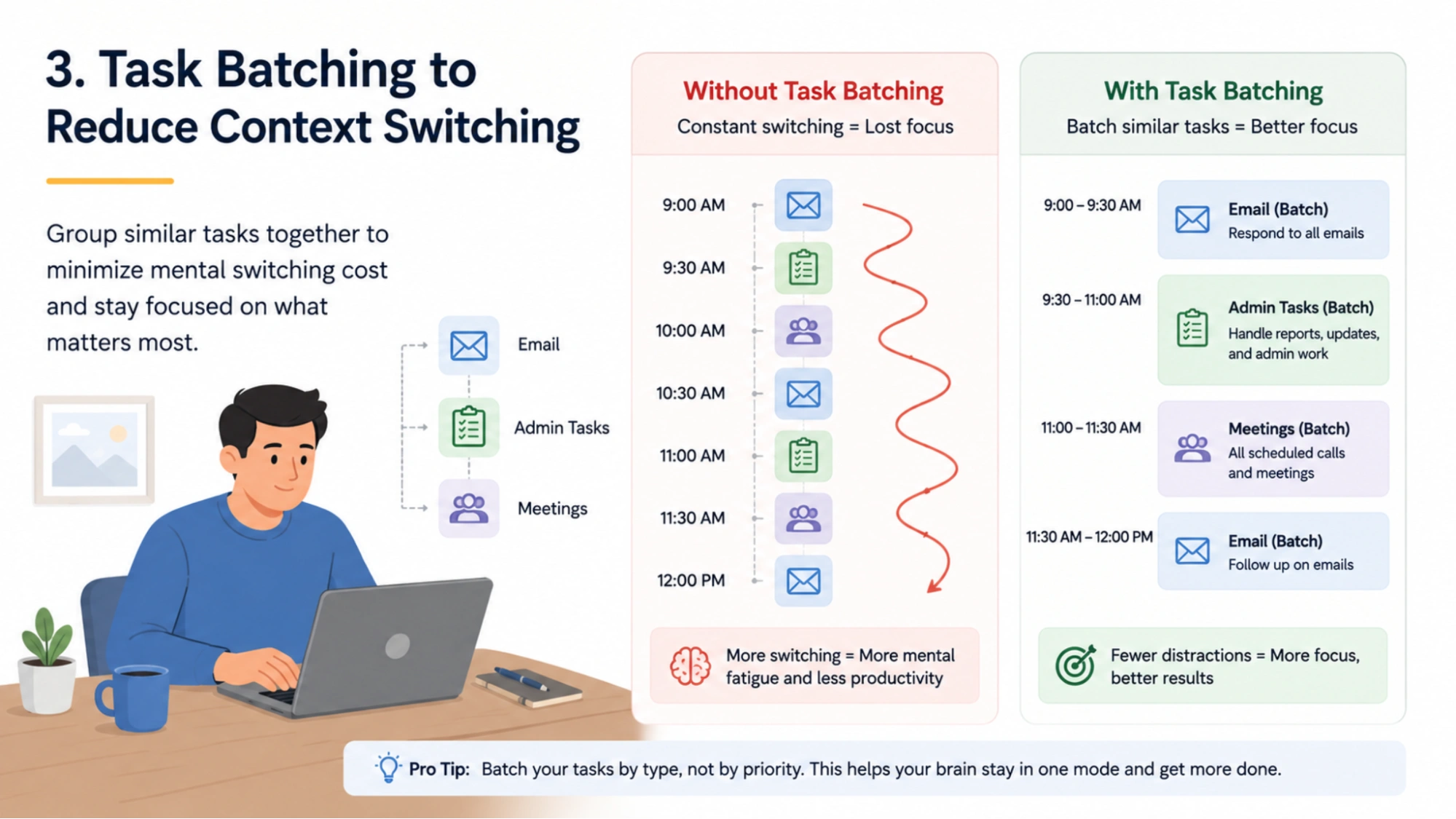
Every time you switch between different types of tasks, your brain incurs a mental switching cost. Task batching groups similar activities together to minimize this cost. For example, checking and responding to all emails in two dedicated 30-minute windows per day rather than answering them as they arrive. This approach preserves deep focus time and keeps your attention where it matters most.
4. Async Communication Instead of Constant Meetings
High-performing remote teams have shifted away from back-to-back video calls toward asynchronous communication. Tools like Loom, Slack, and Notion allow team members to share updates, decisions, and feedback without requiring everyone to be online at the same time. This gives people uninterrupted blocks of focus time while keeping collaboration flowing across time zones.
5. Shared Team Dashboards for Project Visibility
When everyone on a team can see the current status of projects, deadlines, and blockers in one place, status meetings become unnecessary. Platforms like Asana, Monday.com, and Linear give teams a real-time view of progress. A marketing team using a shared dashboard can instantly see which campaigns are on track and which need attention, without a single check-in email.
Also Read!
Productivity vs Efficiency: Stop Confusing the Two – and Start Winning at Both
What Is a Hybrid Work Schedule? Benefits, Types & Best Practices
6. Pomodoro Technique for Managing Attention
The Pomodoro Technique breaks work into 25-minute focused sprints followed by 5-minute breaks. After four sprints, you take a longer break. This rhythm prevents mental fatigue and builds sustainable work stamina over a full day. It works especially well for tasks that feel overwhelming, since committing to just 25 minutes is psychologically easier than committing to hours of effort.
7. AI Meeting Summaries for Faster Collaboration
AI tools like Otter.ai, Fireflies, and Zoom’s built-in AI can automatically transcribe meetings and generate summaries with action items. Instead of team members scrambling to take notes, they can stay fully present in the conversation. After the meeting, everyone receives a clear summary of decisions made and next steps, dramatically reducing follow-up confusion.
8. SOP Documentation for Repetitive Processes
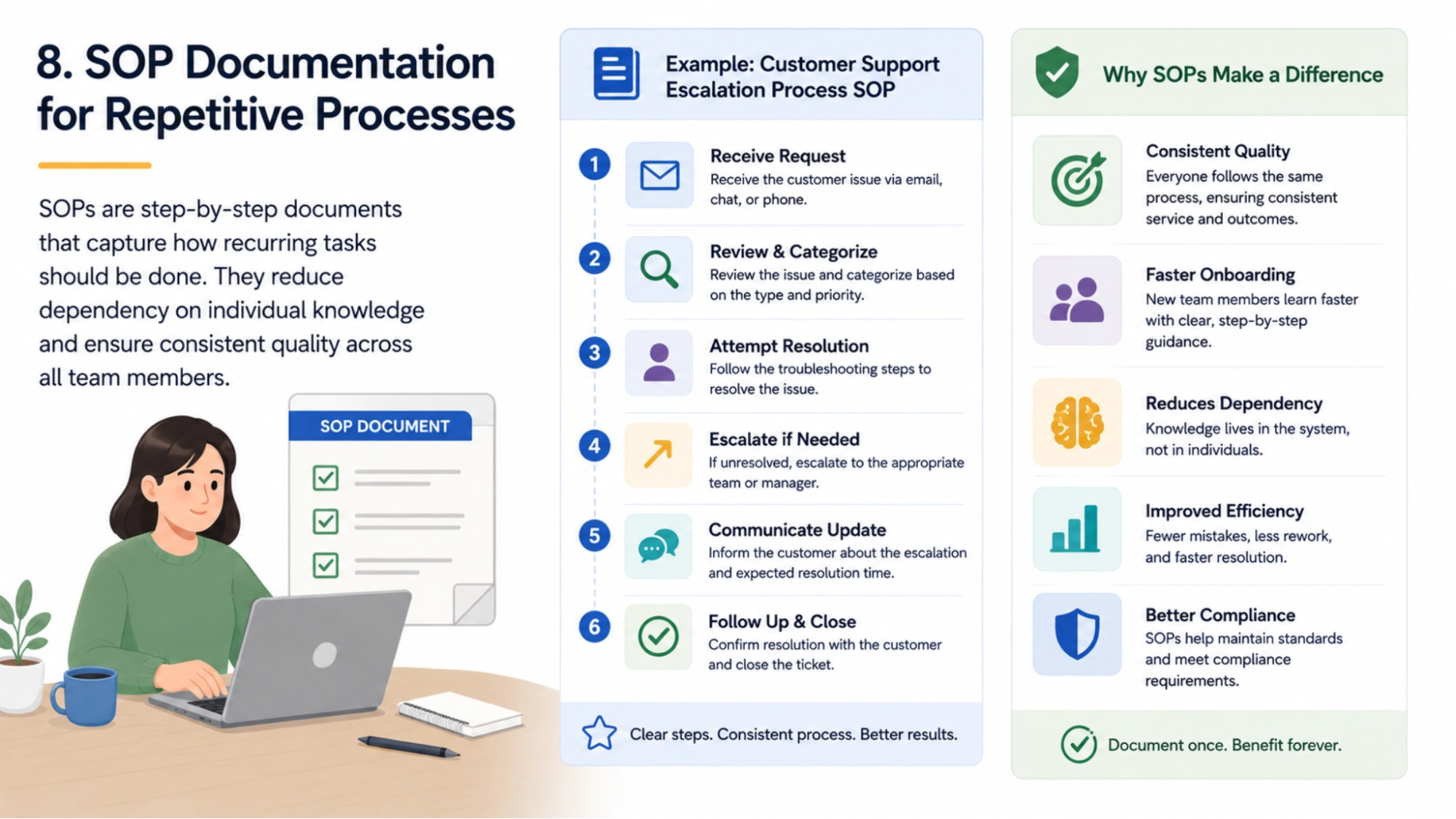
Standard Operating Procedures (SOPs) are step-by-step documents that capture how recurring tasks should be done. A customer support team that documents its escalation process, for example, can onboard new team members in days rather than weeks. SOPs reduce dependency on individual knowledge and create consistent quality across all team members.
9. Daily Priority Planning Systems
High performers start each day by identifying the three most important tasks they must complete. Methods like the MIT (Most Important Task) system or the Ivy Lee Method help workers cut through the noise and focus on high-leverage activities. Spending five minutes planning at the start of the day consistently saves hours of reactive, unfocused effort.
10. Workflow Automation Using Productivity Software
Tools like Zapier, Make (formerly Integromat), and n8n allow teams to automate multi-step workflows without writing code. For example, when a lead fills out a contact form, an automation can add them to a CRM, send a welcome email, and notify the sales rep on Slack simultaneously. Eliminating manual handoffs like this saves hours of administrative work every week.
11. Calendar Blocking for Team Productivity
At a team level, calendar blocking ensures that collaborative time and focused work time are intentionally balanced. Engineering teams at many tech companies designate “no meeting days” to give developers uninterrupted coding time. This practice is not just individual preference; it is a structural commitment to protecting productive capacity.
12. Deep Work Sessions Without Notifications
Deep work, a concept popularized by Cal Newport, refers to cognitively demanding tasks performed in a state of distraction-free concentration. Writers, designers, engineers, and analysts who practice deep work regularly report producing higher-quality output in less time than peers who work in a fragmented, interrupt-driven mode.
13. Digital Note-Taking Systems for Faster Organization
Scattered notes mean wasted time searching for information. Note-taking apps like Notion, Obsidian, and Roam Research allow knowledge workers to capture, tag, and retrieve information instantly. A well-organized personal knowledge base means that research done for one project easily informs the next, compounding your intellectual investment over time.
14. Automation of Customer Support Responses
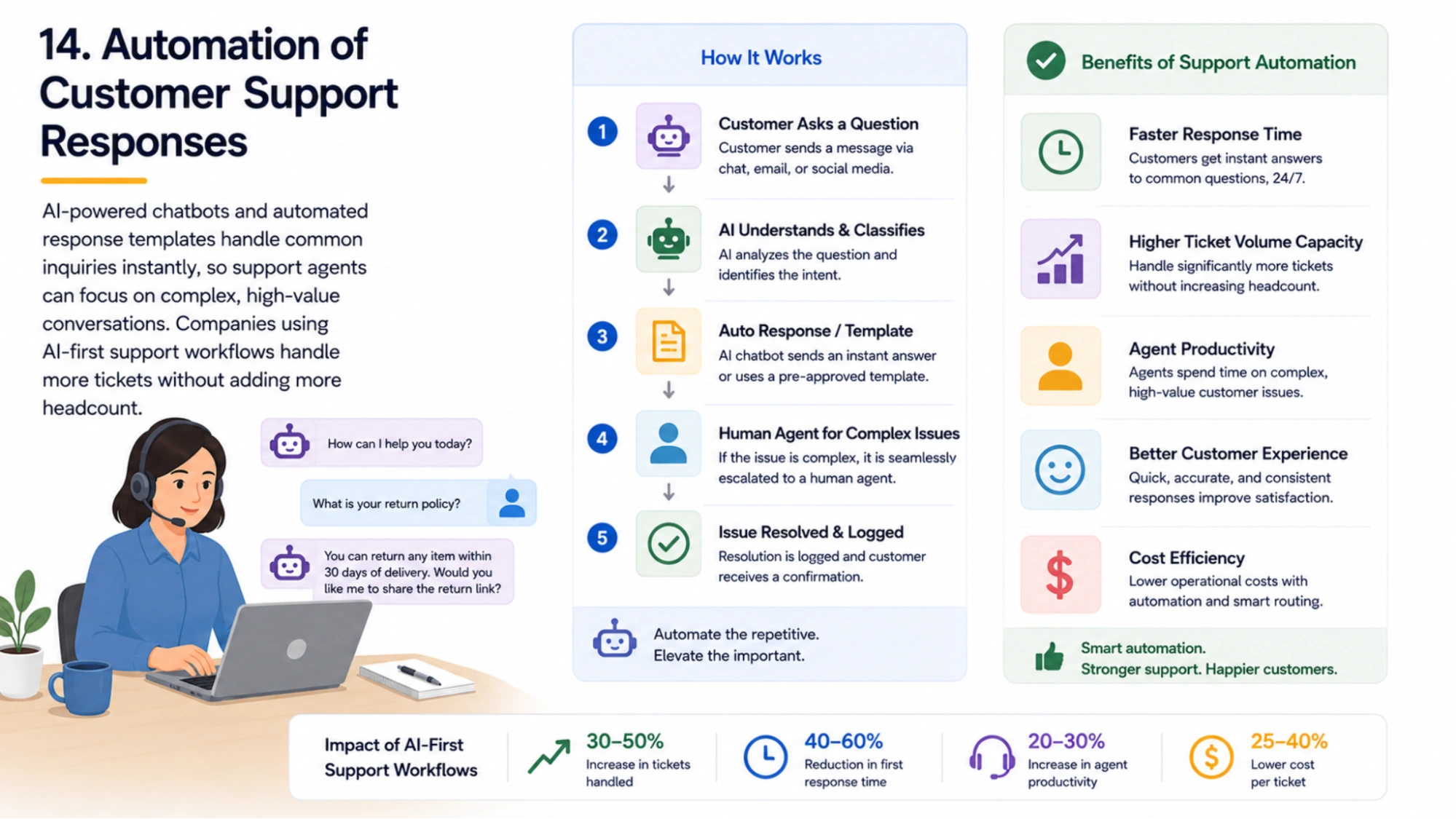
Customer support teams can use AI-powered chatbots and automated response templates to handle common inquiries without human intervention. This allows support agents to focus their energy on complex, high-value interactions. Companies using AI-first support workflows report handling significantly higher ticket volumes without proportionally increasing headcount.
15. Goal Tracking Dashboards for Employees
Visibility into personal and team progress is a powerful motivator. Tools like Weekdone, Lattice, and Gtmhub help employees track OKRs and KPIs in real time. When workers can see how their daily work connects to company goals, engagement and accountability increase naturally.
16. Collaborative Project Management Tools
Platforms like Jira, Trello, and ClickUp centralize task management so nothing falls through the cracks. Instead of projects living across emails, spreadsheets, and verbal agreements, everything is tracked in one system. Teams that adopt project management tools consistently deliver projects on time more often than teams relying on ad hoc coordination.
17. Meeting-Free Work Hours
Designating specific hours of the day or week as meeting-free gives employees predictable time for focused work. Some companies formalize this with “Focus Fridays” or morning quiet hours. The result is that workers spend less time in low-value discussions and more time producing the output they were hired to deliver.
18. AI Content Drafting for Marketing Teams
Marketing teams use AI writing tools to generate first drafts of blog posts, social media captions, ad copy, and email campaigns. Rather than staring at a blank page, copywriters can start with a solid draft and focus their creative energy on refining tone, adding brand voice, and ensuring accuracy. This can cut content production time by 40 to 60 percent.
19. Using Templates to Speed Up Repetitive Work
Templates eliminate the friction of starting from scratch on recurring deliverables. Whether it is a weekly status report, a client proposal, or a project brief, having a well-designed template ensures consistency and saves significant time. The best templates are living documents, regularly refined based on feedback and results.
20. Productivity KPIs for Measuring Team Performance
What gets measured gets managed. Teams that track productivity dashboard metrics such as tasks completed per sprint, average time to resolve support tickets, or lead response time can identify bottlenecks and improvements with data rather than guesswork. KPIs turn productivity from a vague intention into a concrete, improvable metric.
21. Voice-to-Text Productivity Workflows
Voice-to-text technology allows professionals to capture ideas, dictate emails, and transcribe notes while commuting, exercising, or moving between meetings. Busy executives who dictate their thoughts rather than typing them can produce three to four times more content in the same amount of time, freeing written focus sessions for work that genuinely requires a keyboard.
22. Focus Mode and Distraction Blocking Apps
Apps like Freedom, Cold Turkey, and Forest block distracting websites and apps during scheduled work periods. Research consistently shows that even brief interruptions, like glancing at social media, can take more than 20 minutes to fully recover cognitively. Proactively removing temptation is one of the simplest and most effective productivity interventions available.
23. Weekly Review Systems for Better Planning
A weekly review is a structured habit of looking back at the past week and planning the next one. Popularized by David Allen’s Getting Things Done methodology, this practice helps professionals clear mental clutter, close open loops, and enter each week with clarity. Thirty minutes of weekly review prevents hours of reactive scrambling.
24. Automated Reporting and Analytics
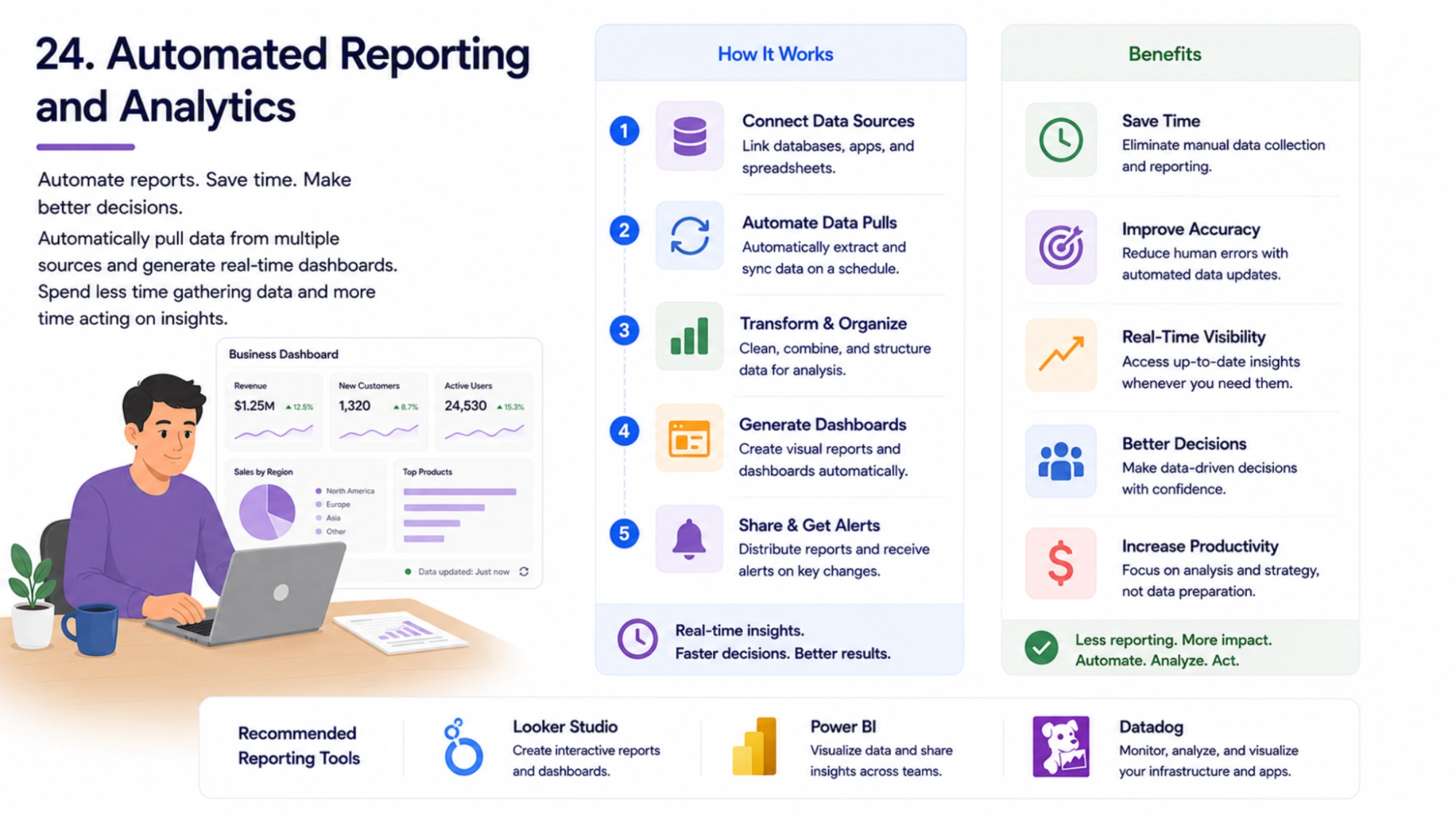
Manually compiling reports from multiple data sources is one of the most common time drains in business. Tools like Google Looker Studio, Power BI, and Datadog can automatically pull data and generate dashboards that update in real time. Leaders who adopt automated reporting spend less time gathering data and more time acting on it.
25. Energy-Based Scheduling for High-Impact Work
Not all hours of the day are equal. Most people have a natural peak energy window of two to four hours when their concentration and creativity are at their highest. Scheduling the most cognitively demanding work during this window and reserving low-energy hours for administrative tasks, emails, and routine decisions is one of the most powerful productivity upgrades a professional can make.
Best Productivity Software Examples In 2026
In 2026, productivity software has become essential for managing remote teams, improving efficiency, and automating repetitive work. Modern businesses now use AI-powered productivity tools, employee monitoring platforms, and workflow automation software to streamline operations and improve team performance.
One strong example is EmpMonitor, a workforce productivity platform designed to help businesses track employee performance, manage workflows, and improve productivity.
Employee Monitoring
Track employee activity and work patterns with detailed productivity insights and reports.
Time Tracking
Monitor productive and idle hours with automated timesheets and real-time tracking.
User Activity Monitoring
Analyze app usage, website activity, and workflow behavior to improve efficiency.
Insider Threat Prevention
Detect suspicious activities and protect company data from internal security risks.
Attendance Monitoring
Manage attendance, leaves, and HR records from a centralized dashboard.
Workforce Productivity & Engagement
Improve employee engagement, workflow visibility, and project efficiency with real-time insights.
Live Screencasting & Screen Recording
View employee screens in real time and store recordings securely for compliance and collaboration.
Real-Time Activity Tracking
Track live application usage, website visits, and employee productivity from one dashboard.
Project Management
Assign tasks, monitor progress, and improve team collaboration with integrated project management tools.
As hybrid and remote work continue to grow, workforce productivity software examples like EmpMonitor help businesses improve accountability, automate workflows, and increase overall work efficiency in 2026.
Productivity Goals Examples For Work And Teams
SMART Productivity Goals Examples
SMART goals are Specific, Measurable, Achievable, Relevant, and Time-bound. Example: “Reduce average email response time from 4 hours to 1 hour by implementing a twice-daily inbox schedule within the next 30 days.” This framework turns vague intentions into clear commitments with built-in accountability.
Weekly Productivity Goals for Teams
- Complete all sprint tasks by Friday, 3 PM
- Reduce weekly meeting time by 20 percent
- Publish two pieces of content per team member each week
Examples of Productivity in the Workplace
Productivity Examples for Remote Teams
Remote teams thrive when they establish clear async communication norms, use shared dashboards, and hold fewer but more focused synchronous meetings. The most productive remote teams document decisions thoroughly, eliminating the need for repeated clarification.
Productivity Examples for Managers
Effective managers delegate clearly, conduct structured one-on-ones with written agendas, and review team KPIs weekly. They protect their team’s focus time rather than filling calendars with check-in meetings. The best managerial productivity habit is making decisions at the right level rather than holding every decision personally.
Productivity Examples for Sales Teams
High-performing sales teams use CRM automation to handle follow-up sequencing, template libraries for outreach, and AI tools to research prospects before calls. By automating administrative CRM work, sales reps spend more time in actual conversations with potential clients.
Common Productivity Mistakes That Reduce Work Efficiency
Avoiding these pitfalls is as important as adopting good habits:
- Multitasking — splits attention and reduces output quality on all tasks simultaneously
- Too many meetings — fragments the day and leaves no time for deep work
- Lack of prioritization — treating every task as urgent makes nothing truly important
- Overworking without systems — effort without structure leads to burnout, not results
- Notification overload — constant pings destroy concentration and raise cortisol levels
How To Build Your Own Productivity System
The best productivity system is one you will actually use. Build it in five steps:
- Audit your current week to identify where time is being wasted
- Choose one or two productivity tools that fit your workflow
- Automate at least one repetitive task this week
- Set three SMART goals for the next 30 days
- Schedule a 30-minute weekly review every Friday to assess and refine
Future Productivity Trends in 2026
Productivity in 2026 is being shaped by several powerful forces. AI-first workflows are becoming standard, with teams expecting their tools to handle first drafts, data summaries, and routine decisions automatically. Async work culture continues to grow, driven by global talent distribution and a desire for more focused work time. Automation-driven teams are shrinking administrative overhead while maintaining or increasing output. Perhaps most importantly, sustainable productivity, the kind that preserves mental health and energy over the long term, is gaining recognition as the goal worth pursuing.
Conclusion
The 25 productivity examples covered in this guide represent a toolkit, not a prescription. You do not need to implement all of them at once. Pick one or two that resonate with your current challenges, implement them consistently for 30 days, and measure the impact. Small, sustained improvements compound into transformational gains over time.
The goal is never to become a productivity machine. It is to create enough efficiency in your work that you have time for the things that matter most, whether that is creative thinking, team mentorship, client relationships, or simply finishing on time. Start with one example from this list today.
Frequently Asked Questions
What are some real productivity examples?
Real productivity examples include time blocking, task batching, Pomodoro sessions, AI-assisted writing, automated reporting, SOP documentation, and async communication. These are practical techniques that professionals and teams use to achieve more in less time.
Which productivity software is best in 2026?
The best productivity software depends on your needs. For project management, Asana, ClickUp, and Linear lead the market. For AI assistance, Claude and Microsoft Copilot are top choices. For automation, Zapier and Make are industry standards.
How can I improve work efficiency?
Start by auditing where your time actually goes, then eliminate or automate low-value tasks. Adopt time blocking for focused work, reduce unnecessary meetings, and set clear daily priorities. Consistency in small habits drives the biggest long-term efficiency gains.
How does AI improve productivity?
AI improves productivity by handling time-consuming repetitive tasks such as drafting content, summarizing meetings, answering common customer questions, generating reports, and researching topics. This frees human attention for strategic, creative, and relational work where people add the most unique value.