**Start Free Trial, instant setup →
Layered monitoring with real-time screens, keystrokes, and DLP is the fastest, most reliable way for call centers to cut exposure and speed response in 2026. To make that work, you need insider threat and data loss prevention tied to shift rules, privacy controls, and alerts that reach the right lead in minutes.
As a call center ops manager or IT lead, you already juggle high agent turnover, strict PCI workflows, and hybrid shifts. You also see how fast a social engineer can turn a helpful agent into a leak path.
This guide explains what matters, how to evaluate tools, and where a platform like EmpMonitor fits. You’ll get clear buying criteria, a practical rollout plan, and a straight comparison with Teramind and Veriato. No fluff, just what you need to reduce risk without slowing talk time or AHT.

Why Call Centers Are Ground Zero for Insider Threats
High-volume call centers hold live streams of PII and PCI data. Agents handle card numbers, addresses, and birth dates all day. With staff turnover and constant onboarding, access expands fast. That’s fertile ground for insiders and for outsiders who trick insiders.
However, the risk is not only malicious insiders. Untrained or rushed agents can copy data to spreadsheets, paste SSNs into chats, or save screenshots to USB drives. Those small actions create large breaches. Moreover, hybrid work adds home Wi‑Fi, personal devices, and shared spaces to the mix. Each one widens the attack surface.
For example, social engineering thrives in help-first cultures. Attackers pose as customers, auditors, or even supervisors. They pressure agents to bypass a step or pull extra data.
The tactic is so common it has its own history and patterns documented in security literature. If you need a primer, see the background on social engineering (security).
In addition, PCI-DSS demands strict control over cardholder data fields. Even a short clipboard copy can break scope and policy. While you can train to reduce mistakes, training alone won’t stop misuse of screen captures, note-taking apps, or personal email. Therefore, you need controls that see risky behavior in real time and block exfil paths without breaking service levels.
Common insider paths in call centers
- Copy/paste card data from CRM to personal notes “to call back later”
- Upload CSV exports to personal cloud drives after shift
- Take smartphone photos of screens during QA or callbacks
- Plug a USB stick to “save logs” that include PII
- Click phishing links in webmail or chat tools during idle time
As a result, your plan should assume errors and pressure will happen. Build monitoring and prevention into the workflow. Then tie that to fast alerts, clear playbooks, and shift-aware rules. This is where insider threat and data loss prevention move from policy docs to real controls on endpoints and browsers.
What to Look for in Call Center Insider Threat Monitoring
The right platform must blend always-on visibility with privacy, compliance, and cost control. You need proof, not guesswork, when an alert fires. You also need to avoid loud tools that spook good agents or slow CRM screens.
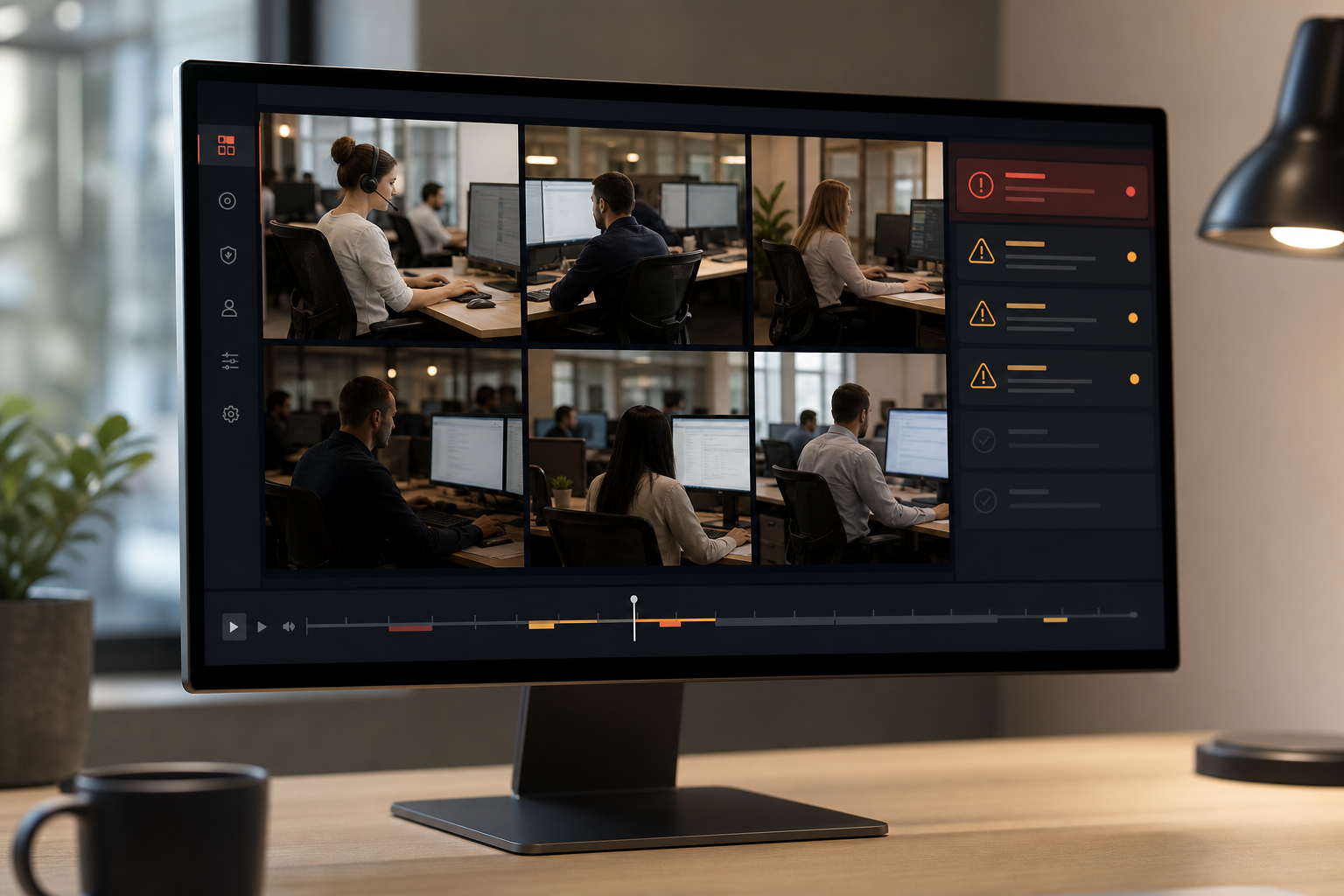
Start with real-time screen capture. You want live screencasting to spot risky steps the moment they occur, plus recording for audits. Pair that with keystroke logging held under strict access controls. That way, supervisors can reconstruct the exact action stream during a QA review or security case.
Real-time visibility and control
Look for live screen viewing, session recording, and granular URL/app tracking. Moreover, require web app and USB blocking with allowlists tied to shift schedules. For PCI work, set rules that block clipboard actions on payment fields and prevent uploads to unapproved domains. In addition, a stealth/un‑stealth mode toggle lets you choose privacy stance by team or site.
Privacy, compliance, and forensic needs
If you process EU resident data, confirm the tool is GDPR compliant and supports “private time” and role-based access to sensitive logs. Furthermore, make sure it supports forensic analysis and user behavior analytics so you can detect anomalies like off-hours data pulls or sudden spikes in screen recording attempts. Audit trails must be exportable for legal review.
Shift-aware scheduling and scale
Call centers run 24×7. Therefore, pick software that applies rules per shift, per campaign, and per role. Alerts should route to the on-duty lead, not a cold mailbox. Finally, check pricing that scales: seats rise and fall with seasonal peaks. Scalable pricing, not just annual locks, helps you manage margin.
To dig into blocking strategies that keep PCI in scope, this short primer on a data loss prevention solution lays out common controls and where they fit in the stack. And if you want a quick tour of behaviors to watch for, here are real-world insider threat examples you can turn into alert rules.
Across all of this, remember the target: reduce risk at the workstation without slowing average handle time. In short, your shortlist should meet these needs while tying insider threat and data loss prevention into a single workflow your team can run.
Also Read!
How EmpMonitor Protects Call Centers from Insider Threats
EmpMonitor was built to watch work as it happens and to give you the proof you need when it matters. In call centers, that means seeing the agent’s screen in real time, catching suspicious keystrokes, blocking risky sites or USB use, and alerting the right lead without delay. It also means holding data under strict controls for audits and training.
EmpMonitor offers live screencasting and recording so supervisors can view an active session or replay it later. That helps QA leads coach on the exact step where an agent copied sensitive data or opened an unapproved site. In addition, keystroke monitoring adds context to the screen view, so you can see what was typed in the CRM, chat tool, or browser field.
Data loss controls and blocklists
EmpMonitor includes URL/app tracking with web app and USB blocking. You can allowlist CRM, payment gateways, and helpdesk tools while blocking personal webmail, cloud drives, or note apps that leak data. It also offers data loss prevention features that watch for specific strings or patterns, such as cardholder data fields, and can trigger alerts or blocks based on rules you set.
Shift scheduling, alerts, and reports
Call center work happens by the clock. With shift scheduling, EmpMonitor applies the right policies to the right agent at the right time. Alerts and auto email reports route events to on-duty team leads. As a result, action happens fast. One finance customer put it this way: “Since implementing EmpMonitor, we’ve improved our time to acknowledge mishaps to just under 5 minutes.”.
Scale, trust, and global use
EmpMonitor is trusted by 15,000+ companies across 100+ countries and tracks over 500,000 employees globally. That reach matters for BPOs with teams in multiple regions and languages. Role-based permissions and private time options help you align the tool with local norms and laws while still meeting corporate security goals.
Compared to alternatives that focus on either pure productivity or heavy forensics, EmpMonitor balances depth of monitoring with DLP and price. Unlike tools that hide key features behind top tiers only, you can start with the core set, live screens, keystrokes, blocking, and alerts, and scale as you grow. That makes it easier to run insider threat and data loss prevention as one program instead of two separate stacks.
**See Pricing, scale seats as needed →
EmpMonitor vs. Teramind vs. Veriato: Call Center Comparison
Your shortlist likely includes EmpMonitor, Teramind, and Veriato. All three can monitor endpoints, but they differ in focus, price, and how they fit call center workflows. Below is a clear, buyer-first comparison you can use in 2026 planning.
First, pricing and tiers. EmpMonitor’s Gold plan is $9/user/month paid yearly for 51–200 users, with Bronze at $11/user/month paid yearly for 1–10 users. Diamond offers custom pricing for 200+ users.
A free 15-day trial is available, so you can validate features on a pilot team before you buy. By contrast, Teramind is widely listed at ~$15+/user/month for comparable depth, which impacts large agent teams with slim margins. Veriato is competitive on certain tiers but tends to price higher for advanced forensics.
Second, feature emphasis. Teramind is known for stronger UEBA across some packages, which can aid long-horizon anomaly work. Veriato has a forensic focus that helps after an incident, especially for legal holds and deep investigations. EmpMonitor centers on real-time oversight, live screencasting and recording, keystroke monitoring, DLP, web app and USB blocking, with shift scheduling, alerts, and auto email reports tuned to high-volume operations.
“Handled the complex and multifaceted security issues in our company with ease and efficiency.” — Forensic & Legal Master Analyst in Financial Forensics
Third, stealth and privacy settings. All three offer stealth options in different forms. EmpMonitor supports Stealth/Un‑stealth mode, private time, and multiple roles & permissions to match site policy and local law. That mix makes it practical to run transparent productivity tracking on one campaign and heavier, stealth monitoring on a fraud-prone campaign.
Finally, scale and compliance. EmpMonitor is used by 15,000+ companies across 100+ countries and tracks over 500,000 employees. That’s a strong signal for BPOs that span regions. It’s also GDPR compliant and supports SSL, Firewall, and IP allowlisting across environments. In contrast, Teramind and Veriato bring their own strengths, but you should confirm shift-aware controls and pricing at 500+ seats, as those details shape your total cost.
For call centers, the choice comes down to live oversight and speed-to-action at a price you can roll out site-wide. EmpMonitor hits that balance while keeping insider threat and data loss prevention in one workflow you can train, audit, and scale.

Trust, Compliance, and Proven Scale
Security teams care about controls and proof. EmpMonitor is GDPR compliant and supports security with SSL encryption, Firewall, and IP allowlisting. Those controls fit well with PCI care paths where you must reduce exfil paths at the agent desktop and restrict network egress to known tools. If you need to review the legal text of GDPR, see the official EU regulation on europa.eu.
In addition, EmpMonitor provides 24X7 customer support for new and existing customers, you won’t wait until Monday when a Friday-night alert hits a live campaign. That support matters when you have dozens of queues across time zones and seasonal volumes that spike in Q4. It also helps when you tune DLP patterns and alert routes during go-live.
Moreover, EmpMonitor’s social proof is clear: used by 15,000+ companies across 100+ countries, tracking over 500,000 employees globally. That reach shows it can handle multi-region call centers and BPO partners. As one project leader said, “Simplified the management of the entire workforce by 80% in terms of workforce, time, and effort.”.
Finally, compliance is not only checklists. It’s a lived practice of privacy, monitoring, and response. EmpMonitor’s private time option, role-based permissions, and audit exports help you align global policy with local law. Therefore, you can run insider threat and data loss prevention without losing the trust of your team or your auditors.
Also Read!
Best Employee Productivity Tracking for Healthcare in 2026
EmpMonitor vs Hubstaff for Small Businesses: Which Is Better for Employee Productivity Tracking?
Getting Started: Deploying EmpMonitor in Your Call Center
A staged rollout gets you proof fast without slowing queues. Here’s a simple, shift-aware plan that most centers can run in a week.
- Step 1: Start with the Free 15-day trial on a single campaign. Invite one supervisor and one IT admin. Turn on live screencasting, keystrokes, URL/app tracking, and alerts. Use Personalized onboarding to set goals and confirm data retention.
- Step 2: Decide on Stealth/Un‑stealth mode by site policy. For a fraud-watch team, run stealth with clear, documented notice in your handbook. For general productivity, run transparent mode and enable the private time option.
- Step 3: Configure Multiple roles & permissions. Grant supervisors screen/alert views for their teams only. Keep keystroke and USB logs to IT/Sec roles. Add IP allowlisting for admin access.
- Step 4: Build alert rules for PCI data and risky apps. Block personal cloud drives and webmail. Set shift-aware schedules so alerts route to the on-duty lead. Enable auto email reports for EOD review.
- Step 5: Expand to two more teams and move to the Gold or Diamond tier as you hit 51+ or 200+ agents. Use shift scheduling templates to speed rollout. Document your playbooks and coach with recordings.
As you scale, keep a weekly review: close false positives, tune DLP patterns, and adjust report frequency. This keeps insider threat and data loss prevention effective and low-friction.
**Get Started Free, 15-day trial →
Frequently Asked Questions
 , alert tuning for PCI, shift scheduling, and scaling to tiers; clean icons, neutral colors)
How much does insider threat monitoring for call centers cost?
EmpMonitor ranges from $9–$12 per user per month depending on team size, with custom pricing for 200+ agents. The Gold plan is $9/user/month paid yearly for 51–200 users, while Bronze is $11/user/month paid yearly for 1–10 users. A free 15-day trial is available so you can validate on one campaign before buying. By comparison, Teramind is commonly listed at ~$15+/user/month for similar depth, which can raise total cost for large teams in 2026.
Can EmpMonitor monitor agents in stealth mode without them knowing?
Yes. EmpMonitor offers both stealth and un‑stealth modes so you can match site policy and legal needs. Many call centers run stealth for fraud-prone teams while using transparent settings for general productivity tracking. Private time and role-based permissions also help balance privacy and monitoring.
Does EmpMonitor support GDPR and PCI-DSS compliance requirements?
EmpMonitor is GDPR compliant and protects data with SSL, Firewall, and IP allowlisting. These controls support privacy by design and secure access to logs and dashboards. For PCI-DSS, consult your compliance team; EmpMonitor’s DLP rules, URL/app controls, and USB blocking help you enforce many workstation requirements that reduce cardholder data risk.
How does EmpMonitor detect insider threats specifically in call center environments?
EmpMonitor ties real-time screencasting and recording to keystroke monitoring and URL/app tracking. It can block USB devices and risky web apps while sending automated alerts to the right shift lead. User behavior analytics flag patterns like off-hours data pulls, sudden spikes in screen grabs, or attempts to open blocked cloud drives.
What are the alternatives to EmpMonitor for call center insider threat monitoring?
Key alternatives include Teramind, Veriato, and ActivTrak. Teramind is known for stronger UEBA in some packages, though at a higher price for large teams. Veriato leans into forensics and legal-hold needs. ActivTrak is a lighter monitoring choice. EmpMonitor balances DLP depth, live oversight, and affordability for big agent groups.
Can EmpMonitor scale to call centers with 500+ agents across multiple shifts?
Yes. EmpMonitor tracks 500,000+ employees across 15,000+ companies globally, including operations in 100+ countries. Shift scheduling, role-based permissions, and Diamond-tier custom pricing support large multi-shift contact centers. You can apply policies per team, campaign, or region as you grow.
How long does it take to deploy EmpMonitor in a call center?
Most teams go live within 1–2 days for a pilot group. Personalized onboarding and 24×7 support guide install, policy choices, and alert tuning. Use the 15-day free trial to prove the value on one campaign, then roll out by shift using your templates.
Will monitoring software slow down agent workstations or CRM tools?
EmpMonitor runs as a lightweight background agent designed for high-volume environments. It does not interfere with common CRM, telephony, or ticketing apps. If you see slowness, support can help review device specs, exclusion lists, and policy timing to keep calls and screens crisp.
Final Takeaways
- Real-time visibility plus DLP stops loss at the agent desktop. You need live screen views, keystrokes, and smart blocklists you can trust.
- Shift-aware rules, alert routing, and clear playbooks shrink mean time to respond. One finance team cut acknowledgement to under five minutes.
- Pricing at $9–$12 per user per month and global scale make EmpMonitor a strong fit for 2026 rollouts across large, multi-site centers.
**Try EmpMonitor Free, no credit card →
As you evaluate, keep your goal tight: insider threat and data loss prevention, working together, in a workflow your leads can run every shift.