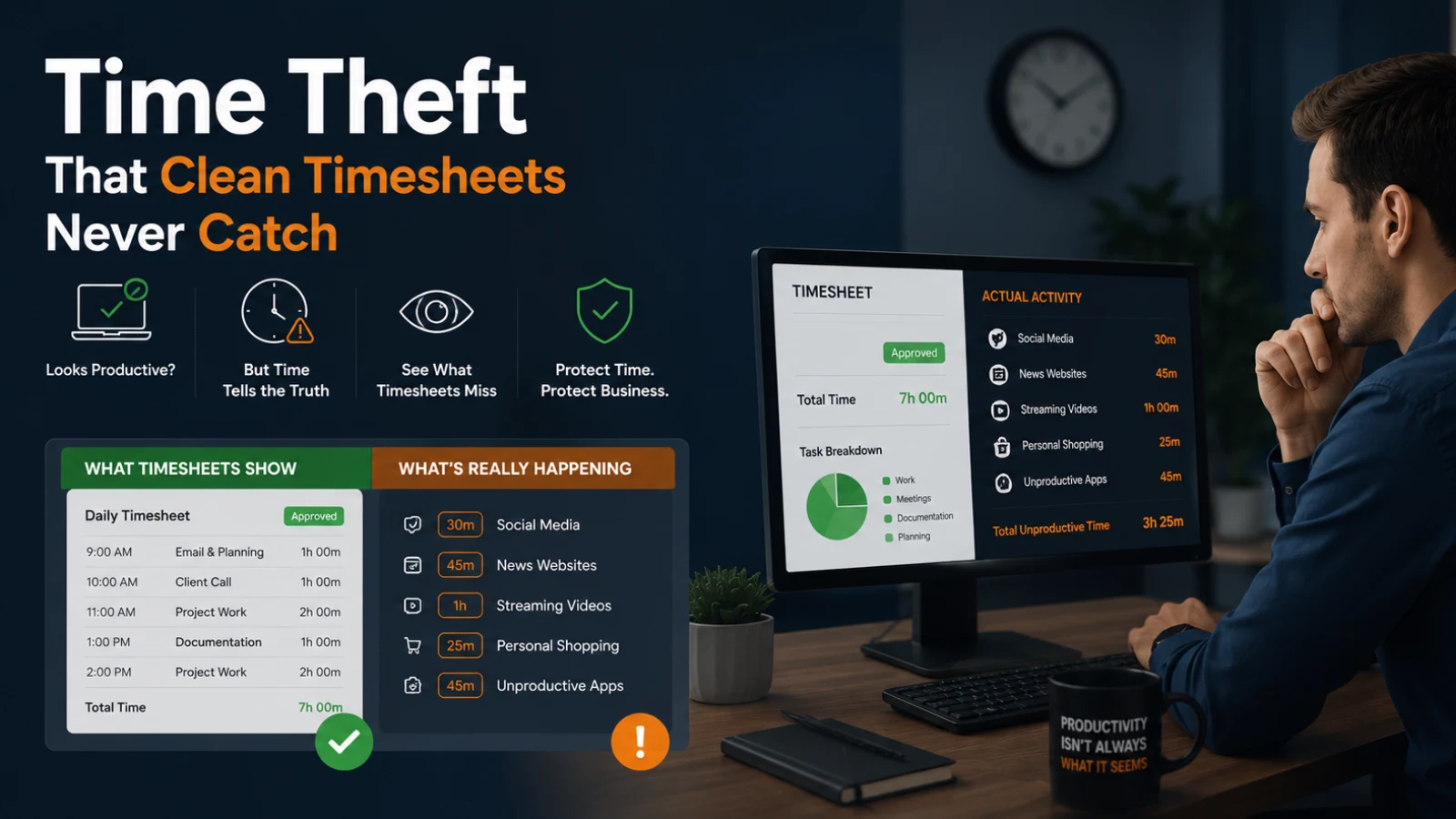
Time theft has a simple definition: any hour a company pays for that an employee did not actually work. It shows up as a coworker clocking in for someone still in the parking lot. Or a timesheet that rounds 4:47 to 5:00 every single day. Or a screen that looks busy while the person behind it is shopping for shoes. The practice costs U.S. employers over $11 billion annually in lost productivity and wages, and that figure only captures what can actually be measured. The rest is buried in paperwork that looks clean.
Stricter rules do not fix this. Better data does. This guide covers the five most common forms of time theft at work and why manual detection collapses under real-world conditions. It then compares tracking technologies and walks through a detection workflow using EmpMonitor, an employee monitoring platform that turns suspicious patterns into documented, actionable evidence.
Listen to the podcast!
5 Forms of Time Theft That Clean Timesheets Never Catch
1. Buddy Punching
One employee clocks in on behalf of a coworker who is late, absent, or skipping the shift entirely. Most common anywhere, a shared PIN or generic login allows anyone to punch in for anyone else. The cost is not dramatic on any single day, which is exactly why it persists. The variance sits below whatever threshold a manager would notice by eye, and it never appears in the timesheet at all. As our in-depth breakdown of time theft at work notes, buddy punching is nearly impossible to detect manually without biometric verification or location-based controls.
2. Timesheet Padding
Often rationalized as harmless. Logging “prep time” that did not happen, rounding a six-hour day up to eight, noting a project as complete when half the afternoon went somewhere else. According to 2026 time theft statistics, inflated timesheets rank among the most prevalent and costly forms of time theft precisely because each instance is small and deniable. The cumulative total across a quarter is neither.
3. Extended and Unlogged Breaks
A 15-minute coffee break that quietly becomes 45 minutes. A lunch that runs 90 minutes while the clock still reads “working.” Even 15 extra minutes per day consistently stolen across a 250-day working year equals over 60 hours of paid but unworked time theft per employee annually. Multiply by headcount, and a pattern that feels minor becomes a material payroll variance.
4. Idle Time Disguised as Work
The status light is green, the timer is running, and the chat window is open. The employee is on a personal call or scrolling a personal finance blog. This is the hardest type to catch by eye and the easiest to surface with workforce analytics because the gap between logged time and recorded active time is directly measurable. The Worklytics 2025 industry benchmarks report found that over 50% of companies now use monitoring practices to oversee worker activity. Yet the vast majority receive raw data without context. That gap is exactly why continuous activity tracking matters far more than a simple punch clock.
5. Moonlighting on Company Time
Running a freelance client project, fulfilling orders from a personal e-commerce store, or working a second remote job during paid hours. Remote and hybrid arrangements have made this substantially more common. No standard timesheet will ever reveal it. Activity logs will.
Why Manual Detection Breaks Down
Manual timesheet review has a structural ceiling. A manager overseeing a 40-person team has no realistic way to cross-reference 40 timesheets against 40 people’s actual activity patterns every week ot with any consistency, and not without producing something defensible. What happens in practice is selective attention: effort concentrates on whoever already raises flags for other reasons, while the quieter offenders operate untouched. The result is not a character flaw. It is a data problem. Instinct without signal produces uneven enforcement, and uneven enforcement fails when challenged.
That challenge arrives faster than most managers expect. When a termination gets disputed, undocumented suspicion is not a defense. HR and employment attorneys consistently note that wrongful-termination claims turn on documentation: what was observed, when, and how it was recorded. “I had a feeling something was off” satisfies none of those requirements. An exported activity log does.
Effective detection has to be continuous, objective, and documented. That means comparing logged hours against real signals: which applications were open, when the keyboard and mouse were active, what categories of sites were visited, not just what someone typed into a timesheet.
Three Technologies Worth Comparing
Not all time-theft solutions work the same way, and the right fit depends on your workforce.
Biometric Time Clocks
Fingerprint or facial-recognition terminals solve buddy punching definitively; you cannot clock in for someone else using their fingerprint. The limitations are cost and scope. Hardware and installation costs per terminal add up fast, and biometric clocks only capture punch times. They tell you when someone arrives and leaves; they say nothing about what happened in between. For manufacturing or retail with fixed stations, they are a strong partial solution. For knowledge workers using laptops, they are close to useless.
GPS Punch-In
Mobile apps that require location verification at clock-in time work well for field teams: delivery drivers, construction crews, service technicians. The gap: GPS confirms location at a single moment, not sustained presence. Someone can check in at the worksite and leave 20 minutes later. For remote office workers, requiring GPS data raises its own employee-relations and legal questions depending on jurisdiction.
Activity-Based Monitoring
This is where tools like EmpMonitor operate. Instead of checking location at a single moment, activity monitoring records continuous signals: application usage, active versus idle time, website categories visited, and periodic screenshots via Screen Recording. The result is a timeline, not a timestamp.
The pattern becomes visible quickly. EmpMonitor’s Real Time Activities Tracking surfaces employees whose eight-hour billing days show only a fraction of recorded active time. The idle gap concentrates in URL categories that have nothing to do with whichever project they had marked as active. Weekly standups will never show this. Workforce analytics data shows it on day one.
Concretely, you can see that a given employee logged 8 hours, had 2.5 hours of recorded activity, spent 40 minutes on a personal shopping site, and registered a first keystroke at 9:53 despite a 9:00 clock-in. That is the kind of specificity that turns an instinct into evidence. Before committing to a tool, it is worth working through the trade-offs in employee monitoring software with real-time theft activity tracking in advance.
Read More!
What Is Time Theft? Types, Causes, and How to Prevent It (2026 Guide)
What Is Time Theft And How You Can Curb It?
How to Detect Time Theft with Activity Data: A 6-Step Workflow

The sequence below uses the data EmpMonitor captures automatically. Work through it in order: baselines before flags, flags before confrontations.
- Establish a baseline before flagging anything. Pull several weeks of activity data across the team and note each person’s typical active-time-per-logged-hour ratio. Nobody types for eight consecutive hours; some idle time theft is expected and normal. You need to know your team’s actual normal range before any deviation means anything at all.
- Flag statistical outliers, not personal hunches. Look for employees logging eight hours with three hours of recorded activity, or timesheets that end on the exact quarter-hour, so consistently that it could not be a coincidence. EmpMonitor’s Real-Time Activities Tracking surfaces these ratios per person without anyone manually eyeballing a spreadsheet.
- Cross-check punch times against the first recorded activity. If someone clocks in at 9:00 but their first keystroke, captured via Keystroke monitoring, lands at 9:54 every single morning, that gap is documented evidence. It is also a strong indicator of buddy punching or padded start times that a biometric clock would catch, but a shared-login system never will.
- Review app and URL category logs for flagged windows. Time in Slack, your project tracker, or your CRM is work. Time in a personal email account or a shopping cart during logged hours is not. EmpMonitor classifies app and URL usage into productive, neutral, and unproductive categories defined by the employer, so the distinction does not require anyone to manually audit browser histories.
- Use screenshots to confirm specific concerns. Screen Recording converts “the numbers look off” into “here is what was on screen at 2:14 PM on Tuesday.” Use this feature to verify a targeted concern that activity logs have already flagged, not as a tool for blanket, all-day surveillance.
- Export and document before any conversation. EmpMonitor lets you export a full activity log for any employee or date range. That document is what makes the conversation about facts rather than impressions, and it protects the company if the matter escalates to HR or legal review.
See how remote work monitoring software handles the full spectrum of time theft signals, then start your own free trial and pull your first activity baseline in under 15 minutes.
What to Do When You Confirm a Case
Confirmed evidence does not automatically mean termination. Most HR practitioners recommend a graduated response: a first documented instance typically warrants a formal written warning with a clear statement of expected behavior going forward. A pattern across multiple instances, or a single instance of significant dollar value, supports stronger action. For a clearer picture of what appropriate consequences look like across severity levels, the breakdown of employee time theft consequences is worth reviewing before you sit down with HR.
Whatever the response, keep the conversation grounded in the exported data. “Our records show 14 days over the past six weeks where logged hours exceeded recorded active time theft by more than three hours” is a manageable HR conversation. “We think you have been padding your timesheet” is not. The activity log is not just an operational tool; it is your documentation for progressive discipline, termination defense, or an unemployment hearing.
If the case involves a remote employee moonlighting on a second job, check your employment agreement. Many contain exclusivity clauses; if yours does, that clause plus the activity evidence gives you a clean, documented basis for action that does not depend on performance metrics at all.
Prevention: Remove the Opportunity, Not Just the Employee
Detection catches time theft after the fact. Prevention removes the structural conditions that make it easy in the first place.
Automate the clock: Replace manual punch-in with time tracking tied to actual computer activity. When hours are logged from real work signals rather than typed into a form, padding and buddy punching lose their mechanism; there is simply nothing to fudge. This is the core principle behind reducing time theft at scale: remove the mechanism, and enforcement stops being a daily task.
Use monitoring visibility as a structural deterrent: EmpMonitor’s Stealth/ Un-stealth mode lets administrators choose when monitoring is visible to employees. Switching to un-stealth gives staff direct awareness that their activity is being recorded, which changes behavior without requiring a single conversation or policy reminder. When employees know that idle hours, unproductive URL categories, and keystroke gaps are visible to managers in the same dashboard, self-correction handles most of the load. The transparency also removes the element of surprise when patterns eventually surface in a review.
Set idle-time alerts early: Configure a notification when logged time and active time diverge past your team’s established normal threshold. Catching a pattern early means a brief, low-stakes conversation fixes it. Discovering months of it during a budget review is a different conversation entirely.
A Note on Legal Compliance
Employee monitoring laws vary by jurisdiction. The practical baseline: draft and distribute a clear written monitoring policy before you turn anything on, and retain data only as long as operationally necessary. Have employment counsel review if you operate across multiple jurisdictions. EmpMonitor’s stealth/un-stealth mode lets administrators configure visibility at the individual level, giving organisations a way to meet disclosure requirements without gutting the utility of the underlying data.
Inaccurate timekeeping records create legal exposure under wage and hour laws. Payroll built on falsified time data is a financial liability and a legal one. The compliance case for accurate activity logging runs in both directions, protecting the company from theft and from the regulatory risk that falsified records invite.
Close the Gap Between Logged Hours and Real Work
Time theft is not a character problem you can solve by hiring differently. It is a systems problem, one that thrives wherever hours are self-reported, oversight is inconsistent, and documentation is thin. Every organisation that switches from manual timesheets to activity-based tracking finds the same thing: the gap between what was logged and what was worked was there all along. It just had nowhere to show up.
Ready to see where your team’s hours are actually going? Start your free EmpMonitor trial and pull your first idle-time anomaly report in under 15 minutes; setup takes less time than your next one-on-one.