
Mouse jigglers, tools designed to simulate cursor movement and keep a computer appearing active, have become one of the more talked-about workarounds in remote work. The premise is simple: keep the mouse moving, stay green on Slack, and avoid the idle timeout. But as employee monitoring software has grown more sophisticated, the question that matters most has changed from “does it work?” to “can it be detected?”
The short answer is yes, in many cases. Whether a mouse jiggler can be detected depends on the type of jiggler being used, the monitoring tools an employer has deployed, and how closely those tools are configured to flag suspicious activity patterns. This guide breaks down everything you need to know, from how each type of jiggler works to exactly what monitoring software looks for, to what happens if you get caught.
Listen to the blog:
What Are Mouse Jigglers? Software vs Hardware Explained
Mouse jigglers are tools, either software applications or physical hardware devices, that generate simulated mouse movement to prevent a computer from registering as idle. They became widely used during the shift to remote work, when employees began appearing “active” on collaboration platforms like Teams and Slack as a proxy for being at their desks and working.
There are three main types, and they differ significantly in how they work and how detectable they are.
Software Mouse Jigglers
Software-based mouse jigglers run as applications on the employee’s computer. They use operating system APIs to generate artificial cursor movement at set intervals, typically a small, repetitive pattern that keeps the system from triggering its idle timer. Because they run as installed programs, they are visible in the application list, process manager, and installation records.
USB Mouse Jigglers
USB mouse jigglers are small hardware devices that plug into a USB port and register with the operating system as a human interface device, essentially pretending to be a mouse. They generate movement signals at the hardware level, bypassing the need for any software installation. Endpoint monitoring tools that log USB device connections will record the presence of an unknown or unrecognized input device.
Physical Mouse Movers
Physical mouse movers are motorized pads or devices that physically move the mouse itself, creating genuine hardware input that is indistinguishable at the OS level from real user movement. They leave no software trace and no USB device log. They are the hardest type to detect directly, but they still produce behavioral patterns that sophisticated monitoring tools can flag.
Why Do People Use Mouse Jigglers?
The appeal is straightforward. Many remote work environments use presence indicators, the green dot on Slack, the “available” status on Teams, as informal proxies for whether someone is working. Idle timeouts that trigger automatic status changes can make an employee appear unavailable even during legitimate breaks, deep focus work, or phone calls away from the desk.
Mouse jigglers address that specific frustration. They keep the status indicator green without requiring constant physical interaction with the computer. Common use cases include:
- Preventing automatic live screen lock during long video calls or meetings
- Maintaining “active” status on Teams or Slack during brief away periods
- Avoiding idle flags in basic time tracking tools that measure mouse and keyboard activity
- Bypassing inactivity detection in environments where screen time is used as a productivity metric
It’s worth noting that not everyone using mouse jigglers is being deliberately deceptive. Some use them to prevent unnecessary status changes during legitimate work that doesn’t involve the computer. But the line between that and falsifying activity records is thin, and employers generally don’t distinguish between the two.
Also Read!
Veriato Vs EmpMonitor: Choosing The Right Investigation Tool
Moving Away from Teramind? Here Are 4 Cost-Effective Swaps
Can Mouse Jigglers Be Detected? How Monitoring Software Spots Them
Modern employee monitoring software uses several overlapping methods to detect the behavioral signatures that mouse jigglers produce. No single signal is conclusive on its own, but the combination creates a recognizable pattern.
Behavioral Pattern Analysis
Mouse jigglers produce movement that is mechanically regular in a way that genuine human cursor activity is not. Real mouse movement is variable in speed, direction, and timing; it reflects the organic randomness of human interaction. Jiggler movement, by contrast, tends to follow a fixed interval, a repeated path, or a perfectly timed loop. Monitoring tools that analyze cursor behavior over time can flag this regularity as anomalous.
Keyboard vs Mouse Activity Ratio
A legitimate working session involves both mouse and keyboard activity. Someone typing, clicking, filling in forms, or navigating applications generates a natural ratio of both input types. Mouse jigglers generate mouse activity without any corresponding keyboard input, a pattern that stands out clearly in activity logs, particularly over extended periods. Long stretches of mouse movement with zero keystrokes are a primary detection signal.
Screen Capture Validation
Screenshot monitoring, whether interval-based or continuous, captures what is actually on the screen during active periods. If the screen shows a static document, a locked application, or an unchanged state while mouse activity is being logged, the discrepancy is immediately visible. Screen captures that consistently show no meaningful on-screen changes during reported activity periods are a strong indicator of artificial input.
App Usage Correlation
Monitoring tools that log application usage alongside activity data can cross-reference whether the apps in use match the reported active time. A computer showing eight hours of activity but only thirty minutes of application usage is a straightforward flag. Software jigglers are particularly visible here because the jiggler application itself may appear in the active app log.
USB Device Monitoring and Installed Software Scans
For hardware-based mouse jigglers, endpoint monitoring tools that log USB device connections will record when an unrecognized or unexpected input device is connected. IT administrators can also run periodic software scans that identify known jiggler applications in the installed programs list. Company policy audits that cross-reference approved software lists against installed applications will surface most software jigglers quickly.
Detection Difficulty By Type Of Mouse Jiggler
Not all mouse jigglers carry the same detection risk. Here’s how they compare.
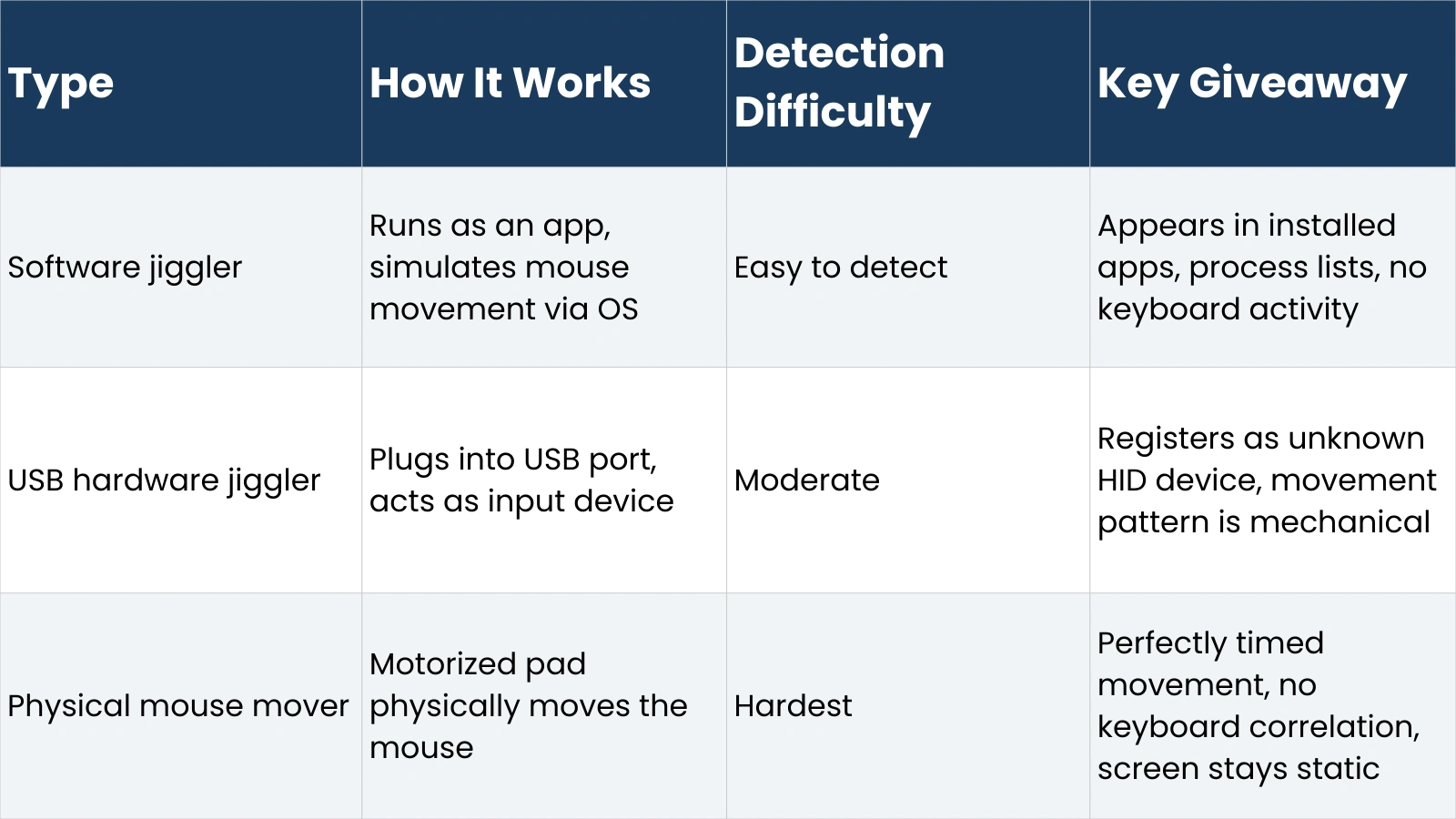
The important takeaway from this table is that “hardest to detect” is not the same as “undetectable.” Physical mouse movers still produce the behavioral signatures described above, no keyboard activity, static screen content, and perfectly timed movement, which pattern-based monitoring tools are designed to catch.
The ‘Undetectable’ Mouse Jiggler Myth
A significant number of mouse jiggler products, particularly USB hardware versions, are marketed as “undetectable” or “stealth” devices. This claim is misleading in the context of modern employee monitoring software.
What these devices are undetectable from is basic idle detection, the simple OS-level timeout that triggers a screen lock or status change. Against that specific mechanism, they work. But “undetectable by idle timeout” is not the same as “undetectable by monitoring software.”
Advanced monitoring platforms don’t rely on idle detection alone. They analyze behavioral patterns, cross-reference multiple data streams, and use anomaly detection to flag activity that looks automated rather than human. A device that successfully prevents an idle timeout while the screen shows no real work happening and the keyboard hasn’t been touched in four hours is not undetectable; it’s generating exactly the kind of signal that gets flagged.
The randomized movement features some jigglers advertise, varying the timing and path of cursor movement to mimic human behavior, do reduce the regularity signal, but they don’t address the keyboard inactivity problem, the screen content correlation, or the USB device log.
How EmpMonitor Detects Mouse Jigglers and Artificial Activity
EmpMonitor is an employee monitoring and workforce productivity platform used by over 15,000 companies across more than 100 countries. It’s designed to give managers accurate visibility into how work time is actually being spent, which means it’s built to catch exactly the kind of artificial activity that mouse jigglers produce.
The platform combines several of the detection mechanisms described in this guide into a single dashboard. It tracks real-time activity, including mouse and keyboard input, logs application and website usage with time-on-task data, and captures screenshots at configurable intervals. Crucially, it cross-references these data streams, so a session showing mouse activity but no keyboard input, no meaningful application usage, and a static screen will appear as anomalous in the productivity reports.
EmpMonitor also monitors USB device connections and logs installed applications, which gives IT administrators visibility into hardware jigglers and software-based tools that employees may have installed. The real-time dashboard means unusual patterns can be spotted and investigated as they happen rather than only in retrospect.
For employers concerned about artificial activity inflation, EmpMonitor’s combination of behavioral analytics, screenshot validation, and device monitoring provides the layered approach that individual detection methods alone can’t match. It’s available on Windows, Mac, and Linux, with plans starting from around $3 per user per month. More information is available at empmonitor.com.
Can You Get in Trouble for Using Mouse Jigglers?
Yes, and the consequences can be serious. Whether using a mouse jiggler constitutes a disciplinable offense depends on your employment contract, your company’s acceptable use policy, and how your employer interprets the behavior.
Most remote work agreements and company IT policies include clauses about accurate time reporting, appropriate use of company systems, and prohibitions on circumventing monitoring tools. Using a mouse jiggler to falsify activity records can fall under any of these categories, and has, in documented cases, led to formal warnings, performance improvement plans, and termination.
From a legal standpoint, the situation varies by jurisdiction and contract. In most cases, using a jiggler isn’t illegal, but it can constitute a breach of employment contract, which creates grounds for dismissal. In some industries where time records have legal or billing significance (legal services, healthcare, government contracting), falsifying activity data could have more serious consequences.
The ethical dimension is worth considering directly: using a mouse jiggler to appear active while not working is, in plain terms, misrepresenting your work to your employer. Regardless of how you feel about the monitoring approach, that misrepresentation carries professional risk beyond the immediate disciplinary one; it affects your reputation, your relationships with managers, and your standing if performance questions arise later.
Alternatives to Mouse Jigglers
The underlying frustration that drives mouse jiggler use is often legitimate: activity-based monitoring that equates cursor movement with productivity is a blunt and imperfect approach to measuring work. If that frustration resonates, there are healthier ways to address it.
Talk to your manager about how productivity is measured and whether output-based metrics make more sense for your role than activity tracking
Use transparent time tracking tools that log actual work sessions accurately. This builds a defensible record of your productivity without the risk of artificial inflation
Configure your system’s power settings to extend screen lock timeouts legitimately, rather than working around them covertly
If presence indicators are causing disproportionate stress, raise it as a well-being concern. Many companies are actively reconsidering activity-based monitoring in favor of results-focused management
The most durable solution to the problem mouse jigglers are trying to solve is a working environment where productivity is measured by outcomes rather than screen time. That conversation is worth having openly rather than working around covertly.
Conclusion: Should You Use Mouse Jigglers?
The risk calculation has shifted significantly as monitoring technology has improved. A few years ago, a basic software jiggler could reliably fool simple idle-detection systems. Today, employers using modern workforce monitoring platforms have access to behavioral analytics, cross-referenced activity data, and pattern detection that makes artificial activity much harder to hide.
If your employer uses a sophisticated monitoring platform, the probability that mouse jiggler use will eventually be detected is meaningful, and the consequences when it is detected are professional at minimum and potentially contractual. The short-term convenience of staying green on Slack is rarely worth that exposure.
If your employer uses only basic presence indicators with no deeper monitoring, the immediate detection risk is lower, but the underlying dynamic is still one of misrepresentation that can surface in other ways.
The honest answer is that mouse jigglers solve a symptom rather than the problem. If activity monitoring is creating unfair pressure in your workplace, the path forward is addressing that directly, not working around it in ways that create new risks.
Frequently Asked Questions
Are mouse jigglers detectable in 2026?
Yes, in many cases. Basic idle-detection systems can still be fooled, but modern employee monitoring platforms use behavioral pattern analysis, keyboard-to-mouse activity ratios, screenshot validation, and USB device logging to detect artificial activity. The more sophisticated the monitoring tool, the higher the detection likelihood.
Can mouse jigglers be detected without monitoring software?
IT administrators can identify software jigglers through manual application audits and installed software reviews without dedicated monitoring software. Hardware jigglers may appear in device manager logs. However, behavioral detection, spotting the pattern of activity without corresponding keyboard input or screen changes, generally requires active monitoring tools.
Can companies detect mouse jigglers on personal devices?
It depends on whether the company has installed any monitoring agent on the personal device. If the device is enrolled in a corporate MDM (mobile device management) system or has monitoring software installed as a condition of remote work access, detection capabilities are similar to a company-owned device. Personal devices with no corporate software installed are generally outside the employer’s monitoring reach.
Do employers know if you use a mouse jiggler?
Not automatically in every case, but employers using comprehensive monitoring platforms are increasingly likely to notice the behavioral signatures that mouse jigglers produce. The safest assumption for any employee considering a jiggler is that a sufficiently motivated employer with modern monitoring tools will eventually be able to identify artificial activity patterns.