When it comes to streamlining business operations, automation is invaluable, especially in today’s world.
With a growing ecommerce business comes a handful of daily orders, preventing operations from staying simple. Product catalogs expand, inventory moves across multiple channels, payments require monitoring, fulfillment becomes more complex, and customers expect faster support. Simultaneously, teams may still spend hours on repetitive tasks such as updating stock, confirming orders, sending shipping notifications, and preparing reports.
That is why ecommerce automation is required. It uses software, integrations, predefined rules, and increasingly AI-powered systems to automate repetitive and predictable processes. However, instead of treating automation as something limited to order processing, businesses can connect inventory, payments, fulfillment, customer communication, marketing and analytics into coordinated workflows.
The shift is timely. Salesforce’s 2025 Connected Shoppers research reported that 39% of consumers were already using AI for product delivery, showing how quickly technology is influencing the ecommerce journey.
This guide explores ecommerce automation use cases, operational benefits, customer experience, AI, technology requirements, implementation, ROI, and the point at which custom ecommerce development may become necessary.
What Is Ecommerce Automation?
Ecommerce automation is defined as the use of software, integrations, rules, and intelligent systems to perform repetitive online-store tasks automatically. It connects triggers and conditions to predefined actions, helping businesses process orders, manage inventory, communicate with customers, and monitor operations with less manual intervention.
Unlike general business automation, ecommerce automation is specifically designed around the processes that make an online store function. These include product and inventory management, order processing, payment workflows, fulfillment, customer communication, marketing, and reporting.
A simple Trigger → Condition → Action → Result model explains how it works.
For example: “Inventory reaches minimum level → system detects the threshold → low-stock alert is triggered → purchasing team receives a notification.”
To simplify repeated monitoring of the same information for employees, an ecommerce automation software platform or ecommerce workflow builder can connect these steps.
How Ecommerce Automation Works
Here are the simple and straightforward four stages:
- Trigger: Something happens, such as an order being placed or inventory falling below a threshold.
- Condition: The system checks whether predefined criteria are met.
- Action: The relevant automated task is executed.
- Result: The process produces an outcome, such as an alert, status update, notification, or system change.
Using this structure can help businesses create repeatable workflows without requiring employees to manually initiate every step.
Manual vs Automated Ecommerce Processes
| Process | Manual Approach | Automated Approach |
| Inventory | Staff manually check stock | Automated stock alerts |
| Orders | Employees manually process orders | Automated order routing |
| Shipping | Staff send updates manually | Automated tracking notifications |
| Customer support | Repetitive questions handled manually | Automated responses and escalation |
| Reporting | Reports prepared manually | Scheduled reports and dashboards |
Why Is Ecommerce Automation Important for Business Operations?
Manual processes may work when an online store is small. The actual problem appears when transaction volume grows faster than the team’s ability to handle repetitive work.
Employees may need to copy information between systems, verify orders, update inventory, check payment statuses, send shipping messages, and prepare reports. These activities consume time while creating opportunities for inconsistent data, delayed processing, and human error.
Through precision-backed ecommerce development services, automation can help you eliminate repetitive dependencies and bring consistent workflows into play. Instead of relying on someone to remember each step, businesses can define the process once and allow software to execute it repeatedly.
The productivity case is also becoming stronger as AI and automation mature.
Salesforce reports that AI saves an average of 6.4 hours per week in its commerce-related research, although this is a statistic reported by Salesforce rather than a universal industry benchmark.
Automation can therefore improve more than speed. It can give teams better visibility into operations, reduce repetitive administrative work, and make it easier to coordinate disconnected systems.
The major opportunities include inventory, orders, payments, fulfillment, customer support, marketing, and reporting.
Which Ecommerce Processes Can Businesses Automate?
One of the biggest advantages of ecommerce automation is its breadth. It can operate behind the scenes across backend operations while also supporting customer-facing workflows.
Inventory Management
Businesses can automate stock-level monitoring, low-stock alerts, inventory synchronization, and replenishment triggers. When inventory falls below a predefined threshold, the system can notify purchasing teams or initiate a replenishment workflow.
For businesses selling through multiple channels, automated synchronization can also help keep inventory information aligned between the online store, marketplaces, and internal systems.
Order Processing
Order workflows can automate confirmation messages, order tagging, verification, routing and processing. For example, an order containing a particular product category could automatically be routed to the appropriate warehouse or fulfillment location.
This reduces the repetitive handling required after every purchase.
Payment Processing
Payment-related workflows can trigger confirmation messages when transactions succeed and notifications when payments fail or require attention. Systems can also update order statuses according to payment conditions, reducing the need for employees to repeatedly check payment dashboards.
Fulfillment and Shipping
Automation can connect ecommerce stores with warehouse and shipping systems. Once an order is ready, fulfillment instructions can be generated, shipping information can be synchronized, and tracking notifications can be sent automatically.
Customers receive updates without requiring support staff to manually send every message.
Customer Support
Frequently asked questions, order-status requests and routine inquiries can be handled through automated responses, knowledge bases and ticket-routing workflows. More complicated cases can automatically be escalated to human support teams.
This creates a balance between automation and human judgment.
Marketing and Customer Retention
Automated workflows can support abandoned-cart reminders, post-purchase emails, customer segmentation, re-engagement campaigns, and behavior-based communication.
For example, a customer who purchases a particular product could automatically enter a relevant post-purchase communication sequence.
Reporting and Analytics
Instead of manually compiling spreadsheets, businesses can schedule sales reports, inventory reports, and performance dashboards. Automated alerts can also notify managers when important metrics move outside defined thresholds.
Ecommerce Automation Opportunities
| Ecommerce Area | What Can Be Automated? | Potential Operational Benefit |
| Inventory | Stock alerts, synchronization, replenishment | Better stock visibility |
| Orders | Confirmation, routing, tagging | Faster processing |
| Payments | Status updates, payment workflows | Fewer manual checks |
| Fulfillment | Order routing, tracking updates | More consistent fulfillment |
| Customer Support | FAQs, responses, ticket routing | Faster responses |
| Marketing | Abandoned carts, segmentation, campaigns | Consistent engagement |
| Reporting | Sales, inventory, and performance reports | Faster access to information |
Ecommerce Automation Workflow: From Order to Fulfillment
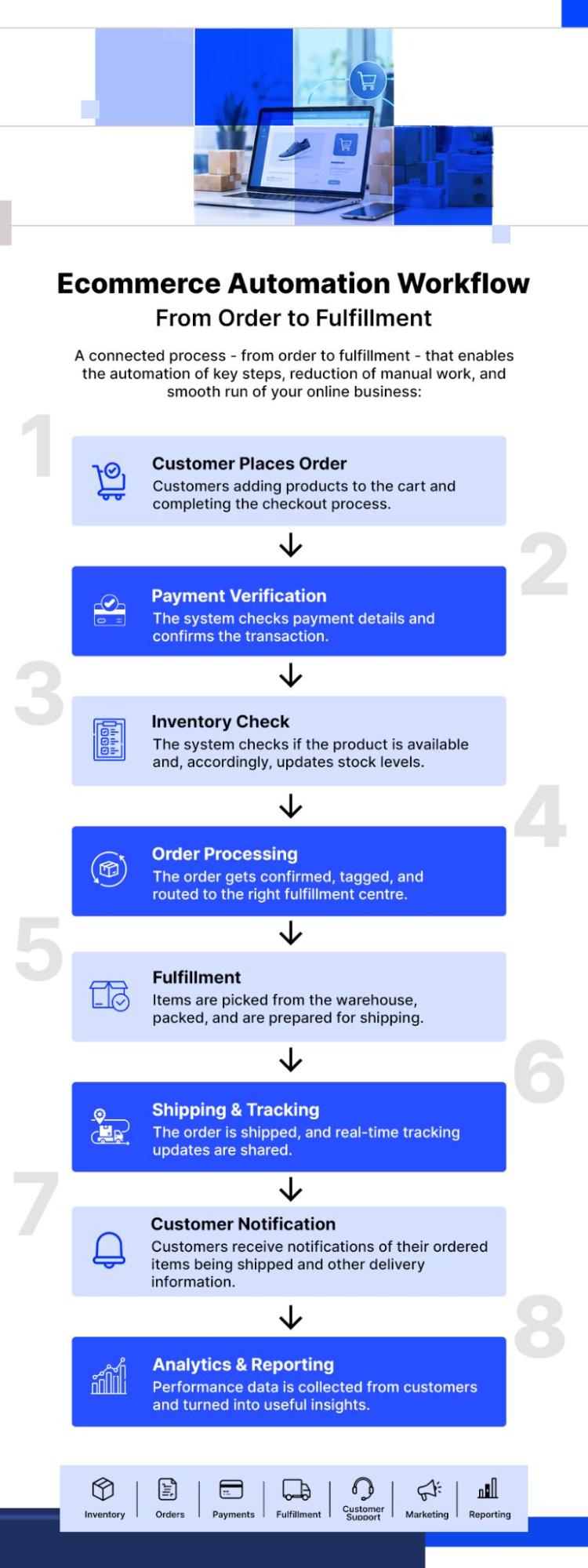
7 Ways Ecommerce Automation Can Streamline Business Operations
The value of ecommerce automation becomes clearer when each benefit is connected to a specific operational challenge.
- Reducing Repetitive Manual Work
Employees often spend valuable time performing tasks that follow the same sequence. Updating order statuses, checking stock thresholds, or sending standard notifications does not necessarily require constant human intervention.
Automation transfers these repetitive activities to software, allowing employees to concentrate on work that requires judgment.
- Speeding Up Order Processing
A manually processed order may pass through several employees or systems before fulfillment begins. Automated workflows can move orders through confirmation, verification, tagging, and routing immediately after predefined conditions are satisfied.
The result is a faster and more consistent order journey.
- Improving Inventory Visibility
Inventory discrepancies can occur when stock information is updated separately across systems. Automated synchronization, stock alerts, and replenishment workflows help teams access more current information.
This is especially important for businesses operating multiple sales channels.
- Reducing Operational Errors
Repetitive manual data entry creates opportunities for mistakes. Standardized workflows reduce the number of times employees have to manually copy, check or re-enter information.
Automation does not eliminate every error, but it can make routine processes more consistent.
- Improving Customer Response Times
Customers expect timely communication after making a purchase. Automated confirmations, shipping updates and support workflows can respond immediately to defined events instead of waiting for an employee to initiate communication.
This creates a more predictable customer journey.
- Supporting Ecommerce Business Growth
One of the best ways to scale an online business is to increase operational capacity without making every repetitive activity more labor-intensive.
A workflow that automatically handles 100 orders can often continue handling a substantially larger volume, provided the underlying systems and integrations are designed appropriately.
- Giving Employees More Time for High-Value Work
When repetitive tasks are reduced, employees can spend more time on merchandising, customer relationships, strategic planning, analysis, problem-solving, and process improvement.
This is where the productivity value of ecommerce automation extends beyond simply saving minutes on individual tasks.
Ecommerce Automation vs Manual Ecommerce Operations
The fundamental difference is who or what initiates and manages routine processes.
In a manual operation, employees repeatedly monitor systems and perform individual steps. In an automated operation, predefined workflows initiate those steps when specific triggers and conditions occur.
Importantly, automation is not about eliminating employees. Human teams remain essential for strategy, decision-making, exception handling, complex customer issues, and situations that fall outside predefined rules.
The objective is to let technology handle predictable activities while people focus on work that benefits from human judgment.
| Operational Factor | Manual Operations | Automated Operations |
| Order processing | Employee-driven | Workflow-driven |
| Inventory updates | Manual checks | Automated synchronization |
| Customer notifications | Manually triggered | Automatically triggered |
| Reporting | Manually prepared | Automatically generated |
| Scalability | Requires increasing manual effort | Repetitive workflows can scale |
| Process consistency | Depends on manual execution | Based on defined rules |
| Response time | Depends on staff availability | Can occur automatically |
How Ecommerce Automation Can Improve Customer Experience
Operational efficiency eventually becomes customer experience.
When an order is confirmed quickly, inventory information is accurate and shipping updates arrive at the right time, customers experience less uncertainty. Automated support workflows can also provide immediate answers to common questions while routing complex issues to the appropriate employee.
Personalization is another opportunity. Customer behavior, purchase history and product interactions can trigger relevant communications rather than generic messages.
However, ecommerce automation should not be presented as a solution to every conversion problem. Baymard Institute’s ongoing research places average ecommerce cart abandonment at approximately 70.22%, based on 50 studies on average. Its research also identifies factors such as additional costs, delivery speed, account requirements, and checkout complexity among abandonment reasons.
Automation can support the customer journey through timely communication and recovery workflows, but checkout design, pricing transparency, payment reliability, shipping information, and overall usability remain important factors in conversion.
How AI Is Changing Ecommerce Automation
Traditional automation generally follows predefined rules: when X happens, do Y. AI-powered automation adds the ability to analyze information, identify patterns, generate content, make predictions, and adapt responses based on data.
That distinction is important because modern ecommerce automation is increasingly moving from simple rule-based workflows toward intelligent systems.
AI-Powered Customer Support
AI chatbots can answer routine questions, summarize customer requests and route tickets according to intent. Human agents can then handle complex or sensitive cases.
Product Recommendations
AI can analyze browsing behavior, purchase history, and product relationships to recommend products that are more relevant to individual shoppers.
Demand Forecasting
AI systems can analyze historical sales, seasonality, and current signals to help businesses anticipate future demand. Forecasting can support purchasing and inventory planning.
Intelligent Inventory Management
Instead of relying only on a fixed low-stock threshold, AI can identify demand patterns and provide predictive insights about potential inventory requirements.
Automated Product Content
AI can assist with product descriptions, categorization, attributes, summaries and other catalog content. Human review remains important for accuracy, brand consistency and product-specific claims.
Fraud and Risk Detection
AI can analyze unusual transaction patterns, account activity and behavioral signals to identify potentially suspicious activity for further review.
The scale of this shift is already visible. Salesforce’s 2025 Connected Shoppers research found that 39% of consumers were using AI for product discovery, with more than half of Gen Z reporting such use. The research surveyed shoppers globally and reflects changing consumer behavior rather than a universal measure of AI adoption across all ecommerce businesses.
What Technology Is Required for Ecommerce Automation?
If you’re after effective automation, you will perhaps need multiple technology components working together rather than one standalone tool.
Ecommerce Platform
Platforms such as Shopify, WooCommerce and Magento provide the core environment for products, customers, orders and transactions. Their native functionality, APIs, apps and extensions determine many of the available automation options.
APIs and Integrations
APIs connect the ecommerce platform with systems such as:
- CRM platforms
- ERP systems
- Payment gateways
- Shipping systems
- Inventory platforms
- Marketing tools
- Analytics platforms
Webhooks can also communicate events between systems in near real time.
Automation and Workflow Layer
The automation layer coordinates triggers, rules, conditions, actions and exceptions. Modern systems may combine conventional workflows with AI-powered automation.
An ecommerce workflow builder can make this logic easier to configure and manage.
Data Layer
Automation is only as reliable as the data behind it. Product, customer, order and inventory data must be accurate and synchronized.
Ecommerce Automation Technology Stack
| Technology | Role in Ecommerce Automation | Example |
| Ecommerce platform | Manages storefront and transactions | Shopify |
| API | Connects different systems | REST API |
| CRM | Manages customer information | CRM platform |
| ERP | Connects operational data | ERP system |
| Payment gateway | Automates payment workflows | Payment provider |
| Shipping system | Manages fulfillment and tracking | Shipping platform |
| Analytics | Measures performance | Analytics platform |
| AI tools | Supports prediction and intelligent workflows | AI system |
When Should an Ecommerce Business Invest in Automation?
Businesses should consider automation when repetitive manual processes begin affecting productivity, accuracy, customer experience, or scalability.
Signs your ecommerce business may need automation:
- Employees repeatedly perform the same ecommerce tasks.
- Orders require excessive manual processing.
- Inventory information is frequently inaccurate.
- Customer-service teams answer the same questions repeatedly.
- Shipping updates are manually sent.
- Reports take significant time to prepare.
- Business systems do not communicate effectively.
- Order volumes are increasing.
- Operational errors are becoming more frequent.
The answer is not to automate everything immediately but to prioritize workflows according to frequency, time consumption, error risk, and business impact.
A daily process that consumes several employee-hours and has a high risk of error is generally a more logical starting point than an occasional task. This approach allows companies to build ecommerce automation progressively instead of introducing unnecessary complexity.
How to Implement Ecommerce Automation Step by Step
A structured implementation process helps businesses avoid automating inefficient processes or creating unnecessary system complexity.
Step 1 – Audit Existing Ecommerce Processes
Map the current workflow from order placement through fulfillment and post-purchase support. Identify repetitive activities, bottlenecks, duplicate data entry and manual dependencies.
Step 2 – Prioritize Processes for Automation
Select workflows that are frequent, time-consuming, error-prone, or operationally important. Start with processes where automation can produce a measurable improvement.
Step 3 – Define the Automation Rules
Use the simple framework: Trigger → Condition → Action → Result
For example, an order payment succeeds → order meets verification criteria → order is routed to fulfillment → fulfillment process begins.
Step 4 – Evaluate Platform and Integration Requirements
Check whether the existing ecommerce platform, plugins, APIs, and third-party systems can support the required workflow.
Step 5 – Build and Test the Workflow
Create the workflow and test it using controlled data. Test normal scenarios as well as failed payments, missing information, out-of-stock products, and other exceptions.
Step 6 – Launch Gradually
Start with selected high-impact workflows rather than changing the entire operation simultaneously. This reduces disruption and makes problems easier to isolate.
Step 7 – Monitor and Optimize
Track performance after launch. Review processing times, errors, exceptions, and employee workload, then refine the workflows based on actual operational data.
When Do You Need Ecommerce Development Services for Automation?
Standard ecommerce platforms, plugins, apps, and automation tools can handle many common workflows. However, businesses may need custom development as part of ecommerce automation when their requirements involve complex functionality, specialized integrations, or workflows that existing features cannot support effectively.
Examples include:
- Custom inventory workflows
- Complex order-management requirements
- Third-party system integrations
- Customized shopping-cart functionality
- Payment gateway integration
- Advanced checkout requirements
- Analytics integration
- Mobile optimization
- Security requirements
- Custom ecommerce functionality
For example, a business might need an inventory workflow that considers multiple warehouses, supplier availability, regional demand, and specific fulfillment rules. A simple plugin may not provide enough control over that process.
Similarly, companies with legacy ERP systems or specialized payment and logistics infrastructure may require custom APIs or middleware to connect their systems reliably.
When implementation requires this level of customization, expert-led ecommerce development solutions can help businesses design, integrate, and optimize the underlying ecommerce architecture rather than forcing complex requirements into unsuitable off-the-shelf workflows.
How to Measure the ROI of Ecommerce Automation
Automation should be measured through operational outcomes rather than assumed to be successful simply because a workflow has been deployed.
Before implementation, establish a baseline. Record how long processes take, how many manual steps are involved, and how frequently errors occur. After implementation, measure the same indicators over a comparable period.
Note: The most useful KPI depends on the business and the workflow being automated.
Ecommerce Automation KPIs
| KPI | What It Measures | Why It Matters |
| Order processing time | Processing efficiency | Shows workflow speed |
| Manual tasks per order | Automation coverage | Shows remaining manual work |
| Order error rate | Process accuracy | Identifies operational issues |
| Customer response time | Support efficiency | Measures responsiveness |
| Inventory discrepancy rate | Stock accuracy | Identifies inventory problems |
| Cost per order | Operational cost | Tracks efficiency |
| Employee hours saved | Productivity | Measures recovered time |
| Automation failure rate | Workflow reliability | Identifies technical issues |
ROI should therefore be assessed using the metrics most relevant to the specific business rather than relying on one universal formula.
For one company, the main objective may be reducing processing time. For another, it may be improving inventory accuracy or reducing support workload.
Ecommerce Automation FAQs
What is ecommerce automation?
Ecommerce automation is the use of software, rules, integrations, and intelligent systems to perform repetitive online-store processes automatically. For example, when inventory falls below a defined threshold, a system can automatically generate a low-stock alert instead of requiring an employee to check stock manually.
What ecommerce tasks can be automated?
Inventory management, order processing, payments, fulfillment, customer support, marketing and reporting can all be automated to varying degrees. Common examples include stock alerts, order routing, payment notifications, shipping updates, FAQ responses, abandoned-cart workflows, customer segmentation and scheduled reports.
How does ecommerce automation improve business operations?
Ecommerce automation can reduce repetitive work, standardize workflows and improve processing speed. By replacing repeated manual steps with defined rules and system integrations, businesses can create more consistent processes while allowing employees to spend more time on strategic work, customer relationships and exception handling.
Can small ecommerce businesses use automation?
Yes, small ecommerce businesses can use automation by starting with simple, high-frequency workflows. A small store might begin with order confirmations, inventory alerts, shipping notifications or automated customer responses. Automation does not have to involve a large technology project; businesses can expand their workflows as operational needs grow.
Can Shopify, WooCommerce and Magento stores be automated?
Yes, Shopify, WooCommerce, and Magento stores can support many forms of automation, but the available options vary by platform, apps, plugins, integrations and APIs. More complex requirements may require custom development. The right approach depends on the store’s architecture, operational processes, and integration requirements.
Does ecommerce automation replace employees?
No, ecommerce automation primarily handles repetitive and predictable activities rather than replacing the need for employees. People remain important for strategy, decision-making, customer relationships, creative work, exception handling and complex problem-solving. The goal is to shift employees away from repetitive administration toward higher-value responsibilities.
How much does ecommerce automation cost?
Ecommerce automation costs vary according to the ecommerce platform, number and complexity of workflows, integrations, customization, development requirements and ongoing maintenance. A simple workflow may require considerably less effort than a system connecting an ecommerce platform, ERP, CRM, warehouse and multiple third-party services.
When does an ecommerce business need custom development?
Custom development becomes relevant when native platform capabilities and existing automation tools cannot adequately support the required functionality, integration or workflow. Examples include specialized inventory logic, complex order routing, advanced checkout functionality, custom payment integrations, legacy-system connections and highly customized ecommerce experiences.
Final Takeaway
Ecommerce automation is ultimately about creating connected, consistent, and scalable workflows across business operations.
If you have an online business, you can start with repetitive processes such as inventory updates, order processing, customer notifications, or reporting and gradually introduce more advanced automation and AI. The most effective approach is not necessarily the one with the most automation; it’s the one that fits the business’s platform, processes, integrations, data quality, and growth requirements.