You don’t need to watch over their shoulders to know they’ve checked out. The data is already telling you, you just need to know how to read it.
Here’s the thing nobody in HR wants to say out loud: your most dangerous attrition risk right now isn’t the person who handed in their notice last Tuesday. It’s the person who decided three months ago that they were done giving anything extra, and hasn’t told anyone.
They show up. They hit the bare minimum. They answer enough Slack messages to stay off the radar. And every single day they do it, they’re quietly pulling the floor out from under your team’s output, culture, and momentum.
Quiet quitting isn’t a Gen Z meme. It’s a measurable behavioral shift with a very specific fingerprint in your productivity data, and if you’re not looking for it, you’re flying blind while your team slowly hollows out from the inside.
What Quiet Quitting Actually Is And What It Isn’t?
The Shift From Engagement to Minimum Viable Effort
Let’s get something straight first. Quiet quitting isn’t laziness. It’s not incompetence. And it’s almost never about a bad employee, it’s almost always about a broken relationship between an employee and either their role, their manager, or the organization itself.
What it actually looks like is this: someone who used to send ideas nobody asked for, who jumped on projects outside their lane, who stayed twenty minutes longer than they needed to just to finish something cleanly, that person has made a conscious or semi-conscious decision to stop doing any of that. They’ve recalibrated to exactly what’s written in their job description and not one pixel beyond it.
The problem isn’t that they’re doing their job wrong. The problem is what’s underneath the behavior, because minimum viable effort is almost always a symptom of something deeper. Burnout. Feeling overlooked. A manager who doesn’t listen. A promotion that never came. A workload that’s been quietly crushing them for eight months with zero acknowledgment.
And here’s why it’s so dangerous specifically:
- It’s invisible to casual observation. They’re present. They’re responsive. They’re technically performing.
- It spreads. When high-effort employees watch disengaged colleagues get the same treatment, the calculus changes fast.
- It’s almost always a precursor to actual resignation, typically six to twelve months ahead of a formal departure.
- By the time you notice it through traditional management channels, you’ve already lost significant ground.
The workforce management trend data backs this up brutally. Gallup’s most recent State of the Global Workplace report found that actively disengaged and “quietly disengaged” employees cost the global economy an estimated $8.8 trillion in lost productivity. Not billion. Trillion. And the majority of those employees were never identified as disengaged until they left or were asked directly.
The Red Flags: What Employee Productivity Analytics Actually Reveals
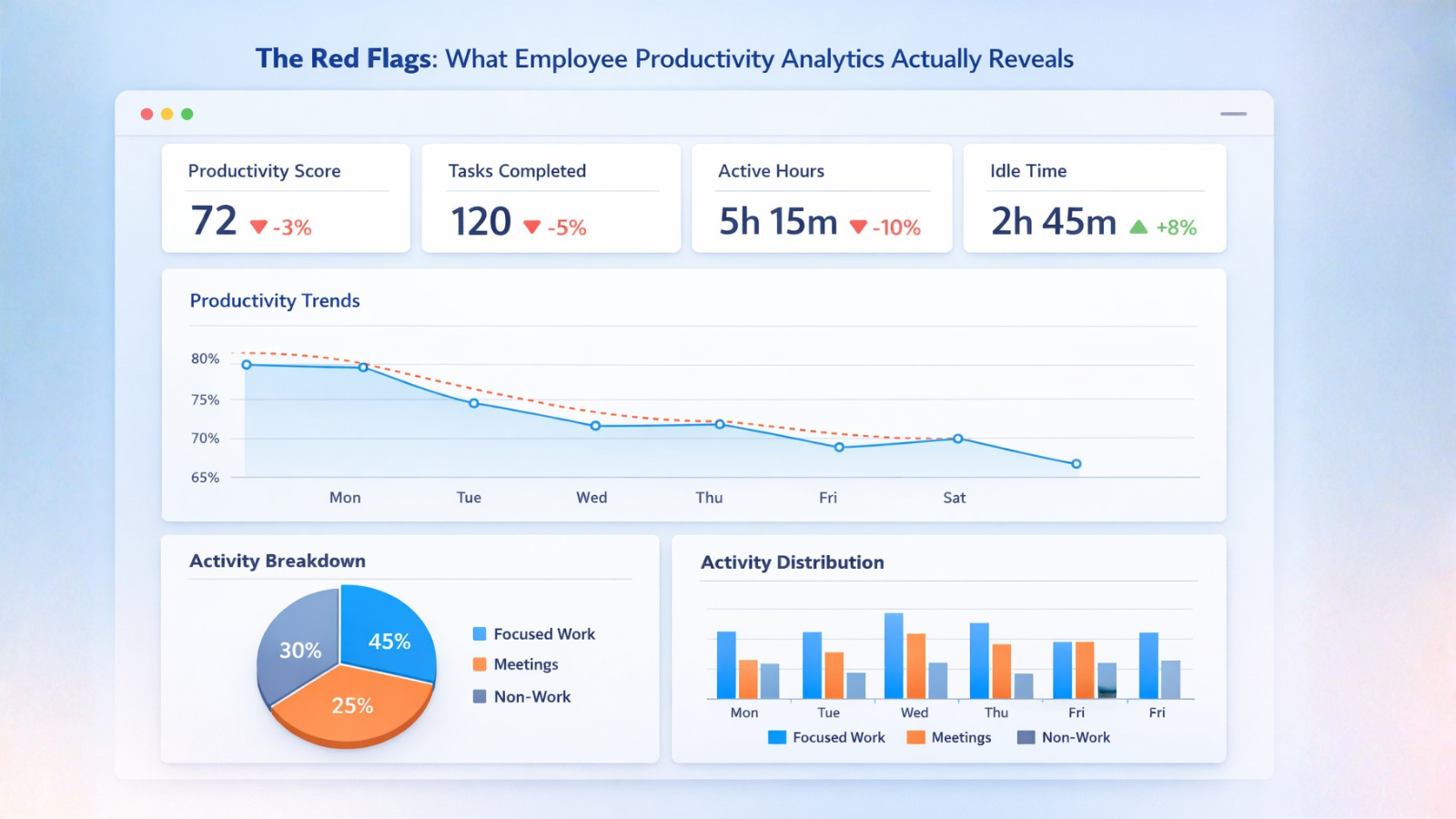
Active Hours vs. Output: The Gap That Tells the Real Story
The single most revealing signal in your productivity data isn’t how many hours someone logs. It’s the relationship between hours logged and meaningful output generated. And when those two lines start to diverge, when someone’s online hours stay flat but their output quietly drops, that’s the fingerprint.
Specific patterns to watch for in your employee productivity analytics:
- Login and logout times drift toward the exact boundaries of contracted hours. No early starts, no late finishes, no weekend check-ins on something they were excited about. Pure clock-in, clock-out behavior where there used to be flexibility.
- Task completion rates stay acceptable but task initiation drops. They finish what they’re assigned but stop picking up anything independently. The proactive behavior disappears first.
- Response time to non-urgent communications lengthens noticeably. Not dramatically, just enough to signal that the urgency they used to bring to everything has quietly evaporated.
- Application usage patterns shift. More time in passive consumption tools, email reading, document viewing, and less time in active creation tools like project management platforms, collaborative docs, or code editors.
- Meeting participation drops qualitatively. They attend. They might even speak. But the quality and frequency of contribution in collaborative settings thins out in ways that are hard to articulate but very easy to measure if you’re tracking the right signals.
Collaboration Signals: The Canary in the Coal Mine
Collaboration behavior is often the earliest indicator of disengagement because it’s the first thing people pull back from when they stop caring. It requires discretionary effort; you don’t have to collaborate well, you just have to collaborate enough, and discretionary effort is exactly what quiet quitters are rationing.
Watch for decreased cross-functional communication, reduced tagging and mention behavior in collaborative tools, shorter and less substantive written contributions, and a general contraction of their digital footprint within team workflows. The person who used to be in four Slack channels with something to say in all of them is now in four Slack channels reading silently.
Actionable Data: How EmpMonitor’s Productivity Reports Reveal Early Disengagement
EmpMonitor’s productivity reports and performance graphs are one of the most practically useful tools in this space because they translate raw activity data into a visual pattern that managers can interpret without needing to be data experts.
What you’re looking at isn’t surveillance, it’s trend analysis. Over time, productivity graphs reveal shifts in active hours, application usage, and output consistency. When those patterns change suddenly or flatten out, it often signals disengagement long before a resignation letter appears.
Here’s what disengagement can look like inside structured productivity reports:
- Flat, uniform activity patterns replacing previously dynamic ones. Engagement used to spike around project deadlines, team meetings, collaborative pushes. Now it’s just… consistent and flat. Same output, same hours, every day. That consistency is a red flag, not a green one.
- Activity concentrated in the first half of the workday with a pronounced drop-off after lunch a classic signal of someone who is depleting their motivation reserves faster than they’re replenishing them.
- Sudden and sustained reduction in after-hours activity for someone who previously worked flexibly across the day.
- Application usage drift toward low-value tools more time in email, less time in the tools that reflect actual work product creation.
Using Productivity Data Without Weaponizing It
This is where a lot of managers get it wrong. The data isn’t an indictment. It’s a conversation starter, and the conversation it starts needs to be about support, not suspicion.
EmpMonitor’s remote employee engagement dashboards give you something genuinely valuable: the ability to approach a struggling employee with specificity and care rather than vague concern or accusation. You’re not saying “you seem checked out lately.” You’re saying “I’ve noticed your collaboration patterns have shifted and I want to make sure we’re giving you what you need to do your best work.”
That’s a completely different conversation. And it’s only possible when you have real data behind it.
Management Strategy: Opening a Dialogue Based on Data, Not Assumptions

Most managers, when they sense disengagement, do one of two things: they either ignore it and hope it resolves itself, or they have a clunky, accusatory conversation that makes everything worse. Employee productivity analytics give you a third option a data-informed, human-first conversation that signals to the employee that you’re paying attention and that you give a damn.
The framework looks like this:
- Lead with observation, not interpretation. “I’ve noticed some changes in your activity patterns over the last few weeks” is very different from “it seems like you’re not as engaged as you used to be.” One is factual. One is a judgment.
- Ask before you assume. After the observation, stop talking. Ask them what’s going on. Ask if there’s something about their workload, their role, or their team dynamic that isn’t working. And then actually listen to the answer.
- Use the data to show you care, not to build a case. The worst version of this conversation is one where the employee feels monitored and cornered. The best version is one where they feel seen, where the data is evidence that someone noticed they were struggling and cared enough to say something.
- Come with options, not ultimatums. If the data suggests burnout, come with concrete options: workload redistribution, a project change, a flexible schedule adjustment, a mentorship conversation, a promotion discussion that was overdue. The goal is re-engagement, not documentation for a performance plan.
What Happens When You Get This Right?
The organizations that use employee productivity analytics well, not as surveillance infrastructure but as an early warning system for employee burnout signals, consistently report lower voluntary attrition, faster identification of systemic management problems, and higher scores on remote employee engagement surveys.
Because the dirty secret of quiet quitting is that most of those employees didn’t want to leave. They wanted someone to notice they were struggling and do something about it. The data lets you be that someone, before they start updating their LinkedIn.
When You Need A Second Perspective: Chatly AI
Look, managing people is hard. And understanding the nuance behind workforce psychology, engagement theory, burnout research, and productivity data interpretation isn’t something most managers were ever formally trained on. You’re expected to just know it, which is a ridiculous expectation that nobody talks about enough.
This is where having something like Chatly AI Chat quietly open in a tab actually makes a difference. Not as a replacement for judgment or experience, but as a thinking partner you can pull into the messy middle of figuring this stuff out.
Research Without the Rabbit Hole
Say you just pulled an EmpMonitor detailed report of a team member and you’re seeing the flat activity pattern we described earlier. You have a gut feeling something’s off but you want to understand the psychology before you say anything. Normally that means thirty minutes of googling through mediocre articles. With Chatly, you just ask “what does flat, consistent productivity output typically signal in employee engagement research?” and you get a substantive, nuanced answer in seconds, sourced across 30+ top AI models including GPT-5.2 Pro, Gemini, Grok, and Claude.
That multi-model thing matters more than it sounds. Different AI models have genuinely different knowledge depth on different topics. Grok might give you a more contrarian take on remote engagement trends. Claude tends to be more nuanced on psychological and ethical dimensions. Gemini pulls in more recent data. Having access to all of them from one place means your research isn’t filtered through a single model’s blind spots.
Exploring Ideas Without Judgment
Sometimes what you actually need isn’t research, it’s a space to think out loud. How do I approach a conversation with someone who’s clearly disengaged but hasn’t done anything wrong? What are the ethical boundaries of using productivity data in performance conversations? Is this burnout, or is this someone who’s just found their sustainable pace, and I’m confusing that with disengagement?
These aren’t Google-able questions. They’re nuanced, contextual, and they benefit from a conversation rather than a search result. Chatly handles this kind of exploratory dialogue genuinely well. You can think out loud, push back on the response, refine your thinking, and arrive somewhere useful without having to book a coaching session or find a management consultant.
From Thinking to Doing
Once you’ve worked through the research and the ideas, Chatly’s AI Document Generation means you can turn that thinking into something tangible. Draft a conversation framework for your one-on-one. Build out a team health check template. Write up a summary of what the productivity data is showing and what interventions you’re considering. It goes from “I kind of know what to do” to “I have something concrete in front of me” faster than anything else in this category.
It’s not going to manage your team for you. Nothing should. But for the research, the exploration, and the “I need to think this through before I say something I regret” moments, it’s genuinely useful to have around.
The Bottom Line
Quiet quitting isn’t a mystery. It has a pattern, a fingerprint, and a timeline, and all of it shows up in your productivity data weeks or months before it shows up in an exit interview. The question isn’t whether your analytics can identify it. The question is whether you’re looking.
EmpMonitor gives you structured productivity reports, engagement dashboards, and performance graphs that help you spot behavioral shifts early. With clear activity insights and trend data, managers can detect disengagement sooner, approach it humanely, and take meaningful action before a valued team member decides the only move left is a formal goodbye.