The market for employee monitoring software has never been more crowded. Remote work normalization, distributed team management, and growing data security concerns have pushed hundreds of thousands of organizations to evaluate workforce tracking tools in the past four years. Against that backdrop, EmpMonitor has carved out a specific position: a feature-rich monitoring platform at a price point that significantly undercuts most of its competitors.
But does competitive pricing translate into real value? This review examines EmpMonitor across every dimension that matters to a buying decision, features, pricing, ease of use, real user feedback, and how it compares to the alternatives, so you can make an informed assessment before committing.
EmpMonitor Reviews 2026: Quick Summary
What Is EmpMonitor Employee Monitoring Software?
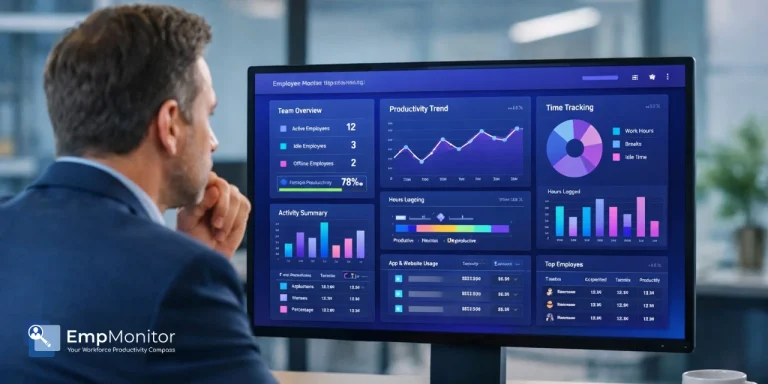
EmpMonitor is a cloud-based workforce productivity and employee monitoring platform founded in 2014 and headquartered in Bangalore, India. It is designed for organizations of all sizes, from startups to mid-market enterprises, that need comprehensive visibility into employee activity across remote, hybrid, and on-premise environments.
Unlike analytics-first tools that focus primarily on productivity dashboards, EmpMonitor combines workforce monitoring with security-grade features, including keystroke logging, USB detection, and insider threat alerts. This positions it as a hybrid solution sitting between basic time tracking platforms and enterprise-grade surveillance tools.
The platform operates through a lightweight agent installed on company-managed devices. Once deployed, the agent runs in the background, optionally in stealth mode with no taskbar notification, and syncs activity data to a centralized cloud dashboard accessible to administrators from any internet-connected device.
Key Features of EmpMonitor, Deep Review
Time Tracking & Attendance Monitoring
EmpMonitor automatically records employee working hours, login and logout times, break durations, and idle periods without requiring manual input. Attendance reports are generated at individual, team, and organizational levels, and the platform includes shift management tools for businesses with staggered or rotating schedules. Leave management is handled within the same interface, reducing the need for a separate HR system for basic attendance administration.
One limitation noted by users is occasional inaccuracy in idle time calculation; some reviewers report that productive working time is sometimes miscategorized as idle, inflating apparent non-working hours. This is worth accounting for if attendance data is used directly for payroll calculations.
Employee Productivity Monitoring Software Capabilities
EmpMonitor tracks application usage and website visits throughout the working day, categorizing each as productive or non-productive based on administrator-defined rules. Productivity scores are calculated per employee and per team, surfaced through charts and timeline reports that allow managers to compare performance across individuals or departments.
The platform also captures mouse activity levels and keyboard engagement as proxies for active work. These signals feed into the overall productivity score, though, as with all activity-based monitoring tools, high activity does not necessarily correlate with high output quality. EmpMonitor’s own positioning acknowledges this, framing productivity data as one management input among several rather than a definitive performance metric.
Screenshot Monitoring & Keystroke Logging
EmpMonitor captures screenshots at configurable intervals across all plan tiers, no add-on purchase required. Screenshot frequency and the specific applications captured can be customized by administrators, and screenshots are time-stamped and stored in cloud-accessible activity logs.
Keystroke logging is a feature that meaningfully differentiates EmpMonitor from analytics-focused competitors like ActivTrak and Hubstaff, neither of which includes this capability. EmpMonitor records keystrokes across active applications, providing content-level visibility into what employees are typing and in which contexts. This is particularly relevant for customer service operations, legal teams, and any environment where content accountability or data security monitoring is required. The platform specifies that keystroke data is captured in a work context rather than recording personal communications such as passwords.
Project & Task Management
EmpMonitor includes built-in project and task management tools, allowing administrators to assign tasks, set deadlines, and track progress without switching to a separate project management platform. Work progress is linked directly to time tracking data, so managers can see not only what tasks exist but how much time each employee is spending on them. This integration is a practical advantage for agencies and IT companies that need to correlate billable hours with specific deliverables.
Security & Insider Threat Detection
This is one of EmpMonitor’s most significant differentiators from productivity-focused monitoring tools. The platform includes USB device detection, alerting administrators when external drives are connected, and logging file transfer activity, as well as real-time alerts for suspicious behavior patterns such as unusually high data access or off-hours activity. For industries handling sensitive client data, intellectual property, or regulated information, these security features can address compliance requirements that analytics-only platforms cannot meet.
Also Read!
Is ActivTrak Spyware? Understanding the Line Between Analytics and Spying
Protecting Your IP: How To Stop Developers Stealing Source Code
Remote Employee Monitoring Software: How EmpMonitor Performs
EmpMonitor was purpose-built to support distributed work environments and performs well in remote and hybrid deployments. The agent operates independently of VPN connections and syncs data to the cloud dashboard in near-real time, allowing administrators to view activity across geographies from a single interface.
Live screen monitoring, the ability to view any enrolled employee’s desktop in real time, is available directly from the admin dashboard without triggering a visible alert on the employee’s device. This capability is particularly valued by managers of remote customer service or data entry teams where real-time oversight is operationally relevant.
For hybrid workforces, EmpMonitor handles both office-based and remote employees within the same dashboard, eliminating the need for separate systems or manual reconciliation of attendance data across locations. Geolocation tracking is also supported for field teams, though GPS capabilities are less developed than dedicated field workforce platforms like Hubstaff.
EmpMonitor Pricing Plans 2026
EmpMonitor uses a volume-based pricing model where the per-user rate decreases as team size increases. All plans include the full feature set; there are no feature paywalls between tiers, only seat-count thresholds. Annual billing is required for the rates below.
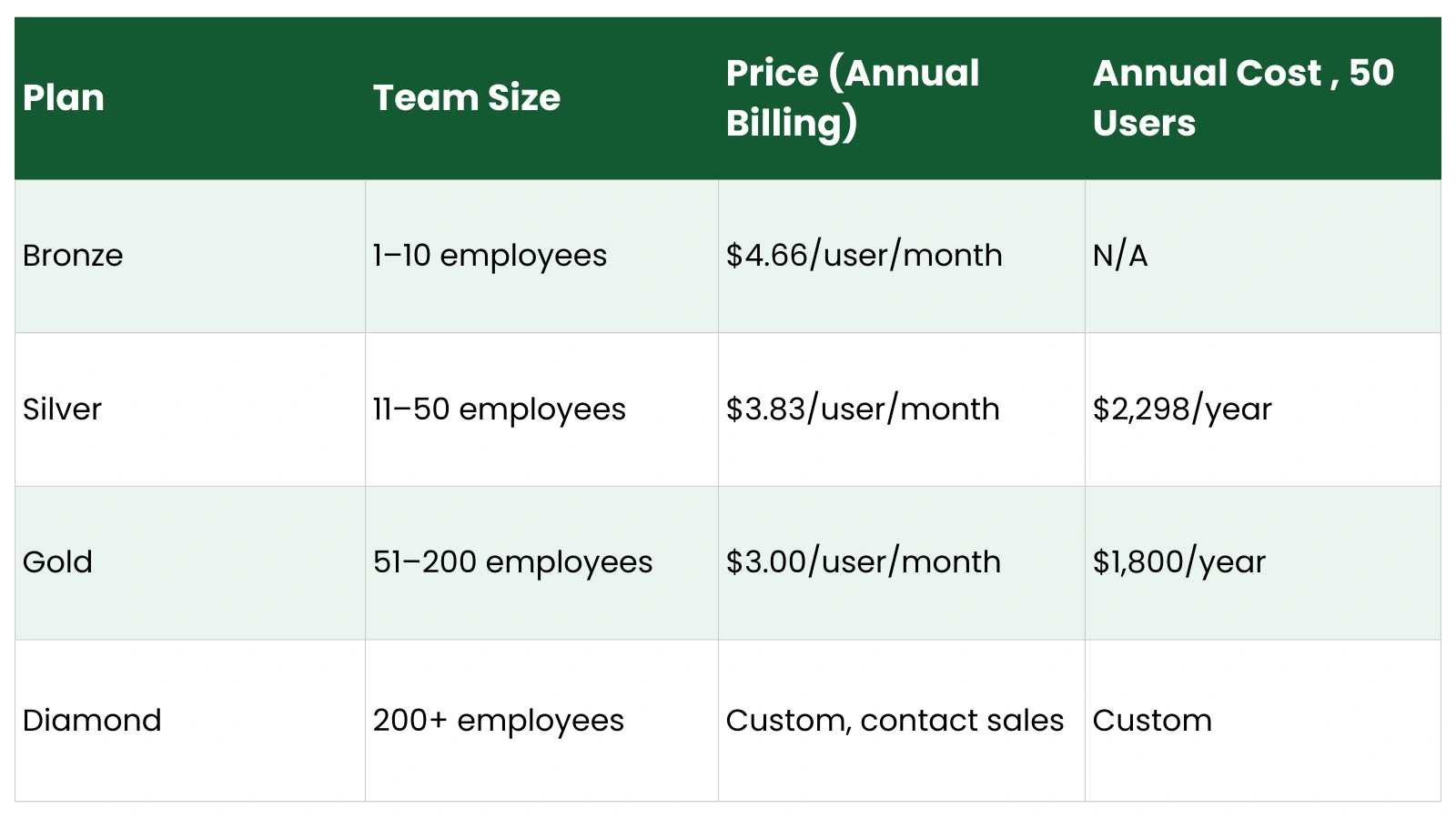
A 15-day free trial is available on all plans with no credit card required, covering up to five users with full feature access.
Is EmpMonitor Affordable for Small Businesses?
At the Bronze tier, EmpMonitor costs $4.66/user/month, competitive but not dramatically cheaper than entry-level plans from Time Doctor ($5.90/user/month) or ActivTrak ($10/user/month). The real pricing advantage emerges at 50+ users, where the Gold plan at $3.00/user/month produces meaningful savings versus flat per-user models. A 50-person team on EmpMonitor Gold pays $1,800 per year; the same team on ActivTrak Essentials would pay $6,000 per year. For budget-conscious SMBs planning to grow, that gap compounds significantly over a two-to-three-year horizon.
Ease of Use, Setup & User Experience
EmpMonitor’s installation process is straightforward: administrators download the agent installer from the dashboard and deploy it across employee devices, either individually or via a group policy deployment for larger organizations. Most reviewers describe the setup as simple, with a functional support team available via Skype during the onboarding period, an unconventional channel but repeatedly praised in early-stage reviews.
The admin dashboard presents activity data through charts, timelines, and tabular reports. Navigation is intuitive enough for non-technical managers, though some users note that the reporting interface requires filtering and drilling down to extract meaningful insights. The default views can feel dense with raw data rather than surfacing actionable summaries automatically.
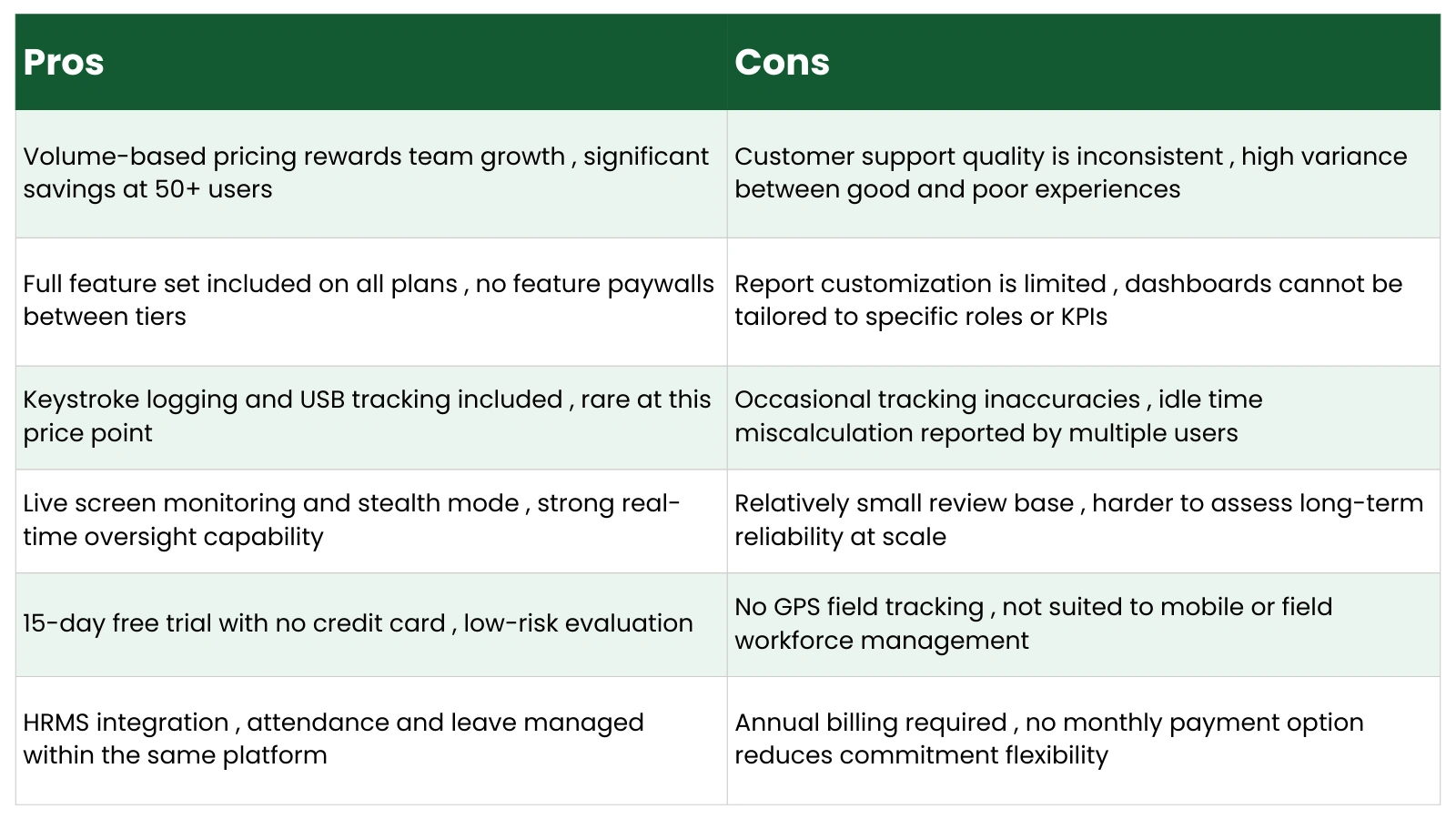
Dashboard customization is a recurring limitation in user feedback. Administrators can configure process monitoring settings and access controls, but the ability to build custom reports or tailor dashboard views to specific roles or metrics is limited compared to more analytically mature platforms. For organizations with straightforward monitoring needs, this is unlikely to be a dealbreaker. For teams with complex reporting requirements, it is worth evaluating during the free trial.
EmpMonitor Reviews 2026: Customer Ratings & Feedback
EmpMonitor holds a 94% user satisfaction rating across verified review platforms, including Capterra, GetApp, Software Advice, and Trustpilot, based on an aggregate of approximately 50 reviews as of early 2026. That is a relatively small review base compared to more established platforms, which is worth factoring into any interpretation of the scores.
Positive User Reviews
Consistent themes in positive reviews include the breadth of features relative to price, the accuracy of screenshot and activity tracking, and the ease of installation. Several administrators working in remote team environments highlight the screenshot monitoring and live screen capabilities as the features delivering the most immediate operational value. Users at SMBs and startups frequently note that EmpMonitor provided capabilities they previously assumed were only accessible on enterprise-budget platforms.
One administrator managing a team that grew from 10 to 50 employees noted that the platform scaled without requiring any changes to configuration or pricing tier, a practical advantage for organizations in active growth phases.
Negative User Reviews
Critical reviews cluster around two primary issues. The first is customer support inconsistency: while some users report responsive, helpful service, particularly during onboarding, others describe frustrating interactions with support staff when technical issues arise post-deployment. This inconsistency is the most frequently cited concern in negative reviews and represents a genuine risk for organizations that require dependable support for business-critical monitoring infrastructure.
The second recurring issue is occasional inaccuracy in productivity tracking, specifically, idle time miscalculation. Some users report periods of active work being recorded as idle, which can distort productivity reports and create friction between managers and employees if the data is not interpreted with appropriate context.
Pros And Cons of EmpMonitor
EmpMonitor vs Best Employee Monitoring Software, Comparison
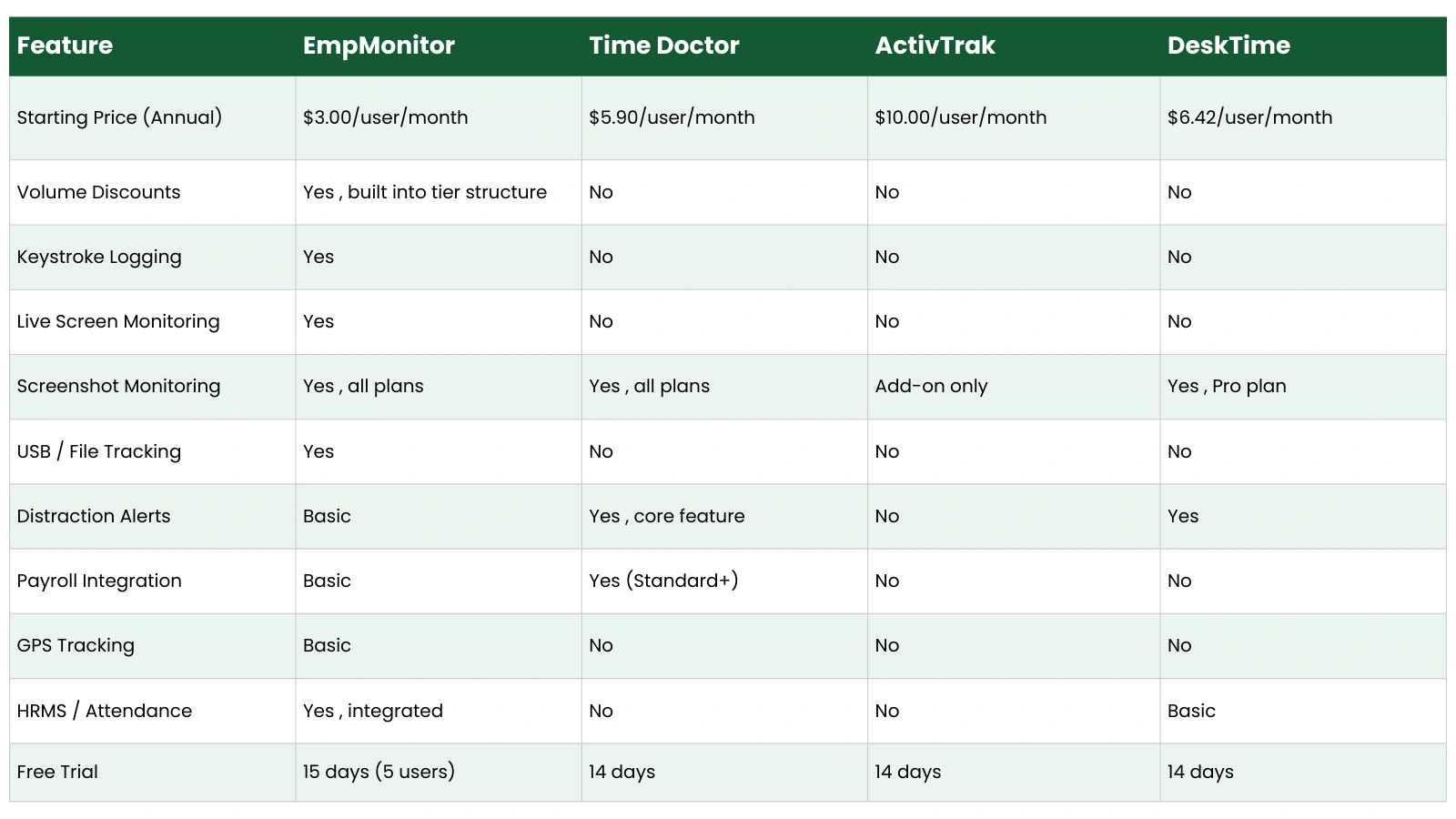
EmpMonitor competes across a wide range of monitoring use cases. Here is how it compares to three of the most commonly evaluated alternatives:
The comparison reveals a clear pattern: EmpMonitor offers the most comprehensive monitoring feature set at the lowest per-user price point among the tools evaluated here. The trade-off is in analytics sophistication; ActivTrak and Time Doctor offer more advanced workforce analytics, burnout detection, and AI-driven insights. DeskTime provides a cleaner, simpler experience for teams that only need time tracking and basic productivity visibility. EmpMonitor’s advantage is depth of monitoring capability per dollar spent; its limitation is that the data analysis layer is less mature than analytics-first competitors.
Who Should Use EmpMonitor?
EmpMonitor delivers the strongest return for organizations in the following categories:
- Remote and hybrid teams that need activity visibility across distributed environments without investing in multiple separate tools.
- IT companies and software development firms that require security-grade monitoring, including USB activity tracking and insider threat detection.
- Digital agencies and BPO operations that need screenshot evidence, keystroke logs, and project-linked time tracking for client accountability.
- SMBs with 10–200 employees that are actively growing and need a pricing model that does not penalize headcount growth.
- Organizations in regulated industries, finance, healthcare, and legal, where content-level monitoring and audit trails are compliance requirements.
EmpMonitor is less well-suited to organizations whose primary need is productivity analytics rather than monitoring depth, field teams requiring robust GPS tracking, or businesses that rely heavily on integrations with third-party project management or payroll platforms.
Is EmpMonitor Safe and Legal to Use?
EmpMonitor is a legitimate commercial software product used by organizations across multiple industries and jurisdictions. The legal question, as with any employee monitoring tool, is not whether the software itself is legal, it is, but whether the deployment complies with applicable workplace monitoring laws in your region.
In the United States, employee monitoring on company-owned devices is broadly permissible under federal law, though several states, including Connecticut, Delaware, and New York, require written notice to employees before monitoring begins. In the European Union, GDPR imposes stricter standards: monitoring must be proportionate to a legitimate business purpose, employees must be informed, and data retention periods must be defined and limited.
Best practice for any organization deploying EmpMonitor, or any monitoring software, includes issuing a written monitoring policy before deployment, limiting data collection to what is necessary for the stated purpose, restricting dashboard access to those with a legitimate management need, and establishing a defined data retention schedule. Stealth mode monitoring, while technically available in EmpMonitor, should be approached carefully and only deployed in jurisdictions and contexts where it is legally permissible and consistent with your organization’s transparency commitments.
Final Verdict: Is EmpMonitor The Best Value For Money In 2026?
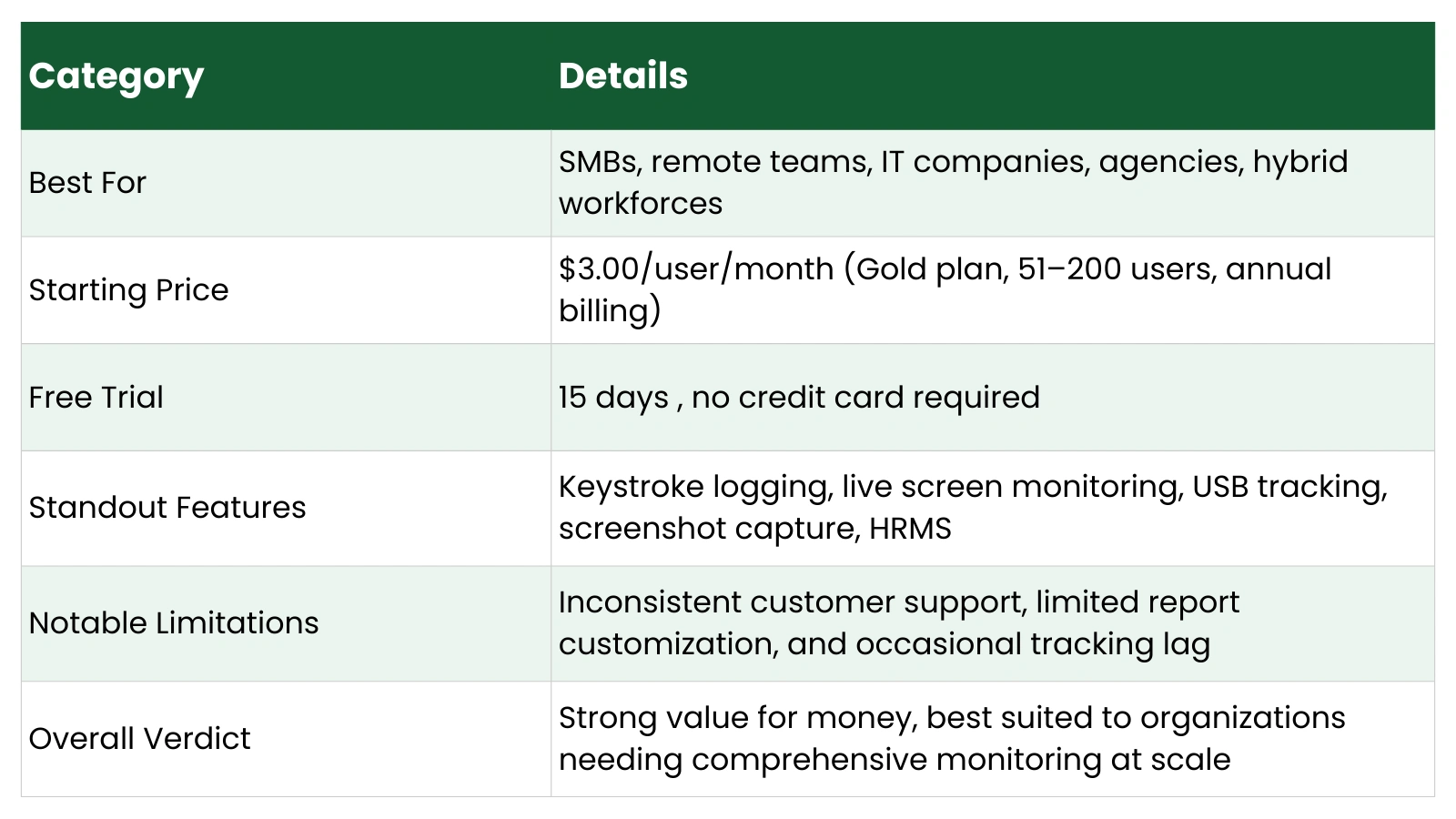
On a pure value-for-money basis, EmpMonitor is difficult to beat. It offers a feature set, keystroke logging, live screen monitoring, USB tracking, screenshot capture, attendance management, and project tracking, which most competitors either do not include at any tier or charge significantly more to access. Its volume-based pricing structure means the cost advantage grows as team size increases, making it particularly well-positioned for SMBs in growth mode.
The caveats are real and worth taking seriously. Customer support inconsistency is a genuine operational risk for organizations that depend on monitoring infrastructure being reliable at all times. The reporting layer is functional but not analytically sophisticated. Teams that want AI-driven productivity insights, burnout detection, or advanced workforce management tools will find platforms like ActivTrak more capable in those dimensions. And the relatively modest review base means long-term reliability at enterprise scale is less proven than for more established competitors.
For organizations that prioritize monitoring breadth, security features, and cost efficiency, particularly at 50 or more users, EmpMonitor is the strongest value proposition in its category in 2026. For organizations whose primary need is workforce analytics rather than monitoring depth, or who require dependable enterprise-grade support, evaluating ActivTrak or Time Doctor alongside EmpMonitor during the free trial period is advisable before making a final decision.
Frequently Asked Questions, EmpMonitor
Is EmpMonitor good for remote teams? Yes. EmpMonitor was designed with distributed work environments as a primary use case. It supports live screen monitoring, real-time activity tracking, stealth mode operation, and cloud-accessible reporting across geographies, all without requiring VPN connectivity. Multiple reviewers managing remote teams of 10 to 50+ employees specifically cite it as a practical and affordable solution for maintaining productivity visibility across distributed workforces.
How much does EmpMonitor cost in 2026? EmpMonitor pricing starts at $4.66/user/month for teams of 1–10 employees (Bronze plan, annual billing), $3.83/user/month for 11–50 employees (Silver plan), and $3.00/user/month for 51–200 employees (Gold plan). Custom pricing is available for organizations with more than 200 users. A 15-day free trial covering up to five users is available with no credit card required.
Does EmpMonitor track screenshots? Yes. Screenshot monitoring is included across all EmpMonitor plans at no additional cost. Capture frequency and the specific applications monitored are configurable by administrators. Screenshots are time-stamped and stored in the cloud-accessible activity log, providing a visual record of employee screen activity that can be reviewed at any time.
Is EmpMonitor the best employee monitoring software? EmpMonitor is the strongest value option for organizations prioritizing monitoring depth and cost efficiency at scale. For pure productivity analytics, ActivTrak offers more sophisticated workforce intelligence features. For payroll integration and distraction management, Time Doctor is better positioned. For simple, clean time tracking, DeskTime is a viable alternative. The best choice depends on whether your primary need is monitoring breadth, in which case EmpMonitor leads, or analytics depth, where other platforms have an edge.
Is EmpMonitor legal to use? Yes, in most jurisdictions, provided that deployment follows applicable workplace monitoring laws. In the US, employee monitoring on company devices is broadly legal, though several states require written notice to employees. In the EU, GDPR requires monitoring to be proportionate, purposeful, and disclosed. EmpMonitor’s stealth mode is technically available but should only be used where legally permissible and in compliance with local data protection regulations. Issuing a written monitoring policy before deployment is strongly recommended as both a legal safeguard and an ethical practice.