In today’s digital world, cyber threats are evolving faster than ever. Businesses constantly face risks such as ransomware attacks, phishing attempts, and advanced malware targeting their devices and data. To stay protected, organizations must adopt reliable endpoint security solutions, and the SentinelOne Agent has emerged as one of the most trusted options.
The SentinelOne Agent uses advanced artificial intelligence (AI) to detect threats, protect devices in real time, and automatically respond to potential security incidents. It acts as a powerful security layer installed directly on endpoints such as computers, laptops, and servers.
For organizations of all sizes, deploying a reliable endpoint protection agent is no longer optional—it is a critical part of a modern cybersecurity strategy. Sentinel’s EDR software comes with agents and collects details on security processes, connections, and user activities.
In this guide, we’ll explain everything you need to know about the SentinelOne Agent, including what it is, how it works, its key features, benefits, and how it fits into a comprehensive cybersecurity framework.
You can Listen to this Blog here.
What is SentinelOne?
SentinelOne is a leading cybersecurity platform designed to protect endpoints, cloud workloads, and enterprise networks from modern cyber threats. Unlike traditional antivirus software, SentinelOne uses artificial intelligence and machine learning to detect, prevent, and respond to threats automatically.
At its core, SentinelOne is designed to provide businesses with automated, real-time security. It continuously monitors devices for unusual activity, identifies potential threats, and takes immediate action to prevent breaches. This proactive approach makes it much more effective than older, signature-based security solutions.
Businesses around the world trust SentinelOne because it not only detects malware, ransomware, and other threats but also simplifies security management. With features like automated threat remediation and detailed reporting, companies can maintain strong cybersecurity without dedicating excessive resources.
What is SentinelOne Agent?
The SentinelOne Agent is the software component installed on individual devices such as desktops, laptops, and servers. It acts as the frontline defense against cyber threats by continuously monitoring system activity and detecting suspicious behavior in real time.
While SentinelOne is the overall cybersecurity platform, the SentinelOne Agent is responsible for protecting each endpoint directly.
Essentially, the SentinelOne Agent works silently in the background, scanning for suspicious activity and potential threats. It can detect malware, ransomware, spyware, and even advanced threats that traditional antivirus tools might miss. With AI-powered analysis, the agent identifies unusual behavior patterns and automatically responds to contain or neutralize threats.
One of the key advantages of the SentinelOne Agent is its autonomy. Unlike older security solutions that require constant manual intervention, the agent can make decisions and take action immediately. This ensures that endpoints remain protected even when IT teams are not actively monitoring every device.
Understanding what is SentinelOne Agent helps businesses see why it is a critical component of modern cybersecurity. It’s not just software, it’s an intelligent guardian that keeps devices secure and reduces the risk of data breaches.
Key Features of SentinelOne Agent
The SentinelOne Agent comes packed with powerful features that make it an essential tool for modern cybersecurity. These features ensure that devices are protected around the clock without requiring constant manual oversight. Here are some of the most important capabilities:
-
Real-Time Threat Detection
The SentinelOne Agent continuously monitors devices for malicious activity. Using AI-driven behavioral analysis, it can detect malware, ransomware, and other cyber threats in real time—often before they cause damage.
Automated Response and Remediation
When a threat is detected, the SentinelOne Agent automatically isolates infected files, removes malware, and can even roll back system changes caused by ransomware attacks.
AI and Machine Learning Capabilities
Unlike traditional antivirus solutions, the SentinelOne Agent analyzes behavioral patterns to detect both known and unknown threats.
Cross-Platform Protection
The SentinelOne Agent supports multiple operating systems, including Windows, macOS, and Linux, ensuring comprehensive protection across an organization’s entire IT environment.
Detailed Reporting and Visibility
Administrators receive detailed insights into device activity, threat detection, and system health through comprehensive dashboards and reports.
How Does SentinelOne Agent Work?

The SentinelOne Agent functions as an intelligent security layer installed on endpoints. It continuously monitors device activity and uses AI-powered behavioral analysis to detect suspicious patterns that may indicate malware or cyberattacks.
At the core of its functionality is behavior-based detection. Unlike traditional antivirus software that relies solely on known malware signatures, the SentinelOne Agent observes how applications and files behave. If it detects unusual patterns such as attempts to encrypt multiple files or modify critical system settings, the agent flags the activity as suspicious and takes immediate action.
When a threat is identified, the SentinelOne Agent can isolate the affected files, remove malicious code, or roll back changes caused by ransomware. This automated response ensures that endpoints remain secure without requiring constant intervention from IT teams.
Additionally, the agent continuously updates its knowledge base using machine learning. This allows it to recognize new threats in real-time and adapt to evolving cyberattack techniques. In essence, the SentinelOne Agent not only detects threats but also predicts and neutralizes them before they can compromise your system.
Understanding what does SentinelOne do highlights the agent’s proactive nature—it acts as both a monitor and a first responder, providing businesses with a robust layer of security against modern cyber threats.
Benefits of Using SentinelOne Agent
The SentinelOne Agent offers a wide range of benefits that make it an essential component of modern cybersecurity strategies. By installing the agent on devices, businesses can enjoy both enhanced protection and improved operational efficiency.
- Enhanced Endpoint Security
With the SentinelOne Agent, devices are continuously monitored for malware, ransomware, and other threats. Its AI-driven detection ensures that even previously unknown threats are identified and neutralized quickly, keeping sensitive data safe. - Automated Threat Response
One of the major advantages of the SentinelOne Agent is its automated remediation capability. The agent can isolate infected files, remove malware, and roll back harmful changes without manual intervention. This saves IT teams valuable time and reduces downtime for employees. - Reduced Risk of Cyberattacks
By proactively detecting and responding to threats, the SentinelOne Agent minimizes the chances of a successful cyberattack. Businesses can maintain continuous operations while ensuring that sensitive information remains protected. - Easy Management and Monitoring
The SentinelOne Agent provides detailed reports on device activity, security events, and threat status. This makes it easier for IT teams to monitor endpoint security, plan updates, and ensure compliance with company policies. - Cost and Resource Efficiency
With automated detection and response, the agent reduces the need for extensive IT resources dedicated to threat management. Businesses can focus on growth and productivity without compromising on security.
Overall, the SentinelOne Agent offers businesses a reliable, intelligent, and proactive security solution. It not only protects devices but also simplifies cybersecurity management, making it a must-have tool for organizations of all sizes.
SentinelOne Agent in Enterprise Security
For enterprises, maintaining robust cybersecurity across multiple devices and locations is a constant challenge. The SentinelOne Agent plays a vital role in strengthening enterprise security by providing centralized protection for all endpoints.
Enterprises deploy the SentinelOne Agent across desktops, laptops, and servers to create a consistent layer of defense. The agent continuously monitors each device for malicious activity, ensuring that threats are detected and mitigated before they can compromise the organization’s network.
Integration is another strength of the SentinelOne Agent. It works seamlessly with existing security infrastructure, such as firewalls, intrusion detection systems, and network monitoring tools. This unified approach allows security teams to manage threats more efficiently and maintain a proactive security posture.
Furthermore, the SentinelOne Agent simplifies compliance reporting for enterprises. With detailed logs and real-time reporting, organizations can quickly demonstrate adherence to regulatory standards and internal security policies.
By deploying the SentinelOne Agent, enterprises not only protect their critical data but also streamline IT operations, reduce response times, and minimize the risk of costly security breaches. It’s an indispensable tool for businesses that prioritize cybersecurity without compromising efficiency.
SentinelOne Agent vs. Other Security Solutions
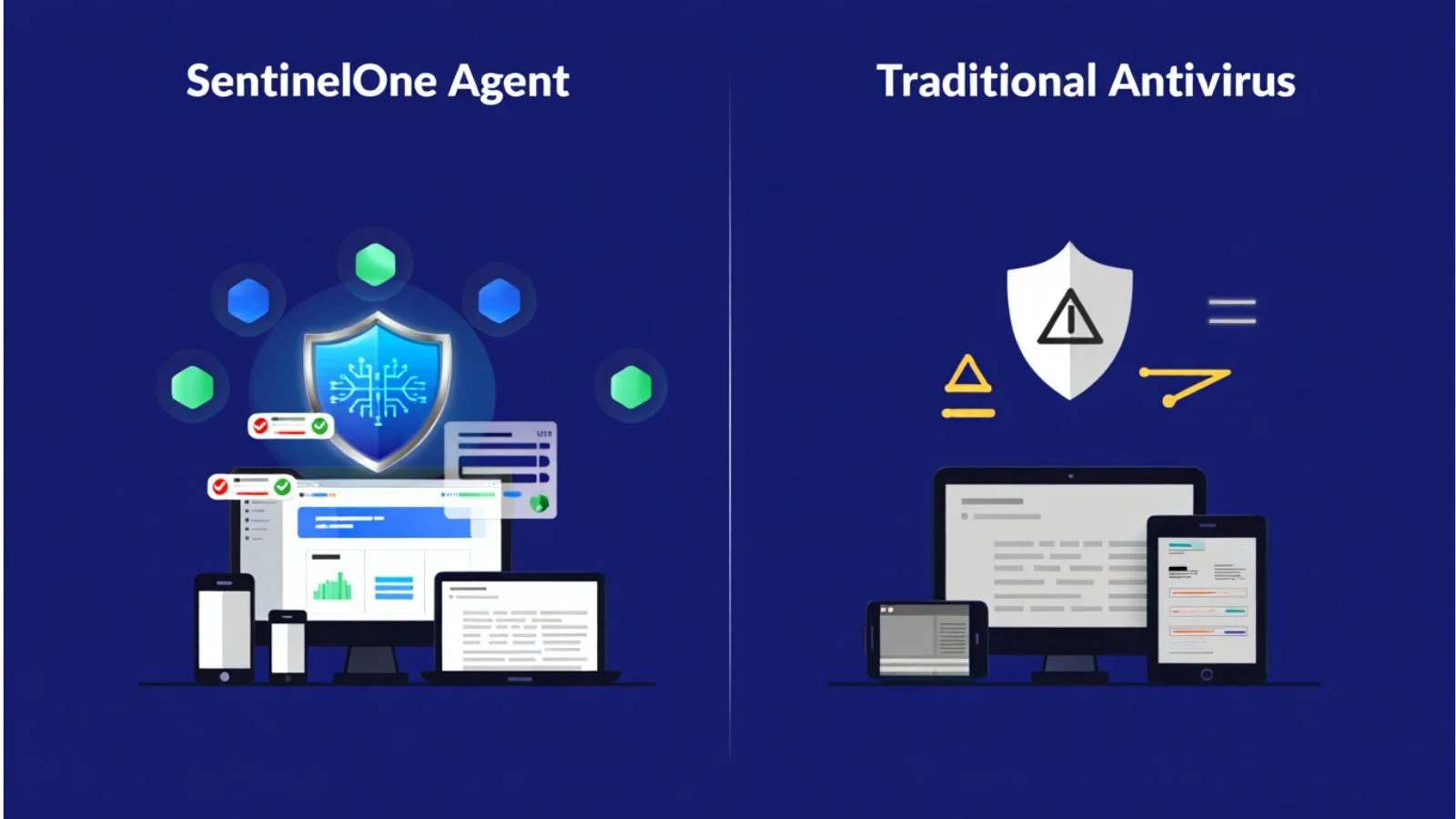
When it comes to endpoint security, businesses have many options, from traditional antivirus software to advanced next-generation solutions. The SentinelOne Agent stands out for several reasons, making it a preferred choice for organizations seeking robust protection.
- AI-Powered Detection vs. Signature-Based Antivirus
Traditional antivirus solutions rely heavily on signature-based detection, which can miss new or evolving threats. In contrast, the SentinelOne Agent uses AI and machine learning to analyze behavior patterns and detect suspicious activity, even for previously unknown malware. - Automated Response vs. Manual Intervention
Many older security tools require manual intervention to remove threats or fix infected systems. The SentinelOne Agent automatically responds to threats in real-time, isolating malicious files, removing malware, and rolling back harmful changes without human input. - Comprehensive Coverage vs. Limited Scope
While standard antivirus programs may focus only on malware, the SentinelOne Agent protects against a broad spectrum of cyber threats, including ransomware, spyware, and zero-day attacks. Its cross-platform support ensures that all devices within an organization are covered. - Detailed Reporting vs. Basic Logs
Traditional tools often provide limited reporting, making it difficult to track security events. The SentinelOne Agent offers detailed dashboards and reports, giving IT teams better visibility into threats and device health.
By comparing these aspects, it’s clear that the SentinelOne Agent provides a modern, intelligent, and efficient alternative to traditional security solutions. For businesses looking to strengthen endpoint protection, the agent offers unmatched speed, accuracy, and automation.
How EmpMonitor Complements SentinelOne Agent?

While the SentinelOne Agent provides strong endpoint security and threat detection, organizations also need tools that help monitor productivity and manage device usage effectively. This is where EmpMonitor complements the SentinelOne ecosystem.
EmpMonitor is a comprehensive employee monitoring and productivity tracking software. It tracks application usage, internet activity, idle time, and even detects potential insider threats. When used alongside the SentinelOne Agent, organizations can achieve both strong security and enhanced operational oversight.
When used alongside the SentinelOne Agent, businesses benefit from both strong cybersecurity protection and improved workforce visibility.
For example:
-
SentinelOne Agent protects devices from malware, ransomware, and cyberattacks.
-
EmpMonitor ensures employees use company resources productively and securely.
Together, these tools help organizations maintain a secure, efficient, and well-managed digital workplace.
How to Install SentinelOne Agent?
Getting started with the SentinelOne Agent is straightforward, ensuring that businesses can quickly deploy endpoint protection across their devices. Here’s a step-by-step overview of the installation and setup process:
- Download the Agent
Begin by downloading the SentinelOne Agent installer from the official SentinelOne platform. Make sure to select the version that corresponds to your operating system, whether it’s Windows, macOS, or Linux. - Run the Installer
Launch the installer on the device you want to protect. The installation process is quick and doesn’t require extensive technical expertise. The SentinelOne Agent is designed to run seamlessly in the background without interrupting normal device operations. - Connect to the Management Console
Once installed, the SentinelOne Agent needs to be linked to your organization’s management console. This central console allows IT administrators to monitor all endpoints, view threat reports, and configure security policies. - Configure Security Policies
Through the management console, you can customize the agent’s settings to suit your organization’s security requirements. This includes enabling automated threat responses, scheduling scans, and setting notification preferences. - Verify Installation
After setup, verify that the SentinelOne Agent is active on the device. You can check its status through the management console, ensuring that it is ready to detect and respond to threats in real-time.
By following these steps, businesses can quickly implement the SentinelOne Agent across their network, providing comprehensive protection for all endpoints while maintaining ease of management.
EmpMonitor Installation Guide
Windows Installation Steps
- Download the Agent
Access your EmpMonitor dashboard and download the Windows setup file (.exe). - Run the Installer
Double-click the downloaded file to start the installation. - Follow the Setup Wizard
- Accept the terms and conditions
- Choose the installation location (default recommended)
- Click Install
- Approve System Prompt
When the User Account Control (UAC) prompt appears, click Yes. - Complete Installation
Click Finish once the setup is complete. - Login (If Required)
- Personal agents will prompt for login using your EmpMonitor credentials
- Office agents install silently and run in the background without user interaction
Mac Installation Steps
- Download the Agent
Download the EmpMonitor installer package (.pkg) from your dashboard. - Run the Installer
Double-click empmonitor.pkg to begin installation. - Complete the Installation Wizard
Click Continue, then Install, and wait for the process to finish. - Grant Required Permissions
Go to System Preferences > Security & Privacy > Privacy and allow EmpMonitor access to:- Accessibility
- Full Disk Access
- Screen Recording
Important Installation Notes
- Office vs. Personal Agent
- Office agents are designed for domain-level deployment and work silently
- Personal agents are for individual systems and require user login
- Administrator Access Required
Installation must be performed with admin privileges on the device. - Stealth Operation
EmpMonitor runs in stealth mode and does not appear in Task Manager or standard application lists.Also read,
Cyber Security Management During COVID-19 Pandemic
Insider Threat Indicators: 7+ Warning Signs Managers Should Know
Conclusion
The SentinelOne Agent is a powerful and intelligent endpoint security solution designed to protect modern organizations from evolving cyber threats. By combining AI-driven detection, automated threat response, and cross-platform support, it delivers comprehensive protection for business devices and data.
Understanding what is SentinelOne Agent and how it works helps businesses strengthen their cybersecurity strategy, reduce downtime, and prevent costly security breaches.
When paired with tools like EmpMonitor, organizations gain both advanced security protection and improved workforce management. This combination enables companies to maintain a secure, productive, and well-monitored digital environment.
Investing in the SentinelOne Agent is not just about installing security software—it’s about building a proactive defense system that protects your business while supporting long-term growth.
FAQs
Q1: What is SentinelOne Agent, and why do I need it?
this software is installed on devices to protect against malware, ransomware, and other cyber threats. It continuously monitors endpoints, responds automatically to threats, and provides businesses with real-time security.
Q2: What is SentinelOne, and how does it differ from the agent?
it is the overall cybersecurity platform, while the SentinelOne is the component installed on devices to monitor and protect them. The agent ensures endpoint security while the platform provides centralized management.
Q3: What does SentinelOne do for my business?
it detects and responds to threats in real-time, reduces downtime caused by cyberattacks, and simplifies IT security management. The agent actively protects devices from known and unknown threats.