Ask an engineering manager how they Measure Dev Productivity and you’ll often get a long pause. Ask a developer how their productivity should be measured and the answer tends to come faster — and it’s usually some variation of ‘it can’t be.’
Both responses point to the same underlying tension. Software development is creative, collaborative, and deeply contextual work. Unlike manufacturing or sales, there’s no single unit of output that cleanly reflects how much value a developer is creating. Lines of code written, commits pushed, bugs fixed — none of these tell the full story, and all of them can be gamed.
And yet, engineering leaders have a real responsibility to understand how their teams are performing. Without some way to Measure Dev Productivity of developers, it becomes impossible to identify bottlenecks, allocate resources fairly, have meaningful performance conversations, or make the case for headcount when the team is stretched.
The challenge isn’t whether to measure — it’s knowing what to measure, what to ignore, and how to use data in a way that supports developers rather than undermining their work. This guide breaks that down practically, and shows how EmpMonitor can give engineering managers the workforce visibility they need without reducing developer performance to a number on a dashboard.
Why Most Developer Productivity Metrics Miss the Point?

The most commonly used proxies for developer productivity are also the least reliable when organizations attempt to measure productivity. Hours worked is the default for many organizations that haven’t thought carefully about measurement — it assumes that more time at a desk equals more value created. In reality, a developer who works eight focused hours often produces significantly more than one who logs twelve hours while fatigued, distracted, or burned out. Prolonged overwork doesn’t just fail to improve output — it actively degrades it through what engineers call ‘negative work’: work so poorly done that it has to be undone or compensated for later.
Lines of code and commit counts are equally misleading. A developer who writes verbose, redundant code will score higher on these metrics than one who solves the same problem in ten clean lines. Optimizing for lines of code is, as one engineering writer put it, like measuring a power plant by how much waste it produces — it’s tangential to actual value. These metrics are not just unhelpful; they actively reward the wrong behaviors when companies try to Measure Dev Productivity using superficial indicators.
Task completion counts have similar problems. Developers who know they’re being measured on the number of tasks closed will naturally gravitate toward smaller, lower-risk tickets. Bug counts can be inflated. Story points can be padded. Goodhart’s Law applies directly here: when a measure becomes a target, it ceases to be a good measure.
The real problem with all of these approaches is that they measure inputs and byproducts rather than outcomes. What engineering organizations actually care about is whether their teams are consistently delivering useful, working software — and that can’t be captured by any single metric measured in isolation.
What Actually Works: A Framework To Measure Developer Productivity
The most effective approach to Measure Dev Productivity operates at two levels: the team level and the individual level. These require different tools and different expectations.
Team-Level Productivity: Where the Signal Is Clearest
At the team level, the most honest question is simple: Does this team consistently deliver working software within a reasonable timeframe? This aligns with the third Agile principle — delivering working software frequently, from a few weeks to a couple of months. Teams that ship regularly, maintain quality, and keep their commitments to the business are productive. Teams that don’t should be asked why, with genuine curiosity rather than blame.
Within that frame, a handful of meaningful metrics can surface useful patterns. Cycle time — the time it takes from when work begins on a piece of code to when it reaches production — is one of the strongest indicators of team efficiency. It captures the full development process, including the pull request review stage, which is often where the most friction lives. When cycle time is creeping up, something is slowing the team down, and it’s worth investigating whether that’s review bottlenecks, unclear requirements, technical debt, or something else entirely.
Similarly, tracking unplanned work — the proportion of time spent on issues that weren’t on the roadmap — helps teams understand whether they’re in control of their own workflow or constantly reacting to fires. A healthy team handles a manageable level of unplanned work. A team drowning in it needs structural support, not harder deadlines.
Individual Productivity: Handle with Care
To Measure Dev Productivity of an individual developer is significantly harder, and engineering leaders should approach it with appropriate humility. Some developers are force multipliers — they don’t ship the most features, but their code reviews, mentoring, and architectural decisions make everyone around them more effective. Others do a lot of quiet maintenance work — refactoring, testing, documentation — that keeps the codebase healthy but doesn’t show up prominently in any metric.
At the individual level, the most useful data points are behavioral trends over time, not snapshots. A developer whose output quality has been declining for three consecutive weeks is showing a different pattern from one who had a slow fortnight. Attendance consistency, active hours, and the balance between focused work time and collaborative activity all provide context — but only when interpreted alongside human conversation, not instead of it.
This is where good management practices do more than any metric: regular one-on-ones, honest feedback loops, and a culture where developers feel safe raising blockers without fear of it being used against them.
Also Read:
Top 5 Tools To Measure Employee Productivity Metrics
How To Set Effective Productivity Benchmarks?
The DORA Metrics: An Industry Standard Worth Knowing
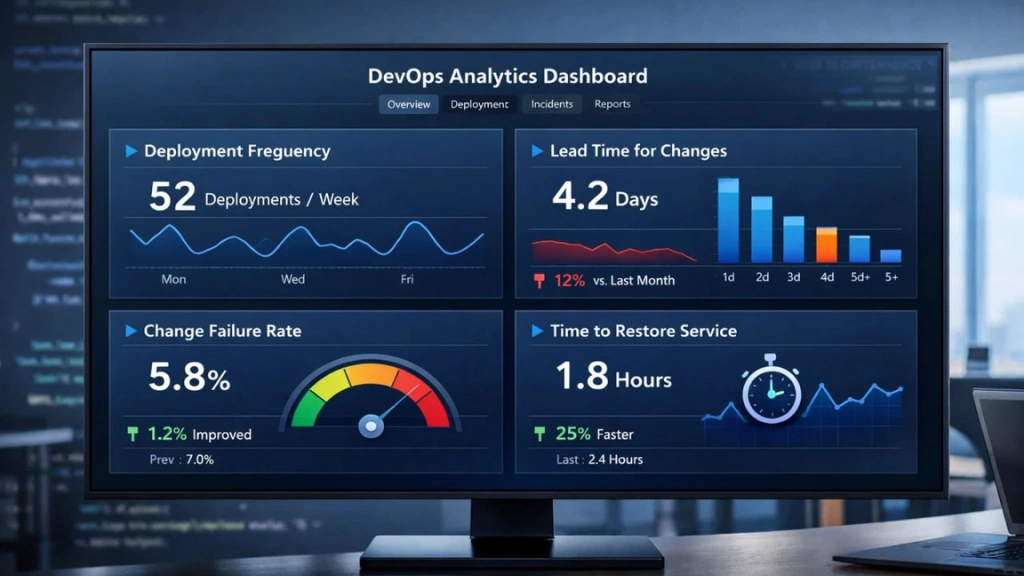
No discussion of measuring developer productivity is complete without mentioning DORA metrics — the four key measures developed by the DevOps Research and Assessment program that have become a widely respected industry benchmark for engineering performance and a reliable way to measure productivity at the team level.
The four DORA metrics are Deployment Frequency — how often a team successfully releases to production; Lead Time for Changes — the time from a code commit to it running in production; Change Failure Rate — the percentage of deployments that cause a failure in production; and Time to Restore Service — how long it takes to recover when a failure occurs.
What makes DORA metrics valuable is that they measure outcomes at the delivery level — not individual activity. A team with high deployment frequency and a low change failure rate is demonstrably delivering value reliably. These four indicators correlate strongly with organizational performance, making them a far more trustworthy signal of engineering health than lines of code or hours logged ever could be when you want to Measure Dev Productivity effectively.
That said, DORA metrics work best as team-level health indicators rather than tools for evaluating individual contributors. They tell you whether your delivery pipeline is working well — not which developer is most responsible for making it work. For individual-level visibility, operational context, and workforce patterns, a platform like EmpMonitor fills the gap DORA metrics leave.
How EmpMonitor Supports Better Productivity Measurement for Engineering Teams?

EmpMonitor is a workforce management and employee monitoring platform that gives engineering managers and HR teams clear, objective visibility into how their developers are working — without reducing that work to vanity metrics or invasive oversight.
Time Tracking That Reflects Reality
EmpMonitor automatically tracks active work hours across each developer’s sessions — recording when work starts, when it stops, and how productive those hours are relative to the individual’s own baseline. Rather than simply logging clock-in and clock-out times, it distinguishes between active, focused work and idle presence, giving managers a far more accurate picture of where productive hours are actually being spent.
For engineering managers trying to understand capacity — particularly when planning sprint commitments or evaluating whether a team is consistently overloaded — this kind of granular time data is genuinely useful. It removes the guesswork from resource planning and provides the factual baseline needed for honest workload conversations.
Productivity Trends and App Usage Insights
EmpMonitor monitors which applications developers are using during work hours and how that usage pattern shifts over time. For software development teams, this can surface meaningful signals: a developer whose time in their IDE has dropped significantly over several weeks while other activity has increased may be dealing with excessive meetings, administrative overhead, or growing disengagement.
These trends — tracked over weeks and months rather than days — give managers the context to have specific, data-backed conversations. Not ‘your productivity seems low’ but ‘I noticed your active coding time dropped quite a bit in the last month — is there something getting in the way?’
Live Dashboard and Attendance Monitoring
EmpMonitor’s live dashboard gives managers a real-time view of team activity — who’s working, what they’re engaged with, and how that compares to their recent patterns. For distributed engineering teams especially, this kind of visibility fills the gap left by the absence of a shared physical workspace.
Attendance tracking across shifts and time zones ensures that remote developers are fairly accounted for without requiring constant manual check-ins. Combined with the platform’s HRMS integration, attendance data connects directly with leave records, performance history, and payroll — giving HR and engineering leadership a unified, accurate view of the workforce.
Screenshot Capture and Activity Verification
For engineering teams working on sensitive or client-facing projects, EmpMonitor’s periodic screenshot feature provides an additional layer of activity verification. Screenshots are captured during designated work hours only, stored securely, and accessible exclusively to authorized managers and HR personnel. This feature isn’t designed for surveillance — it’s designed to provide contextual visibility when output quality is difficult to assess through time data alone.
The Bottom Line To Measure Dev Productivity Of Developer
Measuring developer productivity is genuinely difficult — not because it can’t be done, but because the easy metrics are almost always the wrong ones. Hours worked, lines of code, and commit counts tell you very little about whether your engineering team is creating value. What matters is whether your team is shipping working software consistently, whether individuals are improving over time, and whether the organizational environment is set up to support focused, high-quality work.
EmpMonitor gives engineering managers the workforce visibility they need to answer those questions with confidence — through honest time tracking, behavioral trend data, and productivity insights that reflect real work rather than surface activity. Not to Measure Dev Productivity of developers more closely, but to understand their teams more fully.
FAQs
Q1. Why is counting lines of code a poor way to measure developer productivity?
Lines of code do not reflect quality, efficiency, or business value. A developer who solves a problem with clean, concise code may write fewer lines than someone producing verbose code. Measuring output this way often rewards inefficiency instead of real impact.
Q2. What are better ways to Measure Dev Productivity of developers?
The most effective way to Measure Dev Productivity of developers combines team-level delivery metrics (like cycle time and deployment frequency) with individual trend analysis over time. Outcomes, consistency, and quality matter more than raw activity counts.
Q3. Should individual developer productivity be measured differently than team productivity?
Yes. Team productivity focuses on delivery outcomes such as shipping frequency and system stability. Individual productivity requires contextual evaluation, including collaboration, code quality, mentorship, and behavioral trends rather than isolated numbers.
Q4. How do DORA metrics help Measure Dev Productivity?
DORA metrics evaluate deployment frequency, lead time for changes, change failure rate, and time to restore service. These indicators provide a reliable team-level framework to Measure Dev Productivity based on delivery performance rather than superficial activity metrics.