Most companies think about security only after something goes wrong. A data breach. An internal fraud case. A compliance warning. By then, the damage is already done.
This is where audit logs quietly become your strongest defense.
At their core, audit logs create a clear, time-stamped record of who did what, when, and where inside your systems. They transform digital activity into traceable evidence. Whether you’re managing a small team or a growing enterprise, having structured audit logs helps you maintain transparency, accountability, and compliance without guesswork.
Today’s regulatory landscape is strict. From data protection policies to financial reporting standards, organizations are expected to prove, not just claim, that controls are in place. And the easiest way to prove compliance? Reliable audit logs.
But this isn’t just about regulations. It’s about trust.
When managers can review activity through a well-maintained audit log for employee actions, they gain clarity without micromanaging. When leadership evaluates audit logs for employee productivity insights, they make decisions based on data, not assumptions.
You can listen to this Blog here.
What Are Audit Logs and How Do They Work?
To understand their importance, let’s break it down simply.
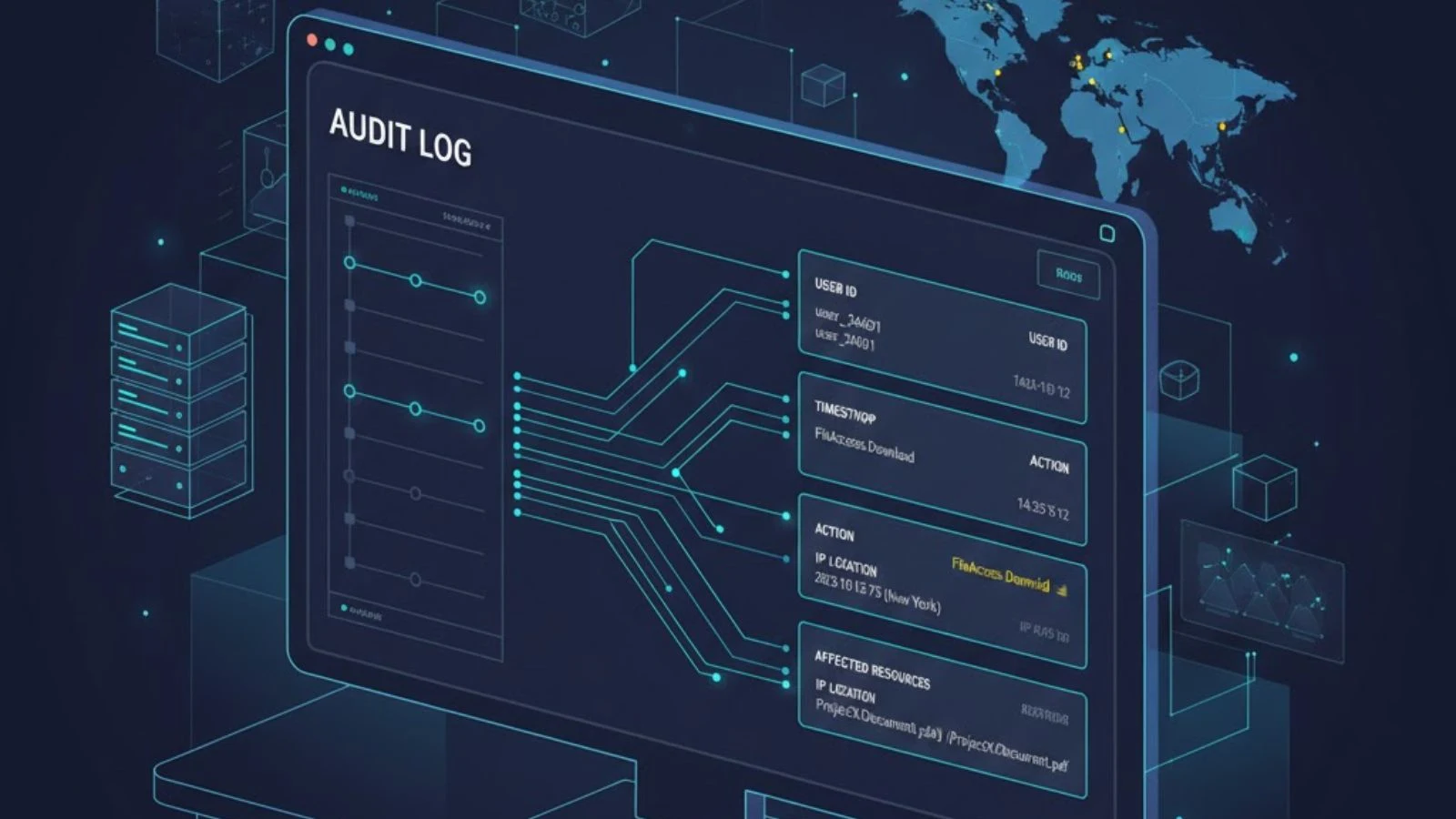
Audit logs are structured records that automatically capture system and user activities within an organization’s digital environment. Every login, file access, data modification, permission change, or system configuration update can be recorded.
Think of them as a digital activity trail.
Each entry in audit logs typically includes:
- User ID – Who performed the action
- Timestamp – When it happened
- Action taken – What was done
- Location or IP address – Where it happened
- Affected resource – Which file, database, or system was involved
This information creates an indisputable chain of events.
How Audit Logs Actually Work
Most modern systems, cloud platforms, HR tools, financial software, and monitoring solutions automatically generate audit logs in the background. These logs are stored securely and can be reviewed in real time or during investigations.
For example:
- An employee downloads confidential data
- A manager changes user permissions
- Someone attempts multiple failed logins
Each of these actions is recorded without manual intervention.
That’s the power of automation.
In compliance-heavy industries, an audit log for employee activity is often mandatory. It provides proof that policies are being followed and that internal controls are functioning properly.
Beyond compliance, businesses increasingly rely on audit log for employee productivity insights. Instead of guessing whether workflows are efficient, companies can analyze logged activity to identify bottlenecks, delays, or unusual patterns.
Why Audit Logs Are Critical for Compliance
Compliance is no longer optional. Whether you operate in finance, healthcare, IT, or e-commerce, regulatory frameworks demand transparency and traceability. And that’s exactly where audit logs become essential.
Regulators don’t just ask, “Do you have policies?”
They ask, “Can you prove they were followed?”
Audit logs provide that proof.
1. They Create Verifiable Evidence
During audits or investigations, organizations must demonstrate:
- Who accessed sensitive data
- When system changes were made
- Whether unauthorized actions occurred
- How quickly incidents were handled
Without audit logs, this becomes nearly impossible. With them, you can generate clear reports that show a chronological record of events.
This documentation protects your business from penalties and strengthens your credibility with clients and partners.
2. They Support Data Protection Regulations
Modern data laws require companies to maintain accountability. If personal or financial data is compromised, you must trace the source of the breach quickly.
Audit logs allow teams to:
- Identify the exact user involved
- Track data movement
- Determine the scope of exposure
- Respond with corrective action
That speed can significantly reduce financial and reputational damage.
3. They Reduce Insider Risk
External hackers aren’t the only threat. Insider errors and misuse can be just as damaging.
A properly maintained audit log for employee activity ensures that sensitive operations like data exports, deletions, or permission changes, are recorded and reviewable. The mere presence of logging often discourages policy violations.
Accountability changes behavior.
4. They Simplify Internal Audits
Preparing for compliance checks can be stressful. But when audit logs are centralized and searchable, internal reviews become structured and efficient.
Instead of scrambling for information, compliance teams can:
- Filter logs by user
- Review time-based activity
- Generate exportable reports
- Document findings clearly
This reduces workload and minimizes compliance risk.
Ultimately, audit logs shift compliance from reactive to proactive. They help you identify irregularities before they become legal issues.
Audit Logs and Insider Threat Detection
When businesses think about security risks, they often focus on cybercriminals. But insider threats, whether intentional or accidental, are just as dangerous.
An employee copied sensitive files before resigning.
A team member is accessing data outside their role.
A user is repeatedly attempting unauthorized system changes.
Without structured audit logs, these activities can go unnoticed for weeks or even months.
Early Detection Through Patterns
One of the biggest advantages of audit logs is pattern recognition. Instead of reviewing isolated events, companies can analyze behavioral trends:
- Unusual login times
- Sudden spikes in file downloads
- Repeated access to restricted folders
- Changes to system permissions
These red flags often signal deeper issues.
When companies implement an audit log for employee tracking, they gain the ability to detect anomalies before they escalate into data breaches or compliance violations.
Accountability as Prevention
Here’s something powerful: when employees know activity is logged, risky behavior naturally decreases.
Audit logs create a culture of responsibility not surveillance, but transparency. They encourage teams to follow policies because every action is traceable.
In that sense, audit logs don’t just detect insider threats they actively prevent them.
Audit Logs and Employee Productivity Insights
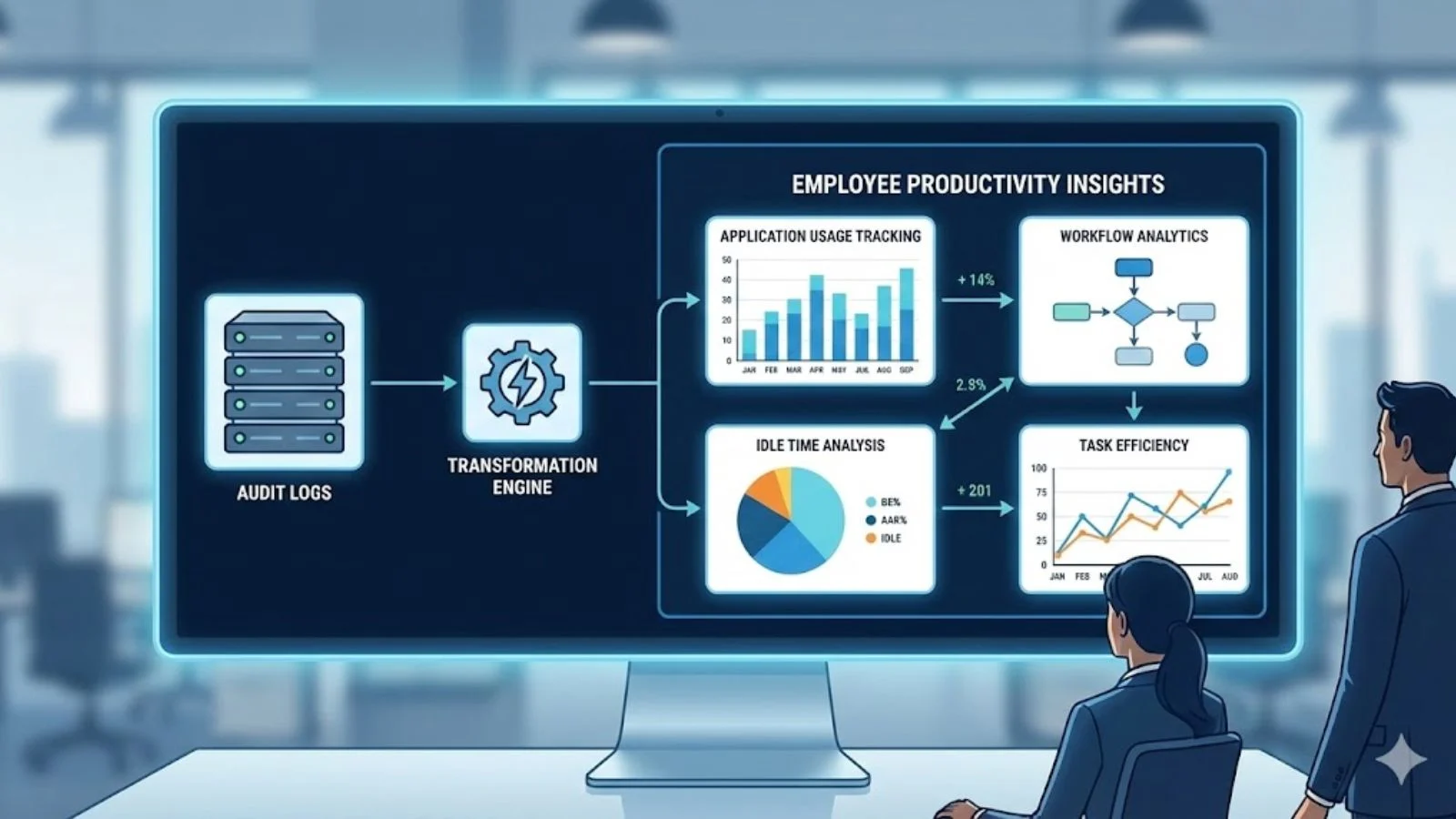
Security and compliance are only half the story.
Modern organizations are increasingly using audit logs to improve performance and operational efficiency.
From Monitoring to Meaningful Data
Instead of guessing how teams spend their time, managers can analyze structured activity records to understand:
- Workflow bottlenecks
- Time spent on applications
- Repetitive or manual tasks
- Idle or inactive periods
When used ethically and transparently, an audit log for employee productivity provides measurable insights that improve output without micromanagement.
Improving Processes, Not Policing People
The goal isn’t to “catch” employees doing something wrong.
It’s to:
- Optimize task distribution
- Identify training needs
- Reduce unnecessary workload
- Streamline digital operations
For example, if audit logs show that employees spend excessive time switching between tools, leadership might invest in integration solutions.
If activity patterns show delays in approval workflows, processes can be redesigned.
That’s data-driven management in action.
Best Practices for Implementing Audit Logs
Having audit logs isn’t enough. How you implement and manage them determines their effectiveness.
Here are proven best practices:
1. Define What Should Be Logged
Not every action needs tracking. Focus on:
- Logins and logouts
- File access and modifications
- Permission changes
- Data exports
- Administrative actions
Logging too much can create noise. Logging too little creates blind spots.
2. Centralize Log Storage
Audit logs should be stored securely in a centralized system. This prevents tampering and ensures logs remain accessible during audits.
Cloud-based logging platforms often provide encryption, backup, and search functionality.
3. Enable Real-Time Alerts
Instead of reviewing logs manually, configure alerts for:
- Multiple failed login attempts
- Large file downloads
- Unauthorized access attempts
- System configuration changes
This transforms audit logs into an active defense mechanism.
4. Maintain Data Retention Policies
Compliance standards often require logs to be stored for specific time periods. Establish clear retention guidelines based on your industry regulations.
5. Protect Log Integrity
Logs must be tamper-proof. Use systems that prevent editing or deleting historical records.
If logs can be altered, they lose legal credibility.
Common Mistakes Businesses Make
Even organizations that implement audit logs sometimes undermine their effectiveness.
Here are frequent pitfalls:
Ignoring Regular Reviews
Logs are collected but never analyzed.
Overloading With Data
Excessive logging without filters creates overwhelming datasets.
Lack of Transparency
Employees are unaware of logging policies, leading to trust issues.
No Clear Compliance Alignment
Logs are stored without mapping to regulatory requirements.
Avoiding these mistakes ensures audit logs remain a strategic asset, not just a technical feature.
How EmpMonitor Strengthens Audit Log Management
Manually managing audit logs across multiple systems can be complex and time-consuming.
This is where EmpMonitor simplifies the process.
EmpMonitor provides structured logging, detailed user activity tracking, and actionable reporting in one centralized dashboard. Instead of scattered data, you get organized visibility into employee actions, system access, and workflow patterns.
With EmpMonitor, businesses can:
- Real-time activity monitoring: Tracks user sessions, applications, websites, and system interactions as they happen, providing instant visibility into daily operations.
- Structured compliance documentation: Automatically records logs and activity trails to maintain organized, audit-ready compliance records.
- Productivity trend analysis: Converts workforce data into measurable insights, helping managers identify performance patterns and improvement areas.
- Early risk detection: Flags unusual behaviors, unauthorized access attempts, or policy violations before they escalate into major issues.
- Audit-ready reporting: Generates detailed, exportable reports for internal reviews, regulatory checks, and management assessments.
By combining monitoring and compliance tracking, EmpMonitor transforms audit logs into a practical business intelligence tool, not just a compliance checkbox.
If your goal is stronger transparency, improved accountability, and streamlined reporting, implementing a centralized solution makes all the difference.
Also Read,
Employee Monitoring vs. Micromanagement: How to Track Performance Without Killing Motivation?
Conclusion
Compliance, security, and operational clarity all begin with visibility.
Without structured activity tracking, businesses rely on assumptions. With reliable records in place, they operate with confidence.
Audit logs act as your first line of defense by documenting every critical action inside your systems. They support regulatory requirements, reduce insider risk, and create measurable accountability.
But their value goes beyond compliance.
When analyzed correctly, audit logs offer insight into productivity, workflow efficiency, and system performance. They help organizations move from reactive problem-solving to proactive management.
In a world where digital operations define success, visibility is power.
And structured logging is how you achieve it.
FAQs
1. What information is typically recorded in audit logs?
They usually include user ID, timestamp, action performed, affected system or file, and location details. This creates a chronological record of activity.
2. How long should companies retain activity records?
Retention depends on industry regulations. Many compliance standards require storage for one to seven years. Always align policies with legal requirements in your region.
3. Can activity tracking improve employee performance?
Yes. When used ethically, structured tracking highlights workflow inefficiencies and helps managers optimize task allocation without micromanaging.