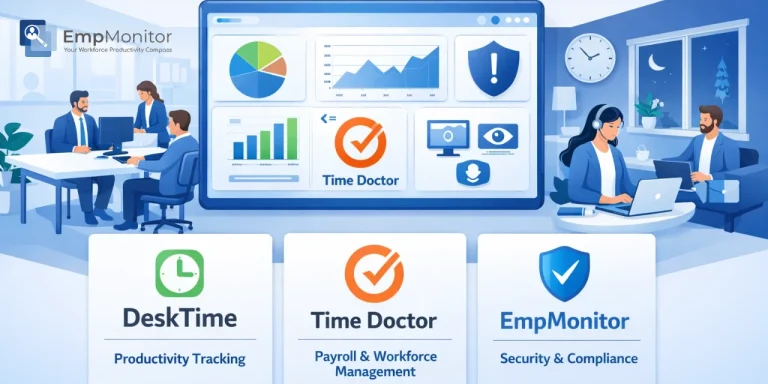
Hybrid work has permanently changed what employee monitoring software needs to do. When part of your team is in the office and part is working remotely, sometimes across different time zones, the visibility challenges are real. You need to know that time is being logged accurately, that productivity is measurable, and that sensitive company data isn’t being mishandled. No single tool approaches all of that the same way. DeskTime vs Time Doctor vs EmpMonitor are three of the most commonly evaluated platforms in this space, and they’re genuinely different products. DeskTime is built around automatic, low-friction productivity tracking. Time Doctor prioritizes workforce operations, time accuracy, payroll, and field team management. EmpMonitor goes deepest into monitoring and security, making it the strongest option for compliance-sensitive environments.
This guide breaks down DeskTime vs Time Doctor vs EmpMonitor across every dimension that matters to hybrid teams: tracking method, monitoring depth, analytics quality, security features, pricing, and ease of use. By the end, you will have a clear picture of which tool fits your specific situation, and why.
In a hurry? Listen to the blog instead:
DeskTime vs Time Doctor vs EmpMonitor: Quick Comparison Snapshot
Here’s the at-a-glance overview before we get into the details.
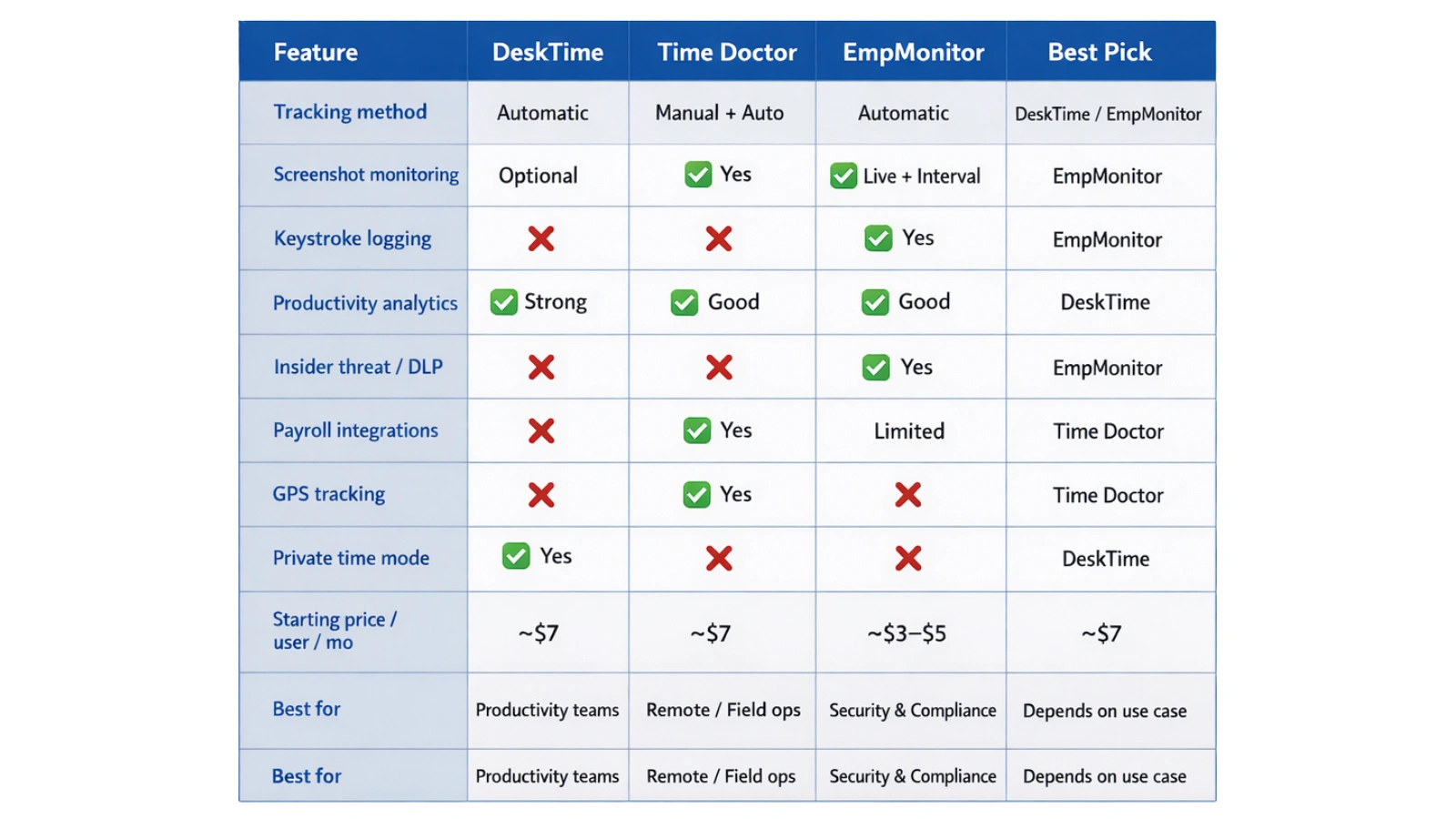
Note: Pricing is approximate based on publicly listed rates at the time of writing. Verify current pricing directly with each vendor before making a decision.
DeskTime Overview: Automatic Time Tracking for Hybrid Productivity
DeskTime launched in 2011 and built its reputation on one core idea: time tracking should require as little manual input as possible. The app runs quietly in the background, automatically recording which applications and websites an employee uses and for how long. There’s no clock-in button to forget, no timer to start and stop; it just runs.
That automatic approach has made DeskTime particularly popular with knowledge-work teams, designers, developers, writers, and analysts, where the work happens inside applications, and the overhead of manual tracking creates friction that erodes compliance over time. If people don’t actually log their time, the data is worthless. DeskTime removes that barrier.
Key DeskTime Features
Automatic time tracking: This records app and website usage without manual input
Productivity classification: It categorizes apps and sites as productive, unproductive, or neutral, with customizable rules per role
Project and task tracking: Employees can assign time to specific projects for billing or reporting purposes
Private time mode: Employees can pause tracking temporarily for personal tasks, which helps with transparency and trust
Absence calendar: Tracks scheduled leave, remote days, and office attendance in one view
Integrations with project management tools, including Jira, Asana, Trello, and Basecamp
Pros and Limitations of DeskTime for Hybrid Teams
DeskTime’s biggest strength is also its most important limitation. The fully automatic tracking is frictionless for employees, but it also means less granular control over how time is categorized. Teams with complex project structures or clients requiring detailed time breakdowns sometimes find the project tracking less flexible than dedicated time billing tools.
Screenshot monitoring is available but not automatic; it captures images at set intervals rather than offering live screen viewing. For teams that want deep surveillance capability, DeskTime falls short. For teams that want productivity visibility without invasive monitoring, that’s precisely the right trade-off.
The private time mode is a genuinely thoughtful feature that most monitoring tools don’t offer. It signals to employees that the tool respects boundaries, which tends to improve adoption and reduce resentment, a real operational benefit for hybrid teams navigating the cultural sensitivities of remote monitoring.
Time Doctor Overview: Workforce Analytics and Remote Team Monitoring
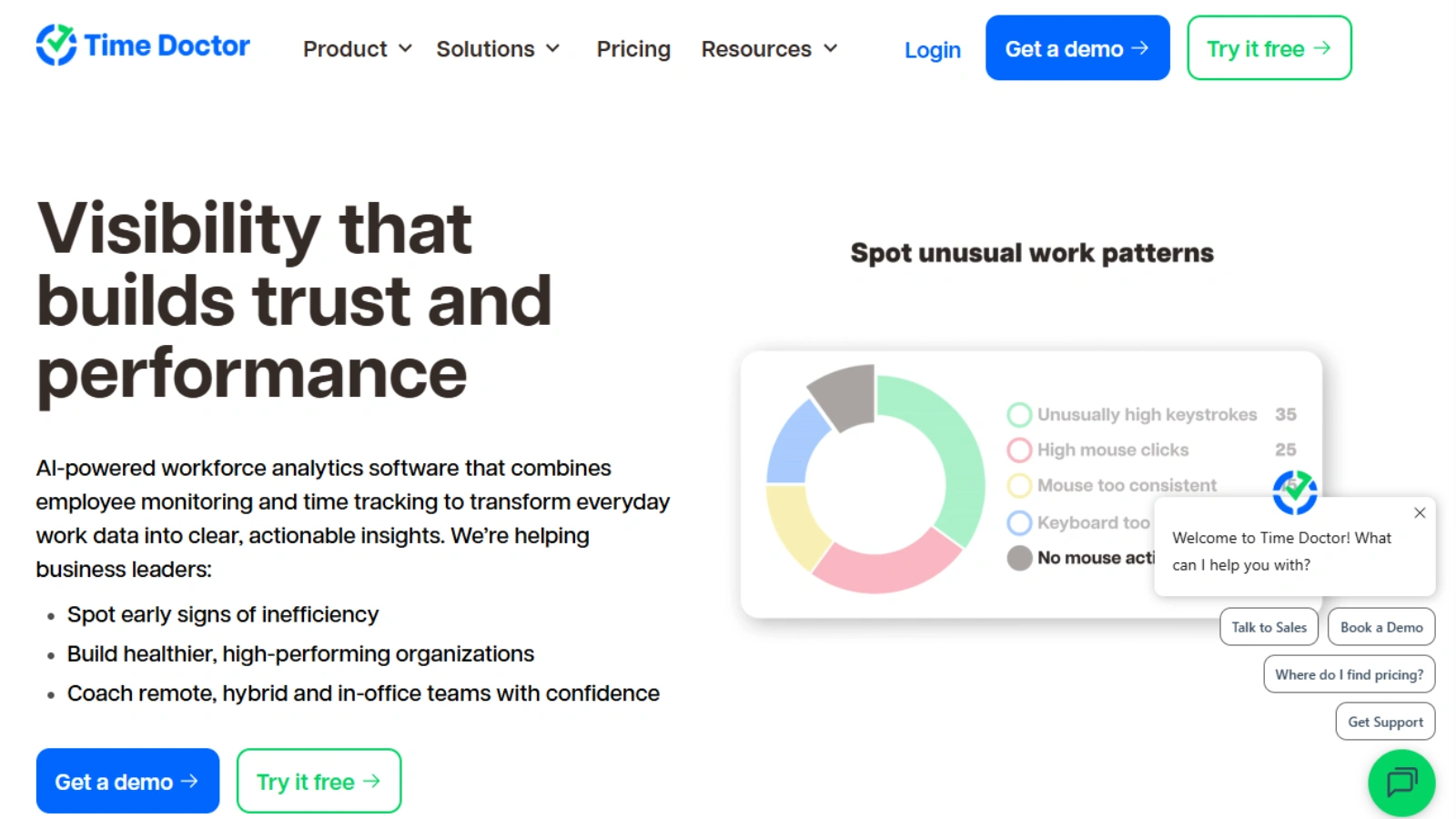
Time Doctor has evolved from a straightforward time tracker into a full workforce analytics platform. It’s particularly strong for businesses that need to connect time data to operational workflows, payroll processing, client billing, project budgeting, and contractor management. If your Hybrid team productivity tools include freelancers, field workers, or staff across multiple countries, Time Doctor’s operational depth is hard to match.
Unlike DeskTime’s fully automatic approach, Time Doctor uses a hybrid model, where employees can run timers manually for specific tasks, and the app also captures automatic activity data in the background. This gives managers both the accuracy of manual project assignment and the reliability of automatic tracking as a cross-check.
Key Time Doctor Features
Manual and automatic time tracking: employees start timers per task; idle detection pauses the timer during inactivity
Screenshot monitoring: captures screens at configurable intervals; managers can review or blur sensitive content
Distraction alerts: notify employees when they visit non-work websites during tracked time
Attendance and shift tracking: logs start times, break durations, and end times, with reporting for managers
Payroll integrations: connect directly with Gusto, PayPal, Wise, and other payment platforms
GPS tracking: it records location for field staff via a mobile app
Client and project reporting: generates detailed time-by-project reports suitable for client invoicing
Pros And Limitations Of Time Doctor For Hybrid Workforces
Time Doctor’s payroll and billing integrations are genuinely best-in-class among the three tools in this comparison. For agencies, consultancies, and businesses with contractor-heavy teams, the ability to move from tracked time to processed payments without manual data entry is a meaningful operational advantage.
The distraction alert system is a polarizing feature. Some businesses find it useful for keeping employees focused; others find it creates tension and undermines trust. It’s configurable, but it’s worth thinking carefully about whether your team culture is a fit for real-time behavioral nudges.
Time Doctor’s interface is more complex than DeskTime’s, and the setup process reflects that depth. Teams that need the full feature set will find it worthwhile; teams that mainly want basic productivity tracking may find it more than they need. It’s also worth noting that Time Doctor’s screenshot monitoring, while solid, doesn’t offer live screen viewing; for businesses that need real-time visibility, that’s a gap.
EmpMonitor Overview: Advanced Employee Monitoring For Hybrid Team Security
EmpMonitor is the most comprehensive monitoring platform of the three. Where DeskTime focuses on productivity and Time Doctor on workforce operations, EmpMonitor covers both of those areas and goes considerably further into security, compliance, and behavioral monitoring territory.
It’s built for organizations that need more than productivity data, teams handling sensitive information, businesses operating in regulated industries, or companies that have experienced or are actively managing insider threat risk. For those use cases, EmpMonitor’s feature depth justifies its place in the evaluation.
Key EmpMonitor Features
Automated time tracking: records active time, idle time, and application usage without manual input
Live screen monitoring: managers can view employee screens in real time, not just at captured intervals
Screenshot capture: configurable interval screenshots with a searchable archive
Keystroke logging: records keyboard input for audit and compliance purposes
Application and website tracking: detailed logs of every app used and site visited, with time-on-site data
Insider threat detection: behavioral analytics that flag anomalous activity patterns
USB and peripheral monitoring: logs connected devices to detect potential data exfiltration
Productivity reporting: generates team and individual productivity scores with trend analysis
Remote deployment: installs silently across endpoints without requiring employee interaction
Why EmpMonitor Stands Out For Security-Focused Hybrid Teams
The combination of live screen monitoring, keystroke logging, and behavioral analytics puts EmpMonitor in a different category from the other two tools when it comes to security use cases. DeskTime vs Time Doctor tells you how time is spent. EmpMonitor tells you what is happening on each device, in real time, with a level of detail that supports genuine security and compliance workflows.
For businesses in financial services, healthcare, legal, or government contracting where data handling is regulated, and audit trails are required, that depth is not optional. EmpMonitor’s compliance-oriented feature set addresses requirements that productivity-focused tools simply weren’t designed to meet.
It’s also the most affordable of the three at the entry level, starting at around $3 to $5 per user per month. For organizations that need comprehensive monitoring, that pricing advantage is significant at scale.
The trade-off is cultural fit. EmpMonitor’s surveillance depth requires thoughtful implementation. Teams that aren’t accustomed to detailed monitoring will need clear communication about what is being tracked and why. Organizations that deploy it without that groundwork risk damaging trust in ways that affect productivity and retention.
Read More!
Feature Deep Dive: Tracking, Monitoring, Analytics & Security Compared
Time Tracking Accuracy
DeskTime’s fully automatic tracking is the most reliable for capturing actual computer usage; there’s nothing for employees to forget or manipulate. The trade-off is that it doesn’t distinguish between different projects unless employees manually assign time, which adds a step that some resist.
Time Doctor’s hybrid approach, manual timers plus automatic background tracking, gives the most complete picture for project-based work. The idle detection is accurate, and the cross-check between manual and automatic data helps catch discrepancies. For client billing and payroll accuracy, it’s the strongest of the three.
EmpMonitor’s automatic tracking is comparable to DeskTime in reliability and adds more granular application-level data. Offline tracking is also supported, which matters for teams that work in environments with intermittent connectivity.
Screenshot Monitoring And Live Visibility
All three tools offer screenshot monitoring, but the depth varies significantly. DeskTime captures screenshots at configurable intervals, useful for periodic check-ins but not real-time visibility. Time Doctor does the same, with the option for managers to blur sensitive content in screenshots before reviewing.
EmpMonitor goes further with live screen monitoring; managers can view any employee’s screen in real time without waiting for a captured interval. Combined with keystroke logging, this creates a level of visibility that the other two tools don’t offer. For security-sensitive environments, that real-time capability is the key differentiator.
Productivity Analytics and Reporting
DeskTime’s productivity classification system is one of its strongest features. Admins can define which apps and websites count as productive for specific roles. A social media platform might be unproductive for a developer but productive for a marketing manager, and the dashboard surfaces productivity scores based on those custom rules. The reporting is clean and easy to interpret.
Time Doctor generates detailed project and client reports that are well-suited for billing and operational reviews, but its productivity analytics are less sophisticated than DeskTime’s. It tells you where time went; it takes more work to draw conclusions about productivity trends.
EmpMonitor produces productivity scores and team dashboards that are solid for day-to-day management. Its advantage is in the depth of underlying data because it captures more behavioral signals than the other two tools; its reports can be more granular when needed. For standard productivity reporting, all three are adequate; EmpMonitor’s analytics become more valuable in security and compliance contexts.
Security and Insider Threat Detection
This is where the comparison becomes straightforward. DeskTime vs Time Doctor are not security tools. They capture enough data to give managers visibility into how work time is spent, but they weren’t designed to detect behavioral risk, prevent data exfiltration, or support compliance audit requirements.
EmpMonitor is purpose-built for this space. Keystroke logging, USB monitoring, behavioral anomaly detection, and real-time screen access create a monitoring environment that can support genuine security workflows. For businesses with compliance obligations or active insider threat programs, EmpMonitor is the only tool in this comparison that addresses those requirements directly.
Ease Of Use And Employee Privacy Considerations
All three tools are meaningfully easier to set up than enterprise security platforms like Teramind, but they differ in how they handle employee transparency and privacy.
DeskTime is the most privacy-conscious of the three by design. The private time mode lets employees pause tracking for personal tasks, and the monitoring is limited to productivity data rather than surveillance-depth logging. It’s also the most straightforward to deploy the desktop app, which is lightweight, and the admin dashboard has a low learning curve.
Time Doctor sits in the middle. Employees are aware they’re being monitored, the app is visible, and the distraction alerts make the monitoring explicit. Some employees find this helpful for accountability; others find it stressful. The setup is more involved than DeskTime, particularly if you’re configuring payroll integrations and project hierarchies.
EmpMonitor can be deployed silently, which is appropriate for security-sensitive environments but requires careful handling from a trust and transparency perspective. Organizations that implement covert monitoring without informing employees take on both a cultural risk and, in many jurisdictions, a legal one. Best practice is to disclose monitoring clearly in employment contracts and onboarding, regardless of the tool used.
Pricing Comparison: DeskTime vs Time Doctor vs EmpMonitor
Here’s how the three tools compare on pricing across different team sizes. All figures are estimates based on publicly available pricing; verify with each vendor before committing.
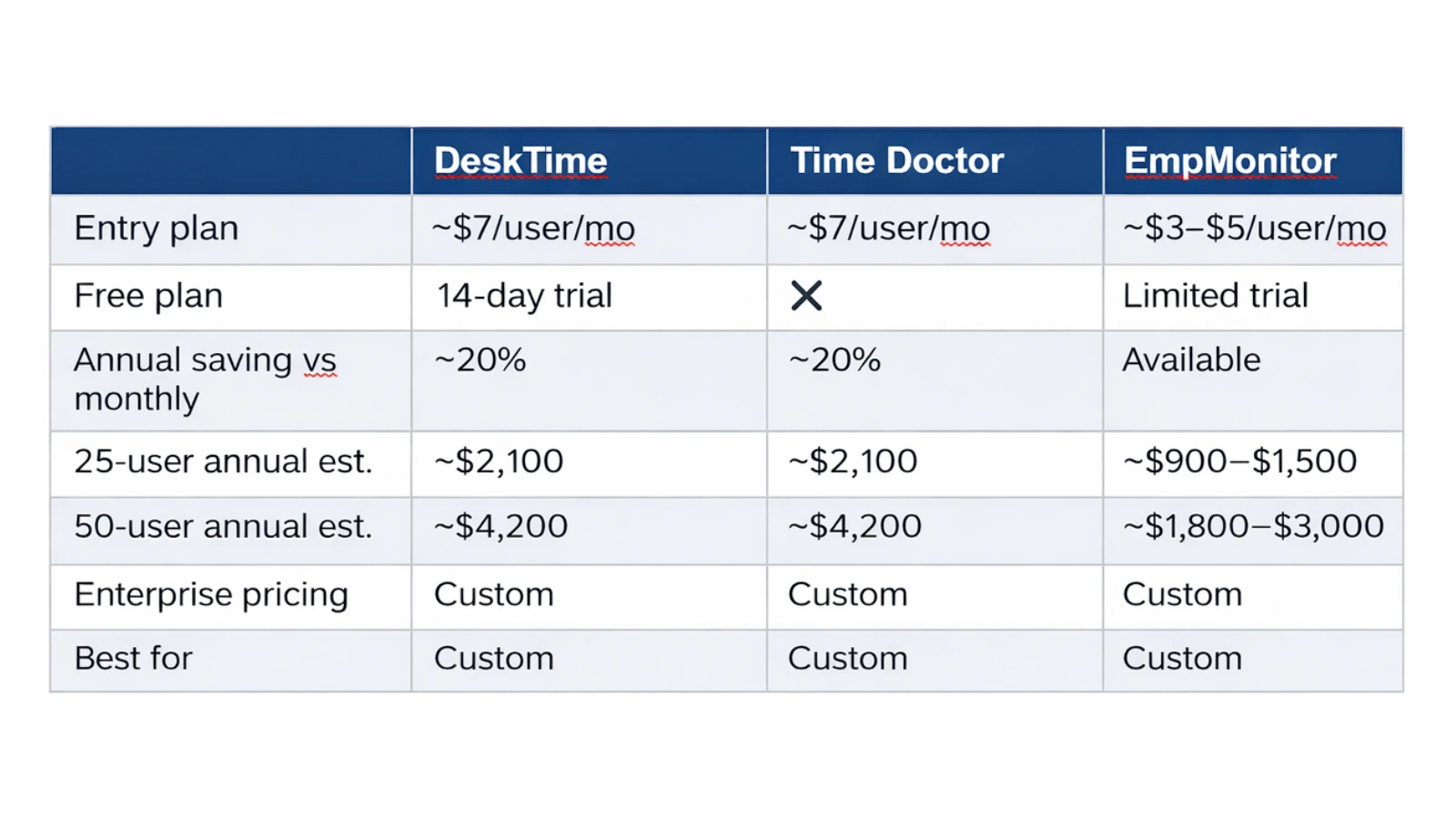
EmpMonitor’s pricing advantage is most pronounced at scale. For a 50-person team, the annual cost difference between EmpMonitor and either DeskTime or Time Doctor can exceed $2,000 significant for SMBs managing tight software budgets. All three tools offer annual billing discounts, and all three have enterprise pricing available for larger deployments.
Best Use Cases: Which Tool Is Right for Your Hybrid Team
Best for Productivity Tracking — DeskTime
DeskTime is the strongest choice for knowledge-work teams where the primary goal is understanding how work time is spent and identifying productivity patterns. Its automatic tracking removes friction, the productivity classification system is flexible and well designed, and the private time mode makes it easier to introduce to teams that are sensitive about monitoring. Design agencies, software teams, content operations, and similar knowledge-work environments are its natural home.
Best for Workforce Operations — Time Doctor
Time Doctor wins for businesses where time data needs to connect directly to payroll, client billing, or contractor management. Agencies with complex project structures, field service businesses that need GPS tracking alongside time records, and companies managing distributed contractors across multiple countries will get the most value from Time Doctor’s operational depth. If your monitoring tool needs to be part of a billing or HR workflow rather than a standalone analytics platform, Time Doctor is the right fit.
Best for Security and Compliance — EmpMonitor
EmpMonitor is the clear choice for organizations where monitoring overlaps with security obligations. Regulated industries, financial services, healthcare, legal, and government contracting, that need audit trails, behavioral analytics, and data exfiltration detection will find the other two tools inadequate for their requirements. EmpMonitor is also worth serious consideration for any business that has experienced a data incident, manages privileged access at scale, or has an active insider threat program. Its pricing advantage makes it accessible to mid-sized businesses that might assume enterprise-grade security monitoring is out of their budget.
Final Verdict: Which Is the Best Employee Monitoring Tool for Hybrid Teams
There is no single best tool in this comparison; the right answer depends entirely on what your hybrid team actually needs from monitoring software.
Choose DeskTime vs Time Doctor if your priority is low-friction productivity visibility for knowledge workers. It’s the most employee-friendly of the three, the easiest to deploy, and delivers clean, actionable productivity data without requiring significant configuration or creating a surveillance-heavy environment.
Choose Time Doctor if your hybrid team includes contractors, field workers, or billable-hours clients, and you need time data to flow directly into payroll or invoicing workflows. No other tool in this comparison handles that operational layer as well.
Choose EmpMonitor if your monitoring requirements go beyond productivity into security, compliance, or behavioral risk management. Its combination of live screen monitoring, keystroke logging, insider threat detection, and competitive pricing makes it the strongest option for organizations where data protection and audit capability are non-negotiable. For SMBs that need enterprise-depth monitoring without enterprise pricing, it’s a particularly compelling fit.
If you’re genuinely unsure, start with a free trial of whichever tool aligns most closely with your primary use case. All three are solid platforms; the differences between them are real, but so is the quality of each. The worst outcome is choosing a tool that’s well built but wrong for your situation.
Frequently Asked Questions
What is the best time tracking tool for hybrid teams?
It depends on what the team needs. For pure productivity tracking with minimal setup, DeskTime is the strongest option. For operational workflows that connect time data to payroll and billing, Time Doctor leads. For teams with security or compliance requirements, EmpMonitor covers ground that the others don’t.
Is DeskTime better than Time Doctor?
For knowledge-work teams focused on productivity analytics, DeskTime’s automatic tracking and classification system gives them an edge. For teams that need payroll integration, GPS tracking, and operational depth, Time Doctor is the stronger choice. They’re built for different primary use cases rather than being direct competitors for the same buyer.
What security features does EmpMonitor offer?
EmpMonitor includes live screen monitoring, keystroke logging, USB and peripheral device tracking, behavioral anomaly detection, and application-level activity logging. Together, these features support insider threat detection, compliance audit trails, and data exfiltration prevention capabilities that DeskTime vs Time Doctor don’t offer.
Do monitoring tools affect employee privacy?
Yes, to varying degrees. DeskTime is the most privacy-conscious. Its private time mode and productivity-focused (rather than surveillance-focused) data collection make it the least intrusive. Time Doctor is explicit about monitoring but visible to employees. EmpMonitor can be deployed silently and captures more behavioral data. Regardless ofthe tool, the best practice is to disclose monitoring clearly to employees and ensure your monitoring practices comply with employment law in your jurisdiction.
Which tool offers the most advanced monitoring features?
EmpMonitor, by a significant margin in this comparison. Live screen monitoring, keystroke logging, behavioral analytics, and USB device tracking put it in a different category from DeskTime vs Time Doctor for organizations with serious monitoring requirements. The other two tools are well-suited to productivity and operations use cases; EmpMonitor is built for environments where monitoring overlaps with security.