


User Activity Monitoring (UAM) has moved from a niche security control to a mainstream part of how modern organizations protect data and manage hybrid teams. With insider-driven incidents now costing organizations an average of $17.4 million a year (Ponemon Institute, 2025) and the global cost of a data breach sitting at $4.44 million (IBM, 2025), understanding what UAM is, how it works, and how to deploy it responsibly matters more than ever.
This guide explains UAM in plain language, breaks down how it works today, and shows you how to implement it in a way that strengthens security without eroding employee trust.
Listen Now
What Is User Activity Monitoring?
User Activity Monitoring (UAM) is the practice of recording, tracking, and analyzing how users, typically employees, contractors, and privileged accounts, interact with an organization’s devices, applications, networks, and data. The goal is to detect insider threats, prevent data breaches, support compliance, and surface productivity insights.
In simple terms, a UAM solution gives administrators visibility into actions such as application usage, web activity, file transfers, logins, and (where lawful and disclosed) screenshots or keystrokes. When an action looks risky, say, a large file being copied to a personal cloud drive at 2 a.m., the system can alert security teams or block the action automatically.
Modern UAM is rarely about “watching people work.” It’s about creating an auditable record of activity around sensitive systems so that negligent mistakes, compromised accounts, and malicious insiders can be caught early.
Why UAM Matters in 2026: The Numbers
The original case for UAM was largely pandemic-driven. Today, the driver is structural: distributed work time is permanent, attack surfaces have expanded, and insiders remain one of the hardest threats to detect.
- Insider risk is expensive and rising. The 2025 Ponemon Cost of Insider Risks Global Report puts the average annual cost of insider incidents at $17.4 million, up from $16.2 million in 2023.
- Insiders take a long time to catch up. It takes an average of 81 days to contain an insider incident, and incidents that drag past 91 days cost roughly $18.7 million versus far less for those contained quickly.
- A large share of breaches start inside. Ponemon’s 2025 file-security research attributes around 45% of data breaches to insiders, whether through negligence, credential theft, or malicious intent.
- Breaches are costly overall. IBM’s 2025 report pegs the global average breach at $4.44 million (the first decline in five years, credited to faster, AI-assisted containment), while the U.S. average hit a record $10.22 million.
- Monitoring is now the norm for distributed teams. Industry surveys indicate 70%+ of remote and hybrid workers are monitored in some form, and the employee-monitoring software market is projected to grow at a strong double-digit CAGR through the end of the decade.
The takeaway: the question for most organizations is no longer whether to monitor, but how to do it responsibly and effectively.
How Does User Activity Monitoring Work?
A UAM solution typically runs as a lightweight agent on endpoints (or integrates with cloud apps and identity providers) and follows four broad stages:
Data collection. The tool captures activity signals, app and website usage, active vs. idle time, logins, file movements, USB/peripheral use, email and messaging metadata, and optionally screenshots or keystrokes where legally permitted and disclosed.
Baselining. The system learns what “normal” looks like for each user or role, the systems they touch, the hours they work, and the data they typically access.
Detection and alerting. Activity is compared against rules and behavioral baselines. Deviations, an unusual download volume, access to data outside someone’s role, off-hours logins, trigger alerts, or automated responses.
Reporting and response. Dashboards and forensic logs give security and management teams the context to investigate, respond, and, if needed, preserve evidence.
Recommended Read
Is It Valid To Manage Employees Computer Activities In Stealth Mode?
From Rule-Based UAM to Behavior Analytics (UEBA)
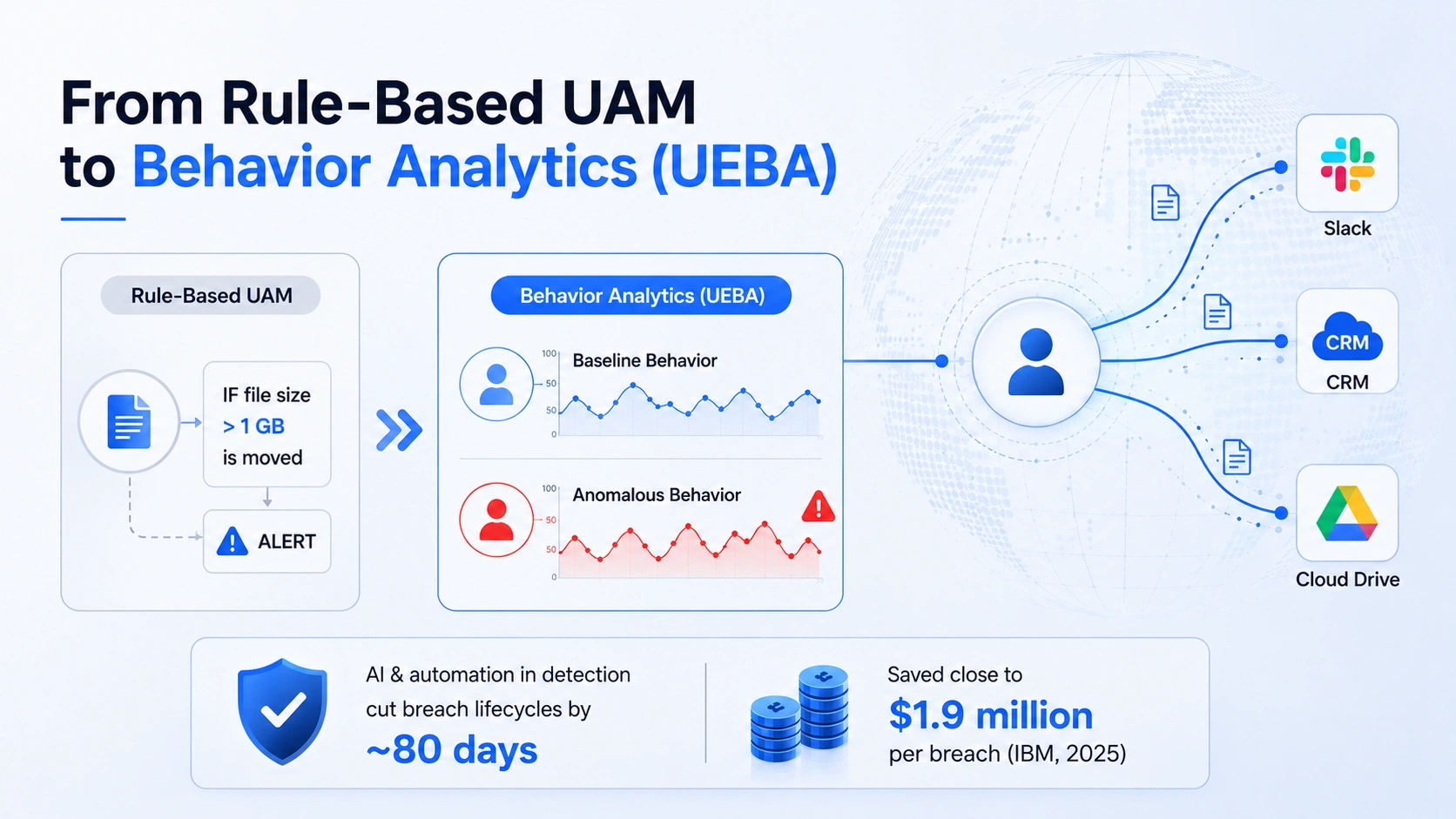

Traditional UAM relied heavily on static rules (“alert if a file over 1 GB is moved”). The current generation increasingly layers in User and Entity Behavior Analytics (UEBA), which uses machine learning to baseline behavior and flag subtle anomalies that rules miss.
This matters because the most damaging insider incidents often look “authorized” on a per-action basis. A real-world pattern documented in 2025–2026 threat research: an insider slowly exfiltrating data across Slack, a CRM, and a cloud drive over months, each action looking legitimate, but the cumulative deviation from normal behavior is the giveaway. UEBA-style monitoring is designed to catch exactly that. Organizations using AI and automation in detection cut breach lifecycles by roughly 80 days and saved close to $1.9 million per breach, per IBM’s 2025 data.
Key Benefits of User Activity Monitoring
1. Stronger Cybersecurity and Insider-Threat Detection
UAM gives you visibility into web activity, file sharing, and data access so you can spot when sensitive information is being moved to an outsider, an unsanctioned app, or a personal account. Rule-based and behavior-based alerts notify security teams the moment risky activity is detected, shrinking the dangerous gap between an incident starting and being caught.
Note on “shadow AI”: IBM’s 2025 report found unauthorized AI tools were a factor in roughly 20% of breaches, adding about $670,000 to average breach costs. Monitoring for uploads of sensitive data into unsanctioned generative-AI tools is now a meaningful UAM use case.
2. Compliance and Audit Readiness
UAM helps enforce internal policy and meet external regulations. Detailed, timestamped activity logs support frameworks such as GDPR, HIPAA, PCI DSS, ISO 27001, and, for organizations handling data of people in India, the Digital Personal Data Protection (DPDP) Act, 2023, and its DPDP Rules, 2025. Rule-based alerts can flag policy violations in real time, and forensic records provide evidence if an incident requires investigation.
3. Workforce Productivity Insights
Most UAM platforms also surface productivity signals, active vs. idle time, application and website usage, and workflow patterns. Used well, these insights help managers spot bottlenecks, balance workloads, and support employees rather than police them. The market is clearly shifting toward non-invasive, trust-based productivity insights over intrusive surveillance.
4. Faster, Evidence-Backed Incident Response
When something goes wrong, having a reconstructable timeline of who accessed what, when, and how dramatically speeds investigation and reduces the cost of a breach. Early internal detection alone meaningfully lowers breach costs, according to IBM’s 2025 findings.
Common Types of User Activity Monitoring
| Type | What It Tracks | Typical Use |
|---|---|---|
| Application & Web Monitoring | Apps opened, websites visited, and time spent. | Productivity insights and policy enforcement. |
| File & Data Activity Monitoring | File access, transfers, downloads, and uploads. | Data-loss prevention and insider-threat detection. |
| Network & Login Monitoring | Logins, locations, IP activity, and session times. | Compromised-account detection and security monitoring. |
| Behavioral Analytics (UEBA) | Deviations from established user behavior patterns. | Advanced insider-threat detection. |
| Screenshot & Session Recording | Periodic screen captures and session activity. | High-risk environments (with proper disclosure). |
The trend in 2025–2026 is toward “softer,” privacy-respecting signals (active time, app usage, work patterns) and away from blanket keylogging or webcam capture, which carry higher legal and trust risks.
The Privacy and Legal Side: Monitor Responsibly
This is the part older guides often skipped, and the part regulators and employees now care about most. Monitoring done badly can damage morale and create legal exposure. Surveys suggest a majority of monitored employees feel some anxiety, and a notable share admit to “faking activity” or using anti-tracking tools when monitoring feels excessive. Transparency is the single biggest factor in whether monitoring helps or backfires.
Key legal considerations by region:
European Union (GDPR). You need a lawful basis to process employee data. Regulators are generally skeptical of “consent” in the employer–employee context because of the power imbalance; legitimate interest or contractual necessity is usually more defensible, alongside a Data Protection Impact Assessment (DPIA), data minimization, and clear transparency notices.
United States. Rules vary by state. States such as New York, California, and Connecticut require notice and/or consent before electronic monitoring, and Illinois’s BIPA tightly restricts biometric data. Federal law (the ECPA) also governs interception of communications.
India (DPDP Act 2023 + DPDP Rules 2025). The DPDP Rules were notified in November 2025 with a phased rollout and full compliance expected by mid-May 2027. Employers acting as Data Fiduciaries must provide clear notice, implement reasonable security safeguards, and honor data-principal rights, with penalties reaching up to ₹250 crore per instance of non-compliance.
Bottom line: Always disclose monitoring, document your lawful basis, collect only what you need, secure the data you collect, and avoid monitoring personal devices or off-duty activity without explicit, informed agreement.
How to Implement User Activity Monitoring: A Practical Checklist
Define the purpose first. Decide whether you’re solving for security, compliance, productivity software, or all three. The purpose shapes what you collect.
Map your legal obligations. Identify the regulations that apply (GDPR, DPDP, HIPAA, state laws) and establish a lawful basis before deployment.
Write a clear monitoring policy. Document what is monitored, why, how long data is retained, and who can access it.
Be transparent with employees. Communicate the policy, fold acknowledgment into employment agreements, and explain the “why.” Disclosure builds trust and reduces backlash.
Collect the minimum necessary. Favor non-invasive signals (active time, app usage, anomalies) over intrusive ones. Use anonymization or aggregation where individual identification isn’t needed.
Layer in behavioral analytics. Combine rules with UEBA to catch the subtle, “authorized-looking” insider activity that static rules miss.
Secure the data and restrict access. Apply role-based access, encryption, and strong authentication (including MFA) for privileged users.
Preserve forensic evidence properly. Retain logs, screenshots (where lawful), and records so incidents can be reconstructed with full context.
Review and improve. Audit your program regularly, prune unnecessary data collection, and recalibrate alerts to reduce false positives.
Tips and Best Practices for Effective (and Ethical) UAM
Lead with transparency. Employees who understand monitoring accept it; those who feel secretly surveilled resist it.
Delegate intelligently. No single admin can review everything, so assign monitoring duties to trusted, accountable team leads.
Strengthen access and password hygiene. Robust password and authentication policies prevent many breaches and curb time tracking.
Vet and protect privileged users. High-access accounts deserve extra scrutiny and two-factor (or multi-factor) authentication.
Prioritize prevention over pure detection. Behavioral coaching and real-time alerts that stop incidents are more valuable than logs that only explain them afterward.
Measure what matters. Track meaningful KPIs, mean time to detect, percentage of high-risk transfers with full visibility, false-positive rate, and incidents actually prevented.=
What to Look for in a UAM Solution
When evaluating tools (including EmpMonitor and alternatives such as Teramind, ActivTrak, Veriato, and Syteca), prioritize:
Centralized, remote management across distributed endpoints
Behavior-based and rule-based alerting (ideally with UEBA)
Productivity analytics that support employees, not just surveil them
Privacy controls, anonymization, role-based access, configurable data collection
Compliance support for the frameworks relevant to your industry and geography
Forensic reporting for fast, evidence-backed investigations
EmpMonitor, A Closer Look at the Tool
If you’re evaluating UAM platforms, EmpMonitor is one of the more established options worth understanding. Operating since 2014, it positions itself as an open-source–friendly employee monitoring and workforce-productivity platform, and reports adoption across 100+ countries, 15,000+ companies, and 500,000+ tracked employees. It’s built to cover both sides of the UAM equation: security and insider-threat prevention on one hand, and productivity and workforce management on the other.
What EmpMonitor Does
EmpMonitor brings together several capabilities that map directly to the UAM use cases discussed above:
User activity & app/URL tracking, real-time visibility into the applications and websites employees use, with productive vs. unproductive classification.
Real-time dashboard & live screencasting, a recently launched live screen-recording, and real-time activity feed for at-a-glance oversight of distributed teams.
Screenshot & keystroke monitoring, periodic screen captures, and keystroke logging for higher-risk environments (to be used transparently and within legal limits).
Productivity measurement & idle-time tracking, active vs. idle time, and productivity scoring to surface bottlenecks and workload imbalances.
Insider-threat prevention & data-loss prevention (DLP), monitoring designed to flag risky data handling and help prevent leaks before they happen.
Attendance, time tracking & HRMS, built-in time tracking, attendance management (including face-recognition attendance), and human-resource management features.
Task & project management, assign, track, and review tasks alongside the monitoring data.
Field-force management is a dedicated module for tracking employees who work in the field rather than at a desk.
Platforms, Industries, and Pricing
Platform support: EmpMonitor runs on Windows (including older versions and Server editions), macOS (10.8 and newer), and Linux/Ubuntu (16/18/20), making it suitable for mixed-OS environments.
Industries served: the platform markets tailored use cases for IT, banking, healthcare, call centers, digital forensics, and education, mapping monitoring features to each sector’s priorities (e.g., insider-theft prevention for banking, authorized-access control for healthcare, evidence-gathering for forensics).
Pricing is published on a per-user, per-month basis (billed annually) across three tiers, with a free trial and live demos available:
| Plan | Team Size | Price (Billed Yearly) | Core Inclusions |
|---|---|---|---|
| 🥉 Bronze (Essential) | 1–10 Users | $4.66 / User / Month | HRMS, URL & app tracking, real-time dashboard, idle-time tracking, and productivity analytics. |
| 🥈 Silver (Standard) | 11–50 Users | $3.83 / User / Month | All core features with enhanced scalability for growing teams. |
| 🥇 Gold (Premium) | 51–200 Users | $3.00 / User / Month | Full feature set optimized for larger organizations and enterprise teams. |
Where EmpMonitor Fits
EmpMonitor is a strong fit for organizations that want a single, affordable platform combining security-oriented monitoring with day-to-day productivity and HR management, especially distributed or hybrid work across mixed operating systems. As with any UAM tool, its more intrusive capabilities (screenshots, keystroke logging, live screen recording) deliver value only when deployed transparently, with a documented lawful basis, clear employee notice, and data minimization in line with the privacy guidance covered earlier in this guide. Independent reviews are available on platforms such as G2, Capterra, TrustRadius, and SoftwareSuggest for a balanced view before committing.
Final Thoughts
User Activity Monitoring has matured. What began as a reactive, pandemic-era productivity check is now a core security and compliance discipline, one that, done well, protects organizations from breaches that cost millions and insider incidents that take months to surface.
The organizations that win with UAM in 2026 share one trait: they treat it as a trust-based, transparent, behavior-aware program, not a surveillance tool. Pair the right solution, EmpMonitor among them, with clear policies, a lawful basis, minimal data collection, and modern behavioral analytics, and you get the security and productivity upside without the cultural and legal downside.
Have questions about implementing UAM responsibly in your organization? Share them in the comments, and if this guide helped, pass it along to a colleague who’s navigating the same challenge.
Frequently Asked Questions (FAQs)
What is user activity monitoring in simple terms?
It’s software that records and analyzes how users interact with company devices, apps, and data so organizations can detect insider threats, prevent breaches, meet compliance requirements, and understand productivity.
Is employee monitoring legal?
Generally, yes, but it depends on your jurisdiction. Most laws require transparency, a lawful basis, and proportionality. Monitoring company-owned devices with proper disclosure is widely permitted; monitoring personal devices, private communications, or off-duty activity is heavily restricted. Always check GDPR (EU), state laws (US), and the DPDP framework (India).
What’s the difference between UAM and UEBA?
UAM records and tracks user activity, often using predefined rules. UEBA (User and Entity Behavior Analytics) is the evolution that uses machine learning to baseline normal behavior and flag anomalies, catching subtle insider threats that rule-based UAM can miss.
How much do insider threats cost organizations?
The 2025 Ponemon report estimates an average annual cost of $17.4 million per organization, with incidents taking around 81 days to contain.
Does monitoring hurt employee morale?
It can,if done covertly or excessively. Research consistently shows that transparency is the deciding factor. Clear policies, minimal data collection, and honest communication let organizations gain security benefits while preserving trust.
Can UAM help with compliance?
Yes. Detailed activity logs and access records support audits and frameworks such as GDPR, HIPAA, PCI DSS, ISO 27001, and India’s DPDP Act, provided the monitoring itself is compliant.