
Managing a distributed team comes with a specific kind of complexity that office-first businesses rarely deal with. When your workforce is spread across time zones, employment types, and work schedules, raw headcount becomes almost meaningless as a planning tool. You might have ten people on your roster, but three are part-time, one is a contractor splitting hours across two clients, and another is on a reduced schedule. What does “ten employees” actually tell you about real capacity? Not much. That’s where FTE comes in.
Full-time equivalent FTE is a workforce metric that standardizes hours worked across different employment types into a single, comparable number. Instead of counting bodies, you’re counting capacity. For remote and hybrid teams where schedules are irregular or split across multiple arrangements, knowing how to calculate FTE employees accurately is the difference between guessing your team’s bandwidth and actually knowing it.
Without a proper FTE calculation, workforce planning, budget forecasting, and compliance reporting become exercises in guesswork. This guide walks you through the math and how to apply it practically.
Listen To The Podcast Now!
What FTE Actually Means And Why It’s Not Just HR Jargon


The FTE meaning is simple: one FTE equals the hours worked by a single full-time employee in a given period. Everything else is expressed as a fraction of that.
If your organization defines full-time as 40 hours per week, a 40-hour employee is 1.0 FTE. Someone working 20 hours is 0.5 FTE. Someone working 32 hours is 0.8 FTE. Add them all up and you have your team’s total capacity in a unit that’s consistent regardless of how many people are on payroll.
This is especially relevant for remote and hybrid teams because flexible arrangements create a real gap between headcount and capacity. A team of eight with four part-timers might only represent five or six FTEs. Staffing a project assuming eight people’s worth of output when you only have six leads to missed deadlines and overworked employees.
There’s also a compliance dimension. In the US, the Affordable Care Act uses FTE thresholds to determine whether an employer qualifies as an Applicable Large Employer, which triggers specific health coverage obligations. The IRS also uses FTE counts to determine eligibility for small business health care tax credits. Getting these numbers wrong has real legal and financial consequences.
How To Calculate FTE: Step-by-Step
The core formula for how to calculate FTE is:
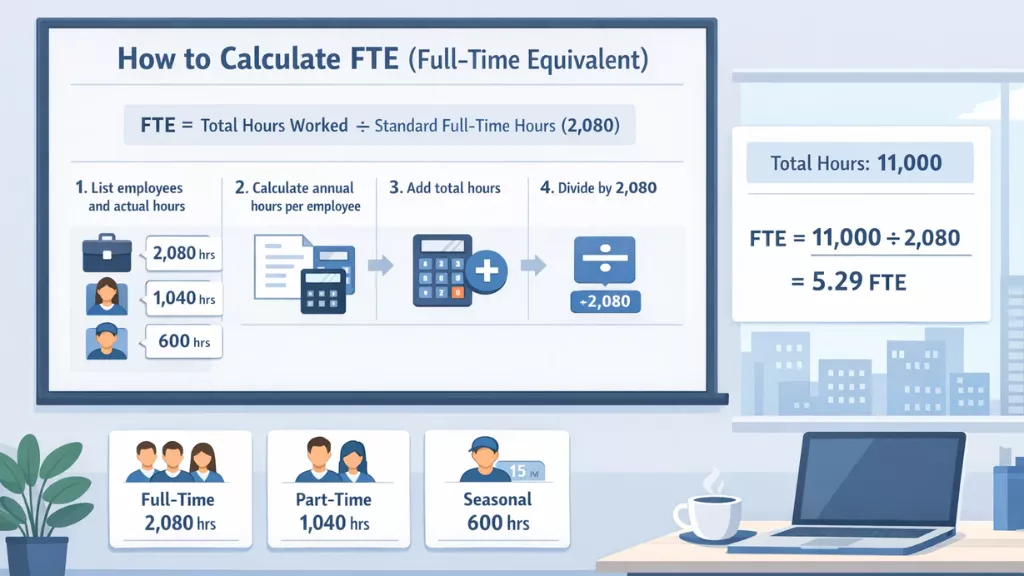
FTE = Total hours worked by all employees ÷ Standard full-time hours for the period
Before running any numbers, establish two things: who counts, and what “full-time” means at your organization. Most US-based companies use 40 hours per week, 2,080 hours annually (40 × 52). Whatever your standard is, it becomes the denominator in every calculation, so consistency matters.
You can perform this manually in a spreadsheet or use a time calculator to simplify hour aggregation and reduce the risk of arithmetic errors — especially when dealing with large or hybrid teams.
Step 1: List every employee and their actual hours. Include full-time, part-time, and anyone with a variable schedule. Document actual hours worked rather than scheduled hours. For remote and hybrid teams, this is where most errors happen — flexible schedules mean logged hours and scheduled hours regularly diverge, and FTE figures built on assumptions overstate real capacity.
Step 2: Calculate annual hours per employee. For full-timers: 40 × 52 = 2,080 hours each. For part-timers, multiply weekly hours by weeks worked. A part-timer at 20 hours/week for the full year logs 1,040 hours. A seasonal employee at 25 hours/week for 20 weeks logs 500 hours.
Step 3: Add all hours together. Sum the annual hours across every employee, full-time and part-time combined.
Step 4: Divide by your full-time hours baseline. Divide the total by 2,080 (or your organization’s equivalent). The result is your FTE count.
A Real Example
Say your hybrid team includes 4 full-timers at 40 hours/week (8,320 hours), 2 part-timers at 20 hours/week (2,080 hours), and 1 part-timer at 15 hours/week for 40 weeks (600 hours). Total: 11,000 hours.
FTE = 11,000 ÷ 2,080 = 5.29 FTE
You have seven people on your roster, but capacity equivalent to just over five full-time employees. That’s the number that should drive your planning decisions not seven.
How to Calculate FTE Hours for Different Business Needs
Knowing the formula is only half the equation, the other half is knowing when and why to apply it. Depending on whether you’re staffing a project, managing compliance, or building a budget, how to calculate FTE based on hours shifts slightly in both method and purpose. Here’s how it breaks down across the three most common business scenarios.
For Project Staffing
FTE tells you how much capacity a project requires before you start assigning people. If a project needs 800 hours of work over 10 weeks:
Required FTE = 800 ÷ (10 × 40) = 2.0 FTE
That could be two full-timers, four people at 0.5 FTE each, or any mix totaling 2.0. For hybrid teams where employees split time across multiple workstreams, calculating the FTE requirement first prevents overcommitting people who are already stretched.
For ACA Compliance
The ACA defines full-time as 30 hours per week — not 40. Count full-time employees (30+ hours/week) as 1.0 FTE each. For part-time employees, total their monthly hours and divide by 120 to get their FTE contribution for that month. If the combined total hits 50 or more FTEs across six or more months in the calendar year, your organization becomes an Applicable Large Employer with coverage obligations. Running this monthly rather than annually protects growing teams from crossing that threshold unexpectedly.
For Budget Forecasting
Finance teams use FTE to model labor costs without getting lost in individual salary lines. If your average cost per FTE is $75,000 annually and you plan to grow capacity by 2.5 FTE, that’s roughly $187,500 in additional labor, regardless of whether those hours are filled by full-timers or part-timers. It makes cross-department scenario modeling cleaner and more comparable.
Also Read
How Does An Employee Time Calculator Work?
7 Best Hybrid Team Building Activities For Your Workforce
Common FTE Mistakes Hybrid Teams Make
The most frequent error is an inconsistent baseline. If HR uses 40 hours and finance uses 37.5, every comparison will be slightly off. Pick a standard, document it, and apply it everywhere.
Confusing scheduled hours with actual hours is the other major issue, and it hits hybrid teams harder than anyone. Remote employees often have schedules that look standard on paper but vary considerably in practice. FTE figures built on assumed schedules routinely overstate capacity.
Teams also need to be deliberate about inclusion. Independent contractors not on payroll, unpaid interns, and non-salaried business owners are typically excluded from FTE calculations for compliance purposes, though the rules vary by framework. Applying the wrong criteria quietly distorts your results.
Finally, FTE and headcount are not the same metric. Headcount tells you how many people work for you. FTE tells you how much capacity you have. For remote and hybrid teams, those numbers often diverge, and that gap is where poor staffing decisions originate.
How EmpMonitor Helps You Take Action on What You’ve Tracked


EmpMonitor is a comprehensive employee monitoring and productivity platform built for teams that need clear, real-time visibility into how work is actually happening — whether your workforce is remote, hybrid, or in-office. Rather than relying on estimates or self-reported data, EmpMonitor gives managers accurate, automated insights that feed directly into better decisions.
Features Built for Workforce Visibility
Real-Time Monitoring- It gives you instant visibility into every employee’s active or idle status, app usage, and web activity — all from a single centralized dashboard, with no back-and-forth required.
Time Tracking- It captures every minute of working hours automatically, eliminating time gaps and giving you the precise data you need for accurate reporting and planning.
Screenshots & Screen Recordings – EmpMonitor deliver automated screenshots at customized intervals alongside recorded screen sessions, so you can review workflows, ensure compliance, and maintain full accountability without micromanaging.
Live Screen Monitoring – It lets you view all employee screens from one unified panel, improving oversight and workflow efficiency across the team.
Insightful Reports & Automated Timesheets – EmpMonitor turn raw activity data into graphic-rich analytical reports, making team performance reviews faster, more objective, and easier to act on.
Chat Monitoring – It tracks time spent on messaging and social apps during working hours, helping teams stay focused without needing constant check-ins.
With role-based access controls and work-hours-only monitoring, EmpMonitor keeps data collection transparent, compliant, and non-invasive — so your team can trust the process while you get the visibility you need.
Conclusion
FTE changes how you think about your workforce once you start using it properly. For remote and hybrid teams especially, it’s the most reliable way to understand real capacity rather than just headcount — and that difference matters far more than most teams realize until a project goes sideways or a compliance issue appears.
The calculation is straightforward: consistent baseline, accurate hours data, clear purpose. Get those three things right and the rest follows. What takes more deliberate effort is building the habit of using FTE as a primary planning lens rather than a compliance-only exercise.
The shift from counting people to measuring capacity is small on paper but meaningfully improves how you make decisions about hiring, project resourcing, and workload distribution. FTE doesn’t just improve your reporting — it makes the questions you ask about your team fundamentally more useful.
FAQs
-
Should paid time off be included when calculating FTE hours?
Yes, in most cases. Paid vacation, sick days, and holidays are typically included because you’re still compensating for that capacity even when the employee isn’t actively working. If you’re calculating FTE to assess productive output rather than labor cost, actual working hours may be more appropriate. Whichever approach you use, apply it consistently across the entire team.
-
How does FTE calculation work for contract or freelance workers?
Independent contractors are generally excluded from FTE calculations for compliance purposes like ACA reporting because they aren’t classified as employees under those frameworks. For internal project staffing, some organizations include contractors to get a more realistic capacity picture — just keep that figure separate from your employee FTE count to avoid confusion in formal reporting.
-
How often should a company recalculate its FTE?
Quarterly reviews are sufficient for general workforce planning. For ACA compliance, monthly tracking is smarter — the ACA looks at whether you hit 50 FTEs across six or more months in the year, a threshold that growing hybrid teams can approach faster than expected. Monthly calculations give you enough lead time to adjust before crossing a compliance threshold without warning.
-
Can a single employee ever be counted as more than 1.0 FTE?
In standard compliance and workforce planning frameworks, employees are capped at 1.0 FTE regardless of overtime hours. Counting anyone above 1.0 overstates capacity and distorts compliance figures. Some internal capacity models deliberately express heavy overtime above 1.0 FTE to flag unsustainable workloads — but this should always stay separate from formal FTE reporting used for regulatory or financial purposes.