Ensuring productivity is quite a challenge for every business, and many organizations struggle to maintain consistent output. However, if you want to keep your business productivity on track, you must focus on productivity metrics. These metrics help evaluate employee performance, review their work, and analyze production growth in a measurable form. Isn’t that amazing?
Today, reliable performance measurement is easier thanks to modern monitoring tools. Instead of depending on vague, manually created reports, technology makes it possible to capture accurate KPIs that help you monitor productivity effortlessly.
Listen To The Podcast Now!
What Are Productivity Metrics?
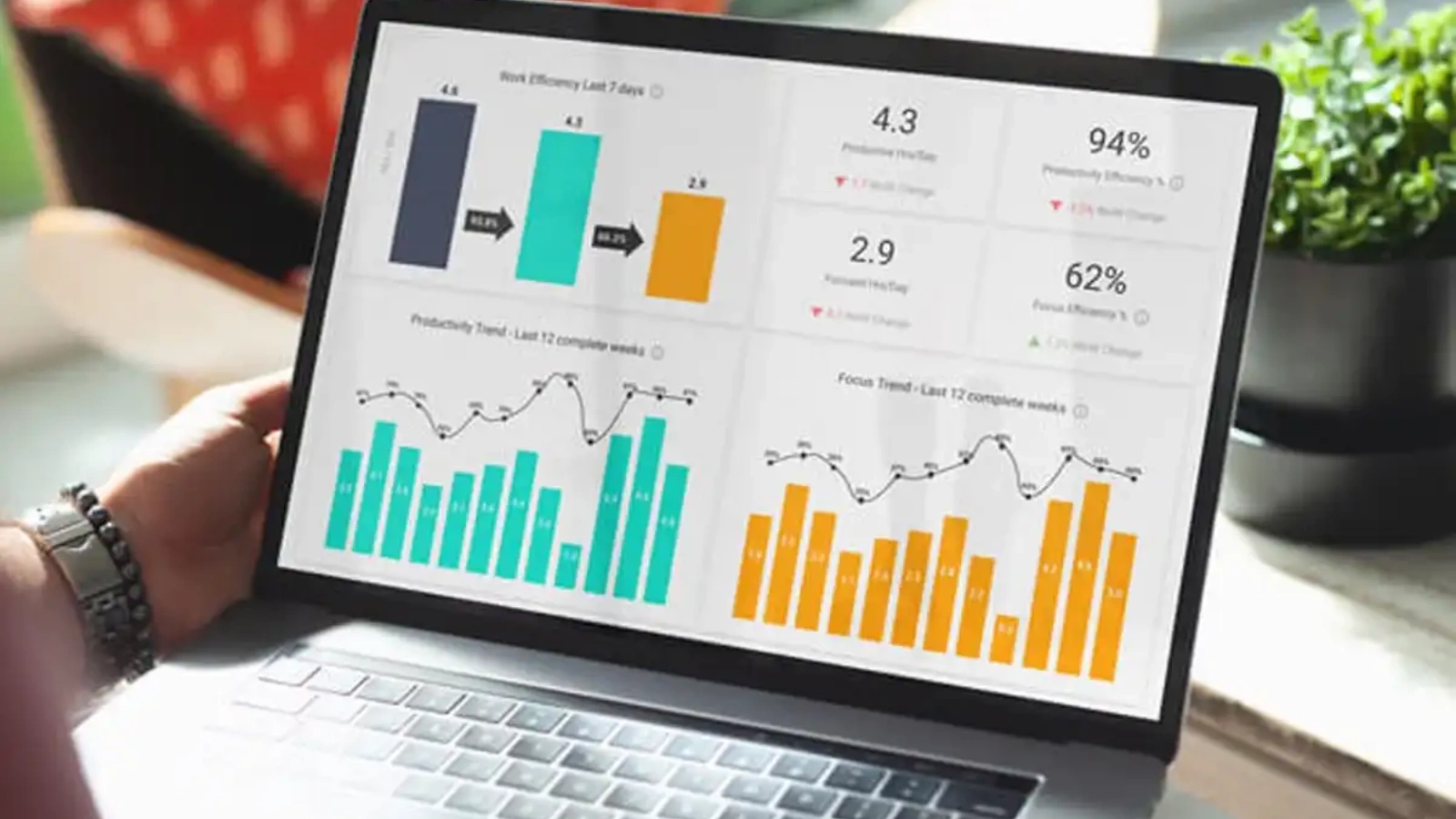

Productivity metrics represent employee productivity in numerical values. They highlight how efficiently employees perform tasks and where they can improve.
These metrics are influenced by various KPIs and organizational factors. For instance, HR professionals, managers, or support representatives can refine their decision-making when backed by accurate output data.
When employees know their activities are being tracked, they naturally focus more, avoid delays, and complete tasks on time.
Let’s dive deeper into productivity metrics and see how they benefit your business!
What Is The Importance Of Productivity Metrics?

Productivity metrics play a crucial role in strengthening team performance because they provide transparent, data-based insights rather than relying on assumptions. By continuously tracking work patterns, task completion rates, efficiency levels, and behavioral trends, organizations gain a clear picture of how employees contribute to overall goals.
These metrics not only help improve individual output but also assist leaders in building healthier, more organized workflows.
Here’s why they matter:
Provide structured and actionable feedback for employees:
Employees receive clear insights into where they excel and where improvements are needed. Instead of vague opinions, teams get focused guidance that can be used for personal growth, skill development, and performance refinement.
Highlight strengths, weaknesses, and improvement areas:
Productivity metrics reveal hidden talent, repeated bottlenecks, and areas requiring training. This helps managers assign responsibilities based on capability, improving team efficiency and job satisfaction.
Help managers evaluate work patterns and performance trends:
Over time, metrics show how workload, deadlines, and tasks are handled. Managers can identify peak productivity hours, recurring delays, and workflow blockers, then optimize processes or redistribute tasks to maintain balance.
Reduce assumptions and avoid biased decision-making:
Without data, performance reviews can become subjective. Metrics eliminate personal bias by presenting objective information, ensuring evaluations, promotions, and rewards are fair and transparent.
Support smarter planning with factual productivity data:
Organizations can use these insights to forecast project timelines, allocate resources, adjust workloads, and plan training initiatives. This leads to smarter decisions, predictable outcomes, and improved operational strategy.
Overall, productivity metrics create clarity, accountability, and consistency across the workplace, helping leaders make informed decisions while empowering employees to perform at their best.
In today’s digitally driven workflow, using the right tool makes this process seamless, and EmpMonitor is a prime example. It empowers companies to track employee performance in a clear, natural, and automated way.
With powerful capabilities such as:
- Real-time activity monitoring
- Screenshot capture for transparency
- Timesheet and attendance tracking
- Keystroke logs to analyze workflow behavior
EmpMonitor becomes especially advantageous for hybrid and remote teams.
Additionally, all productivity data is securely stored and can be reviewed anytime to:
- Identify top performers
- Analyze historical productivity trends
- Track application and website usage
- Sudy employee workload patterns
These insights help managers optimize skill development, assign tasks efficiently, and maintain balanced workloads across the team.
Also Read:
13 Essential Employee Productivity Metrics You Need To Know
5 Ways To Measure Employee Productivity With Examples

1. Get the Right Data:
To measure employee productivity accurately, relying on manual methods is no longer practical. Modern organizations use digital tools like EmpMonitor to gauge performance and track production trends more reliably.
The software helps monitor essential productivity and performance metrics in real time, ensuring fair analysis and better decision-making.
EmpMonitor allows you to track several important factors:
Work Hours:
This metric records the total duration employees spend at work from clock-in to clock-out. It helps determine attendance consistency, workload capacity, and whether employees are investing enough time to meet deadlines and project expectations. Work hours are a vital part of overall productivity metrics evaluation.
Productive Hours:
Productive hours indicate how much time employees spend actively completing assigned tasks and deliverables. It reflects output quality, task focus, and efficiency levels, helping managers identify who performs consistently within working hours.
Active Hours:
Active hours measure how long employees stay engaged on their devices, collaborating with teammates, attending meetings, responding to tasks, and participating in work-related activities. It highlights engagement levels and helps detect idle or unresponsive periods.
Task Assigned:
Through the project section, managers can assign tasks to individuals or groups, ensuring workload distribution remains balanced. It allows transparency on task ownership, prevents excessive workload on one employee, and supports smoother project execution.
Time Spent on Tasks:
For every assigned task, the system tracks total time taken until completion. Managers can check progress percentage, compare performance with expected timelines, and quickly detect delays or inefficiencies in workflow handling.
Productivity Reports:
These graphical, data-driven reports present employee activity trends, comparing individual and team productivity visually. They help identify top performers, spot bottlenecks, understand efficiency changes, and evaluate overall workforce output patterns.
Employee Behavior:
This feature alerts managers about any policy violations or suspicious activity in real time. It promotes accountability, reinforces workplace discipline, ensures ethical conduct, and helps maintain a secure and compliant work environment, indirectly influencing productivity metrics and employee performance outcomes.
Also Read:
How To Analyze Employee Productivity Report In 2025 + Things To Consider
2. Planned to Done Ratio:
The Planned to Done Ratio measures how much of the scheduled work is actually completed within a given period. It helps determine whether employees are meeting expectations or if tasks are consistently being pushed forward.
When too many activities are paused or delayed, workloads pile up, creating stress and inefficiency across the team. Without careful planning, employees may end up working overtime to meet deadlines, which can reduce productivity quality and increase labor costs over time.
Example:
If a team routinely receives more assignments than it can reasonably finish, tasks start accumulating and deadlines are missed. As the backlog grows, employees are pressured to work longer hours, leading to fatigue, slower performance, and higher payroll expenses.
Tracking this ratio allows managers to balance workloads, prioritize tasks sensibly, and help prevent employee burnout.
3. Per Employee Turnover Revenue:
This metric shows how much revenue each employee generates, helping assess individual performance impact and measure employee performance more accurately. It also gives managers clarity on workforce value and contribution, supporting better resource allocation and strategic planning.
Formula:
Per Employee Revenue = Overall Revenue ÷ Total Number of Employees
Higher revenue per employee generally indicates stronger productivity and optimized staffing.
4. Recruitment Conversion:
Recruitment Conversion measures how effectively your HR team turns qualified applicants into productive, long-term employees, often supported by AI recruiting software such as Microsoft Recruitment Software to speed up screening and improve candidate quality. It reflects the quality of hiring decisions and indicates whether the organization is bringing in talent that aligns with skill requirements, cultural fit, and performance expectations. A high conversion rate suggests that HR is selecting capable candidates who contribute consistently and stay with the company for longer periods.
As workloads increase, the speed and efficiency of the recruitment cycle become even more important. Delays in hiring force existing employees to absorb extra tasks, which can lead to stress, declining productivity, and missed deadlines. Poor recruitment efficiency can ultimately result in burnout, slow project progress, and higher turnover. Monitoring this metric helps ensure timely hiring, balanced workloads, and a healthier operational flow.
Also Read:
Why Tracking Productivity KPIs Is Essential For Employee Growth?
5. Customer Satisfaction:
Customer feedback reflects the quality of teamwork and service delivery. Satisfied customers are more likely to return with new projects, boosting business growth. Automated tools can be used to send surveys, collect ratings, and understand expectations better. Higher satisfaction scores indicate stronger performance and effective project management.
Having the right productivity metrics helps identify challenges, address workflow gaps, and set realistic benchmarks for growth.
You can explore EmpMonitor’s free trial to view detailed productivity and performance reports for your workforce.
Steps To Implement EmpMonitor In Your Organization

To start using EmpMonitor effectively, follow these structured steps to onboard employees, track productivity, and ensure seamless workflow monitoring.
Add Employees to the Dashboard:
Begin by opening the EmpMonitor dashboard and navigating to the employee section to add your workforce details. This creates a structured database for tracking user activity individually.
By assigning roles and departments, managers can filter data easily. It also helps when segmenting reports across multiple teams and tracking productivity KPIs.
Install the Monitoring Agent:
After adding employees, install the EmpMonitor client software on their systems. Once active, it automatically records attendance data, clock-ins, and productive hours. Managers can view idle time, active time, and work behavior without manual reporting. This eliminates discrepancies and helps maintain accountability.
Assign Tasks in the Project Module:
Navigate to the project section to allocate tasks based on skill sets and workload. Employers can set deadlines, attach descriptions, and monitor real-time progress.
The system updates task status as employees work, reducing confusion. This transparent workflow prevents bottlenecks and improves turnaround time.
Review Reports and Activity Data:
The reports section offers a detailed breakdown of user activity collected from the system. You can review browsing history, frequently visited websites, application usage, screenshots, and even keystroke patterns.
These insights reveal productivity patterns and potential distractions. It helps managers make data-driven decisions with accuracy.
Monitor Behavior with Alert Rules:
EmpMonitor’s behavior monitoring feature triggers alerts when employees break predefined policies. This includes accessing restricted websites, using unauthorized apps, or engaging in suspicious activity. Managers receive instant notifications to evaluate risk using real-time productivity metrics insights.
This system reinforces discipline and prevents internal threats proactively by ensuring every activity aligns with organizational policies and secure workflow standards.
Create Custom Policies:
Organizations can create new policies tailored to their industry and operations. Rules can be modified based on roles, departments, and security levels.
This ensures flexibility as work environments evolve. Custom policies allow managers to refine compliance without disturbing workflow.
End Words
Measuring employee productivity using the right metrics empowers organizations to make smarter decisions, streamline workflows, and maintain fair performance evaluations. These insights eliminate guesswork, allowing managers to identify challenges early, allocate resources efficiently, and support continuous improvement.
When productivity trends are monitored accurately, businesses can boost output, reduce burnout, and foster a healthier work culture.
To simplify this entire process, EmpMonitor provides real-time tracking, visual reports, behavior alerts, and workflow insights, all in a single dashboard. From time analysis to project tracking, it helps you evaluate employee performance with complete clarity and transparency. By adopting EmpMonitor, companies can optimize workloads, improve compliance, and enhance overall operational efficiency.
Start streamlining your productivity measurement today and unlock smarter workforce management with EmpMonitor.
FAQs
1. How often should employee productivity metrics be reviewed?
Productivity metrics should ideally be reviewed on a weekly or bi-weekly basis to monitor trends, workload balance, and early signs of inefficiency. Frequent reviews help managers take corrective actions before issues escalate. Monthly or quarterly assessments are useful for evaluating long-term growth, employee development, and goal alignment. The review frequency may vary based on work cycles, project intensity, and team size.
2. Can productivity metrics affect employee motivation?
Yes, productivity metrics can significantly influence motivation—positively or negatively. When used fairly, they create clear expectations, provide recognition for effort, and help employees track personal growth. However, if metrics are vague, excessively strict, or lack context, they can create pressure and demoralize teams. To maintain healthy motivation, organizations should combine metrics with constructive feedback, transparency, and realistic benchmarks.
3. Are productivity metrics suitable for creative or non-quantifiable roles?
Definitely. While creative roles may not produce consistent numeric outputs, productivity can be evaluated through delivery timelines, quality ratings, brainstorming participation, client satisfaction, milestone completion, and innovation contribution. Metrics can also focus on collaboration, research depth, revisions required, and idea impact. This ensures fair evaluation without limiting creativity.
4. What common mistakes should organizations avoid while measuring productivity?
Organizations should avoid using a “one-size-fits-all” measurement approach, as each role has unique responsibilities. Focusing only on activity hours instead of outcomes can misrepresent performance. Ignoring mental fatigue, work complexity, or resource limitations may lead to unrealistic expectations. Manual tracking errors and bias also affect accuracy. To prevent these issues, companies should use automated tools, standardized metrics, and contextual analysis.
5. How can organizations maintain employee privacy while using productivity tools?
Privacy can be maintained by clearly communicating what is being monitored, why it is monitored, and how the data will be used. Monitoring should be limited strictly to work-related activity, avoiding personal data collection. Compliance with organizational policies and legal regulations is essential. Providing employees access to their own activity reports builds transparency and trust. Role-based access controls further protect sensitive information.