Remote work has made one question unavoidable for managers: Is my team actually focused, or just present? Time tracking tells you when someone is at their desk. A genuine productivity monitoring tool needs to go further, capturing how that time is being used, whether attention is directed toward real work, and how to distinguish deep focus from surface-level activity. EmpMonitor and Crossover WorkSmart both position themselves as answers to that question, but they approach it very differently. EmpMonitor is a comprehensive activity-based platform that tracks applications, websites, keystrokes, and screen monitoring content to build a detailed picture of how work time is spent. WorkSmart is an AI-driven system built into the Crossover remote work platform that uses periodic snapshots and effort scoring to evaluate focus and output.
This comparison looks at both tools honestly, how they measure focus, where each approach has real strengths and genuine limitations, and which context makes each one the right fit.
Listen to the blog:
What Is a Productivity Monitoring Tool and Why Does Focus Tracking Matters
A productivity monitoring tool is software that tracks how employees spend their working time, recording application usage, website activity, active and idle periods, and, in some cases, screen content or input behavior. The goal is to give managers data-driven visibility into workforce performance that goes beyond simple attendance or hours logged.
The distinction between time tracking and focus tracking matters more than it might seem. Time tracking answers: how long was someone logged in? Focus tracking attempts to answer a harder question: during those hours, how much time was spent on meaningful work?
This distinction has become more important as remote work has revealed the limits of presence-based measurement. An employee can be technically online for nine hours while spending significant portions of time on non-work activities. Equally, a focused employee who produces excellent output in six concentrated hours shouldn’t be penalized by a system that equates screen time with productivity. An effective employee productivity monitoring tool should capture what’s actually happening, not just that something is happening.
Meet the Tools: EmpMonitor vs Crossover WorkSmart
EmpMonitor Overview
EmpMonitor is a standalone employee monitoring and workforce analytics platform used by over 15,000 companies across more than 100 countries. Deployable on any organization’s existing endpoint infrastructure, it collects activity data including application and URL usage, keystroke counts, screenshots, idle time detection, and productivity scores calculated against customizable role-based benchmarks.
It runs on Windows, Mac, and Linux, integrates with HR and payroll workflows, and includes features for attendance tracking, project management, and insider threat prevention. Pricing starts at approximately $3 to $5 per user per month, making it accessible for teams of most sizes without requiring a minimum commitment to a specific hiring platform.
Crossover WorkSmart Overview
Crossover WorkSmart is a monitoring system built specifically into the Crossover remote work platform, a talent marketplace connecting businesses with remote professionals primarily in software, finance, and professional services. WorkSmart is not a standalone product; it is a condition of working within the Crossover ecosystem. Contractors hired through Crossover have WorkSmart installed as a requirement, running continuously during paid work hours.
WorkSmart uses an AI-driven approach: every ten minutes, it captures snapshots of the employee’s screen, webcam, and active applications, then uses machine learning to generate an effort and focus score. This score validates that hours claimed are hours worked and provides performance improvement data to both contractors and hiring managers.
Feature Comparison: How Each Tool Tracks Time, Activity, and Focus
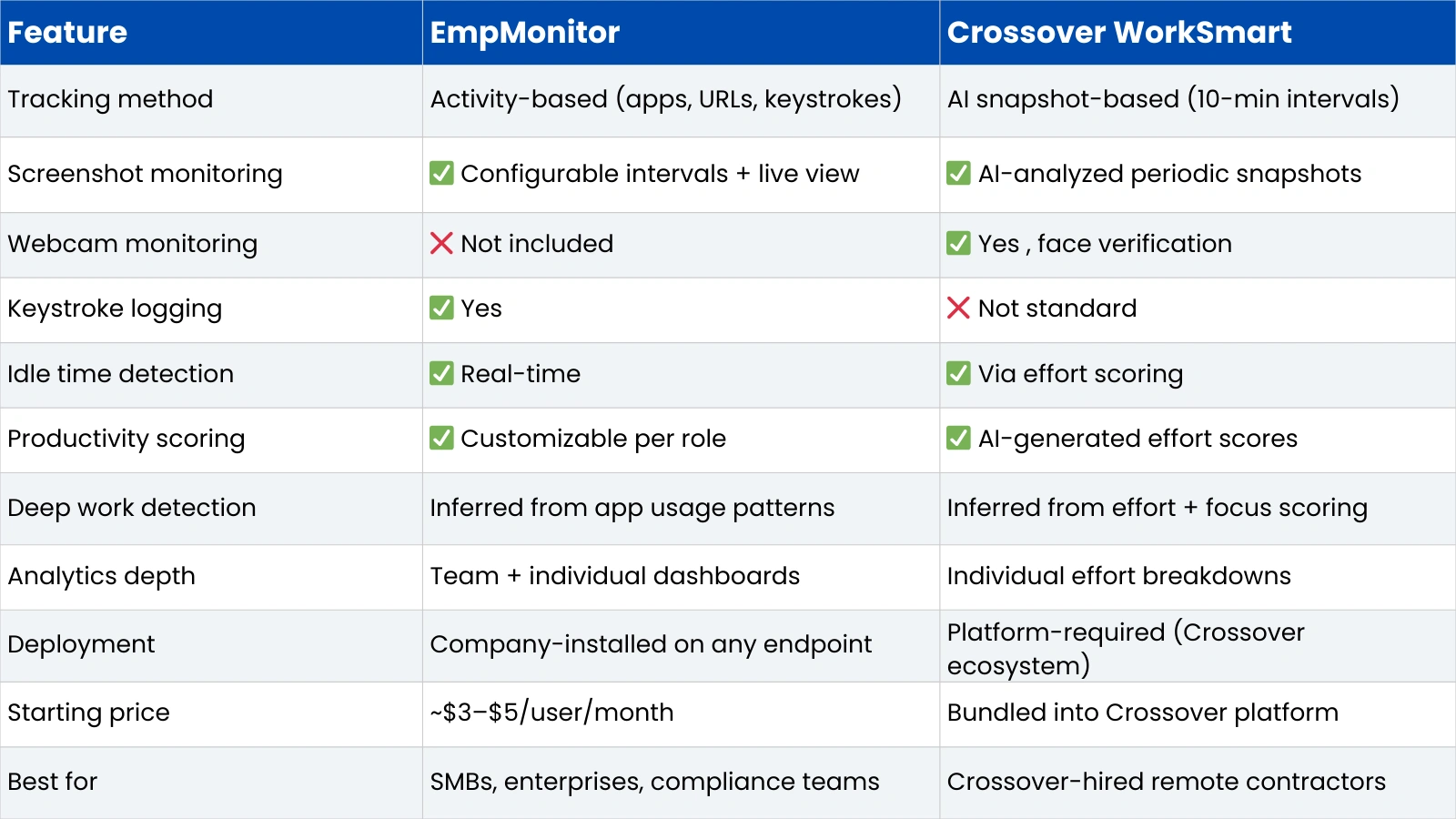
Here’s how the two platforms compare across the dimensions that matter most for productivity and focus tracking.

Activity Tracking and Time Logging
EmpMonitor’s activity tracking is granular and continuous. It logs every application used and website visited with time-on-task data for each. Idle time is detected in real time based on input inactivity, and the platform distinguishes between active work time, idle time, and unproductive time using customizable classification rules. This makes it a genuine time tracking and productivity monitoring tool in one, showing not just how long someone worked, but what they worked on.
WorkSmart’s time logging works differently. Because it’s tied to Crossover’s hourly billing model, it validates claimed hours through the 10-minute snapshot system. Active time is inferred from snapshot analysis rather than tracked continuously. If an employee claims eight hours, WorkSmart verifies that focus and activity were present across those intervals.
Focus Measurement and Productivity Scoring
EmpMonitor calculates productivity scores by classifying applications and websites as productive, unproductive, or neutral based on rules that administrators configure per role. A developer’s productive applications look different from a marketer’s, and the system accounts for that flexibility. The score reflects the proportion of active time spent on classified productive activity.
WorkSmart’s approach is AI-interpretive. Its algorithm analyzes each snapshot for evidence of focused work, whether the screen shows relevant work content, whether the employee appears present via webcam, and whether application usage suggests active engagement. The resulting effort score attempts to capture not just whether activity occurred, but whether it looked like genuine focused work.
Screenshot Monitoring and Visual Verification
Both tools use screenshots, but serve different purposes with them. EmpMonitor’s screenshots are captured at configurable intervals and stored for manager review, providing a record of what was on screen at a given time, useful for accountability and dispute resolution. A live screen viewing feature allows managers to check in on active sessions in real time.
WorkSmart’s snapshots are AI-analyzed rather than primarily manager-reviewed. The system processes each image for content relevance and focus signals, generating a score rather than simply archiving the image. WorkSmart also incorporates webcam snapshots to verify physical presence, a significant distinction from EmpMonitor, which does not include webcam monitoring.
Measuring Deep Work: What These Tools Can and Cannot Capture
Both tools face the same fundamental challenge: the most cognitively demanding work often produces the least visible surface activity. A developer thinking through an architecture problem, a writer planning a complex piece, or an analyst working through data mentally may appear idle by any input-based measure, no typing, no clicking, minimal application changes. This is the central limitation of digital monitoring as a proxy for intellectual work.
Activity-Based Monitoring and Thinking Time
EmpMonitor’s activity-based approach performs best when work naturally generates digital signals, writing, researching, communicating, coding, and designing. It is less reliable for tasks involving extended periods of thought without corresponding input. An employee who spends twenty minutes thinking before writing a high-quality analysis will register as idle during those twenty minutes, even though the thinking was the most valuable part of the process.
Administrators can configure which applications and activities count as productive for specific roles, which partially addresses this gap, but it doesn’t resolve the fundamental challenge of measuring cognition through observable behavior. This is a known limitation of activity-based monitoring generally, not specific to EmpMonitor.
AI Interpretation and Its Limits
WorkSmart’s AI scoring attempts to go further by interpreting the content of screen snapshots rather than just the presence of activity. In theory, this should be better at capturing whether real work is happening. In practice, the 10-minute snapshot model introduces its own gaps: a great deal can happen between snapshots, and a periodic image may not reflect the quality or depth of the work being done in between.
The webcam monitoring component is the most privacy-invasive aspect of WorkSmart. It verifies physical presence, but presence is not equivalent to focused engagement; an employee can be visibly present and distracted, and brief physical absence during a snapshot doesn’t mean work isn’t happening. WorkSmart’s design reflects its specific context: validating billable hours for contractors in a platform where trust needs to be established through verification rather than assumed.
Also Read!
Reporting and Analytics as a Productivity Monitoring and Analytics Tool
EmpMonitor Analytics Dashboard
EmpMonitor’s reporting covers individual and team productivity scores, application usage trends, active and idle time breakdowns, attendance records, and historical performance data. Reports can be generated at the individual, team, or organization level, and the dashboard supports real-time monitoring alongside historical trend analysis.
For organizations that need to identify patterns across large teams, consistently underperforming individuals, applications consuming disproportionate time, or productivity comparisons across departments, the analytics depth is one of EmpMonitor’s clearest strengths.
WorkSmart Performance Analytics
WorkSmart’s analytics focus on the individual worker’s effort and focus scores over time. Hiring managers can see aggregate effort data, identify peak productivity windows, and review the snapshot record for specific periods. An AI coaching layer provides workers with feedback about their own focus patterns, which is a differentiating feature; most monitoring tools offer no direct feedback to the monitored employee.
The analytics scope is narrower than EmpMonitor’s for organizational-level reporting, which reflects WorkSmart’s purpose: validating individual contractor performance within the Crossover ecosystem rather than providing workforce analytics across a large internal organization.
Use-Case Comparison: Choosing the Right Tool for Your Team
Remote and Hybrid Teams
For organizations building their own remote monitoring infrastructure, EmpMonitor is the more practical choice. It’s a standalone product deployable on any endpoint, with pricing that scales from small teams to large enterprises. Managers get continuous activity visibility, customizable productivity rules, and reporting that covers the full workforce.
Enterprises and Compliance-Driven Industries
EmpMonitor’s insider threat prevention, keystroke logging, USB device monitoring, and audit trail capabilities make it well-suited for regulated industries, financial services, healthcare, legal, and government contracting, where compliance documentation is required. WorkSmart has no equivalent compliance feature set, as it wasn’t designed for that use case.
Crossover Contractors and Freelancers
WorkSmart exists for one specific context: workers engaged through the Crossover platform. For that context, it does what it’s designed to do: validate that claimed hours reflect genuine focused work, with an AI layer that goes beyond simple activity tracking. If you’re working with or as a Crossover contractor, WorkSmart is not a choice; it’s a condition of the engagement.
Knowledge Workers and Deep Work Environments
Neither tool perfectly captures deep work. EmpMonitor’s customizable classification system gives more flexibility to define productivity per role. WorkSmart’s AI interpretation attempts to infer focus quality from visible signals. For knowledge-intensive teams where output quality matters more than hours logged, supplementing monitoring data with output-based metrics remains the most reliable management approach regardless of which tool is used.
Pros And Cons Summary
EmpMonitor
- Comprehensive feature set: time tracking, activity monitoring, screenshots, keystroke logging, and security tools in one platform
- Highly customizable productivity classification adapts to different roles and industries
- Standalone product, deployable by any organization on any endpoint without platform dependency
- Strong compliance and insider threat features for regulated industries
- Transparent, affordable pricing from ~$3/user/month
- Limitation: activity-based measurement has a known gap for cognitive work that doesn’t generate visible digital signals
- Limitation: no AI interpretation of screen content, records raw activity rather than inferred focus quality
Crossover WorkSmart
AI-driven effort scoring goes beyond raw activity to infer focus quality from snapshot content
The 10-minute snapshot model is specifically calibrated for validating contractor billable hours
Webcam monitoring provides physical presence verification not available in most alternatives
AI coaching feedback gives workers visibility into their own focus patterns
Limitation: not a standalone product, only available within the Crossover hiring ecosystem
Limitation: The snapshot-based model cannot capture what happens between 10-minute intervals
Limitation: webcam monitoring is among the more privacy-invasive approaches in the market
Pricing and Accessibility
EmpMonitor is openly priced and available to any organization. Plans start at approximately $3 to $5 per user per month, depending on team size, with annual billing reducing the per-user cost further. A free trial is available for teams that want to evaluate the platform before committing.
WorkSmart’s cost is not separately listed; it is bundled into Crossover’s platform structure, which is built around contractor hiring fees and engagement rates. For organizations already using Crossover, WorkSmart has no additional cost. For organizations outside the Crossover ecosystem, WorkSmart is simply not available as a purchasable product.
This access difference is itself a meaningful factor: EmpMonitor is a tool any employer can adopt independently; WorkSmart is a monitoring condition within a specific talent platform.
Final Verdict: Which Tool Tracks Focus More Accurately?
The honest answer is that both tools make meaningful trade-offs, and the right choice depends on context rather than a universal ranking.
On feature depth, organizational flexibility, and accessibility, EmpMonitor is the stronger platform for most businesses. It covers more ground, time tracking, activity monitoring, compliance, security, and workforce analytics, with customizable rules that adapt to how different roles actually work. For any organization building its own remote monitoring capability, it is the more practical and independently accessible choice.
WorkSmart’s AI-driven effort scoring represents a genuinely different approach to the focus measurement problem. Its attempt to interpret the content of work, not just its presence, is conceptually more sophisticated than activity-based scoring alone. But the 10-minute snapshot model, the webcam requirement, and the platform-locked access make it a solution for one specific context rather than a general-purpose productivity monitoring tool.
For the majority of businesses evaluating monitoring solutions for their remote or hybrid workforce, EmpMonitor’s combination of depth, flexibility, affordability, and standalone deployment makes it the more practical starting point. WorkSmart is a compelling and purpose-built system for exactly the context it was built for.
Frequently Asked Questions
What is the best productivity monitoring tool for remote teams?
For organizations building their own monitoring infrastructure, EmpMonitor is one of the strongest standalone options, combining time tracking, activity monitoring, analytics, and compliance features at an accessible price. WorkSmart is effective for its specific purpose but is only available within the Crossover hiring ecosystem.
How accurate are employee productivity monitoring tools?
Accuracy depends on what you’re measuring. Activity-based tools like EmpMonitor are highly accurate at recording which applications are used and for how long. AI-based tools like WorkSmart attempt to infer focus quality from snapshots, which is a harder problem. Neither fully captures deep cognitive work that doesn’t generate visible digital signals, the most complete picture of productivity combines monitoring data with output and results-based metrics.
Can productivity monitoring tools track deep work?
Not directly. Both activity-based and AI-snapshot tools have limitations with cognitive work that doesn’t produce continuous visible output, thinking, planning, and complex problem-solving. Activity-based tools will log these periods as idle; snapshot tools may score them poorly. Supplementing monitoring data with deliverable quality and task completion metrics remains the most reliable approach for knowledge-work environments.
EmpMonitor vs Crossover WorkSmart: which is better?
For most organizations, EmpMonitor is the more versatile and accessible choice, a standalone product with a comprehensive feature set that works across industries and team sizes. WorkSmart is the right fit for contractors and managers within the Crossover platform, specifically. If you’re operating within Crossover, WorkSmart is part of the engagement; if you’re not, EmpMonitor is the practical and independently deployable alternative.