


Most managers don’t set out to micromanage. It happens gradually — a missed deadline here, an unanswered message there — and before long, they’re checking in three times a day and second-guessing every decision their team makes. With remote work, the temptation is even stronger, because the usual signals that tell you “everything’s fine” simply aren’t there.
Over 12% of full-time employees now work fully remotely, and nearly 28% operate in a hybrid model. That’s a significant portion of the global workforce that managers can’t supervise traditionally. And yet, many still try — refreshing dashboards, sending “just checking in” messages, and treating every quiet afternoon as a red flag.
The irony is that micromanagement doesn’t fix the visibility problem. It just trades one problem — not knowing what your team is doing — for another: a team that resents being watched, stops taking initiative, and starts doing the bare minimum to avoid scrutiny.
So how do you manage remote employees effectively without sliding into control mode? That’s exactly what this guide covers — from building the right structure to using tools like EmpMonitor that give you real insight without the need for constant oversight.
Why The Micromanagement Trap Is So Easy To Fall Into


According to Survey of remote and international teams managing remote teams strips away the passive visibility that office environments provide. In person, you pick up information effortlessly — you see who looks stressed, whose head is down on something important, and who hasn’t left their desk in three hours. Remote work removes all of that.
What fills the gap, for a lot of managers, is anxiety. And anxiety, left unchecked, turns into micromanagement. The most common pain points that push remote managers toward over-control include:
- No visibility into whether people are actually working — or just appearing to.
- Communication gaps are caused by asynchronous messaging, time zone differences, and absent non-verbal cues.
- Difficulty holding people accountable without physical presence or direct oversight.
- Disengaged or isolated employees who don’t proactively communicate blockers.
- Fragmented team culture across different geographies, backgrounds, and work styles.
None of these are solved by watching more closely. They’re solved by building better systems — and that’s the shift this guide is designed to help you make.
How To Effectively Manage Remote Employees Without Hovering?
The antidote to micromanagement isn’t laissez-faire leadership — it’s structured autonomy. You give people clear frameworks to operate within and then trust them to do their jobs. Here’s what that looks like in practice.
1. Replace “Are You Working?” with Clear Expectations
Most micromanagement stems from unclear expectations. When nobody’s quite sure what success looks like, managers fill that uncertainty by monitoring activity instead. The fix is straightforward: define outcomes so clearly that activity tracking becomes irrelevant.
Set SMART goals — Specific, Measurable, Achievable, Relevant, and Time-bound — for every team member. Each person should know what they’re responsible for this week, what done looks like, and when it’s expected. Use project management platforms to break big initiatives into trackable milestones, so progress is visible without requiring a status call.
When your team knows exactly what’s expected, you stop needing to ask “what are you working on?” — because the answer is already documented.
2. Design Communication So It Runs Itself
A lot of the impulse to micromanage comes from information gaps. Managers ping their team repeatedly because they’re not getting updates — and employees don’t send updates because nobody told them how or when to. The answer is to build a communication structure that makes information flow automatically.
Decide which channel does what. Instant messaging via Slack or Microsoft Teams works for quick, low-stakes questions. Video calls through Zoom or Google Meet are better for alignment conversations, brainstorming, or anything emotionally nuanced. Email handles formal documentation. The moment people know which channel to use for what, communication friction drops significantly.
Set norms around availability too. When is it appropriate to message someone outside work hours? What’s the expected reply time for non-urgent messages? Answering these questions in advance prevents the ambiguity that makes managers feel like they need to follow up constantly.
3. Shift from Activity-Based to Outcome-Based Management
The single biggest mindset shift for remote managers is this: stop measuring presence and start measuring results. It doesn’t matter if someone logged on at 8:47 AM instead of 9:00 AM. It matters whether they delivered quality work by the agreed deadline.
This doesn’t mean going completely hands-off. It means having the right data. Tools that offer productivity insights, time tracking, and activity summaries — like EmpMonitor — give managers a meaningful picture of how work is happening without turning the workplace into a surveillance environment. The goal is informed leadership, not constant observation.
4. Make Employee Well-Being a Management Priority, Not an Afterthought
Micromanagement and burnout are closely linked. Employees who feel constantly monitored experience higher stress, lower motivation, and eventually disengage. Ironically, this produces exactly the drop in productivity that micromanagement was trying to prevent.
Build well-being into your management rhythm. Have one-on-ones that aren’t just task reviews — ask your team how they’re doing, what’s getting in their way, and whether their workload feels sustainable. Create space in team channels for non-work conversations. Run a virtual coffee chat or an informal Friday wrap-up. Small moments of human connection reduce the isolation that makes remote work feel grinding.
Also, encourage real boundaries. When work and home life share the same four walls, they blur. Nudge your team to log off on time, take actual lunch breaks, and not treat being constantly available as a sign of dedication.
5. Manage Time Zones Without Creating a Two-Tier Team
When your team spans multiple geographies, scheduling decisions quietly communicate who matters most. If the same people always take the early call and the same people always take the late one, resentment builds — and it tends to be invisible until it becomes a retention problem.
Rotate meeting times so the inconvenience is shared. Lean into asynchronous communication — recorded updates, written summaries, shared documents — so that people in different time zones can participate on their own schedule without missing critical information. The goal is a team where everyone feels equally included, regardless of where they log in from.
With the human side covered, let’s look at the technology that makes all of this possible without reverting to surveillance.
Also Read:
05 Unbelievable Ways You Can Manage Remote Employees Effectively
Managing Remote Workers: Best Practices And 9 Essential Tips
Tools To Manage Remote Employees: The Right Kit Makes All the Difference
Getting remote team management right requires more than good intentions — it takes the right infrastructure. The categories that matter most are communication, project tracking, and workforce visibility.
Communication and Collaboration Platforms
Tools like Microsoft Teams handle the day-to-day flow of remote communication — instant messaging, file sharing, channels by project or topic, and integrations with the rest of your stack. For video, Google Meet covers everything from quick check-ins to company-wide all-hands meetings.
The tool matters less than how you use it. A communication platform without clear norms is just a louder version of email chaos — messages pile up, important updates get buried, and people stop paying attention.
Project Management Tools
Project management platforms give managers a live view of task ownership, deadlines, and blockers — without needing to send a single “any updates?” message. When work is tracked and documented in a shared space, teams stay aligned naturally, and managers have the context they need to support rather than interrogate.
Employee Monitoring and Productivity Tools
This category tends to make people nervous — and understandably so. Employee monitoring tools have a reputation for enabling exactly the kind of intrusive oversight that drives good people away. But when implemented thoughtfully and transparently, they serve a completely different purpose: giving managers the insight they need to lead well, without having to hover.
EmpMonitor is built with that distinction in mind.
What Is EmpMonitor and How Does It Help Remote Managers Lead Without Micromanaging?


EmpMonitor is a comprehensive workforce management and employee monitoring platform designed for distributed teams. Its job is to give managers and HR teams meaningful visibility into how work is actually happening — attendance, productivity, app usage, time tracking — without creating a culture of suspicion.
Think of it as a management command center. Instead of piecing together a picture of your team’s health from five different sources, EmpMonitor consolidates it into one clean, intuitive dashboard — so you can make informed decisions rather than anxious ones.
Key Features That Support Smarter Remote Team Management
Time Tracking and Attendance Management
EmpMonitor automatically logs when employees start and stop working, tracks productive hours across shifts, and flags patterns that might indicate overwork or disengagement. For remote managers, this replaces the awkward question of “were you actually working this morning?” with objective data. It also feeds directly into payroll workflows, reducing manual errors and billing disputes.
Productivity Monitoring and App Usage Insights
EmpMonitor tracks which applications and websites employees use during work hours, categorizes them as productive or non-productive, and generates clear productivity scores over time. This isn’t about catching people off-task — it’s about understanding where attention drifts so managers can have supportive, data-backed conversations rather than accusatory ones.
Automated Screenshots
For teams working on sensitive projects or client-facing deliverables, EmpMonitor can capture periodic screenshots of employee screens during work hours. These are stored securely and accessible only to authorized managers and HR personnel — providing a visual record of activity when it genuinely matters, without crossing into round-the-clock surveillance.
Keystroke Logging
For organizations that require a deeper layer of activity verification, keystroke tracking captures typing activity during work sessions. It’s a useful signal for active engagement — confirming that employees are doing substantive work, not just keeping a cursor blinking to maintain an online status.
Live Dashboard and Real-Time Monitoring
EmpMonitor’s live dashboard gives managers a real-time view of who’s online, what they’re working on, and how team productivity looks right now. This is especially useful during sprint periods or when you need to assess capacity before assigning new tasks — decisions that used to require a meeting can now be made in seconds.
Geolocation Tracking
For field teams or employees working across multiple locations, EmpMonitor’s geolocation feature adds an extra layer of accountability. Managers can verify where team members are checking in from — useful for fieldwork coordination, client visit verification, and location-based compliance requirements.
Integration with HRMS and Other Platforms
EmpMonitor integrates with HRMS platforms to connect employee records, attendance logs, payroll systems, and performance tools in a seamless data flow. That means less time reconciling spreadsheets and more time actually managing people. Rather than pulling data from five disconnected systems, HR and management teams get a unified, accurate picture of the workforce in one place.
Security, Privacy, and the Ethics of Monitoring Remote Employees
Here’s the part that often gets skipped: no matter how good your monitoring tool is, how you introduce it to your team determines whether it builds trust or destroys it. To manage remote employees effectively, it’s crucial to be transparent from the start.
EmpMonitor’s monitoring functions apply only during designated work hours. Access to sensitive data — screenshots, keystroke logs, app usage — is restricted to authorized managers and HR personnel, with a clear audit trail of who accessed what and when. The platform is designed to support data protection compliance, not circumvent it.
But the ethical responsibility sits with you as a manager. Employees should know what’s being monitored, why, and how that data will be used. When you’re transparent about this upfront, monitoring stops being a source of anxiety and becomes what it’s meant to be: a neutral operational tool — like a timesheet, only far smarter. This approach allows you to manage remote employees with insight and trust rather than fear or suspicion.
Remote Team Management in the Age of AI and Hybrid Work
Managing remote employees isn’t a static problem. The landscape keeps shifting — and right now, two forces are changing it faster than most organizations can keep up with.
AI is starting to do for productivity analytics what GPS did for navigation — it takes raw, complex data and surfaces simple, actionable signals. AI-powered dashboards can flag dips in engagement, early signs of overwork, and patterns that a human manager scanning a spreadsheet would almost certainly miss. The best workforce management platforms are already building these capabilities in.
Hybrid teams introduce a different challenge: proximity bias. When some employees are in the office and others are remote, in-person workers tend to get more visibility, more informal recognition, and more opportunity — not because they deserve it more, but because they’re physically present. Objective performance data from tools like EmpMonitor is one of the most effective ways to counter this bias and ensure remote employees aren’t quietly disadvantaged.
The organizations that invest in the right infrastructure now — structured communication, clear accountability systems, and smart monitoring tools — will be far better positioned to manage remote employees effectively as the future of work keeps evolving.
Common Mistakes Remote Managers Make (And How To Avoid Them)
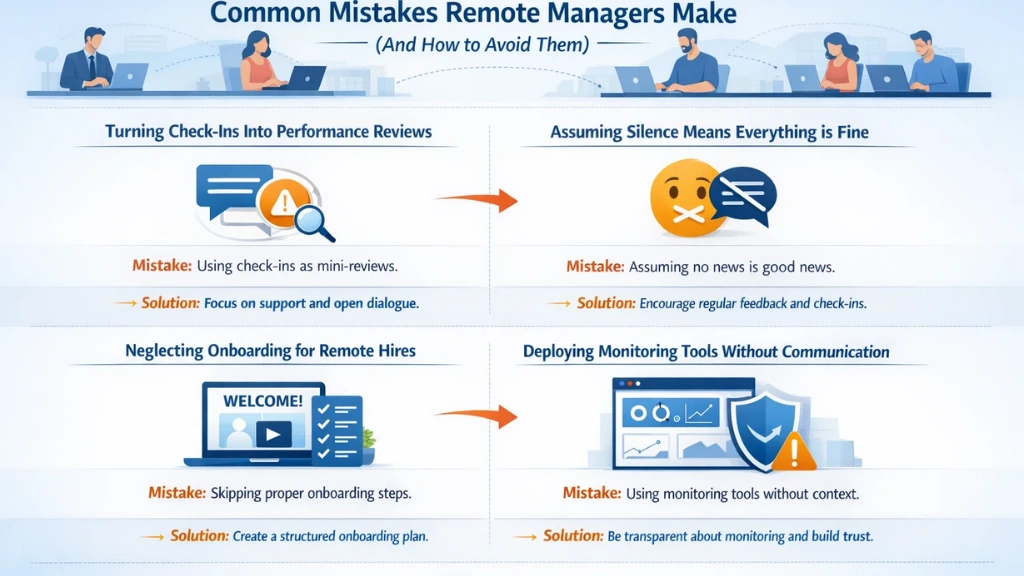
Even well-intentioned managers fall into predictable traps when leading distributed teams. Recognizing these patterns is the first step to breaking them.
- Turning check-ins into performance reviews. Regular calls should create space for connection and honest conversation — not interrogation. When employees dread one-on-ones, they stop being candid about what they actually need.
- Assuming silence means everything is fine. Remote employees rarely raise problems unprompted, especially in cultures that don’t actively encourage it. Building psychological safety means explicitly inviting difficult feedback and responding to it without defensiveness.
- Neglecting onboarding for remote hires. Without a structured onboarding experience, new remote employees spend their first weeks feeling directionless. A digital welcome kit, an assigned buddy, and structured introductions to key stakeholders make an enormous difference in how quickly someone gets up to speed.
- Deploying monitoring tools without communicating their purpose. This breeds suspicion and tanks morale faster than almost anything else. If you’re introducing EmpMonitor, be upfront — explain what data is collected, who can see it, and how it will be used to support your team, not penalize them.
Conclusion
The managers who lead remote teams most effectively aren’t the ones who watch the most — they’re the ones who build the best conditions for their teams to thrive independently. Clear expectations, thoughtful communication structures, genuine care for employee well-being, and tools that provide insight without creating anxiety: that’s the combination that works.
EmpMonitor sits at the intersection of accountability and trust. It gives remote managers the data they need to make confident decisions and support their teams meaningfully — without turning every workday into a performance audit.
Whether your team is fully remote, hybrid, or still figuring it out, the principle stays the same: structure creates freedom. And freedom, handled well, creates the kind of team that doesn’t need to be managed every minute — because they actually want to do great work.
FAQs
1. How can managers avoid micromanaging remote employees?
Managers can avoid micromanagement and effectively manage remote employees by setting clear expectations, focusing on outcomes rather than activity, and establishing structured communication. Using tools like EmpMonitor also helps managers manage remote employees by providing meaningful insights without constant oversight.
2. What role does EmpMonitor play in remote team management?
EmpMonitor helps managers manage remote employees by giving a comprehensive view of attendance, productivity, app usage, and time tracking. With accurate data, managers can confidently manage remote employees without creating a culture of surveillance or mistrust.
3. How can remote managers support employee well-being?
Managers who know how to manage remote employees effectively can prioritize well-being by scheduling regular one-on-ones that focus on challenges and workload, encouraging breaks and boundaries, fostering human connection, and using data to identify burnout risks early. This holistic approach ensures managers can manage remote employees with both accountability and empathy.
