


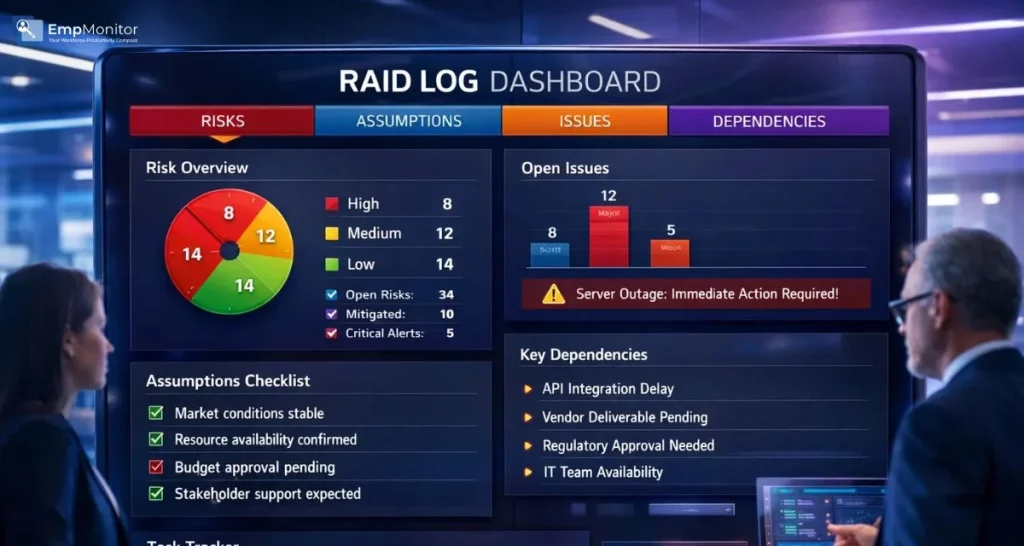
In project management, unexpected problems are rarely the result of bad luck. More often, they happen because risks weren’t identified early, assumptions went unchecked, issues weren’t tracked properly, or dependencies were overlooked. This is exactly where a RAID log becomes essential.
A RAID log is a simple but powerful tool that helps project managers stay in control by documenting and tracking risks, assumptions, issues, and dependencies in one central place. Instead of reacting to problems after they cause delays or cost overruns, teams can spot warning signs early and take action before things spiral.
Whether you’re managing a small internal project or a complex, multi-team initiative, using a RAID log improves clarity and accountability. It gives everyone from project managers to stakeholders a shared view of what could impact project success, what is already causing problems, and what needs close attention.
In this guide, we’ll break down the meaning of a RAID log in project management, explain how it works in real-world scenarios, and share practical tips to help you use it effectively. By the end, you’ll understand why this tool is a must-have for managing uncertainty and keeping projects on track.
What Is a RAID Log?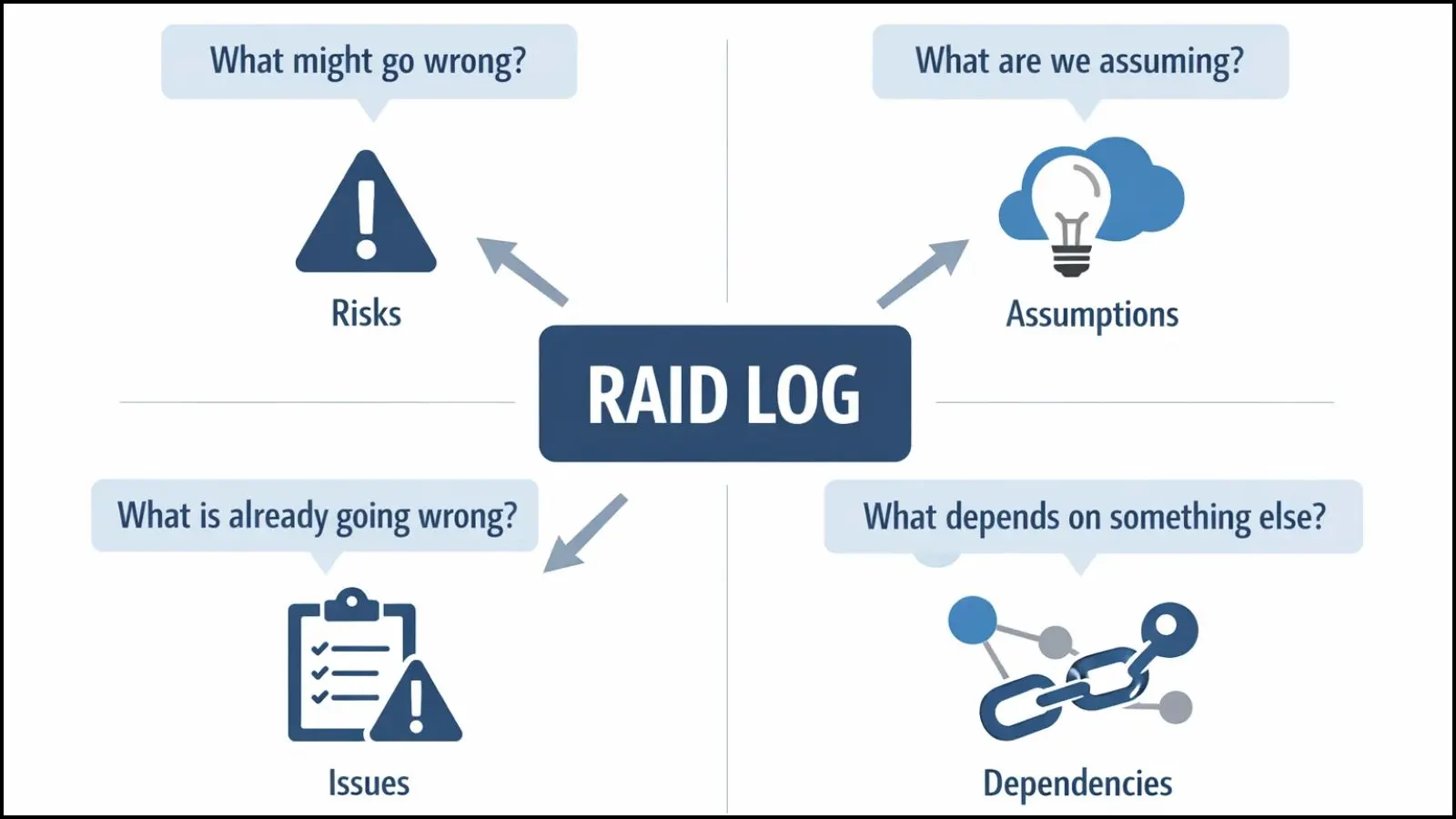

A RAID log is a structured project management document used to record and monitor four critical elements that can affect project success: Risks, Assumptions, Issues, and Dependencies. Instead of managing these items across emails, spreadsheets, or meeting notes, everything is captured in one centralized log.
In simple terms, a RAID log answers four key questions:
- What might go wrong? (Risks)
- What are we assuming to be true? (Assumptions)
- What is already going wrong? (Issues)
- What work depends on something else? (Dependencies)
The concept originated from traditional project management practices where visibility and control were essential for large, complex projects. Over time, the RAID log evolved into a practical tool used across industries from IT and construction to marketing and operations.
If you’re wondering what is a RAID log is really used for, the answer is clarity and control. It helps project managers anticipate problems, assign ownership, and track resolution in a disciplined way. Rather than relying on memory or informal updates, the log provides a factual, up-to-date view of project health.
Importantly, a RAID log is not a static document. It’s a living record that should be reviewed and updated throughout the project lifecycle. As risks turn into issues or assumptions prove incorrect, entries are updated to reflect the current reality of the project.
What Are RAID Logs Made Of? (RAID Breakdown)
To fully understand how a RAID log works, it’s important to break down its four core components. Each part of the log serves a specific purpose, helping project managers identify, track, and manage different types of project uncertainties.
Risks
Risks are potential events that may happen in the future and could negatively impact the project if they occur. These are not problems yet, but warning signs that need attention. Examples include resource shortages, budget overruns, or technical challenges. Logging risks early allows teams to plan mitigation strategies instead of scrambling later.
Assumptions
Assumptions are beliefs or conditions that are accepted as true without full proof. For example, assuming a vendor will deliver on time or a key team member will remain available throughout the project. Over time, these assumptions should be validated. When an assumption turns out to be wrong, it often becomes a risk or an issue.
Issues
Issues are problems that are already happening and are affecting project progress. Missed deadlines, unresolved bugs, or approval delays fall into this category. Capturing issues in the RAID log ensures they are visible, assigned to an owner, and actively tracked until resolution.
Dependencies
Dependencies refer to tasks or activities that rely on the completion of something else. For instance, development work may depend on finalized requirements, or testing may depend on code completion. Tracking dependencies helps teams understand sequencing and avoid bottlenecks.
Together, these four elements form the backbone of raid logs used in project management. By separating concerns into risks, assumptions, issues, and dependencies, project teams gain a clearer, more structured view of what can influence outcomes and timelines.
Importance of a RAID Log in Project Management
A RAID log plays a critical role in helping project managers maintain control, especially when projects become complex or involve multiple stakeholders. Without a structured way to track uncertainties and problems, important details can easily be missed, leading to delays, rework, or cost overruns.
One of the biggest benefits of using a RAID log is visibility. It provides a single source of truth where everyone can see current risks, open issues, key assumptions, and critical dependencies. This shared visibility reduces misunderstandings and ensures that potential problems are discussed early rather than discovered too late.
Another important advantage is accountability. Each item in the RAID log is typically assigned an owner, making it clear who is responsible for monitoring or resolving it. This prevents issues from being ignored or passed around without action. When ownership is clear, teams are more likely to follow through.
A RAID log also supports better decision-making. When project managers have a clear picture of what could go wrong and what is already causing trouble, they can prioritize tasks, allocate resources effectively, and make informed trade-offs. This is especially valuable during status meetings and stakeholder reviews.
Finally, the RAID log improves communication. Instead of relying on lengthy explanations or scattered updates, project managers can use the log to clearly explain project health. This structured approach builds confidence with stakeholders and helps keep the project aligned with its goals.
RAID Log vs Risk Register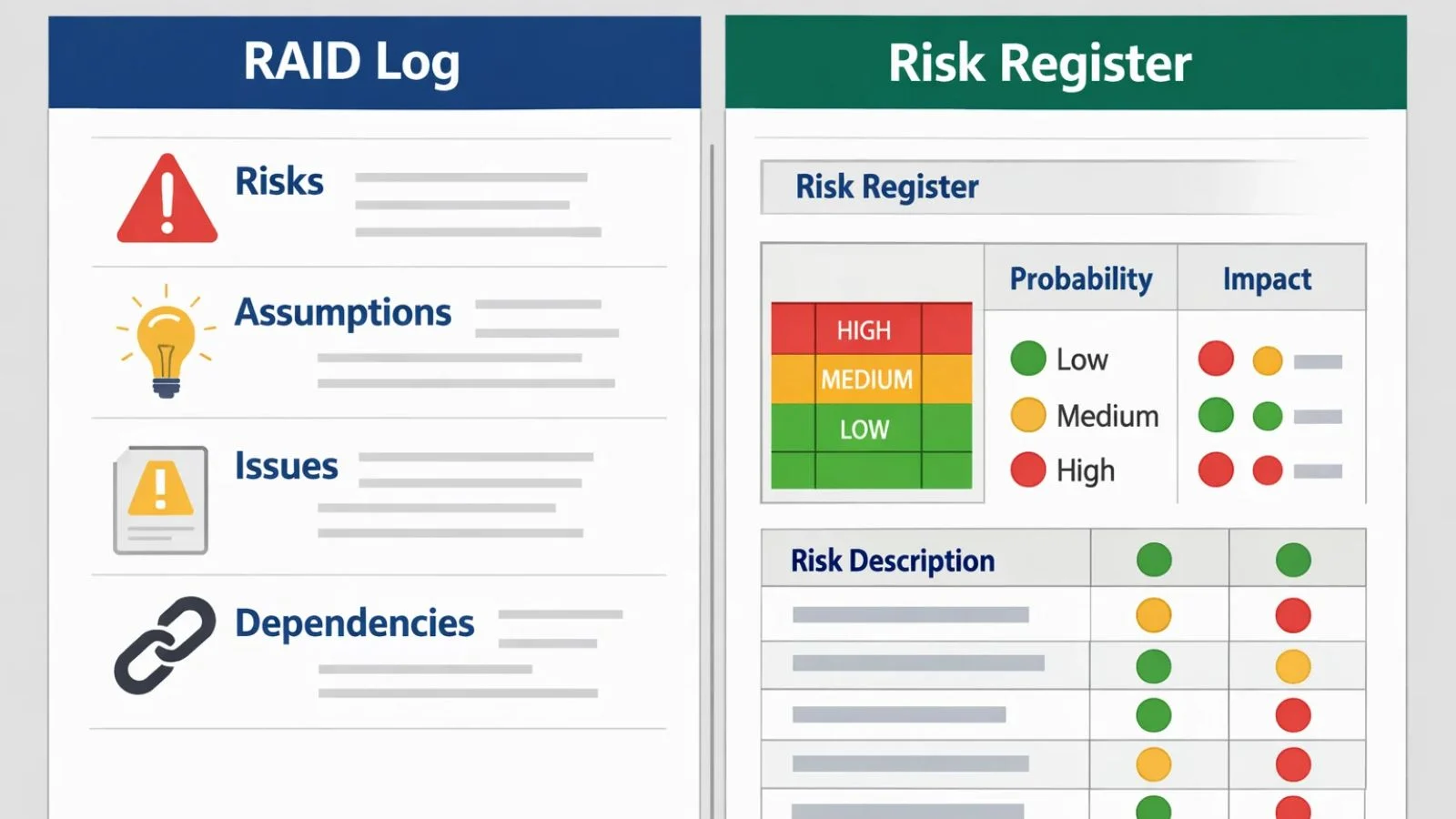
Many project managers wonder whether they need both a RAID log and a risk register, as the two can seem similar at first glance. While they do overlap in some areas, they serve different purposes and are often most effective when used together.
A risk register focuses only on risks—potential future events that could impact the project. It typically includes detailed assessments such as probability scores, impact ratings, mitigation plans, and contingency actions. Risk registers are especially useful for large or high-risk projects where deep risk analysis is required.
In contrast, a RAID log offers a broader view of project health. Along with risks, it captures assumptions, issues, and dependencies in one consolidated place. This makes it easier to understand how different factors interact and affect progress. Instead of looking at multiple documents, project managers can review one log during meetings.
Another key difference lies in usage. Risk registers are often maintained by project managers or risk specialists, while RAID logs are more collaborative. Team members can contribute updates, raise new issues, or flag changing assumptions as the project evolves.
In practice, many teams use a RAID log for day-to-day tracking and high-level reporting, while the risk register supports deeper analysis when needed. Understanding the difference helps teams choose the right tool without duplicating effort or missing critical information.
How a RAID Log Works in Real Projects?
In real-world projects, a RAID log is not just a document—it’s part of the project’s daily rhythm. It typically starts early in the planning phase, where initial risks, assumptions, and dependencies are identified. As the project moves forward, the log evolves to reflect what is actually happening on the ground.
During execution, team members and project managers regularly update the RAID log. New risks are added when uncertainties arise, assumptions are reviewed and validated, and issues are logged as soon as they occur. Dependencies are monitored closely to ensure that delays in one task don’t unexpectedly affect others.
Ownership is a key part of how a RAID log functions. Each entry is assigned to a responsible person who tracks progress, provides updates, and drives resolution. This makes the log actionable rather than just informational.
RAID logs are often reviewed during status meetings, sprint reviews, or steering committee discussions. Instead of vague updates, project managers can point to specific entries, explain their impact, and outline next steps. This structured review helps teams stay proactive and aligned.
Over time, the RAID log becomes a historical record of the project. It shows how risks were managed, how issues were resolved, and how assumptions changed. This information is extremely valuable for lessons learned and improving future projects.
How to Create a RAID Log Step by Step?
Creating a RAID log doesn’t require complex tools or advanced templates. What matters most is clarity, consistency, and regular updates. Here’s a simple step-by-step approach that works for most projects.
Step 1: Choose the Right Format
A RAID log can be created using a spreadsheet, project management software, or a shared document. The format should be easy for the team to access and update. Many teams start with a simple table and evolve it as the project grows.
Step 2: Define the Core Categories
Clearly label the four categories—Risks, Assumptions, Issues, and Dependencies. This ensures that entries are classified correctly and helps avoid confusion during reviews.
Step 3: Identify Initial Entries
During project planning, brainstorm potential risks, list key assumptions, and note major dependencies. At this stage, the focus is on capturing everything relevant rather than perfect wording.
Step 4: Assign Ownership
Every item in the RAID log should have a clear owner. This person is responsible for monitoring the item, updating its status, and taking action when needed. Ownership drives accountability.
Step 5: Set Priorities and Impact
Not all entries carry the same weight. Assess the impact and urgency of each item so the team knows what needs immediate attention and what can be monitored over time.
Step 6: Review and Update Regularly
A RAID log is only effective when it’s kept up to date. Schedule regular reviews—weekly or biweekly—to add new entries, close resolved items, and reassess priorities.
By following these steps, teams can build a practical RAID log that supports better planning, execution, and control throughout the project lifecycle.
RAID Log Example (Simple Table Explanation)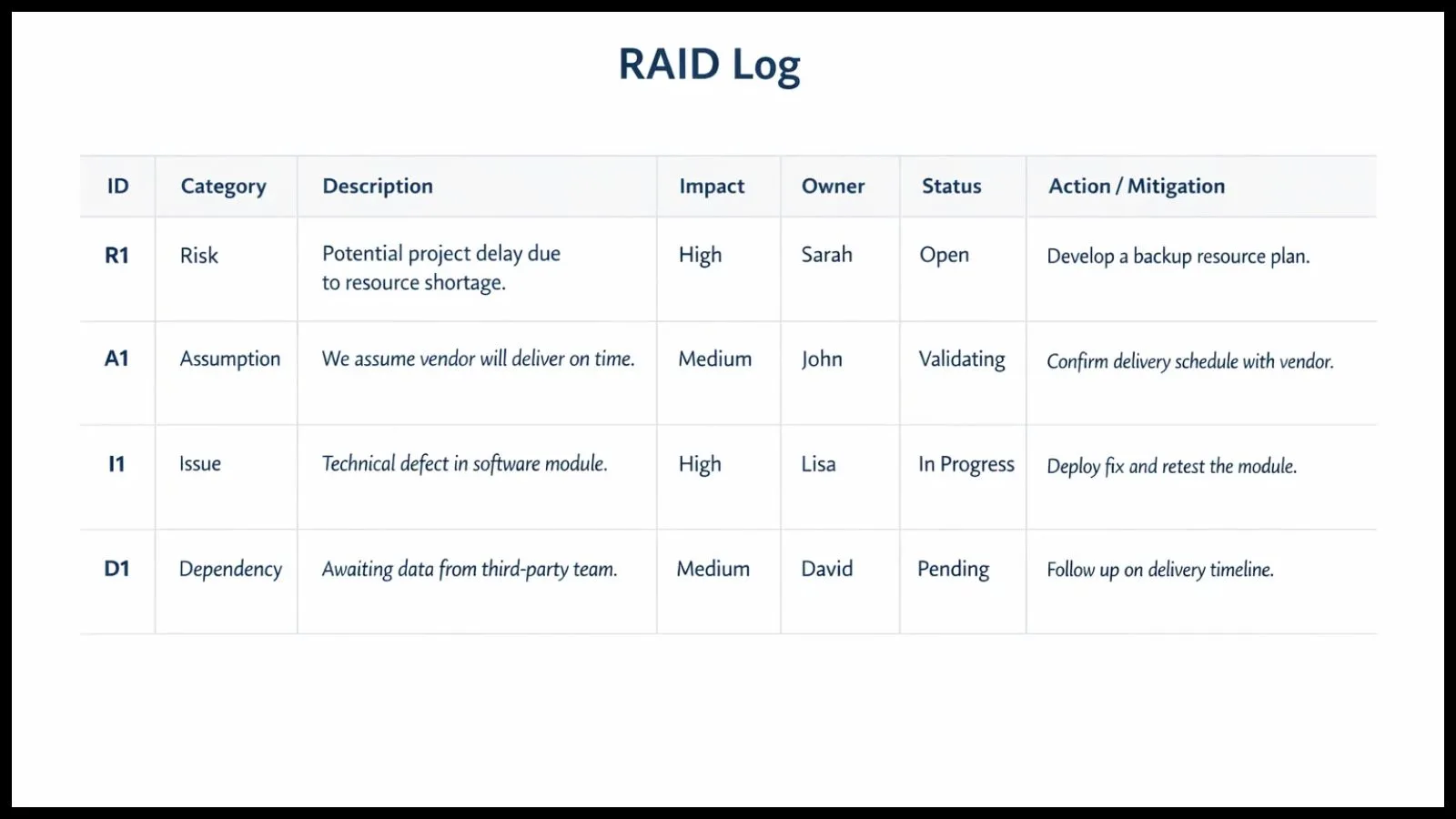
Seeing a RAID log in action makes it much easier to understand how it’s used in day-to-day project management. While formats may vary, most RAID logs follow a simple table structure that captures essential details at a glance.
Here’s how a typical RAID log might look conceptually:
- ID – A unique reference number for each entry
- Category – Risk, Assumption, Issue, or Dependency
- Description – Clear explanation of the item
- Impact – High, Medium, or Low effect on the project
- Owner – Person responsible for tracking or resolving it
- Status – Open, In Progress, or Closed
- Action/Mitigation – Steps being taken to manage the item
For example, a risk entry might describe the possibility of delayed vendor delivery, with a mitigation plan to identify backup suppliers. An issue entry could highlight a missed milestone, along with corrective actions and a revised timeline.
This simple structure helps teams quickly scan the log and understand project health. It also makes it easier to discuss updates during meetings, as everyone refers to the same information. Over time, entries are updated, closed, or reclassified as risks turn into issues or assumptions are validated.
Using clear, consistent entries ensures that raid logs remain practical tools rather than overwhelming lists. The goal is not to document everything, but to track what truly matters to project success.
Using EmpMonitor to Manage RAID Logs Better
Managing a RAID log becomes increasingly challenging as projects grow in size, timelines tighten, and teams work across locations. Spreadsheets and static documents can quickly become outdated, making it harder to track ownership, progress, and accountability. This is where a tool like EmpMonitor adds real value.
EmpMonitor helps project managers maintain visibility into team activity, task ownership, and progress—all of which directly support effective RAID log management. When risks or issues are logged, managers can quickly identify responsible team members, understand workload distribution, and ensure follow-ups happen on time.
One of the biggest advantages of using EmpMonitor alongside a RAID log is accountability. Since each RAID item has an owner, EmpMonitor’s activity tracking and reporting features help managers verify whether action plans are being worked on. This reduces the chances of unresolved issues lingering unnoticed.
EmpMonitor also supports better decision-making. By providing insights into productivity trends and task progress, it helps project managers assess the real impact of dependencies and delays. This allows teams to proactively address risks before they turn into serious issues.
Instead of treating the RAID log as a standalone document, integrating it with EmpMonitor turns it into a living, actionable management tool—one that aligns people, tasks, and outcomes more effectively.
Practical Tips to Get the Most Value from Your RAID Log
To truly benefit from a RAID log, it should be used as a decision-making tool rather than just a reporting document. One practical tip is to review the log before every major meeting. This ensures discussions are focused on what matters most and helps avoid last-minute surprises.
Another useful approach is to link actions to outcomes. When a risk mitigation plan or issue resolution is defined, track whether those actions actually reduce impact. Over time, this improves the quality of future entries and strengthens project planning.
It’s also helpful to revisit assumptions regularly. Many project challenges arise because assumptions are forgotten or never validated. Treat assumptions as temporary and confirm them as the project evolves.
Finally, encourage open communication. When team members feel comfortable raising concerns early, the RAID log becomes more accurate and valuable. A well-maintained log supports transparency, accountability, and smoother project execution.
Conclusion
A RAID log is one of the most practical tools in project management for handling uncertainty and maintaining control. By systematically tracking risks, assumptions, issues, and dependencies, teams gain better visibility, stronger accountability, and improved communication.
When used consistently—and supported by tools like EmpMonitor a RAID log becomes more than just a document. It turns into a reliable framework for proactive management, helping projects stay on track and teams deliver successful outcomes.
Also read,
FAQ’s
Who is responsible for maintaining a RAID log?
Typically, the project manager owns the RAID log, but team members contribute by identifying risks, reporting issues, and updating assigned items.
How often should a RAID log be updated?
Most teams update their RAID log weekly or during regular status meetings. High-risk projects may require more frequent reviews.
What are RAID logs used for?
RAID logs are used to improve planning, monitor ongoing challenges, and support informed decision-making. They help project managers stay proactive rather than reactive.