



You Worked Hard for That Paycheck. Do You Actually Know What’s In It?
You might be wondering, whats a paystub, and why does it matter so much? The answer becomes clear once you start reading it properly. A paystub looks simple at first glance, but it carries more information than most people realize. If you’re looking for a clear paystub definition, it’s essentially a document that breaks down your earnings, deductions, and final take-home pay.
Many employees glance at their net pay and move on. That habit often leads to confusion or even errors. Small business owners and freelancers face a different challenge. They need to create one that is accurate, compliant, and easy to understand.
So what exactly should you be looking for? And more importantly, how do you know if something is off?
This guide breaks down the five essential elements in a way that actually makes sense. By the end, you will not only understand each section but also know how to use that information to your advantage.
Read Aloud!
Gross Pay: The Number That Looks Better Than It Is

At the top of most layouts, you will find gross pay. It is the total amount you earned before any deductions are applied. This includes your base salary or hourly wages, along with overtime, bonuses, or commissions.
On paper, this number feels satisfying. It reflects the full value of your work during that pay period. But here is where many people get tripped up. Gross pay is not what you actually take home.
For example, imagine you earned $2,000 in two weeks. That figure appears clearly as gross pay. However, once taxes and other deductions are applied, your final amount will be significantly lower.
Understanding this gap matters. It helps you set realistic expectations for your income and prevents confusion when your bank deposit does not match your earnings.
If you are a freelancer or small business owner, gross pay becomes even more important. It is the foundation you use to calculate everything else when generating one for yourself or your team.
Let’s look at a quick paystub example. Imagine you earn $2,000 in gross pay, with $400 in taxes and $200 in benefits deducted. Your net pay would be $1,400. Seeing a simple paystub example like this makes the structure much easier to understand.
Tax Deductions: Why the Government Gets Paid Before You Do
This is often the most confusing section of a paystub. Tax deductions can feel unpredictable, especially if you are not familiar with how they work.
Typically, it will include several types of taxes. Federal income tax is the most common. Depending on your location, you may also see state or local taxes. Then there are payroll taxes like Social Security and Medicare.
Each of these deductions is calculated based on your earnings, filing status, and withholding selections. That is why two people with similar salaries can still see different tax amounts.
Here is where mistakes often happen. If your withholding information is outdated, you could be paying too much or too little in taxes. Both scenarios come with consequences. Overpaying reduces your immediate income, while underpaying may lead to a surprise bill later.
A quick review of this section can save you from long-term issues. If something feels off, it is worth checking your tax forms or speaking with your employer or accountant.
For freelancers creating their own paystub, this section requires extra care. You are responsible for estimating and setting aside taxes yourself, which adds another layer of complexity.
Voluntary Deductions: The Benefits You Chose – Now Itemized
Not all deductions are mandatory. Some are choices you made, often during onboarding or benefits enrollment.
These are known as voluntary deductions, and they usually appear clearly. Common examples include health insurance premiums, retirement contributions, and life insurance.
At first, these deductions can feel like a reduction in your paycheck. But they serve a purpose. They represent long-term investments in your health, security, and future.
Let’s say you contribute to a retirement plan. That amount is deducted each period. While it reduces your current income, it builds financial stability over time.
It is worth reviewing this section occasionally. People forget what they signed up for, especially if those decisions were made months or years ago.
For small business owners, listing voluntary deductions correctly on a paystub is critical. It shows transparency and helps employees understand the value of their benefits.
Net Pay: The Only Number Most People Look At (And Why That’s a Mistake)
Net pay is the final amount you receive after all deductions are applied. It is often called “take-home pay,” and it is usually the number people care about most.
You will find it clearly displayed, often highlighted, or placed at the bottom. It is the amount that gets deposited into your bank account.
While this number is important, focusing only on net pay can be misleading. It does not explain how you got there.
If your net pay suddenly changes, the reason will always be found in the sections above. That is why understanding the full breakdown matters. It gives you context, not just a final number.
Think of net pay as the result, not the story.
Year-to-Date Totals: Your Running Financial Scoreboard
This section is often overlooked, yet it provides valuable insight. Year-to-date totals, often abbreviated as YTD, show the cumulative amounts you have earned and paid in taxes so far this year.
On your paystub, you will typically see YTD figures for gross pay, taxes, and deductions. These numbers update with each pay period.
Why does this matter? It helps you track your financial progress over time. You can see how much you have earned, how much tax you have paid, and how your deductions add up.
This section is especially useful when planning for taxes or reviewing your annual income. Instead of waiting until the end of the year, you can monitor everything in real time.
Freelancers can benefit from this concept as well. Keeping a running total of income and taxes helps avoid surprises and supports better financial planning.
How to Actually Check Your Paystub for Errors (Most People Never Do This)
Most people assume it is correct. That assumption can lead to costly mistakes.
Start by comparing your gross pay with your expected earnings. If you worked a set number of hours or have a fixed salary, the numbers should align.
Next, review your tax deductions. Look for consistency across pay periods. Sudden changes without explanation are worth investigating.
Then, check your voluntary deductions. Are you still enrolled in everything listed? Have any amounts changed unexpectedly?
Finally, verify your net pay. If it feels lower than usual, trace the difference back through each section.
Here is a simple approach:
- Confirm your hours or salary
- Scan for unusual deductions
- Compare with your previous record
- Ask questions if anything looks unclear
This process takes only a few minutes but can prevent long-term issues. Errors do happen, and catching them early makes all the difference.
For Small Business Owners: How the Right Tool Makes Paystub Management Effortless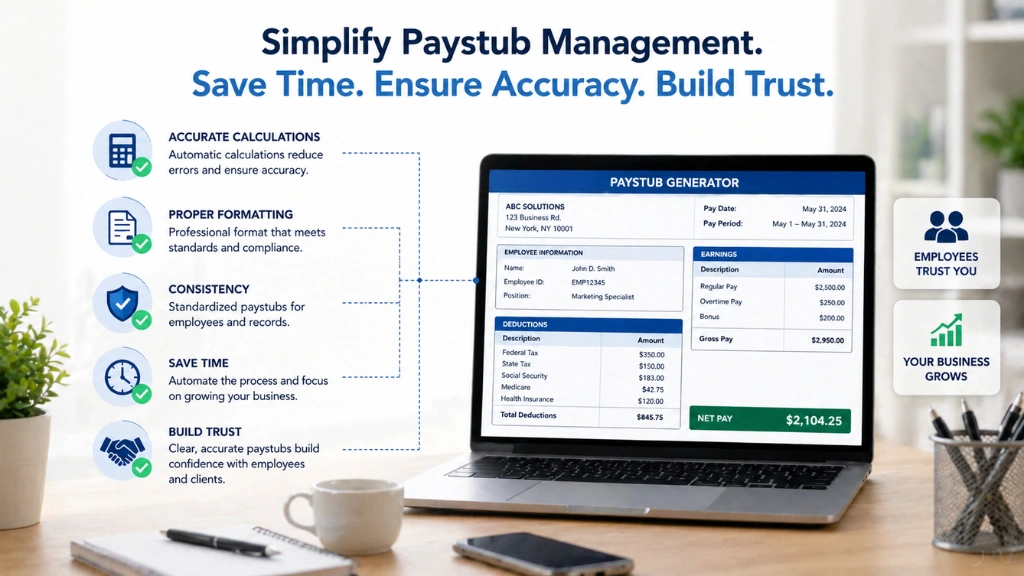
Creating one manually can be time-consuming and error-prone. Small mistakes in calculations or formatting can lead to confusion or compliance issues.
That is where the right tools come in. Payroll software and generators simplify the entire process. They calculate deductions, format information correctly, and ensure consistency.
For small business owners, this means less time spent on administrative tasks and more confidence in the accuracy of each record.
Freelancers can also benefit from these tools. Even if you are managing your own income, having a structured record helps with bookkeeping, taxes, and financial clarity.
The key is choosing a tool that balances simplicity with accuracy. A well-generated document not only saves time but also builds trust with employees or clients.
For Small Business Owners: How EmpMonitor Supports Accurate Payroll Data

Handling payroll becomes much easier when your underlying data is reliable. Many errors in a paystub don’t come from calculations. They start with incorrect work hours or missing activity records.
That’s where EmpMonitor fits in. While it is not a payroll or paystub generator, it plays a critical role in making sure the data behind your records is accurate.
Instead of guessing hours or relying on manual inputs, you get clear visibility into how time is actually spent. This makes your payroll process more precise and reduces the chances of disputes.
It is especially useful for remote teams, freelancers, or businesses managing multiple employees across different schedules.
Here are some core features of EmpMonitor that support payroll accuracy:
- Automatic time tracking to capture real working hours
- Employee activity monitoring for better productivity visibility
- Attendance tracking with login and logout records
- Detailed reports on work patterns and time usage
- Centralized dashboard to manage team data in one place
- Screenshots and activity logs for added transparency
- Performance insights to support fair compensation decisions
With accurate time and activity data, creating a correct paystub becomes much simpler. You are not relying on estimates. You are working with real, verifiable information.
That shift alone can save time, reduce errors, and build trust with your team.
The Paystub as a Financial Health Report Card (Most Employees Miss This)
A paystub is more than a payroll document. It is a snapshot of your financial habits and decisions.
Look at your deductions. Are you saving enough for retirement? Are your taxes aligned with your income? Are you relying too heavily on certain benefits?
These small details add up over time. By reviewing your paystub regularly, you gain insight into your financial health without needing complex tools.
It is a simple habit with long-term impact. A few minutes of attention can lead to better decisions and greater confidence in your finances.
Read More!
Your Paystub Is Trying to Tell You Something – It’s Time to Listen
Your document is more than a summary of your paycheck. It is a detailed record of how your money moves, where it goes, and why it changes.
Once you understand its structure, you gain control. You can spot errors, plan better, and make informed financial decisions.
The next time you receive it, take a closer look. There is more insight there than you might expect.
FAQs
What is a paystub used for?
A document like this is used to show how your earnings are calculated, including gross pay, deductions, and net pay. It also serves as proof of income.
Can I create my own?
Yes, freelancers and small business owners can use a generator or payroll software to create accurate documents.
Why does it look different each time?
Changes in hours worked, bonuses, or deductions can cause variations from one period to another.
What should I do if it is wrong?
Report the issue to your employer or payroll provider immediately. Provide details and compare them with previous records.
Do I need to keep these records?
Yes, keeping them is helpful for taxes, loan applications, and financial tracking.