


In theory, managing freelancers or remote teams should be quite easy as long as you aren’t faced with any questions like: are your projects on time? Is the way you’re tracking hours accurate? And, does your entire team have approximately the same amount of productivity?
That’s where tracking tools step in. But choosing the right one isn’t just about features on a pricing page. It’s about trust, visibility, fairness, and making sure your team feels supported not micromanaged.
An evaluation of Monitask vs. EmpMonitor goes further than just timekeeping. Both programs have been created to allow businesses to check work hours, monitor activities and create actionable insights regarding performance. Yet, these applications will perform differently with respect to how they monitor activities and report on them, how they are priced, and how they can be scaled in order to provide value for your company’s structure.
In this blog, we will explore the two solutions in a factual, objective manner using reliable sources and will refrain from using any type of hype or assumption about either of their services; thus, allowing you to make an informed decision as to which freelance and remote team tool complements your ongoing operational processes, team culture and larger company objectives.
Listen To The Podcast
Overview: Monitask vs. EmpMonitor

Before we dive into the details, let’s briefly introduce both tools.
Monitask
Monitask is a time tracking and employee monitoring solution focused on simplicity and transparency. It’s built to help teams and freelancers automatically track hours, capture screenshots, and measure app and web usage. Monitask is known for straightforward monitoring tools suitable for remote and distributed teams.
EmpMonitor
EmpMonitor is a wider workforce productivity and monitoring platform with tools designed for time tracking, activity monitoring, attendance management, productivity analysis, reports, and security features like data loss prevention. It aims to serve organizations of various sizes from small teams to large enterprises by offering detailed insights into work habits and performance.
Monitask vs. EmpMonitor Pricing Comparison
Pricing can be a deal-maker for freelancers and small teams.
Monitask Pricing
Monitask offers tiered pricing based on features and team size, starting around:
- Pro: About $6.49 per user/month
- Business: Around $8.99 per user/month
- Business Premium: About $12.99 per user/month
- Enterprise: Custom pricing for larger organizations
Plans differ in integrations, reporting depth, team management features, and storage retention durations. It also offers optional screenshot add-ons and a free trial.
EmpMonitor Pricing
EmpMonitor breaks pricing into tiers based on how many users you have:
- Bronze: Around $4.66 per user/month (up to 10 users)
- Silver: About $3.83 per user/month (11–50 users)
- Gold: Around $3 per user/month (51–200 users)
- Diamond: Custom quote for 200+ users
Each plan includes comprehensive features such as automatic time tracking, screenshots, idle time tracking, app and URL monitoring, keystroke logging, custom reports, alerts, and personalized onboarding at no extra cost.
Monitask vs. EmpMonitor:Who Wins on Price?
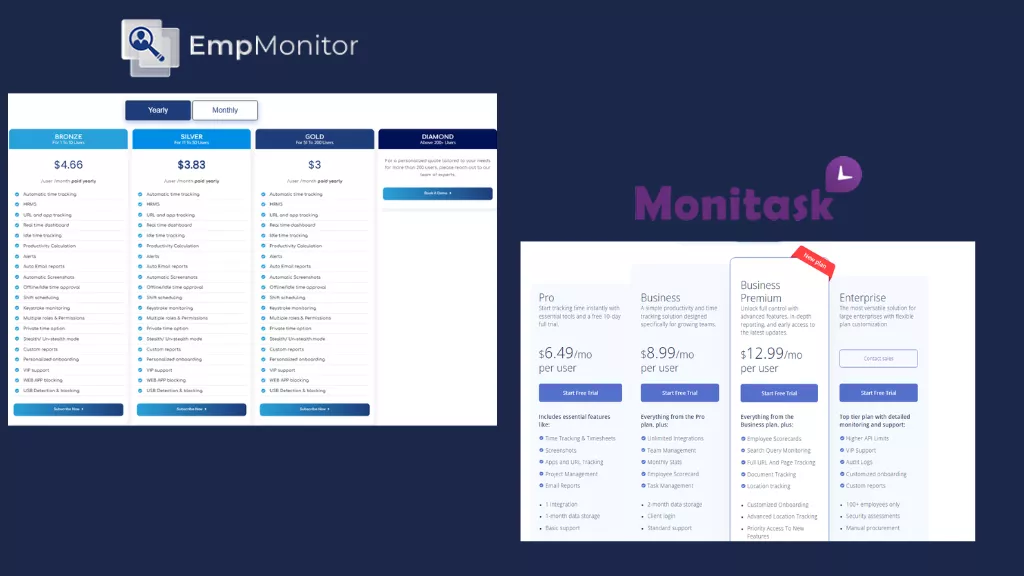
If your priority is raw cost per user, EmpMonitor is typically more affordable, especially as your team grows. Its most feature-rich plans tend to sit below Monitask’s equivalent tiers. However, cost alone isn’t everything, features matter too.
Monitask vs. EmpMonitor: Time Tracking and Timesheets
Both tools deliver accurate time tracking, an essential function for freelancers and remote teams.
Monitask Time Tracking
Monitask lets users manually start and stop time tracking, removing the need for manual timesheets. It captures real worked hours and ties them to projects and tasks.
EmpMonitor Time Tracking
EmpMonitor similarly offers automatic time tracking, capturing work hours with active and idle time tracking. It logs precise work time and ties employee productivity tracking metrics back to projects and individual performance.
Verdict
Both do time tracking well. EmpMonitor’s offering is slightly more robust due to integrated idle time tracking reminders and automatic reports included even on basic plans.
Monitask vs. EmpMonitor: Screenshots and Activity Monitoring
Screenshots are often a point of debate, especially for freelancers who care about privacy.
Monitask Screenshots
Monitask takes screenshots at configured intervals while time tracking is active, giving managers visual proof of work in progress. Importantly, screenshots only upload while the user is clocked in, and employees can see when monitoring starts and stops.
EmpMonitor Screenshots and Monitoring
EmpMonitor also captures screenshots automatically and supports configurable intervals. It goes further with activity tracking, including app and URL usage, browser history, widget behavior, productivity calculation, and idle time analysis. Also, EmpMonitor has a screen casting feature that allows you to keep track of urgent projects, monitoring them live.
Verdict
EmpMonitor’s suite of monitoring data screenshots, keystroke and idle tracking, app/website usage, and productivity calculations tends to provide a more complete picture of remote work behavior.
Monitask vs. EmpMonitor: Productivity Analytics & Reporting
Getting raw data is good, understanding it is great.
Monitask Reports
Monitask can generate reports on time worked, apps and websites used, project hours, and summary statistics. It also supports custom reports to better visualize team performance over time.
EmpMonitor Reports
EmpMonitor includes advanced reporting ranging from attendance and productivity charts to custom insights tailored to your business goals. Auto email reports help managers receive regular performance summaries without logging into dashboards constantly.
Verdict
Both tools provide strong reporting, but EmpMonitor’s deeper analytics and automated reporting capabilities give it a slight edge for teams that want actionable insights rather than raw stats.
Additional Workforce Management Tools
Beyond basic time tracking and screenshots, EmpMonitor bundles more workforce management features into its core offering.
EmpMonitor Extras
EmpMonitor offers several advanced capabilities that go beyond what Monitask is primarily designed for, including:
- Attendance tracking
- HRMS integration
- Alerts & notifications
- Shift scheduling
- Stealth mode
- Web and app blocking
- USB detection / security monitoring
These features support broader workforce management and security use cases not just tracking time.
Monitask Focused Approach
Monitask keeps a tighter focus on time tracking, screenshots, and project hours. While it’s solid at what it does, it doesn’t bundle as many workforce-wide management tools as part of the core product.
Verdict
If you want just time tracking and monitoring, Monitask is straightforward. But for teams that want fuller workforce management without adding extra tools, EmpMonitor goes further out of the box.
Monitask vs. EmpMonitor: Ease of Use and Support
User experience matters.
Monitask Ease of Use
Users consistently report that Monitask is easy to set up and understand, with a clean interface that keeps onboarding friction low. It’s designed to be intuitive even for non-technical users.
EmpMonitor Interface and Support
EmpMonitor also focuses on usability with guided onboarding and personalized support. It provides 24/7 customer assistance, VIP support on higher plans, and assistance with deployment.
Verdict
Both tools are approachable, but EmpMonitor’s personalized onboarding support helps ensure teams get up and running quickly even with its broader feature set.
Monitask vs. EmpMonitor: Privacy and Transparency
Monitoring software naturally raises questions about privacy especially when working with freelancers or distributed teams. Clear communication and visible tracking controls play an important role in maintaining trust.
Monitask – It follows a time-based tracking approach where screenshots and activity monitoring occur while the timer is running. Team members can see when tracking is active, which helps reinforce transparency around when data is being collected.
EmpMonitor- It provides configurable monitoring settings that allow organizations to define how tracking is implemented based on company policies. It offers detailed activity insights while giving businesses flexibility to structure monitoring in a way that aligns with internal compliance and communication standards.
For freelancers and contractors in particular, clarity around what is tracked and during which working hours is essential. Both platforms support transparent monitoring practices, and the overall experience will largely depend on how organizations configure settings and communicate expectations with their teams.
Monitask vs. EmpMonitor: Who Should Use Which Tool?
Choose Monitask If You Want:
- A simple, focused tool for time tracking and screenshots.
- A user-friendly system with minimal setup.
- Transparent tracking where employees control when monitoring starts/stops.
Choose EmpMonitor If You Want:
- Comprehensive workforce management tools in addition to time tracking.
- Detailed productivity insights and automated reporting.
- More affordable pricing at scale with robust monitoring features included.
- Features beyond tracking—like shift scheduling, HRMS, and advanced alerts.
Final Thoughts
Overall, it’s not easy to determine an ideal solution when comparing Monitask vs. EmpMonitor however if you are looking at these products strictly from a perspective of supporting freelance work/remotely based employees they both provide very reliable tools that track hours and work performed. For small teams/freelancers Monitask typically offers more transparency and ease of use because it has fewer features. If you need total workforce productivity management with ability to grow with your business then EmpMonitor has those qualities without resorting to false advertising or making claims that could be construed as hype.
In short:
- For straightforward time and activity tracking, Monitask gets the job done well.
- For holistic workforce productivity management that scales, EmpMonitor stands out, without exaggeration or false claims.
