


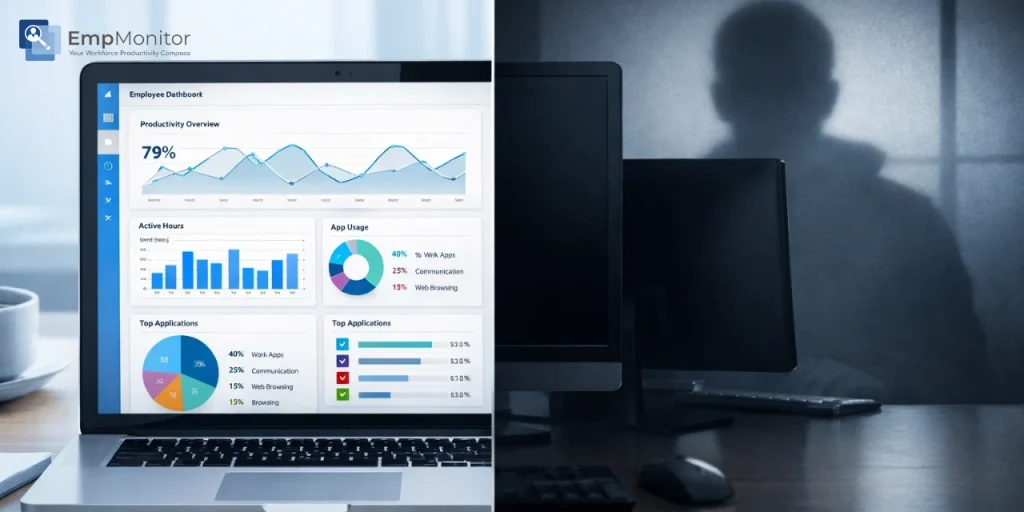
If you have recently discovered ActivTrak running on your work computer, you are probably asking a reasonable question: Is this spyware? The concern is understandable. Remote monitoring software has expanded rapidly since 2020, and the line between legitimate workforce analytics and invasive digital surveillance is not always obvious to employees on the receiving end.
This article examines exactly what ActivTrak does, what it does not do, how it compares to actual spyware under both a technical and legal definition, and where the real limitations of the platform lie, including why some organizations ultimately choose a more comprehensive alternative like EmpMonitor.
🎧 Listen to the blog:
What Is ActivTrak? A Quick Overview Of the Workforce Analytics Platform
ActivTrak is a cloud-based workforce analytics and productivity management platform founded in 2012 and headquartered in Austin, Texas. It is used by more than 9,500 organizations globally, spanning industries from professional services and healthcare to retail and financial services.
Unlike traditional employee monitoring tools that focus primarily on surveillance, ActivTrak positions itself as an analytics-first platform. Its core value proposition is transforming work activity data into actionable productivity insights, helping managers understand how time is spent, identify workflow bottlenecks, and support employee wellbeing through burnout detection and workload balancing.
The platform is designed for remote, hybrid, and office-based teams and is typically deployed by HR leaders, operations managers, and IT administrators who need visibility into workforce productivity without building a culture of micromanagement.
How ActivTrak Works: From Installation to Insights
ActivTrak operates through a lightweight software agent installed on company-owned devices. Once deployed, the agent runs in the background and collects work activity data, application usage, website visits, and active versus idle time, which is then synced to a secure cloud dashboard accessible to authorized administrators.
Administrators and managers access the platform via the ActivTrak login portal, where they can view real-time productivity data, run historical reports, set productivity benchmarks, and configure alerts. Role-based access controls ensure that not every manager sees every employee’s data; access is typically scoped by team or department.
The agent can operate in a visible or background mode depending on company policy, and ActivTrak recommends, though does not enforce, that organizations disclose monitoring to employees as part of a formal acceptable use or monitoring policy.
What Does ActivTrak Monitor? Features Explained
Application & Website Usage Tracking
ActivTrak records which applications and websites employees use during working hours and how long they spend on each. Productivity categories can be customized, so a social media platform might be classified as productive for a marketing team but unproductive for an accounting department. This categorization forms the basis of ActivTrak’s productivity scoring.
Active vs Idle Time Monitoring
The platform distinguishes between active time (keyboard and mouse engagement) and idle time (periods of inactivity). This gives managers a view of attendance calendar patterns and work hours without requiring employees to manually log their time. It is important to note that ActivTrak measures activity signals, not actual work output, a distinction that matters when interpreting productivity scores.
Screenshots & Screen Capture Capabilities
ActivTrak offers screenshot monitoring through its Screen Details add-on, available on paid plans. Screenshots are typically triggered by activity events rather than captured continuously. The frequency and triggers are configurable by administrators. Notably, ActivTrak does not offer continuous video screen recording as a standard feature, a limitation frequently cited in user reviews as a gap for organizations with more intensive monitoring requirements.
Behavioral & Productivity Analytics
Beyond raw activity data, ActivTrak applies analytics to identify focus time patterns, collaboration behaviors, and workload distribution across teams. Its burnout detection feature flags employees who are consistently overworking, and its workforce planning tools help managers forecast capacity. These analytics capabilities are what most clearly differentiate ActivTrak from basic monitoring tools.
Also Read!
Stealth Mode: When and Why to Conduct Covert Investigations
How To Get The Most Out of Your Stealth Monitoring App in 2025?
What ActivTrak Does NOT Monitor, Privacy Safeguards
Understanding ActivTrak’s limitations is as important as understanding its capabilities. The platform does not:
Log keystrokes. ActivTrak does not capture what employees type, including passwords, messages, or documents.
Access email content. The platform tracks time spent in email clients but does not read or record email messages.
Record via webcam or microphone. ActivTrak has no audio or video surveillance capabilities.
Monitor personal devices. The agent must be installed on company-managed devices. BYOD devices are not monitored unless an organization deploys the agent on them through an MDM solution.
Track GPS location. Unlike field workforce tools such as Hubstaff, ActivTrak does not monitor physical location.
These boundaries are meaningful and distinguish ActivTrak from more invasive monitoring tools, though they also represent real capability gaps for organizations with higher security or compliance requirements.
Is ActivTrak Spyware? The Technical and Legal Perspective
The short answer is no, ActivTrak is not spyware by any standard technical or legal definition. Understanding why requires a brief look at what spyware actually means.
Spyware is software that is installed on a device without the user’s knowledge or consent, designed to covertly collect and transmit data to a third party, typically for malicious purposes such as identity theft, credential harvesting, or corporate espionage. Key characteristics of spyware include covert installation, deceptive intent, and data transmission to unauthorized parties.
ActivTrak fails to meet any of these criteria when deployed appropriately. It is installed by IT administrators on company-owned devices, its data is transmitted to the organization’s own ActivTrak account (not to ActivTrak or third parties for commercial exploitation), and it is a commercially licensed, auditable business software application subject to its own privacy policy and data processing agreements.
From a legal standpoint, employee monitoring on company-owned devices is lawful in most jurisdictions when employers provide reasonable notice. In the United States, the Electronic Communications Privacy Act (ECPA) and various state laws permit workplace monitoring with disclosure. ActivTrak’s own guidance recommends that employers notify employees of monitoring as a best practice and legal safeguard.
That said, perception is not always aligned with the legal definition. Employees who were not informed that monitoring software was deployed, or who feel the monitoring is disproportionate to the stated business purpose, will reasonably experience it as invasive, regardless of technical classification. The ethics of deployment matter as much as the legality.
Analytics vs Spying: Where the Line Gets Blurry
The distinction between workforce analytics and employee surveillance is not always sharp in practice. The same technical capability can represent legitimate business oversight or invasive micromanagement depending on how it is implemented, communicated, and used.
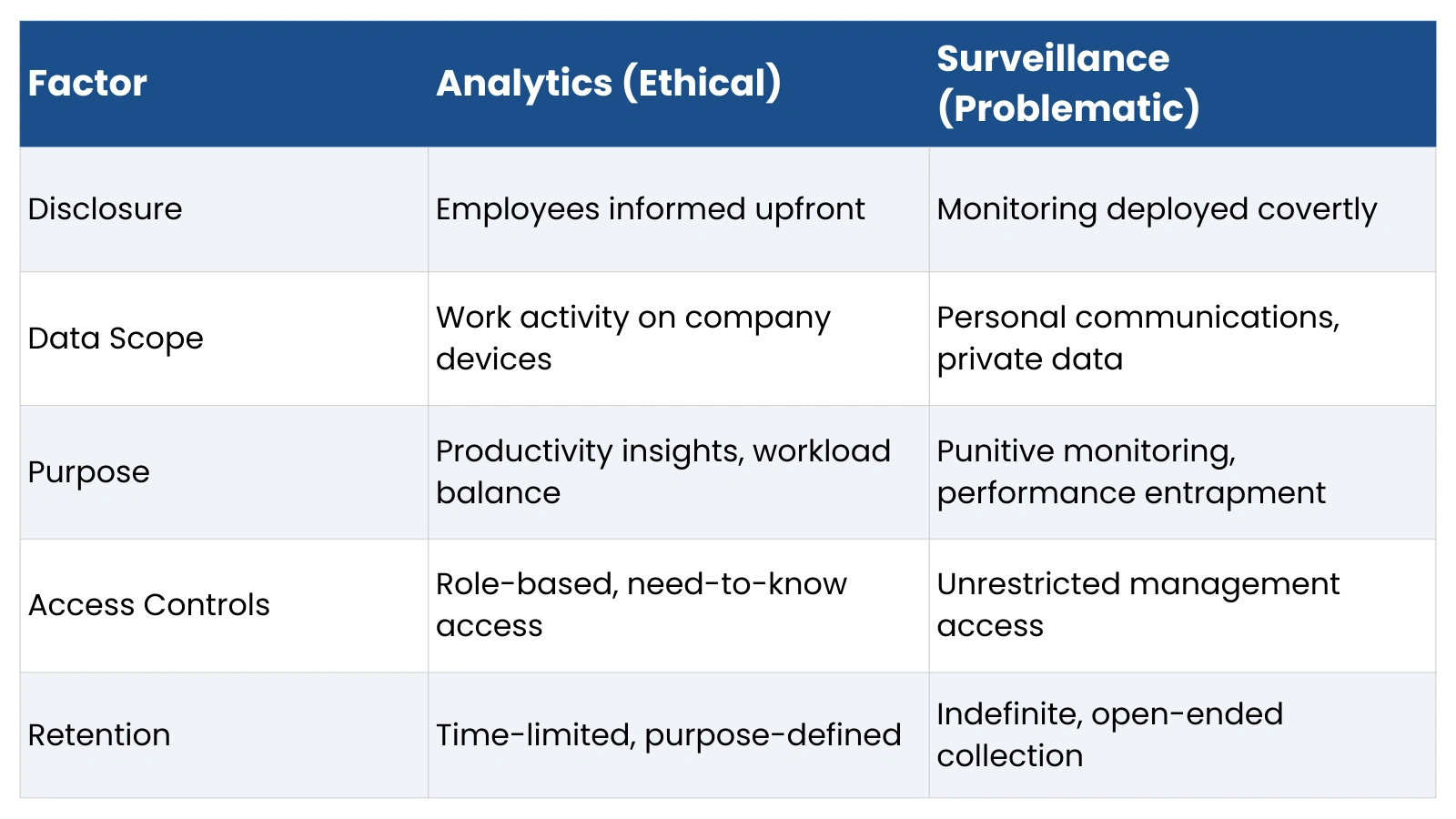

ActivTrak, configured and communicated transparently, sits firmly in the analytics category. The same tool deployed without disclosure, used to monitor personal activity, or applied punitively without context can cross into surveillance territory, not because the software changed, but because the deployment did.
ActivTrak Reviews: What Employers and Employees Say
Positive ActivTrak Reviews
Employers and administrators consistently praise ActivTrak for its clean dashboard, ease of installation, and the clarity of its productivity tracking. Common themes in positive reviews include the ability to identify which employees are overloaded versus underutilized, the usefulness of weekly productivity comparison reports, and the platform’s relatively quick time to value. One administrator noted it provides visibility into team performance in a way that was previously impossible to quantify.
Negative ActivTrak Reviews
Critical reviews cluster around a few recurring issues. The screenshot functionality is frequently described as too limited for organizations that need detailed visual evidence of work activity. The absence of continuous video recording is a noted gap. Some reviewers mention difficulty canceling or modifying subscriptions, and at larger team sizes, cost is raised as a concern. Employees, where reviews are available, often express discomfort with the feeling of being watched, particularly when monitoring policies were not clearly communicated by their employers.
Employee vs Management Perspectives
The experience gap between managers and employees using ActivTrak is real and worth acknowledging. Managers tend to see a productivity tool that provides useful data. Employees, particularly those who discover the software without prior disclosure, are more likely to describe it as invasive. This gap is not unique to ActivTrak; it reflects a fundamental tension in workforce monitoring that no software vendor can fully resolve. Organizational culture, communication, and policy transparency determine whether a monitoring tool builds accountability or erodes trust.
ActivTrak Pricing: Plans, Costs, and Value
ActivTrak offers four plan tiers, all billed annually:
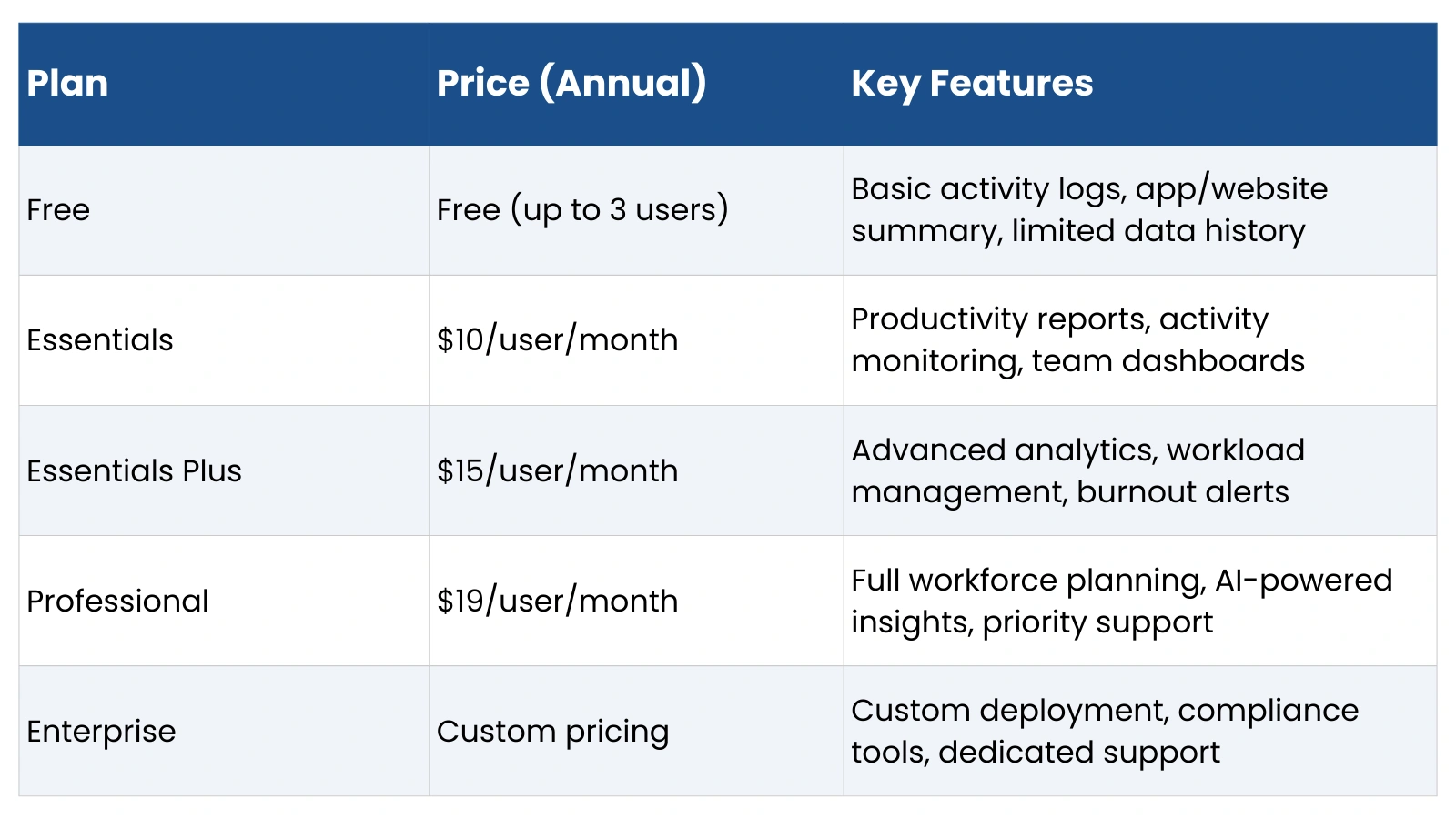
Notable add-ons include Screen Details (screenshot monitoring, priced separately) and Data History extensions at $1/user/month per additional year. ActivTrak requires a minimum of five users on paid plans and only offers annual contracts; monthly billing is not available, which reduces flexibility for smaller or seasonal teams.
At the Essentials tier and above, ActivTrak delivers solid value for analytics-focused use cases. However, organizations that need deeper monitoring capabilities, keystroke logging, continuous screen recording, insider threat detection, or USB activity tracking will find the platform’s feature set insufficient at any price point.
ActivTrak Competitors: How It Compares in Monitoring Depth
ActivTrak vs Surveillance-Heavy Tools
On the monitoring intensity spectrum, ActivTrak sits toward the analytics end. Platforms like Teramind offer significantly deeper surveillance capabilities, including continuous video recording, keystroke logging, email content monitoring, and behavior-based insider threat detection. For organizations in regulated industries or with active data security requirements, tools like Teramind address use cases that ActivTrak explicitly does not.
ActivTrak vs Time Tracking Tools
Compared to time tracking-focused platforms like Hubstaff and Time Doctor, ActivTrak offers more sophisticated productivity analytics but less emphasis on payroll integration, GPS tracking, and per-project time billing. Teams that primarily need to track billable hours and manage distributed payroll will find time tracking tools better suited to their requirements. ActivTrak’s value proposition is in workforce intelligence, not time accounting.
Why Businesses Seeking Deeper Monitoring Choose EmpMonitor Instead
For organizations that find ActivTrak’s analytics-first approach insufficient, particularly those with security concerns, compliance obligations, or a need for more granular activity evidence, EmpMonitor presents a more comprehensive alternative that bridges productivity monitoring and security monitoring within a single platform.
Advanced Real-Time Monitoring Capabilities
EmpMonitor provides live screen monitoring, allowing administrators to view any employee’s desktop in real time without triggering alerts. It also captures time-stamped screen recordings automatically, creating a reviewable audit trail of activity. This capability directly addresses one of the most frequently cited limitations in ActivTrak reviews, the inability to review continuous or contextual screen activity rather than periodic snapshots.
Insider Threat & Data Security Monitoring
EmpMonitor includes features specifically designed for data security use cases that fall entirely outside ActivTrak’s scope. These include USB device tracking (detecting when external drives are connected and what files are accessed), file transfer monitoring, and real-time alerts for potentially threatening activity patterns. For industries handling sensitive client data, intellectual property, or regulated information, this level of visibility is often a compliance requirement rather than an optional feature.
Keystroke Logging and Activity Depth
Unlike ActivTrak, EmpMonitor captures keystroke logs alongside application and website tracking, giving administrators detailed evidence of what employees are doing within applications, not just which applications are open. This capability is particularly relevant for customer service teams, legal departments, or any environment where content-level accountability is required.
Productivity Analytics in One Platform
EmpMonitor does not sacrifice productivity analytics to deliver security monitoring. The platform includes time tracking, attendance management, app and website categorization, productivity scoring, and project tracking, covering most of what ActivTrak offers on the analytics side while adding a significantly broader monitoring capability set.
ActivTrak vs EmpMonitor: Analytics vs Monitoring Depth
The choice between ActivTrak and EmpMonitor ultimately comes down to your organization’s primary monitoring objective. Here is how the two platforms compare across key dimensions:
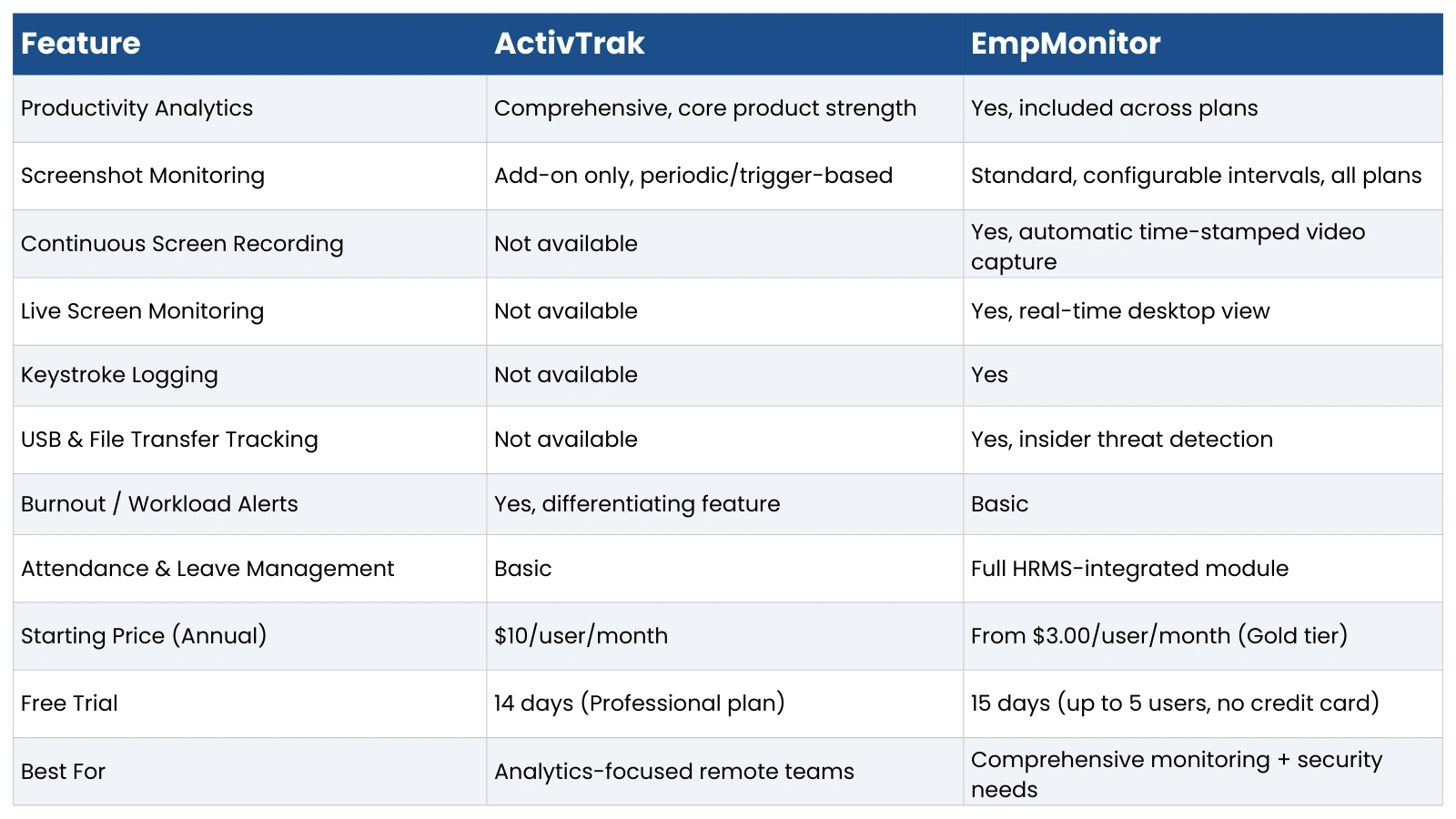
ActivTrak is the stronger choice for organizations whose primary goal is workforce productivity intelligence, and teams that want data-driven insights to improve performance without intensive surveillance infrastructure. EmpMonitor is the more appropriate choice for organizations that need ActivTrak’s productivity visibility plus security monitoring, content-level accountability, or evidence-grade activity records.
Legal & Ethical Considerations of Employee Monitoring Software
Regardless of which platform an organization selects, the legal and ethical framework for deployment matters as much as the software itself.
In the United States, employee monitoring on company-owned devices is generally permissible under federal law, but several states, including California, Connecticut, Delaware, and New York, impose specific notice requirements. In the European Union, GDPR establishes strict standards for data collection proportionality, consent, and employee rights. The United Kingdom’s post-Brexit data protection framework carries similar requirements.
Best practices for ethical deployment include issuing a written monitoring policy before deployment, limiting data collection to what is necessary for the stated business purpose, defining and communicating data retention periods, restricting administrative access to those with a legitimate need, and providing employees with a mechanism to raise concerns about how monitoring data is used.
A monitoring tool that is technically legal but deployed without transparency will generate employee distrust, potential legal exposure in disclosure-required jurisdictions, and organizational culture damage that no productivity gain is likely to offset.
Final Verdict: Is ActivTrak Spyware or Smart Analytics?
ActivTrak is not spyware. It is a commercially licensed, consent-based workforce analytics platform that operates within well-defined technical and legal boundaries. Its design philosophy is explicitly analytics-first; it is built to generate productivity insights, not to conduct covert surveillance. The absence of keystroke logging, email monitoring, and webcam access reflects deliberate product decisions, not technical limitations.
For organizations whose primary need is understanding how remote or hybrid teams spend their working hours, identifying productivity patterns, and supporting employee well-being, ActivTrak delivers genuine value. Its burnout detection and workforce planning capabilities in particula,r set it apart from basic monitoring tools.
However, for organizations that need more than productivity analytics and require continuous screen evidence, keystroke-level accountability, insider threat detection, or data security monitoring, ActivTrak’s feature ceiling is a real constraint. In those use cases, EmpMonitor provides a more complete solution that combines workforce productivity visibility with the depth of monitoring that higher-security or compliance-driven environments require, at a pricing structure that scales more favorably as team size grows.
The right tool depends on what you actually need to monitor, and why. Define that clearly before committing to either platform.
FAQs: Is ActivTrak Spyware?
Is ActivTrak legal?
Yes, in most jurisdictions. Employee monitoring on company-owned devices is lawful when employers provide reasonable notice. In the US, federal law permits workplace monitoring, though several states require written disclosure before deployment. In the EU and UK, GDPR and equivalent frameworks require that monitoring be proportionate and that employees be informed. ActivTrak’s own guidance recommends disclosure as both a legal safeguard and a best practice.
Can ActivTrak see my screen?
ActivTrak can capture screenshots through its Screen Details add-on, which is available on paid plans. Screenshots are periodic or trigger-based, not continuous. ActivTrak does not offer live screen viewing or continuous video recording as standard features. If your organization requires real-time screen visibility or session recording, tools like EmpMonitor provide those capabilities natively.
Does ActivTrak record keystrokes?
No. Keystroke logging is not a feature of ActivTrak at any plan tier. The platform tracks which applications and websites are used and for how long, but it does not capture the content of what is typed. This is one of the clearest distinctions between ActivTrak and surveillance-grade monitoring platforms.
Can ActivTrak monitor personal devices?
Only if the ActivTrak agent is installed on a personal device, which would typically require an employee’s consent, and is not standard practice. ActivTrak is designed for deployment on company-managed devices. Personal smartphones, tablets, and computers that are not enrolled in a company’s device management program are not monitored.
How accurate is ActivTrak productivity tracking?
ActivTrak’s activity tracking is accurate in terms of measuring application engagement and time on screen. However, productivity scores are based on activity signals, keyboard input, mouse movement, and application use, not actual output quality. Creative work, deep thinking, and collaboration often register as lower activity than their actual value warrants. ActivTrak acknowledges this limitation and recommends using productivity data as one input among several, not as the sole performance metric.
What is the best alternative to ActivTrak for deeper monitoring?
EmpMonitor is the strongest alternative for organizations that need monitoring capabilities beyond ActivTrak’s analytics-focused scope. It adds keystroke logging, live screen monitoring, continuous screen recording, USB tracking, and insider threat detection, all within a platform that also covers productivity analytics, attendance management, and project tracking. Its pricing starts at $3.00/user/month on annual billing, making it a cost-effective option for teams that need comprehensive monitoring without the per-user cost escalation of enterprise-grade platforms.

