


If you have ever hired a remote worker through Upwork, you have probably encountered the Upwork Tracker, the built-in time tracking tool that logs hours, captures screenshots, and ties billable time directly to payment. It works smoothly within the Upwork ecosystem, and for straightforward hourly contracts, it does exactly what it’s supposed to. But here’s the question most businesses don’t ask until they’ve outgrown a platform: Who owns that data?
The Hubstaff vs Upwork Tracker comparison isn’t just about features. It’s about whether your workforce data lives in your systems or someone else’s. As remote and freelance teams become a more permanent part of how businesses operate, the difference between a time tracker that generates organizational intelligence and one that generates billing records for a marketplace starts to matter a great deal.
This guide breaks down both tools across every dimension that matters, tracking method, monitoring depth, data ownership, payroll integration, and cost, and explains when each one is the right fit, and when neither is enough.
Listen to the blog:
Hubstaff vs Upwork Tracker: Quick Overview
What Is Hubstaff?
Hubstaff is an independent time tracking app designed for remote teams, agencies, and businesses that need workforce visibility across multiple clients and projects. It tracks time automatically in the background, captures optional screenshots, logs app and URL usage, records GPS location for field teams, and connects to payroll and invoicing platforms. Crucially, it works for any team on any project, not just work done through a specific hiring platform.
Hubstaff is a business performance tool. The data it generates belongs to the organization that subscribes to it, can be exported in full, and builds over time into a genuine workforce intelligence asset.
What Is Upwork Tracker?
The Upwork Tracker is a built-in time tracking tool available to freelancers and clients using Upwork’s hourly contract model. It runs on the freelancer’s device, captures a screenshot every ten minutes, logs keyboard and mouse activity as a percentage, and uses that data to generate a Work Diary that supports Upwork’s hourly payment protection system.
It’s free, it’s automatic, and it integrates seamlessly with Upwork’s billing and dispute resolution infrastructure. What it isn’t is a business tool. The data it generates lives on Upwork’s platform, is tied to individual contracts, and cannot be used to build a picture of workforce performance across your broader organization.
Hubstaff vs Upwork Tracker: Feature Comparison
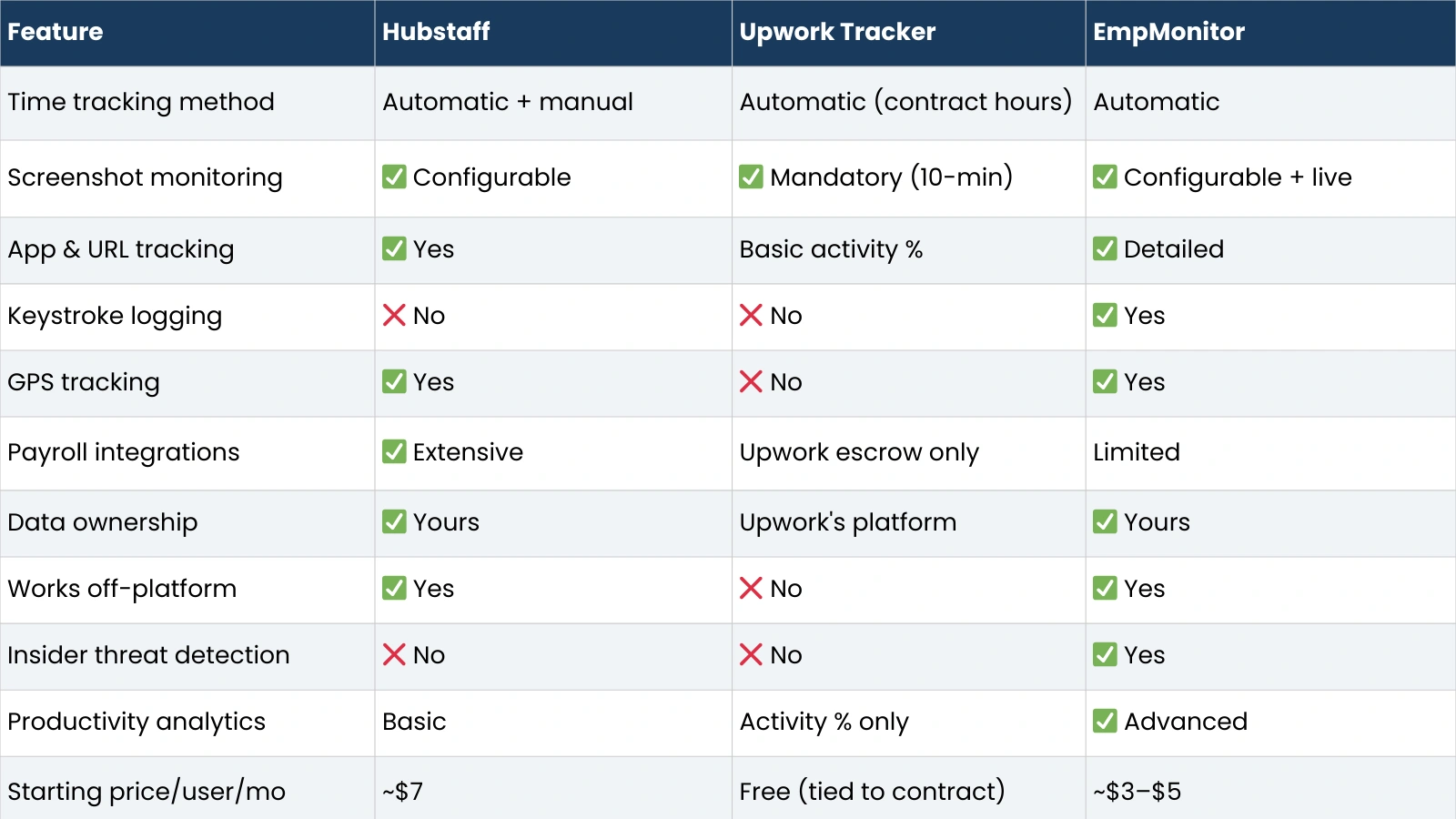
Here’s a detailed side-by-side comparison, including EmpMonitor as a third column for organizations that need deeper monitoring capability than either platform tool provides.

Way EmpMonitor Fits In The Hubstaff Vs Upwork Tracker Debate
While the Hubstaff vs Upwork Tracker comparison focuses on operational time tracking versus marketplace billing, some organizations require more than either tool provides. This is where solutions like EmpMonitor come into the picture.
EmpMonitor is an advanced workforce monitoring and time tracking platform for businesses that need deeper visibility into productivity, security, and employee behavior. Unlike marketplace-bound tools, it works independently across all clients and projects, giving organizations full ownership of their workforce data. For companies managing remote teams, handling sensitive information, or needing detailed performance analytics, it adds a layer of intelligence beyond basic time logging.
Key Features of EmpMonitor
- Automatic time tracking across all projects
- Detailed app and URL usage monitoring
- Productivity classification (productive vs unproductive time)
- Keystroke logging for deeper activity insight
- Live screen monitoring and screenshot capture
- GPS tracking for field employees
- Insider threat detection and security monitoring
- Exportable reports for compliance and audits
- Affordable pricing compared to most enterprise tools
This positions EmpMonitor not just as another time tracking app, but as a workforce intelligence system for organizations that need more than screenshots and activity percentages.
Now, let’s come back to the topic where we are explaining the feature
Time Tracking Methods
Hubstaff runs automatically in the background once started, capturing time against specific projects and clients. Employees can also add manual time entries for work done offline. The timer is controlled by the employee, which means it requires honest usage, but it also means it can track any kind of work, for any client, without being tied to a platform.
The Upwork Tracker runs automatically during Upwork contract hours with no option for manual entry within the hourly billing system. This removes the flexibility issue, but it also means any work that happens outside a logged Upwork session simply doesn’t get tracked. If your team does prep work, admin, or collaboration outside the platform, that time is invisible.
Screenshot Monitoring
Hubstaff’s screenshots are configurable; administrators choose how frequently they’re taken, whether they’re blurred for privacy, and who can review them. This flexibility makes it easier to implement across teams with different monitoring cultures.
Upwork’s screenshots are mandatory at ten-minute intervals for any work logged under hourly billing. Freelancers cannot disable them, and clients cannot change the frequency. This rigidity serves Upwork’s payment protection system well, but it gives neither party control over the monitoring approach.
App, URL, and Activity Tracking
Hubstaff logs which applications are active and which websites are visited during tracked time, giving managers a basic picture of how work hours are being spent. Activity levels based on mouse and keyboard input are also recorded.
The Upwork Tracker logs keyboard and mouse activity as a simple percentage; it tells you that a freelancer was 70% active during a given period, but not what they were doing. There’s no application or URL logging, which means you can verify presence but not productivity tracking.
Data Ownership: Who Controls Your Time Tracker Data, And Why It Matters
This is the core argument for choosing an independent time tracker over a marketplace-tied one, and it deserves more than a brief mention.
When your workforce tracking lives inside Upwork, the data generated by that tracking belongs to Upwork’s ecosystem. You can view Work Diaries while the contract is active. You can download individual reports. But you cannot build a longitudinal view of workforce planning performance across contractors, compare productivity across projects, analyze team utilization trends, or take that data with you if you move away from the platform.
This matters more as your team scales. Early on, when you have two or three Upwork contractors, the Work Diary is sufficient. When you have twenty-five contractors across a mix of Upwork and direct engagements, plus an internal team, you need workforce data that lives in one place under your control, not scattered across multiple platform dashboards with different access rules.
Client Profitability Analysis
Understanding which clients and projects generate the most value relative to the time invested requires time data that cuts across your whole operation. An independent time tracker accumulates this data in a form you can analyze. Upwork’s tracker generates billing records, not business intelligence.
Workforce Utilization and Performance Benchmarking
Knowing that a developer logged 40 hours last week is different from knowing those 40 hours were spent productively on billable work versus administrative tasks and meetings. Independent time tracking tools give you the data to benchmark performance, identify underutilization, and make resourcing decisions. The Upwork Tracker tells you what was billed, not how work was actually distributed.
Negotiation and Billing Transparency
When you own your time tracking data, you control the narrative in client billing and contractor negotiations. You can show exactly how time was spent, demonstrate efficiency improvements over time, and substantiate rate discussions with data. When the data lives on Upwork, your ability to use it outside that context is limited.
Productivity Monitoring and Tracking Flexibility: Beyond Marketplace Hours
Both Hubstaff and the Upwork Tracker capture time and basic activity. Neither is built for deep productivity monitoring. For businesses that need to understand not just when people are working but what they are actually doing during those hours, both tools have significant limitations.
Hubstaff’s productivity monitoring covers app usage and website tracking, which gives a reasonable picture of how work time is spent. It doesn’t classify applications by productivity category, analyze behavior patterns, or detect anomalies. It’s a solid operational time tracking app, but it stops short of workforce analytics.
The Upwork Tracker’s activity percentage is even more limited. A contractor scoring 85% activity could be doing focused work or simply keeping their mouse moving. There’s no way to distinguish between the two from the data alone.
For organizations that need deeper productivity intelligence, behavioral analytics, productivity scoring by role, idle time analysis, app categorization, and security monitoring, tools like EmpMonitor sit in a different category. EmpMonitor tracks application usage in detail, classifies time as productive or unproductive based on customizable rules, offers live screen monitoring, and extends into insider threat detection for teams handling sensitive data. It works independently of any client platform, which means it generates organizational data that accumulates value over time rather than sitting inside a third-party ecosystem.
The tracking flexibility gap is also worth naming directly. Upwork’s tracker only runs during Upwork contract hours; any internal meetings, admin work, training, or collaboration that happens outside a logged Upwork session is untracked. Hubstaff and independent tools cover the full working day, across all clients and projects, giving a complete picture of how time is actually spent.
Payroll, Billing & Compliance Automation
Upwork’s Escrow and Hourly Protection
The Upwork Tracker’s most significant advantage is its integration with Upwork’s payment infrastructure. Hours logged and verified through the tracker are covered by Upwork’s hourly payment protection, meaning clients are billed automatically, and freelancers are paid reliably without manual invoicing. For businesses that primarily use Upwork for hiring and want a seamless payment process, this built-in integration is genuinely valuable.
Hubstaff Payroll Integrations
Hubstaff connects with a broad range of payroll and invoicing platforms, including Gusto, PayPal, Wise, QuickBooks, FreshBooks, and others, allowing businesses to move from tracked time to processed payment without manual data entry. This is particularly useful for agencies managing multiple contractors across different payment arrangements. The flexibility to pay different contractors through different systems, all from a single time tracking dashboard, is something the Upwork Tracker can’t replicate.
Compliance Reporting
For businesses with compliance obligations around workforce time records, particularly in regulated industries or for government contracting, owning your time data in an exportable, auditable format matters. Hubstaff’s reporting can be exported in standard formats and retained indefinitely. Upwork’s Work Diary data is accessible while contracts are active, but it is less straightforward to retain in a compliance-ready format over the long term.
Cost Implications: Marketplace Fees vs Independent Systems
The Upwork Tracker is free, but the cost of using Upwork as a hiring platform isn’t. Upwork charges clients a percentage fee on top of contractor payments, and contractors pay a service fee on their earnings. For low-volume engagements, these fees are a reasonable trade for the platform’s value: talent access, payment protection, dispute resolution, and contract management.
At higher volumes, the fee structure becomes a more significant consideration. Organizations that hire heavily through Upwork and then move contractors to direct engagements often do so partly to reduce platform fee exposure. When that happens, the Upwork Tracker becomes irrelevant for those relationships, and the business needs an independent time tracking tool anyway.
Hubstaff costs approximately $7 per user per month, which is a real expense but a straightforward one. For an agency tracking time across 20 people, that’s $140 per month for complete workforce data that you own and can use however you need. EmpMonitor is even more affordable at $3 to $5 per user per month, while adding deeper productivity analytics and security monitoring, worth evaluating if your requirements go beyond basic time tracking.
The ROI calculation for independent tools isn’t just about replacing marketplace fees; it’s about the business intelligence value of owning your workforce data long-term.
Privacy, Security & Monitoring Control
The Upwork Tracker’s mandatory, non-configurable screenshots are the aspect most likely to create friction with contractors. Some professionals are comfortable with them; others find the rigidity off-putting, particularly for senior or specialized contractors who expect more autonomy. Clients cannot modify this; the monitoring terms are set by the platform.
Hubstaff’s configurable approach, where administrators set screenshot frequency and privacy settings, and employees can see exactly what’s being captured, tends to produce better adoption and less resentment. The monitoring is explicit and adjustable, which matters for building a functional working relationship rather than a surveillance dynamic.
For organizations with enterprise security requirements, insider threat detection, behavioral monitoring, and data loss prevention, neither Hubstaff nor the Upwork Tracker addresses those needs. That’s where purpose-built monitoring platforms with security features become relevant.
Also Read!
Use Case Scenarios: Which Time Tracker Fits Best?
Freelancers Working Only on Upwork
If all your work is through Upwork on hourly contracts, the Upwork Tracker is sufficient and the right choice. It’s free, it’s automatic, and it protects your payments. There’s no practical reason to add a paid independent tool to the workflow.
Agencies Managing Multiple Clients
Hubstaff is the natural fit. Agencies need to track time across a mix of clients, some through platforms, some direct, and need that data in one place. The payroll and invoicing integrations, combined with the ability to generate per-client profitability reports from a single dashboard, make Hubstaff a genuine operational tool rather than just a billing mechanism.
Remote Teams and Hybrid Workforces
Hubstaff handles the basics well. For teams that need deeper productivity intelligence, understanding how work hours are actually spent, identifying performance patterns, or managing security in environments where sensitive data is handled, an independent monitoring platform like EmpMonitor provides the additional layer that Hubstaff doesn’t.
Enterprises Needing Workforce Analytics
At enterprise scale, neither Hubstaff nor the Upwork Tracker provides the analytics depth most organizations need. Enterprise teams typically want productivity scoring, behavioral analytics, compliance documentation, and security monitoring alongside time tracking, a combination that requires a dedicated workforce monitoring platform.
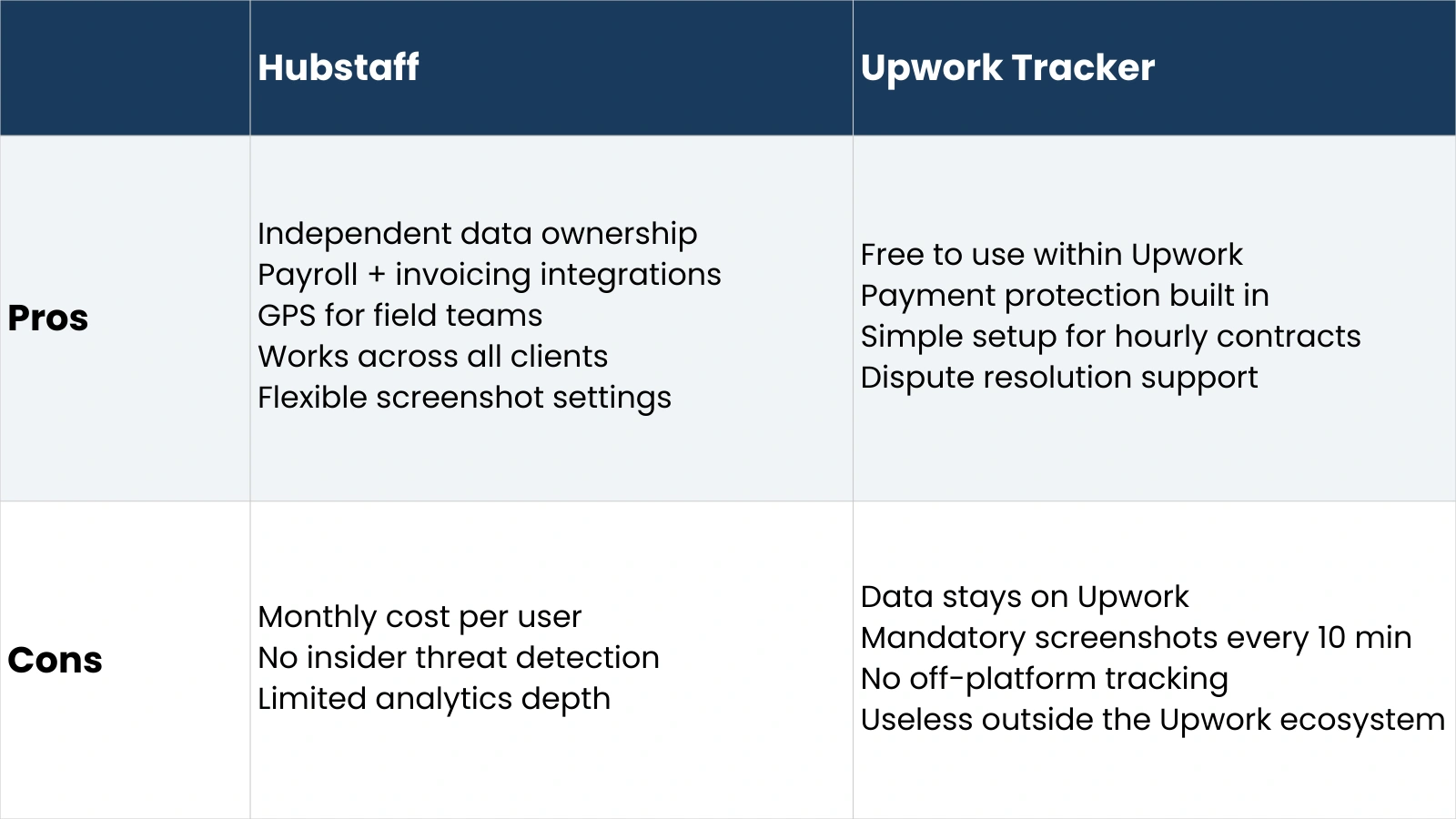
Hubstaff vs Upwork Tracker: Pros & Cons
Conclusion: Why Your Business Needs Its Own Data
The Hubstaff vs Upwork Tracker comparison ultimately comes down to one question: are you running a marketplace billing relationship, or are you building an organization?
If you’re billing hours through Upwork and want a seamless payment process with built-in dispute protection, the Upwork Tracker does that job well and costs nothing extra. It’s the right tool for that specific context.
If you’re managing a workforce, even partly through Upwork, and you want the time data that the workforce generates to build into something your business can use, you need an independent time tracker. Hubstaff is the most capable option in that category for most teams, with strong payroll integrations, GPS support, and cross-client tracking in a well-designed interface.
And if your requirements extend into productivity analytics, security monitoring, or detailed behavioral insights, tools like EmpMonitor go further, providing the workforce intelligence layer that operational teams need at a price point that works for businesses of most sizes.
Platform tools are for platform relationships. Business tools are for building businesses. The sooner you own your workforce data, the more valuable it becomes.
Frequently Asked Questions
Is Hubstaff better than Upwork Tracker?
For most business use cases, yes. Hubstaff offers configurable monitoring, works across all clients and projects, generates data you own, and integrates with payroll systems. The Upwork Tracker is better for one specific purpose: verifying billable hours within Upwork’s hourly contract system. Outside that context, Hubstaff is the more capable and flexible tool.
Can you use Hubstaff for Upwork work?
Yes, but with a caveat. You can use Hubstaff to track the time you spend on Upwork projects independently of the Upwork Tracker. However, Upwork’s hourly payment protection only applies to hours logged through the official Upwork Tracker; hours tracked in Hubstaff alone won’t be covered if a payment dispute arises. For payment protection, you need the Upwork Tracker; for your own records, Hubstaff is a useful parallel tool.
Do freelancers need independent time tracking tools?
It depends on their working model. Freelancers who work exclusively through Upwork on hourly contracts don’t need an independent tool. Freelancers who also take direct clients, want to track their own productivity independently of client platforms, or need to demonstrate time usage for tax or invoicing purposes, benefit significantly from an independent time tracking app.
What is the best time tracking app for agencies?
Hubstaff is the most commonly recommended option for agencies due to its cross-client tracking, payroll integrations, and GPS support for field staff. For agencies that also need productivity monitoring and security features, EmpMonitor provides a more comprehensive solution at a lower per-user price point. The right choice depends on whether the primary need is operational time tracking or broader workforce analytics.

