


Choosing between Hubstaff vs TimeDoctor is rarely just about features. For most businesses, the deciding factor comes down to one thing: what the tool will cost as the team grows. Both platforms use per-user pricing models, which means the monthly invoice scales directly with headcount. That sounds straightforward until you start running the numbers at 25, 50, or 100 employees.
This comparison breaks down how Hubstaff and TimeDoctor stack up on pricing, features, and long-term value, and introduces EmpMonitor as a credible alternative for teams that need to manage cost without sacrificing capability.
🎧 Listen to the blog:
Hubstaff vs Time Doctor: Quick Overview
What Is Hubstaff?
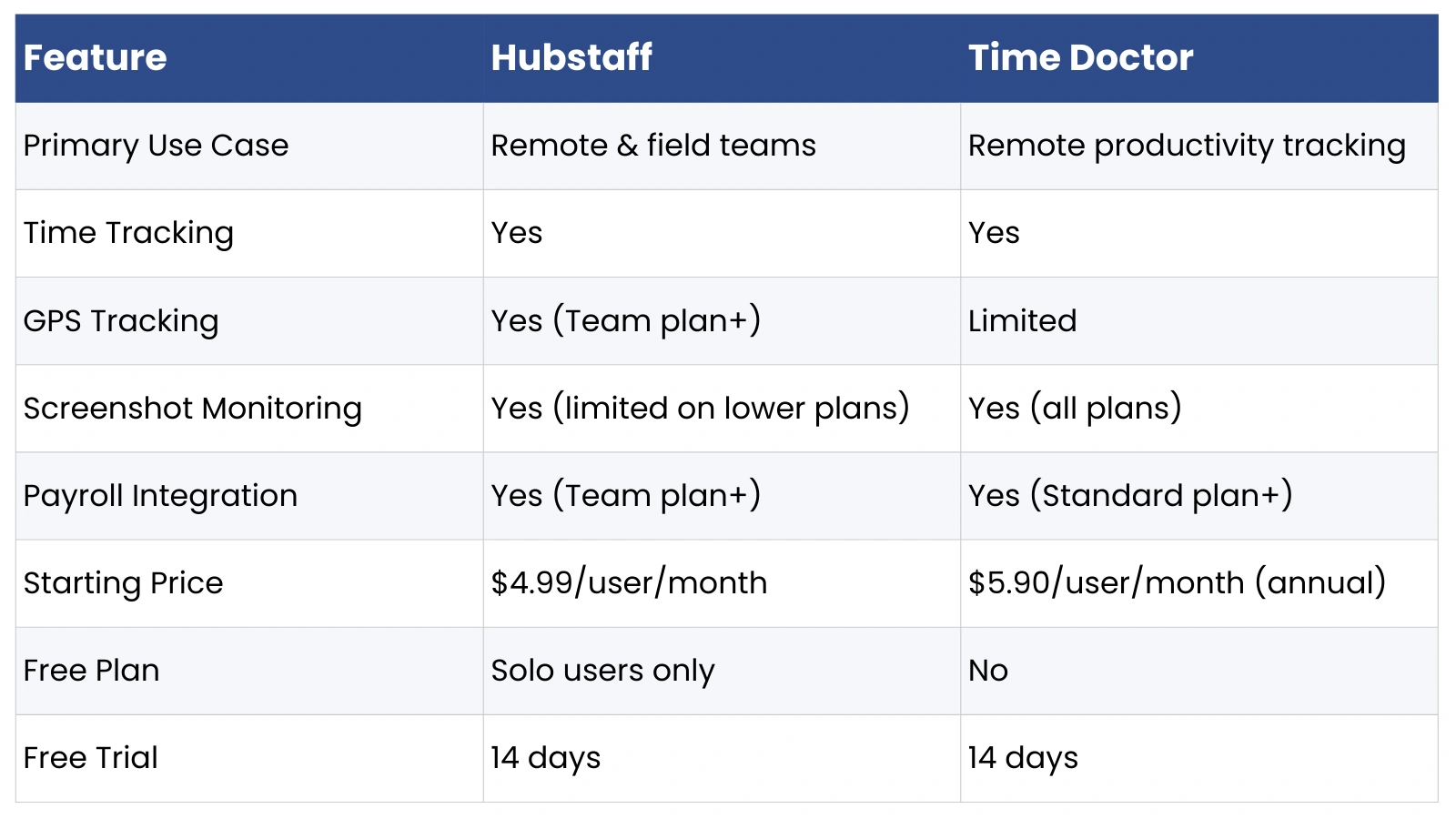
Hubstaff is a workforce management platform built for remote and field teams. It offers time tracking, GPS monitoring, screenshot capture, payroll integration, and project management tools. Founded in 2012, it serves over 95,000 organizations and is particularly strong in industries with distributed or mobile workforces.
What Is Time Doctor?
Time Doctor is an employee productivity and time tracking tool designed primarily for remote teams. It focuses on detailed activity monitoring, distraction alerts, app and website usage tracking, and payroll reporting. It is widely used by BPO companies, digital agencies, and remote-first businesses that need granular visibility into how working hours are spent.
Quick Comparison Snapshot

Why “Per User” Pricing Matters in Employee Monitoring Software
Per-user pricing means you pay a fixed fee for every active employee on the platform each month. On the surface, it feels fair; you only pay for what you use. In practice, however, it creates a compounding cost problem as teams grow.
Consider a business that starts with 10 employees on a mid-tier plan. When they hire 40 more over the next two years, their software bill multiplies fourfold, even if their usage per employee stays exactly the same. Unlike flat-rate or seat-bundled pricing models, per-user SaaS billing offers no economies of scale. Every new hire is a new line item.
For scaling businesses, this is more than a budgeting inconvenience. It can delay hiring decisions, push teams toward lower-tier plans that lack the features they need, or create awkward conversations about whether to remove inactive users mid-billing cycle to cut costs. Understanding this dynamic is essential before committing to either Hubstaff or Time Doctor.
Time Doctor vs Hubstaff Pricing, Plan Breakdown
Time Doctor Pricing Structure
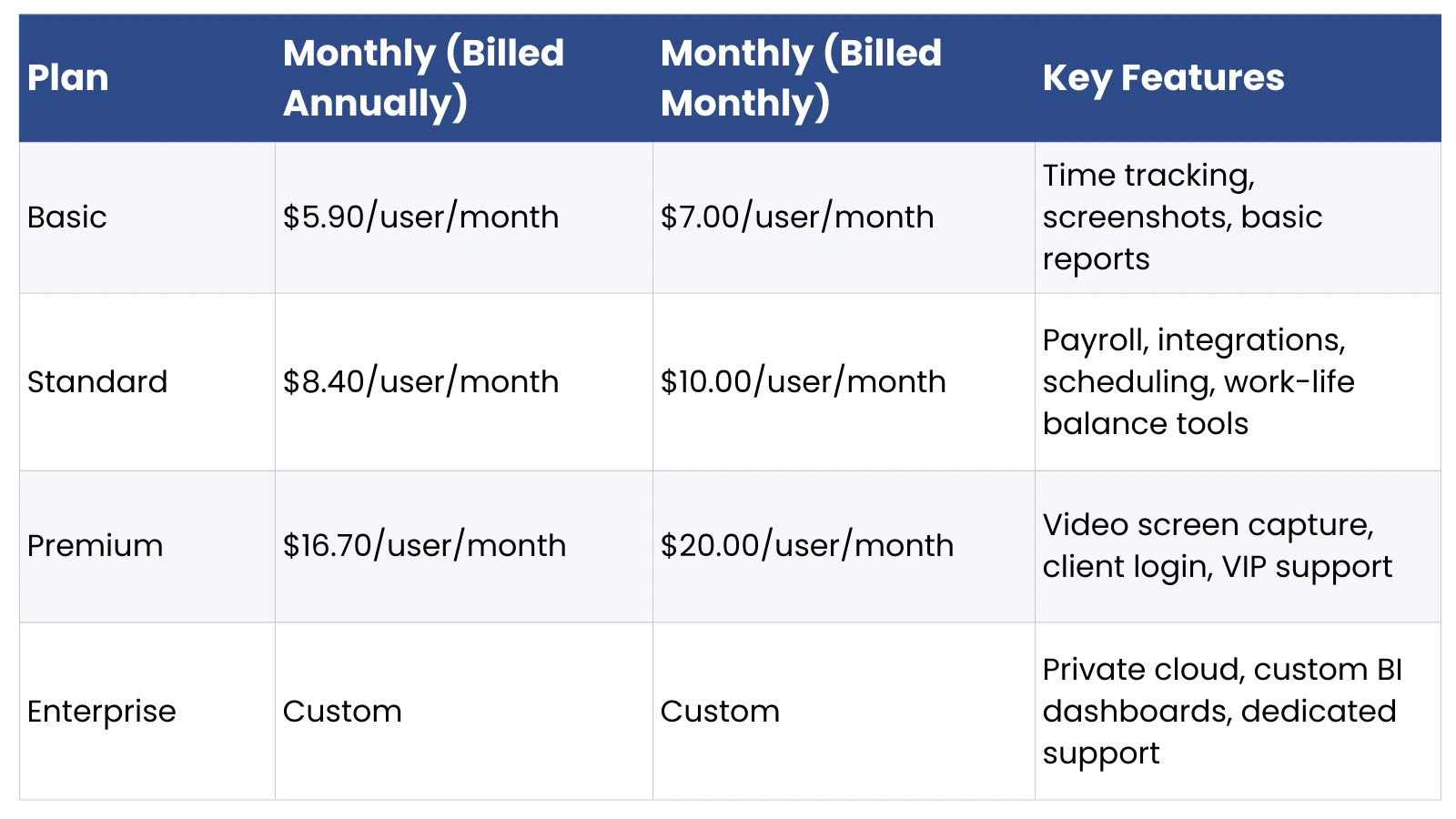
Time Doctor offers three core plans, with pricing based on annual billing:
Important to note: integrations, payroll processing, and advanced reporting are locked behind the Standard plan. Teams that need more than basic time tracking will find themselves on at least the $8.40/user tier.
Related:
How To Pick The Right Attendance Management Software For Your Organization In 2025?
The Complete Guide To Leave And Attendance Management System
InterGuard vs. Teramind: Who Detects Insider Threats Faster?
Hubstaff Pricing Structure
Hubstaff offers four paid tiers, all with a minimum of two users:
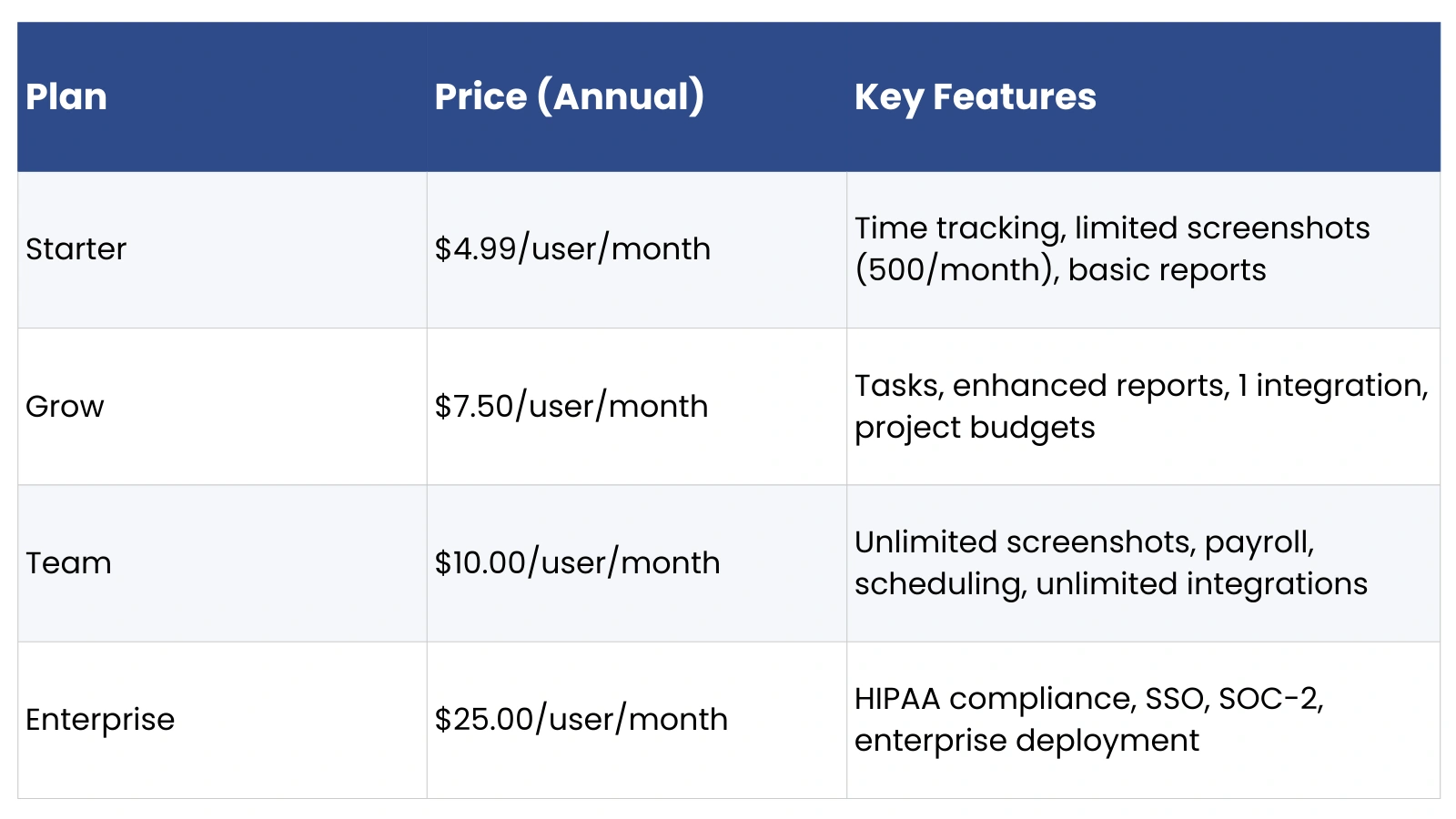
A critical point for Hubstaff buyers: the Starter plan caps screenshots at 500 per month and limits integrations to none. Most businesses running meaningful productivity monitoring will need the Team plan at $10/user/month. Additionally, GPS tracking requires the Locations add-on at $4/user/month on top of plan fees.
Time Doctor vs Hubstaff Pricing Comparison at Scale
The real cost difference between these two tools becomes clear when you calculate total spend at different team sizes. The figures below use each platform’s mid-tier plan on annual billing, the tier most businesses realistically need for full functionality.
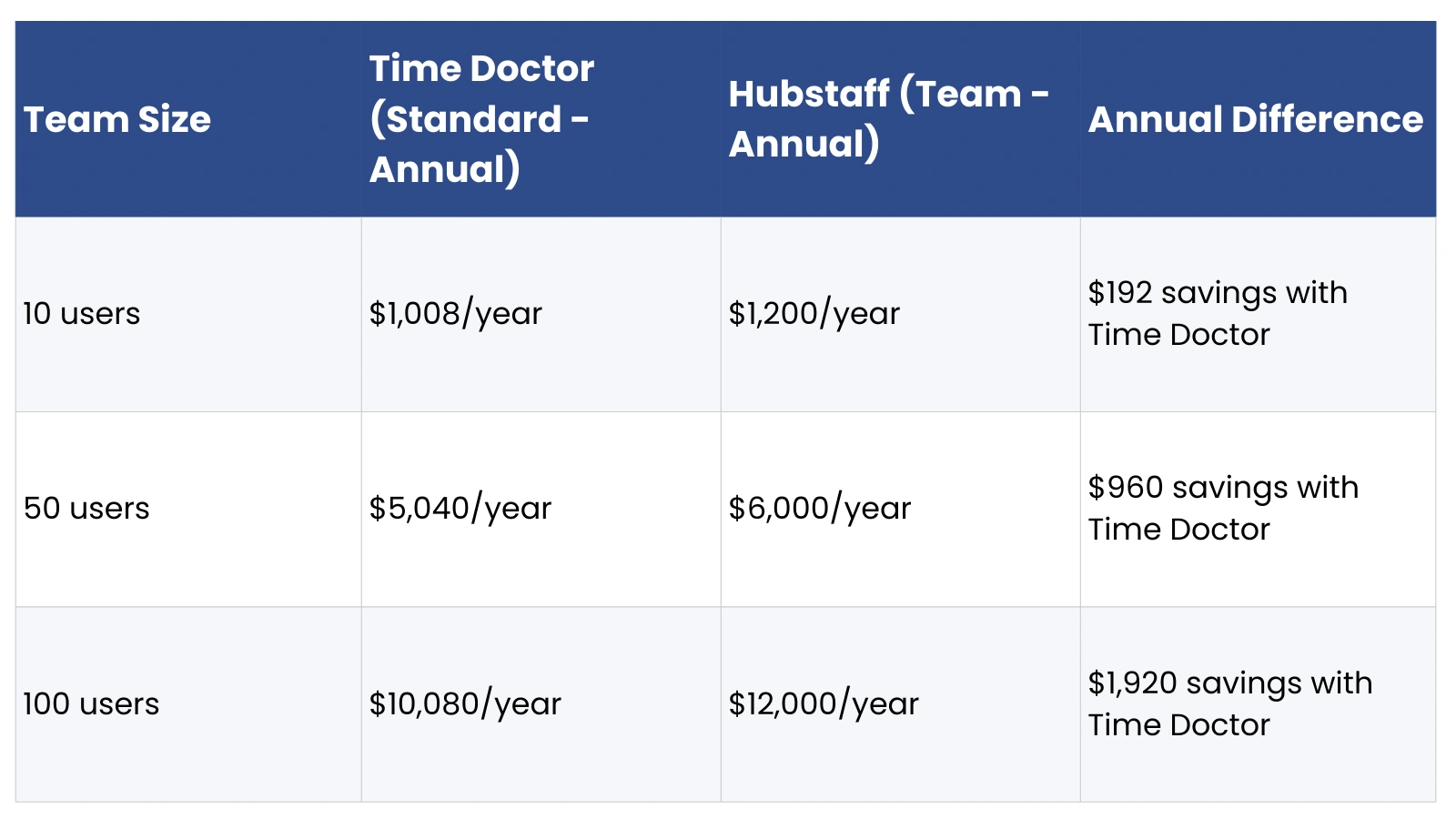
Time Doctor’s Standard plan has a moderate per-user cost advantage over Hubstaff’s Team plan. However, Hubstaff’s Starter plan at $4.99/user/month is cheaper than anything Time Doctor offers, though it sacrifices significant functionality. Annual billing saves approximately 16-17% on both platforms compared to monthly rates.
Time Doctor vs Hubstaff Comparison: Features That Affect Cost
Time Tracking & Productivity Monitoring
Both platforms offer automatic time tracking. Time Doctor stands out with distraction alerts that notify employees when they visit non-work websites, a feature valued by BPO and agency clients. Hubstaff tracks active time through mouse and keyboard activity levels, displayed as a percentage score.
Screenshots & Activity Tracking
Time Doctor includes screenshots across all plans with no monthly cap. Hubstaff limits screenshots to 500 per month on Starter and Grow plans, requiring an upgrade to Team for unlimited captures. If screenshot monitoring is central to your operations, Hubstaff’s lower-tier plans add a hidden cost: you’ll need to upgrade sooner than expected.
Payroll & Invoicing
Hubstaff includes payroll on its Team plan, supporting direct payments and payroll integrations. Time Doctor offers payroll through its Standard plan, with similar integration options. Neither platform includes payroll in its entry-level tier.
GPS & Field Employee Tracking
Hubstaff has a clear advantage here, with GPS tracking, geofenced job sites, and a dedicated field workforce plan. Time Doctor’s GPS capabilities are limited by comparison, making Hubstaff the stronger choice for businesses with mobile or field-based employees.
Project & Task Management
Hubstaff includes task management on its Grow plan and above. Time Doctor focuses more on time and productivity data, with project tracking available but less developed than Hubstaff’s offering.
Reports & Analytics
Both platforms offer detailed reports on time spent, app usage, and website visits. Time Doctor’s work-life balance reports and burnout detection are notable differentiators. Hubstaff’s reporting is strong on payroll and project budget data.
Hidden Costs Behind Hubstaff vs Time Doctor
The advertised per-user rate is rarely the full picture. Both platforms carry additional costs that can meaningfully change your total spend:
- Feature paywalls: Core functionality like payroll and integrations requires mid-tier plans on both platforms, pushing effective costs above entry-level prices.
- Add-on charges: Hubstaff’s GPS/Locations feature costs an additional $4/user/month on top of any plan. Time Doctor offers video live screen recording only on its Premium tier.
- Minimum seat requirements: Hubstaff requires a minimum of two users on all paid plans, a minor issue for most, but worth noting for very small teams.
- Annual contract lock-in: Both platforms offer discounts for annual billing, but reduce pricing flexibility. Removing users mid-year on Hubstaff yields no refund.
- Integration limitations: Hubstaff’s Grow plan supports only one integration. Unlimited integrations require the Team plan, effectively forcing an upgrade for teams using multiple tools.
Which Is Better, Hubstaff vs Time Doctor?
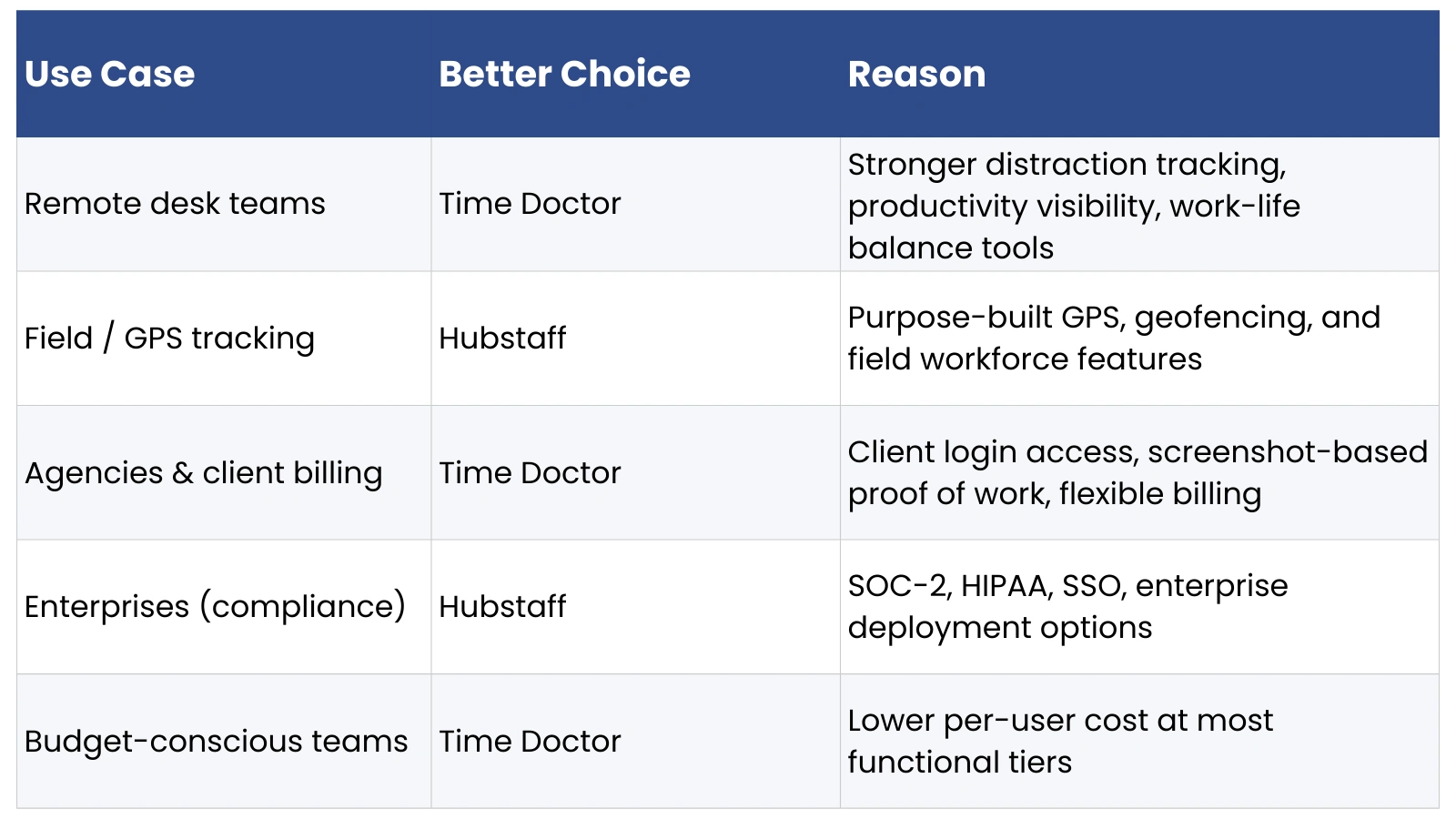
Neither tool is universally superior. The right choice depends on your team’s specific needs:
Limitations of Per-User Pricing Models
Both Hubstaff and TimeDoctor share a structural limitation: their pricing scales linearly with headcount. This creates several challenges for growing businesses:
- Scaling cost unpredictability: A hiring surge translates directly into a software budget increase, creating friction in growth planning.
- Paying for inactive users: Employees on leave, part-time workers, or seasonal staff still consume a full user seat if they remain in the system.
- Difficult ROI calculation: When your software bill doubles due to growth, it becomes harder to attribute productivity gains to the tool itself versus team expansion.
- Budget forecasting challenges: Per-user costs make annual software budgets harder to pin down, especially in fast-growing or high-turnover environments.
These aren’t deal-breakers, but they are reasons to evaluate pricing models carefully, and to consider alternatives that handle scale differently.
Best Alternative to Hubstaff vs TimeDoctor, EmpMonitor
What Is EmpMonitor?
EmpMonitor is a cloud-based employee monitoring and productivity management platform designed for remote, hybrid, and on-premise teams. It covers time tracking, screenshot monitoring, app and website usage analysis, attendance management, project tracking, and HR features within a single platform. It is particularly well-suited for SMBs and mid-market companies that need comprehensive monitoring without the budget pressure of high per-user costs.
Why EmpMonitor Is More Cost-Effective
EmpMonitor uses a tiered pricing structure where the per-user rate decreases as team size increases, a meaningful departure from the flat per-user models used by Hubstaff vs TimeDoctor. Pricing scales as follows:
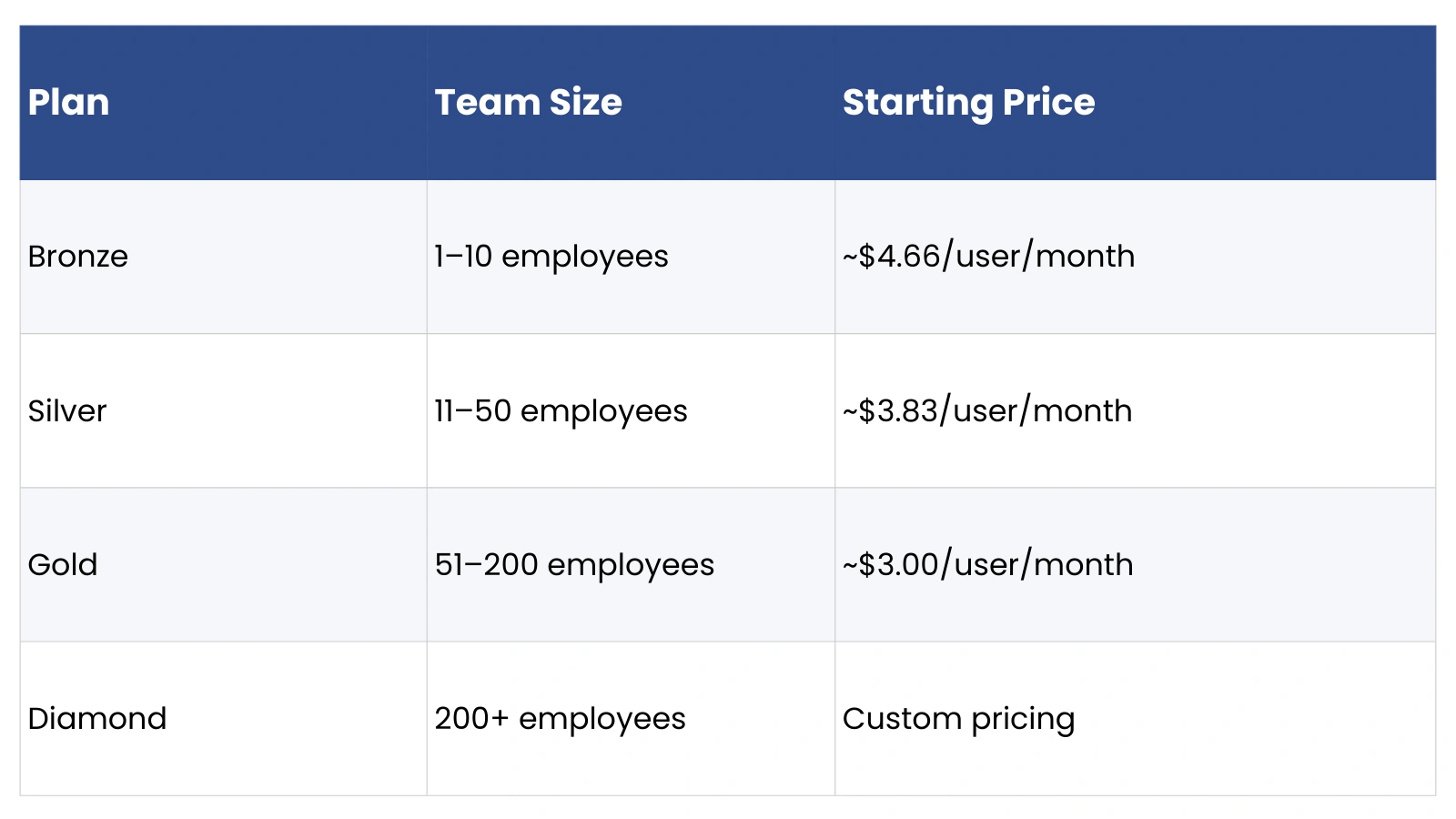
Annual billing adds a further 20% discount. For a 50-person team on the Silver plan, annual spend comes in notably below equivalent plans on either Hubstaff or Time Doctor, while still covering the core feature set most businesses require.
Key Features of EmpMonitor
- Time tracking with automatic and manual options
- Screenshot monitoring at configurable intervals
- App and website usage tracking with productivity categorization
- Attendance tracking and leave management
- Project and task tracking
- Offline tracking with automatic sync when connectivity is restored
- Stealth mode monitoring for company-owned devices
- Real-time productivity dashboard and detailed reporting
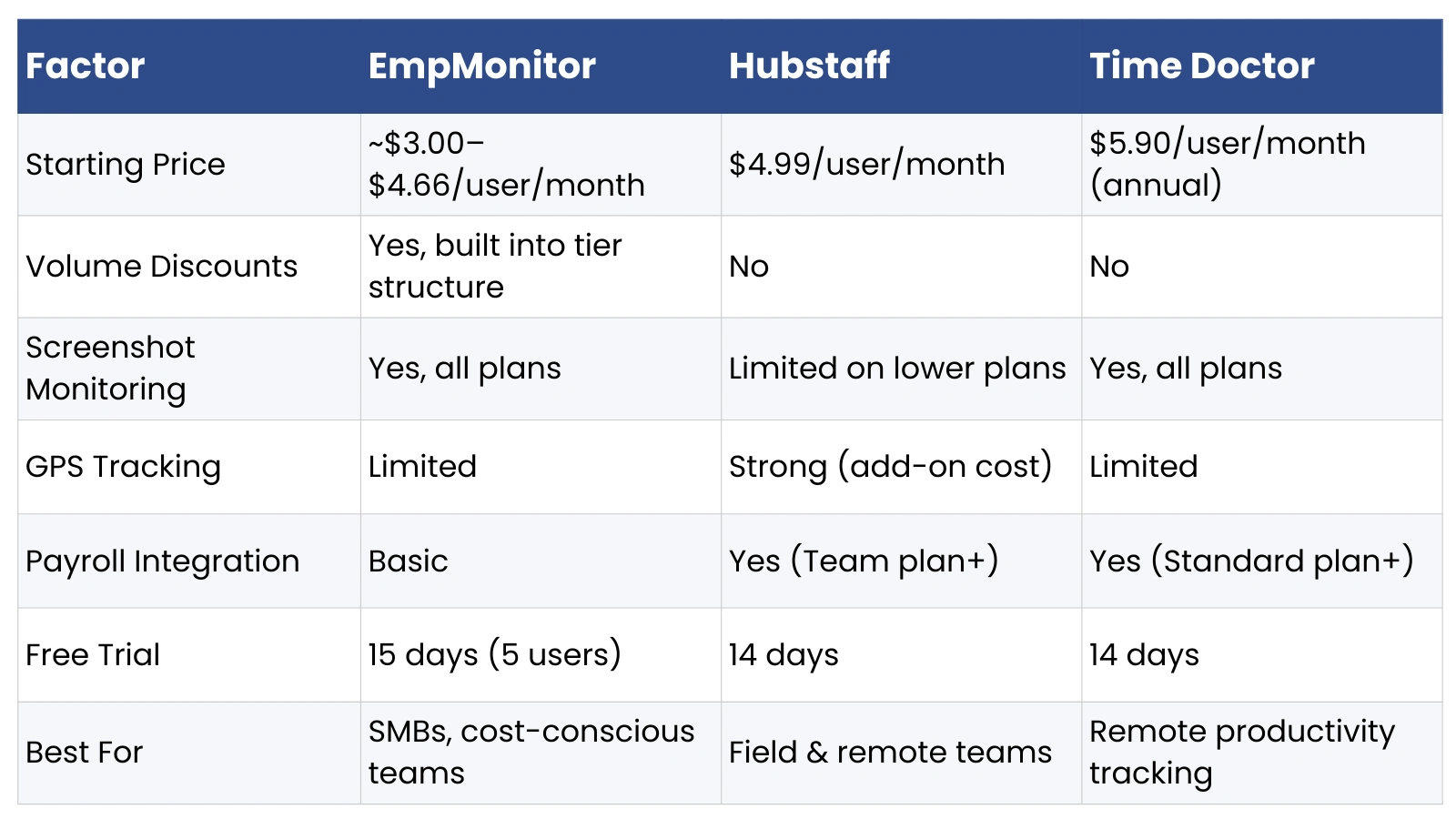
EmpMonitor vs Hubstaff vs Time Doctor
When Should You Choose EmpMonitor Over Hubstaff or Time Doctor?
EmpMonitor is worth serious consideration in the following situations:
- Your team is growing, and you need pricing that rewards scale rather than penalizing it.
- You are an SMB or startup that needs enterprise-level monitoring without enterprise-level pricing.
- Remote productivity tracking is your primary use case, and GPS or field features are not critical.
- You want a broader feature set, including HR and attendance management, without purchasing multiple tools.
- You are evaluating the total cost of ownership over 12–24 months and need to keep the software spend predictable.
EmpMonitor is not the right fit if you need robust GPS-based field workforce management (where Hubstaff leads), deeply polished client-facing billing reports, or enterprise compliance certifications like SOC-2 or HIPAA.
Final Verdict: Hubstaff vs Time Doctor Pricing Comparison
Hubstaff vs TimeDoctor are both capable, well-established tools with clear strengths. Hubstaff is the stronger option for field teams and organizations that need GPS tracking, compliance certifications, and a polished enterprise experience. Time Doctor is better positioned for remote desk teams where granular productivity tracking, distraction management, and client transparency are priorities.
On pricing, Time Doctor holds a modest advantage at most functional tiers, though neither platform offers meaningful relief as headcount grows. Both tools will become more expensive in direct proportion to team size, with no volume discounts built into their standard plans.
For businesses that are actively scaling, or for SMBs operating on tighter software budgets, EmpMonitor presents a compelling alternative. Its tiered pricing model produces genuine savings at 50+ users, and its feature set covers the core use cases that drive most businesses to evaluate Hubstaff vs TimeDoctor in the first place.
The right tool ultimately depends on your team’s makeup, your monitoring priorities, and how much weight you give to long-term cost efficiency. Use the comparisons in this article as a starting point, verify current pricing directly with each vendor, and take advantage of free trials before committing.
FAQs, Hubstaff vs Time Doctor
Is Hubstaff cheaper than Time Doctor?
It depends on the plan and team size. Hubstaff’s Starter plan ($4.99/user/month) is cheaper than Time Doctor’s entry plan ($5.90/user/month on annual billing). However, at comparable functional tiers, Hubstaff Team vs. Time Doctor Standard, Time Doctor is slightly less expensive at $8.40 versus $10.00 per user per month.
Does Time Doctor charge per admin user?
Time Doctor charges based on the total number of users in an account, regardless of access level. Promoting a user to Admin or Manager does not affect billing, but adding new users (including admins) does incur the standard per-user charge on a prorated basis.
Which tool is better for remote teams?
Time Doctor is generally better suited for remote desk teams due to its focus on productivity monitoring, distraction alerts, and work-life balance analytics. Hubstaff is more versatile across remote and field teams, but its stronger GPS and location features are most valuable for mobile workforces.
What is the best alternative to Hubstaff vs TimeDoctor?
EmpMonitor is a strong alternative, particularly for SMBs and growing teams. Its volume-based pricing model means per-user costs decrease as team size increases, offering meaningful savings compared to the flat per-user rates of both Hubstaff vs TimeDoctor. It covers time tracking, screenshot monitoring, productivity reporting, attendance management, and project tracking within a single platform.
Do both platforms offer a free trial?
Yes. Both Hubstaff vs TimeDoctor offer 14-day free trials with no credit card required. EmpMonitor offers a 15-day free trial covering up to five users with full feature access.

