


Keeping track of time has always been one of the biggest challenges for businesses. Whether you’re managing a team of five or five hundred, every minute counts when it comes to efficiency and productivity. In earlier years, organizations relied on manual time logs or spreadsheets to record attendance and work hours. But as companies expanded and remote work became common, these old methods started showing cracks—errors, delays, and a lack of transparency.
That’s where the employee time tracking system steps in. It’s no longer a nice-to-have but a crucial tool that simplifies work-hour management and provides valuable insights into how your teams operate. The right system doesn’t just record attendance; it helps you understand performance patterns, manage workloads, and optimize productivity across departments.
If you’re thinking about implementing such a system in your organization but feel uncertain about what features to look for, you’re not alone. This post will walk you through the must-have features that define a reliable time tracking solution—and why each one matters. By the end, you’ll have a clear picture of what makes a tool truly effective for modern workforce management.
Let’s start by understanding why your business needs it before we explore the features that make it work.
In a hurry? Listen to the blog instead!
Why You Need An Employee Time Tracking System?

An employee time tracking system eliminates this guesswork. It automatically logs employee activities, records attendance, and gives you real-time visibility into their work hours. This not only reduces administrative effort but also builds trust—everyone knows the data is fair and transparent.
Moreover, it helps leaders identify patterns—who’s consistently productive, who might need support, and how team performance aligns with organizational goals. As we move ahead, you’ll see how specific features of a good tracking system contribute to smooth operations and better employee engagement.
Now that we’ve covered the importance, let’s explore the essential features that make such systems effective.
1. Timesheet Management
Every powerful time tracking tool begins with accurate timesheets. A timesheet records when employees clock in, clock out, and how much time they spend on different tasks throughout the day. With automation, this process becomes effortless and error-free.
For instance, in EmpMonitor, the timesheet feature activates automatically when an employee logs into their system. This eliminates manual entries while ensuring accuracy. You can even categorize these timesheets by department or location, helping managers assess how each branch or team performs.
This kind of visibility helps organizations plan resources better and detect potential workload imbalances early. By understanding how time is spent, you can also forecast staffing needs or identify areas where efficiency can be improved.
But timesheets are just the start. Once you have the raw data, the next logical step is to understand what those numbers mean—and that’s where productivity calculation enters the picture.
2. Productivity Calculation
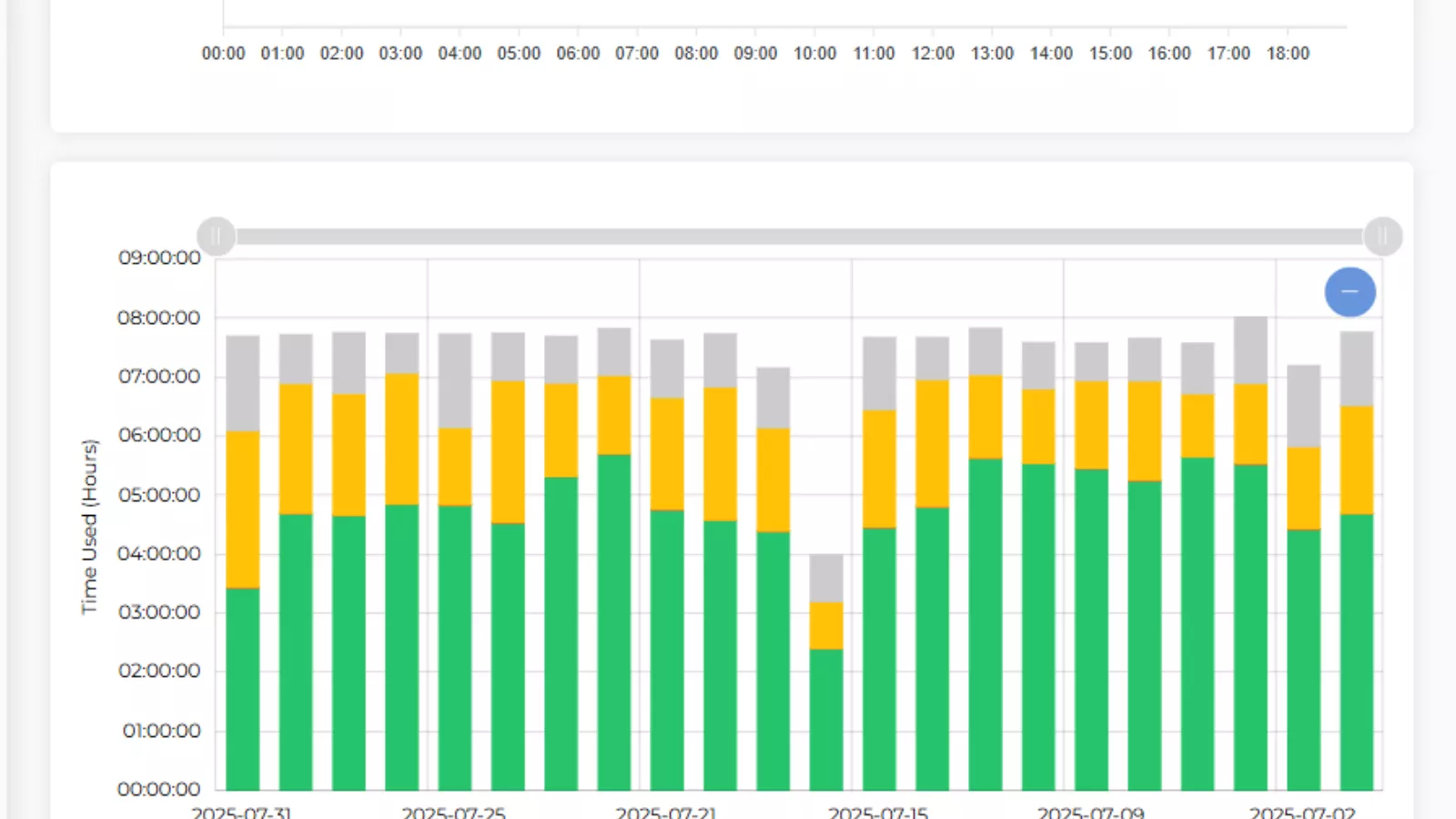
A strong employee time tracking system helps separate active work hours from idle ones. EmpMonitor, for example, displays a clear activity breakdown—active time, idle time, productive, unproductive, and neutral hours. This breakdown gives managers a factual view of how efficiently employees use their work hours.
Moreover, productivity reports are presented graphically, allowing you to visualize day-to-day trends. If a particular department’s performance dips, you can identify the reason—whether it’s a workload issue, process bottleneck, or lack of engagement.
This insight lays the groundwork for employee productivity management, enabling organizations to focus on solutions rather than assumptions. Once you can measure productivity accurately, the next step is reporting it in a way that supports data-driven decisions.
3. Comprehensive Reporting
A good reporting system turns raw time data into actionable insights. Managers should be able to access detailed reports that summarize employee performance over specific periods. With this, you can track progress, identify trends, and plan more effectively.
EmpMonitor offers a reporting dashboard where you can generate custom reports by selecting a date range. Whether you need daily, weekly, or monthly summaries, the reports are downloadable and easy to interpret.
These insights make decision-making simpler—helping leaders assess workloads, adjust schedules, or even forecast future project needs. Comprehensive reporting also enhances transparency within the team, since both employees and employers can access clear performance data.
But productivity data means little if attendance is inconsistent. That’s why a solid attendance feature is essential to keep your team accountable.
4. Employee Attendance
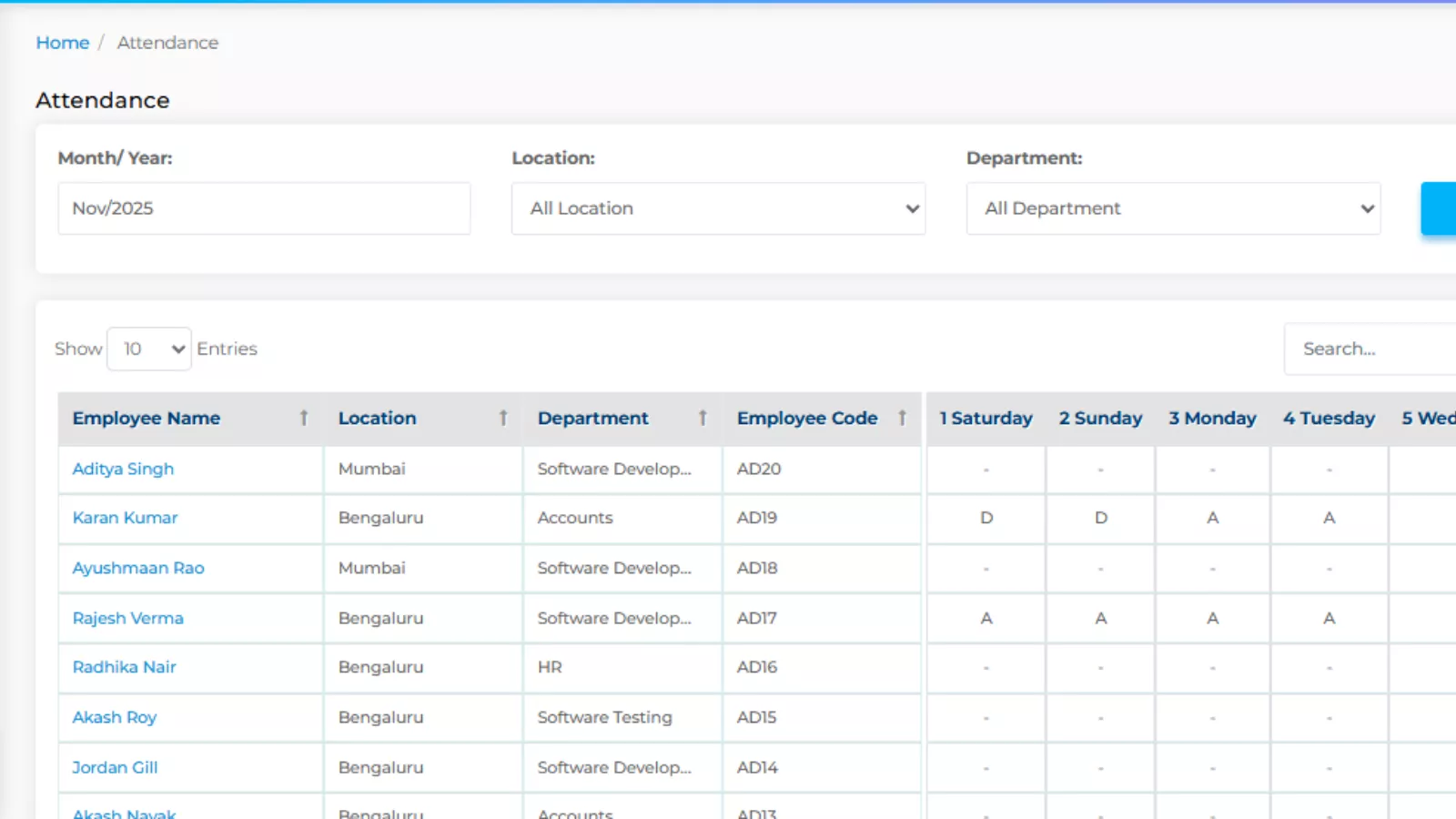
With the employee time tracking system, attendance management becomes automatic. Instead of manually noting arrival and departure times, the system records them as soon as the employee starts or ends their workday.
EmpMonitor’s attendance reports allow employers to spot patterns like habitual late arrivals or frequent absences. This insight helps managers address such issues early and encourage a culture of punctuality and responsibility.
Once attendance is under control, the focus shifts to what employees do during their time at work—how tasks are organized, managed, and executed. That brings us to project management capabilities.
5. Project Management
In any organization, keeping track of multiple projects at once can get complicated. Managers need visibility into who’s working on what, how much progress has been made, and whether deadlines are being met.
The project management feature in a reliable time tracking solution offers just that. It helps you assign tasks, monitor activity, and understand how employees are performing in real time.
EmpMonitor provides real-time tracking, showing which projects employees are working on and how actively they’re engaging with them. If someone is idle for too long during a critical phase, you can intervene quickly and offer support or guidance.
This feature not only ensures projects stay on track but also improves collaboration and accountability across departments. Once you have project visibility, the next thing that amplifies efficiency is system integration.
Read More
Manual vs. Automatic Employee Timesheet Which One is Better?
Top 07 Ways to Use Employee Time Tracking Software
6. Integrations
No single platform can do everything on its own. That’s why integrations are essential. A well-designed employee time tracking system should work seamlessly with other tools—like project management software, HR systems, or communication platforms.
Integrated tools reduce data silos and make workflows smoother. You can synchronize attendance data with payroll, connect project updates to task boards, and analyze performance data across systems without switching screens.
Whether you use accounting software or HR management tools, having an integrated setup ensures consistency in data and minimizes manual work. It’s what transforms a simple tracker into a complete productivity solution.
And since modern workplaces are increasingly diverse, the next crucial feature addresses accessibility—ensuring your system works across every platform your team uses.
7. Multiple Platform Access
Every business today operates with a mix of devices and operating systems. Some employees use Windows, others prefer macOS or Linux. Without cross-platform compatibility, it becomes difficult to manage and track everyone’s work consistently.
The employee time tracking system open source models often perform well in this area, offering flexibility across different setups. However, commercial tools like EmpMonitor take it further with built-in compatibility across all major platforms and devices.
This flexibility ensures that no matter what your employees use, their work time and activity are accurately recorded. It’s especially important for hybrid or remote teams, where consistency in data collection can otherwise become a major challenge.
But even with all these advanced capabilities, usability remains a deciding factor. A system is only valuable if your team can use it comfortably without extensive training. That brings us to the final but equally important feature.
8. Easy-to-Use Dashboard
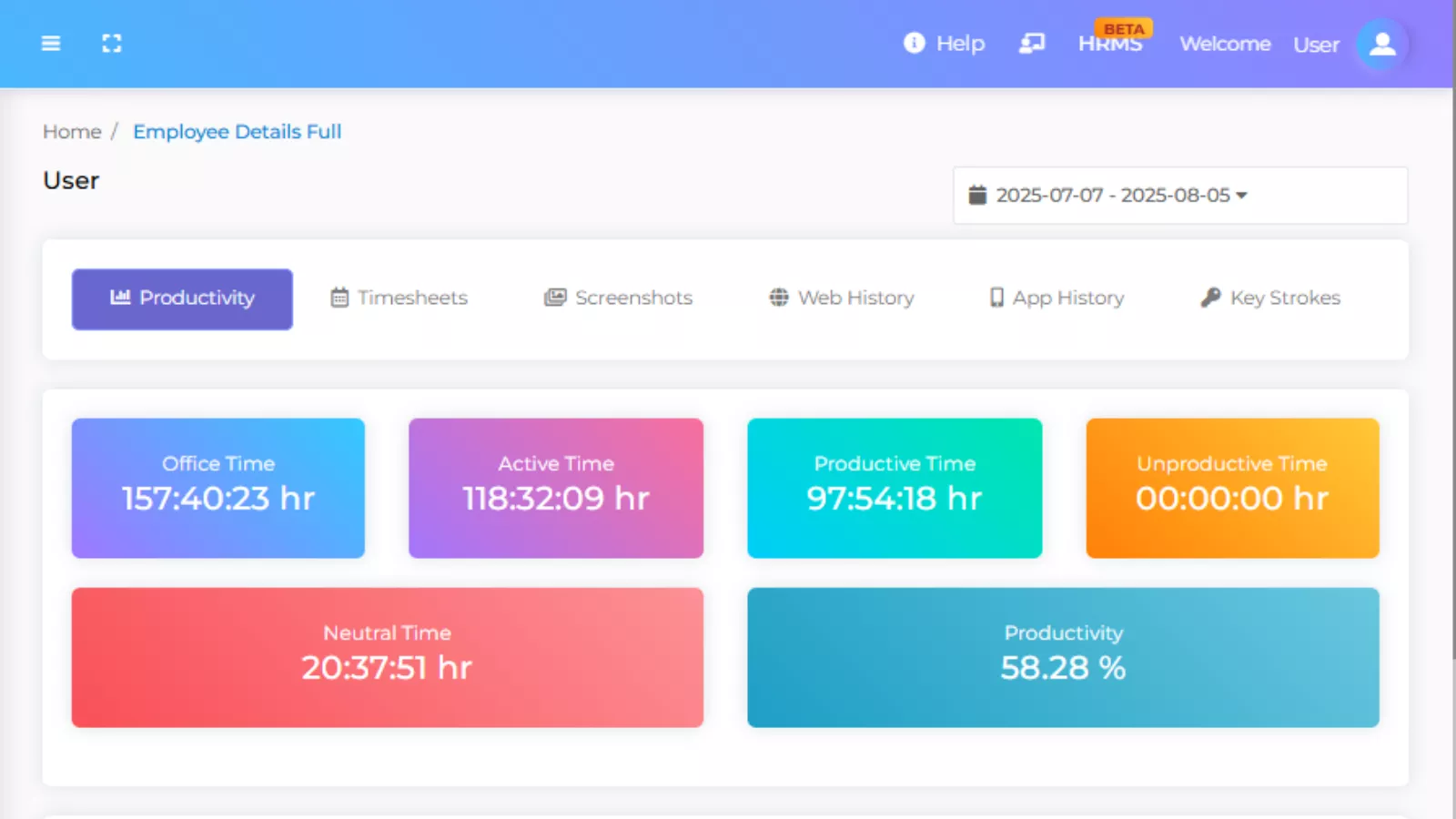
EmpMonitor’s dashboard is designed for simplicity. It automatically captures log activities, generates reports, and displays key metrics—all in one place. Users can easily navigate through sections to view timesheets, productivity graphs, or attendance details without manual input.
This streamlined approach not only saves time but also makes the entire employee time management process more efficient. When employees and managers can both access data without confusion, it creates transparency and trust within the organization.
And once you have all these elements working together—timesheets, productivity analysis, reports, and usability—you’re looking at a comprehensive solution that can genuinely transform how your company operates.
How EmpMonitor Brings It All Together?

Its flexible architecture supports integration, cross-platform access, and a clear, user-friendly interface. It doesn’t just record time—it helps you make sense of it. That’s what makes it a candidate for the best employee time tracking system for organizations that want transparency and measurable productivity growth.
Beyond monitoring, EmpMonitor focuses on actionable insights. You can identify top performers, detect workflow inefficiencies, and plan better with accurate time and productivity data. It bridges the gap between management and employees, ensuring mutual accountability.
But implementing a tracking system is just one part of the journey. The real impact comes when you use these insights to foster a culture of improvement. Let’s wrap up with what that means for your organization.
Building a Culture of Productivity and Trust
Technology alone can’t improve performance—how you use it matters just as much. A robust employee time tracking system provides the framework, but it’s the leadership approach that turns data into growth.
When employees see that time tracking isn’t about surveillance but about improving efficiency and work-life balance, they’re more likely to embrace it. Transparency builds trust. Managers can use the insights not to penalize, but to recognize consistent performers and support those who need help.
This balanced approach nurtures accountability and motivation, resulting in better teamwork and overall business performance. Over time, it creates a workplace culture where productivity is measured, appreciated, and continuously refined.
Conclusion
Selecting the right employee time tracking system is more than just adopting another piece of software—it’s about transforming how your organization manages time and performance. With features like timesheet management, productivity analysis, comprehensive reporting, and cross-platform compatibility, you gain the tools needed to make smarter decisions and improve efficiency.
EmpMonitor brings all these features under one roof, offering a dependable solution for businesses that want to stay organized, data-driven, and productive. Whether you’re managing in-office staff or remote teams, having the right system ensures accuracy, transparency, and long-term growth.
By investing in a tool that simplifies monitoring, enhances collaboration, and promotes accountability, you’re setting the stage for a more disciplined and efficient workforce.
So, if you’re planning to upgrade your management strategy, start with the right foundation—a system built to handle time, data, and people with equal precision.
Frequently Asked Questions
- How does an employee time tracking system improve payroll accuracy?
An employee time tracking system automatically records work hours, breaks, and attendance, ensuring payroll data is precise. It minimizes manual entry errors and eliminates disputes about worked hours or overtime. - Can an employee time tracking system be customized for different departments?
Yes, most modern tools allow customization. You can configure an employee time tracking system to match specific departmental needs, such as project-based time tracking, flexible shifts, or location-based reporting. - Is it difficult to implement an employee time tracking system in a remote team?
Not at all. A cloud-based employee time tracking system can easily support remote or hybrid teams by monitoring attendance, productivity, and task updates from any location with secure access. - What data security measures should an employee time tracking system have?
A reliable employee time tracking system should include encrypted data storage, secure login protocols, and restricted admin access to protect sensitive employee and company information. - How can an employee time tracking system help managers improve team efficiency?
By analyzing work patterns, idle time, and task completion rates, an employee time tracking system helps managers identify bottlenecks and adjust workloads, leading to better team coordination and higher efficiency.

