



In 2026, many remote leaders are weighing EmpMonitor against Hubstaff to see which platform best supports employee productivity measurement and reporting without eroding team trust. This guide breaks down how both tools handle real-time visibility, asynchronous reports, security, and privacy so you can choose confidently.
What Remote Teams Actually Need from Productivity Tracking Software for Employee Productivity Measurement and Reporting
Managing across time zones and contracts is hard. You juggle daily standups, weekly rollups, and month-end audits. Moreover, you must spot risk fast without pinging people at odd hours. That is why real-time visibility and async-friendly reports rise to the top.
First, real-time dashboards reduce guesswork. If a critical ticket stalls, you want to see who is active, which app they are in, and if a blocker popped up. As a result, leads can adjust plans in minutes, not days.
Second, async reporting keeps teams sane. You should not need a live call to answer simple questions like “What did the team do from 2–6 pm UTC?” Or “How many hours went into QA last week?” Good tools schedule and email these reports so you can read them on your own time.
Third, time zone support must be native. Otherwise, your reports will misalign. For example, a developer in Manila and a PM in Berlin should both see accurate local dates on the same sprint report. That sounds small. However, it is the difference between smooth reviews and late nights.
Furthermore, privacy and trust matter. People need a fair way to pause tracking, flag personal time, and know what the tool records. On the other hand, managers need enough detail to coach, improve processes, and keep data safe. Striking this balance is the heart of employee productivity measurement and reporting.
The six criteria that matter for employee productivity measurement and reporting
- Real-time visibility: Live dashboards, activity streams, and alerts that cut time-to-clarity.
- Async-friendly reporting: Scheduled, shareable reports with custom ranges and filters.
- Time zone support: Clean per-user local times plus admin rollups in a chosen zone.
- Privacy balance: Clear controls like “private time,” redact/blur, and role-based access.
- Pricing scalability: Predictable per-seat costs with discounts at 50–200+ users.
- Security: SSL, firewalls, IP allowlists, and data controls that pass client audits.
For deeper context on how teams prove output, this case study on measuring productivity shows what “good” looks like in practice. It ties time data to work done, not just hours.
EmpMonitor Overview: Strengths and Weaknesses for Remote Teams in Employee Productivity Measurement and Reporting


EmpMonitor focuses on knowledge work done on laptops and desktops. It offers live screencasting and recording for managers who need to jump into a session and see work in progress. In addition, its automated time tracking and idle detection reduce manual edits and back-and-forth.
On the reporting side, EmpMonitor calculates productivity based on app and URL usage, with a real-time dashboard and alerts. You can build custom reports, schedule auto emails, and export for audits. This helps with employee productivity measurement and reporting at both daily and monthly levels.
Privacy controls show up in two places. First, a “private time” button lets people pause tracking for personal tasks. Second, admins can choose stealth or un-stealth install modes and tailor roles and permissions. As a result, teams can match visibility to their policies and region.
EmpMonitor states it is GDPR compliant; see the legal framework on General Data Protection Regulation for context.
From a security lens, EmpMonitor includes app/website blocking, USB device blocking, SSL protection, firewalls, and IP allowlisting. Moreover, it adds user behavior analytics and forensic-ready logs, plus data loss prevention features. For companies that handle sensitive client data, that breadth reduces risk.
“EmpMonitor does one thing really well: it saves us time!” — Education Career Counsellor
However, there are honest limits. EmpMonitor does not include native GPS for job sites or deliveries. Integrations are present but not as broad as work management suites. If your main need is to sync tasks from dozens of SaaS tools, you may feel those edges.
Social proof is real: EmpMonitor is used by 15,000+ companies across 100+ countries and tracks over 500,000 employees. It also offers 24X7 customer support for new and existing customers. If you run a distributed org from 1 to 1,000+ seats, that support depth can be the safety net you want.
Also Read!
Healthcare Guide to Employee Internet Monitoring
EmpMonitor vs Teramind for Call Centers: Which Is Better for Employee Productivity Tracking?
Hubstaff Overview: Strengths and Weaknesses for Remote Teams
Hubstaff centers on time tracking with strong field support. GPS tracking stands out for teams that move, installers, drivers, on-site techs, and mixed desk/field crews. In addition, Hubstaff offers native links with tools like Asana and Jira, which helps managers pull time into project boards without glue code.
Payroll automation is another draw. For teams that pay hourly across regions, bundled time-to-payroll flows reduce manual errors. Therefore, you can close weeks faster and with less risk of missed approvals. If you live in sprints and Kanban, these native ties can be a clear win.
In terms of monitoring depth, Hubstaff provides screenshots and activity levels. However, it is less granular on desktop activity than EmpMonitor. If you need keystroke counts, USB blocklists, or web app blocking, those controls skew toward EmpMonitor’s wheelhouse. That said, lighter monitoring can be a deliberate choice to balance trust.
Who is a fit for Hubstaff?
- Field or hybrid teams that need GPS trails and job site proof.
- Engineering and ops teams that want native sync with task boards.
- Finance leads who prefer built-in payroll tied to tracked time.
You should still weigh privacy norms with your team. For example, if you choose screenshots, align on frequency and redaction. And keep ethics front and center in your policy. Strong tools plus clear rules build trust and better employee productivity measurement and reporting over time.
Feature-by-Feature Comparison: EmpMonitor vs Hubstaff for Employee Productivity Measurement and Reporting
Both products can track hours and produce reports. The details, though, steer you toward one or the other. If you prize deep desktop analytics and security controls, EmpMonitor stacks up well. If you lean on GPS and integrations, Hubstaff has the edge.
Moreover, you should judge each feature through your workflow. A call center cares about app/URL use across shifts. A construction firm cares about who was on-site at 9:00 am. Therefore, pick the path that answers your audits with the least friction and the clearest employee productivity measurement and reporting.
Side-by-side summary of employee productivity measurement and reporting features
| Dimension | EmpMonitor | Hubstaff | Winner |
|---|---|---|---|
| Time tracking | Automatic time tracking with idle time tracking and shift scheduling | Strong time tracking; GPS for mobile/field work | Hubstaff (time + GPS) |
| Screenshots | Automatic screenshots plus live screencasting and recording | Screenshots available; no live screencast noted | EmpMonitor |
| Activity monitoring | URL and app tracking, keystroke monitoring, web app and USB blocking | Activity levels; less granular desktop controls | EmpMonitor |
| Reporting/analytics | Real-time dashboard, advanced analytics, custom reports, alerts and auto email reports | Standard reports; ties well to task tools | EmpMonitor for analytics depth |
| Security features | SSL, firewall, IP allowlisting; data loss prevention; forensic/user behavior analytics | Security present; fewer desktop control levers | EmpMonitor |
| Integrations | Integrations present; not the main focus | Native links with tools like Asana and Jira; payroll automation | Hubstaff |
| Privacy options | Private time option; stealth/un-stealth; roles & permissions | Lighter monitoring approach; options vary by plan | EmpMonitor for fine-grained controls |
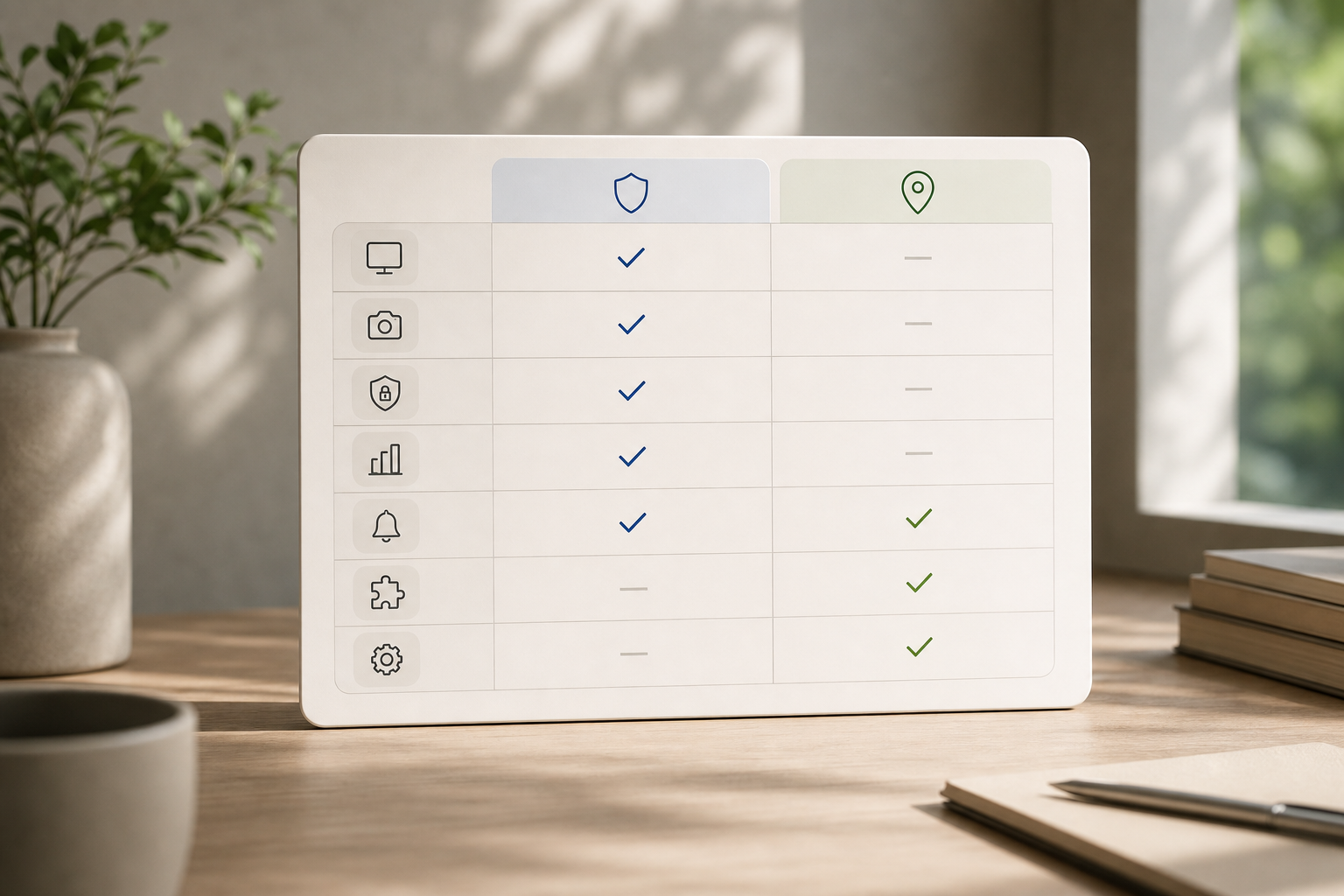
Ethics note: Whichever tool you pick, publish a clear policy. Cite what you track, when, and why. Link to your “private time” process and how long you retain data. Also, align any EU workflows to GDPR principles (lawfulness, transparency, data minimization) referenced above.
For a manager’s playbook on aligning time data with outcomes, see this guide on building a performance tracking system. It shows how to coach with data, not just count hours.
Pricing Comparison: Which Offers Better Value for Remote Teams in Employee Productivity Measurement and Reporting?
Pricing should scale cleanly as you grow from 10 to 200 seats.
- Bronze (1–10 users): $12/user/month monthly, or $11/user/month yearly
- Silver (11–50 users): $11/user/month monthly, or $10/user/month yearly
- Gold (51–200 users): $10/user/month monthly, or $9/user/month yearly
- Diamond (200+ users): Custom pricing
- Free 15-day trial available
Here is what that looks like at common team sizes:
| Team size | Monthly (month-to-month) | Monthly (billed yearly) |
|---|---|---|
| 10 users (Bronze) | $120 | $110 |
| 50 users (Silver) | $550 | $500 |
| 200 users (Gold) | $2,000 | $1,800 |
As of 2026, Hubstaff offers several plans, but list prices vary by features and billing.
- If your per-user rate is above $11 on a 1–10 seat plan, EmpMonitor’s Bronze will be cheaper at 10 users.
- If your per-user rate is above $10 on 11–50 seats, EmpMonitor’s Silver will be cheaper at 50 users.
- If your per-user rate is above $9 on 51–200 seats, EmpMonitor’s Gold will be cheaper at 200 users.
Moreover, check for hidden costs. For example, payroll add-ons, premium integrations, or higher screenshot limits may live behind specific tiers. On the EmpMonitor side, the published tiers above are the core monitoring price, and the 15-day free trial reduces risk before you commit.
**Get instant reporting today → for remote and desk teams (reporting/security-first).