You searched for a free employee monitoring tool. You found the ActivTrak free plan. You set it up. And then slowly, you started hitting walls.
That’s the story many team leads and business owners share. The ActivTrak free plan looks great on the surface. But dig a little deeper, and you’ll find it’s packed with restrictions that make it hard to use for any team serious about productivity.
This blog breaks it all down. We’ll cover exactly what the ActivTrak free plan offers, where it falls short, and why smart businesses are looking at ActivTrak alternatives like EmpMonitor instead.
Hit ‘Play’ Button & Tune Into The Blog!
What Does the ActivTrak Free Plan Actually Give You?
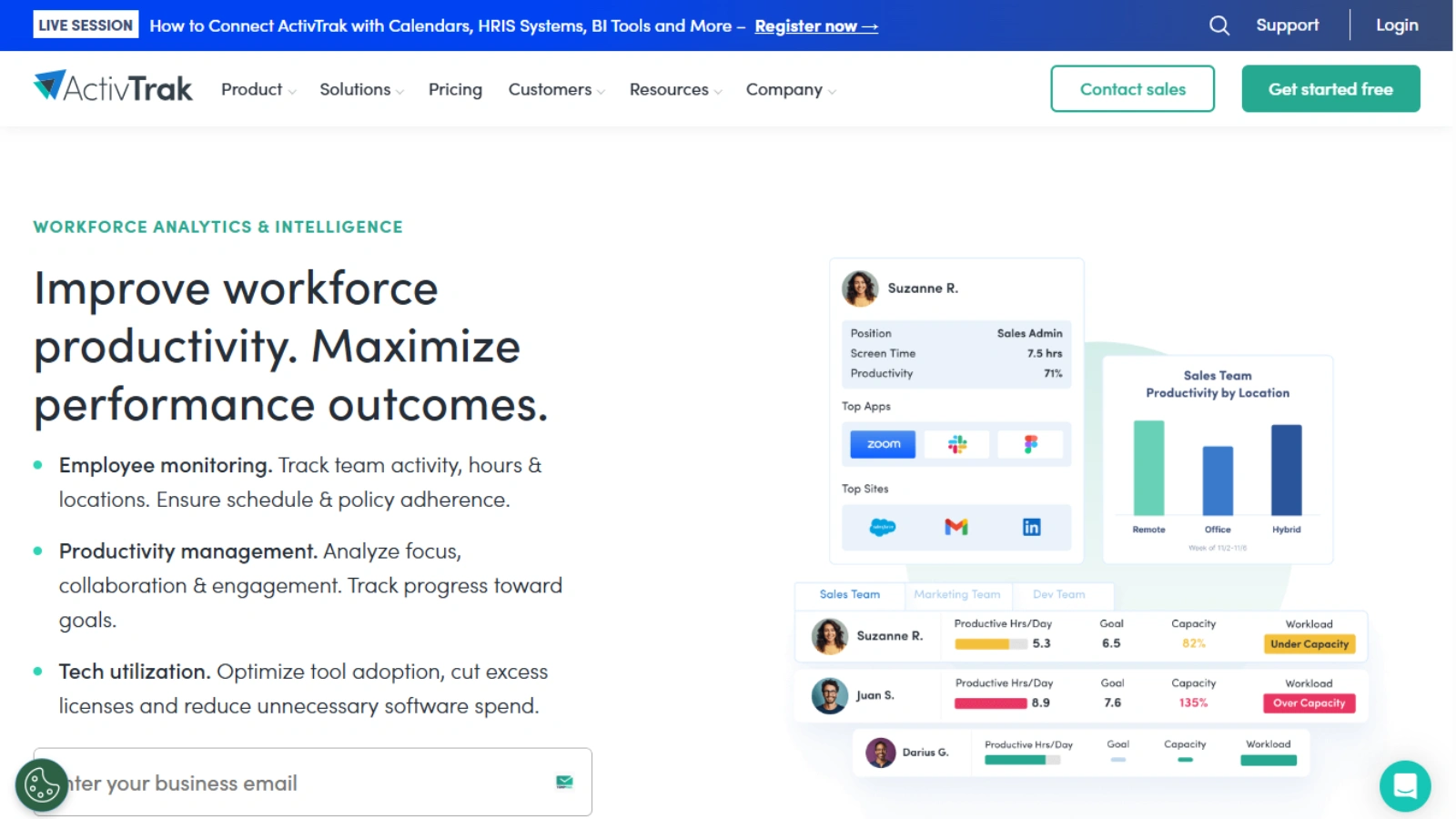

- Activity Dashboard, a bird’s-eye view of your team’s digital activity
- App and website usage tracking: see which apps your team uses most
- Productivity trend reports, basic productivity overviews
- Working hours (daily work metrics): track active and idle time
- Activity log, a basic timestamped record of user actions
For a solo freelancer or a brand-new startup with two or three people, this might be enough. But for anyone running a growing team? These basics quickly become bottlenecks.
The Real Limitations Nobody Talks About
1. Only 3 Users, Forever
This is the first wall you’ll hit. The ActivTrak free plan is hard-capped at just 3 users. That’s not a trial limit. That’s the permanent ceiling.
If you have 5 employees, 10 employees, or 50, you simply can’t use the free plan. You’re forced to upgrade. And ActivTrak’s paid plans have a minimum purchase of 5 licenses, billed annually. There’s no monthly flexibility.
2. Just 30 Days of Data History
The free plan only stores 30 days of data history. That sounds fine at first. But try spotting a seasonal trend, reviewing a month-old incident, or tracking long-term performance patterns with one month of data. You can’t.
To unlock 6 months of history, you need the Essentials plan. For more than that? You’ll need to purchase a separate Data History add-on on top of your paid subscription.
3. No Real-Time Monitoring
Real-time visibility, one of the most critical features in employee monitoring, is completely removed from the ActivTrak free plan. Team Pulse, the real-time activity view, is not available at any free tier level.
So if you want to know what your team is doing right now, you’ll need to pay.
4. No Screenshots or Screen Details
Want to capture what’s actually on your employee’s screen? That’s locked away too. Screenshots, screen views, detailed URL tracking, and title bar monitoring are not available on the free plan at all.
In fact, even on paid plans, these features require purchasing a separate Screen Details add-on at $2 per user per month, on top of your subscription fee.
5. No Alerts or Alarm Features
Productivity alerts, app termination notifications, and USB activity alarms are all gone on the free plan. You can’t set up custom triggers or receive real-time warnings about suspicious behavior.
This is a major gap for any business that cares about data security or wants proactive alerts when something goes wrong.
6. No Data Exports
Want to export your reports? Download your data? Run it through a BI tool? The ActivTrak free plan doesn’t support data exports. That’s gated behind paid plans, and even then, for API access and BI integrations, you’ll need to pay for the ActivConnect add-on at $3 per user per month.
7. Account Goes Inactive If You Don’t Log In
Here’s a quirky one. If you don’t log into your ActivTrak free plan account for 30 days, it gets marked inactive and flagged for deletion. Background data collection doesn’t count as activity. You must manually log in.
For anyone running monitoring quietly in the background, this is a painful surprise.
ActivTrak Pricing: The Upgrade Path Isn’t Cheap
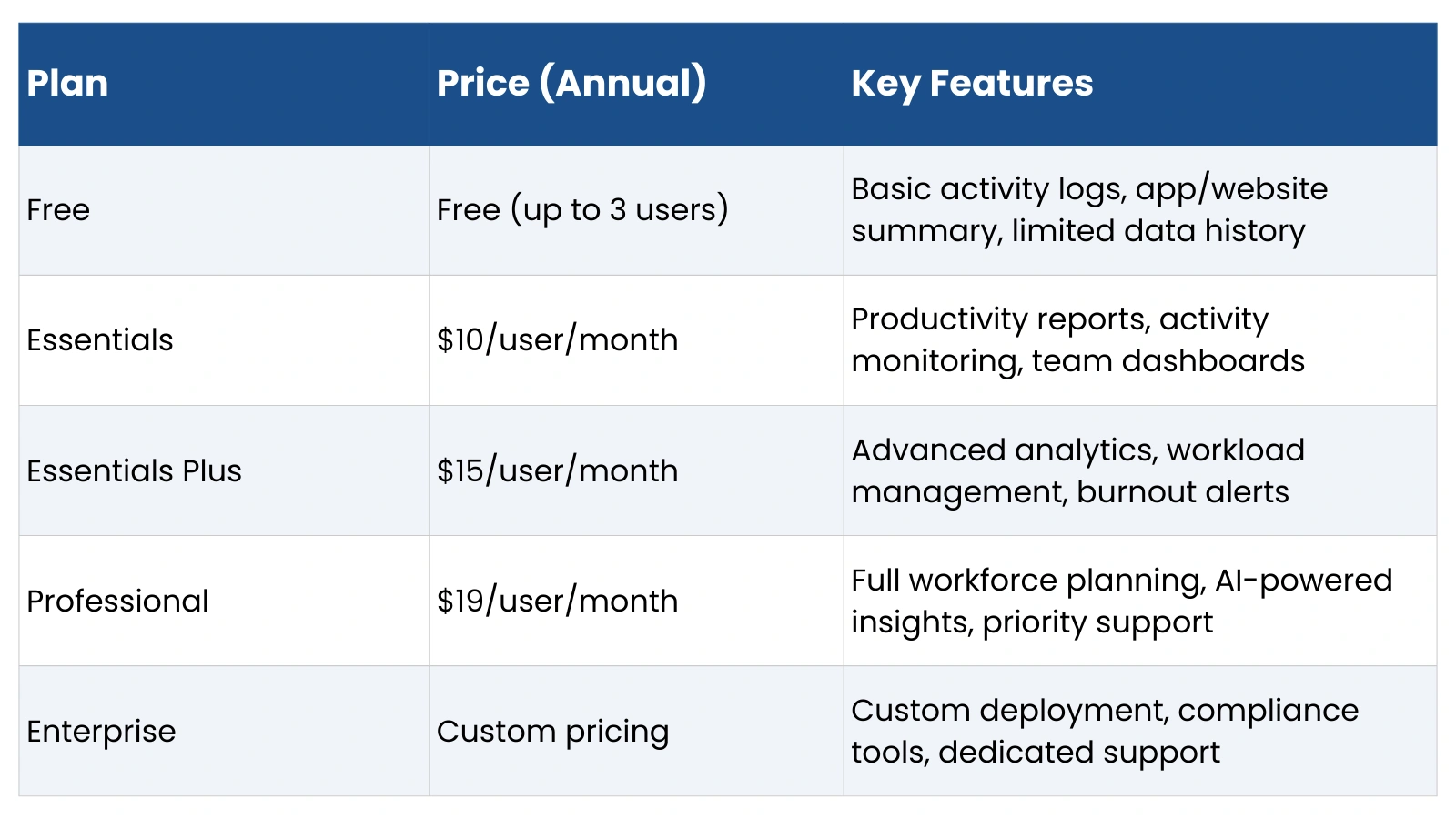
ActivTrak pricing starts at $10 per user per month (billed annually, minimum 5 users). The Professional plan runs up to $19 per user per month. And that’s before add-ons.
Here’s how the add-on costs stack up:
- Screen Details (screenshots, screen views, detailed URLs): +$2/user/month
- ActivConnect (data export, API, BI integrations): +$3/user/month
- Premium/Signature Support: Separate support plan pricing
So a team of 10 on the Professional plan with both add-ons could be paying over $220/month, just for what many competitors include as standard features.
ActivTrak’s pricing structure is heavily criticized by users for being difficult to understand and hard to justify, especially for small and mid-size businesses.
Who Are ActivTrak’s Competitors?
When businesses realize the ActivTrak free plan isn’t enough, they start searching for ActivTrak competitors that offer more value without the nickel-and-diming.
The most commonly compared ActivTrak competitors include tools like Teramind, Hubstaff, DeskTime, and EmpMonitor. Among these, EmpMonitor stands out as one of the strongest alternatives, especially in terms of pricing and feature depth.
Meet EmpMonitor: The ActivTrak Alternative That Doesn’t Hold Back
If you’re frustrated with the ActivTrak free plan’s limitations, EmpMonitor is worth a serious look. It’s a cloud-based workforce management and employee monitoring platform designed to give teams 360-degree visibility without locking core features behind expensive add-ons.
What EmpMonitor Offers
EmpMonitor is built as an all-in-one workforce intelligence tool. Here’s what you get:
Employee Monitoring
- Real-time activity tracking, live dashboards showing what every employee is doing right now
- Screenshot capture: automatic, time-stamped screenshots at configurable intervals
- App and website usage tracking, with productivity categorization (productive vs. neutral)
- Keystroke recording and mouse activity monitoring
- Browser history tracking and detailed app logs
- USB detection, track external storage usage, and flag suspicious activity
Time & Attendance
- Accurate time tracking with active and idle time breakdown
- Attendance management with manual check-in/out support
- Shift management and timesheet reports
- Leave management to simplify HR admin
Project & Task Management
- Task assignment and real-time collaboration tools
- Project progress tracking with SLA tracking
- Detailed time reports per project and per employee
Security & Alerts
- Real-time alerts for suspicious activity
- Insider threat detection
- Customizable productivity alerts
- Live screencasting with optional remote desktop access
Reporting & Analytics
- One-click report generation
- Daily and hourly team activity analysis
- Productivity charts comparing productive vs. idle hours
- Context-rich reports for individual and team performance
One feature that sets EmpMonitor apart is stealth monitoring; the agent runs quietly in the background without notifications or visible icons. This ensures accurate, uninfluenced data on employee behavior.
EmpMonitor Pricing: Surprisingly Affordable
This is where EmpMonitor really separates itself from the ActivTrak pricing model.
EmpMonitor’s plans start at just $3 per user per month, making it one of the most competitively priced tools in the market. Here’s the breakdown:
| Plan | Price |
| Gold | $3.00/user/month |
| Silver | $3.83/user/month |
| Bronze | $4.66/user/month |
| Diamond (200+ users) | Custom pricing |
For context: ActivTrak’s base paid plan starts at $10/user/month — more than 3x the starting cost in the ActivTrak vs EmpMonitor comparison. With EmpMonitor, you’re not paying extra for screenshots, data exports, or alerts. Those features come included.
EmpMonitor also offers a 15-day free trial, so you can test every feature before committing — unlike ActivTrak’s free plan, which is more of a permanently stripped-down version than a true trial.
Read More:
ActivTrak vs EmpMonitor: A Feature-by-Feature Showdown
06 Must Have Characters: Best Employee Monitoring Tool
EmpMonitor vs. ActivTrak: A Quick Comparison
| Feature | ActivTrak Free Plan | EmpMonitor |
| User limit | 3 users only | Scales to enterprise |
| Data history | 30 days | Extended history available |
| Screenshots | Not available (add-on) | Included |
| Real-time monitoring | Not available | Included |
| Alerts & notifications | Not available | Included |
| Data export | Not available | Included |
| Stealth monitoring | Limited | Yes |
| Time & attendance | Basic | Full HRMS module |
| Project management | Not included | Included |
| Pricing | Free (limited) / $10+ per user | From $3/user/month |
The difference is clear. EmpMonitor gives you enterprise-grade features at a fraction of the cost, without a paywall blocking every useful function.
Why Businesses Are Switching from ActivTrak to EmpMonitor
Across review platforms like Saas Adviser, G2, Capterra, and SoftwareAdvice, a common theme emerges. Users who started with the ActivTrak free plan found themselves forced to upgrade faster than expected, only to face a confusing pricing structure with features spread across multiple add-ons.
EmpMonitor users, by contrast, consistently highlight the competitive pricing, responsive customer support, and the fact that monitoring features work out of the box. One user noted that after reviewing 30+ monitoring tools, EmpMonitor offered the most competitive pricing while still delivering essential features like screenshot capture and browser tracking.
For businesses managing distributed or hybrid teams, EmpMonitor’s centralized dashboard, real-time tracking, and attendance management make it a particularly strong fit.
Bottom Line
The ActivTrak free plan is useful if you have exactly 3 employees and don’t mind working with basic reports and 30 days of history. For everyone else, it’s a frustrating experience that quickly leads to upgrade pressure.
Between the 3-user cap, the missing real-time features, the locked screenshots, and the add-on model that drives up ActivTrak pricing quickly, it’s not hard to see why businesses are exploring ActivTrak competitors.
EmpMonitor offers a real alternative. It’s affordable, comprehensive, and doesn’t treat its best features as premium upsells. If you’re ready to move beyond the limits of the ActivTrak free plan, EmpMonitor’s 15-day free trial is a great place to start.
Frequently Asked Questions
- Is the ActivTrak Free Plan really enough for growing teams?
The free plan works for basic monitoring, but growing teams often hit limits quickly. Restrictions on data history, advanced analytics, and scalability can make it less practical as your workforce expands. - What features are missing in the ActivTrak Free Plan that businesses actually need?
Key gaps usually include deeper productivity insights, extended data retention, advanced reporting, and stronger workforce visibility. These limitations can affect decision-making for managers handling larger or remote teams. - How long can you realistically rely on ActivTrak’s Free Plan?
For very small teams or short-term use, it may work fine. However, most businesses outgrow it once they need detailed analytics, historical tracking, or more comprehensive employee monitoring. - Does the ActivTrak Free Plan impact productivity tracking accuracy?
It can. Limited data history and fewer advanced insights may prevent managers from seeing the full productivity picture, especially in hybrid or remote work environments. - Is there a smarter alternative to the ActivTrak Free Plan?
Many businesses eventually look for tools that offer fuller visibility, flexible tracking, and scalable features from the start. Platforms like EmpMonitor are often considered when teams need more than basic free-tier monitoring.